
MAIYUAN AC1200M Wireless Router User Guide


Make sure that the mesh router to be paired is in the restored factory setting
state. If configured, please restore the factory settings first (how to restore
the factory settings see FAQ)
3. Set the wireless name and wireless password, and click "OK" to complete
the setting.
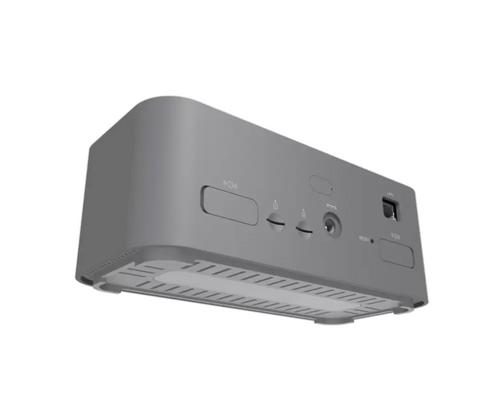
product appearance:
Product installation:
product list:
Use the cell phone to set up the router
Set up the router using your computer:
1. Connect the router with the phone to the default wireless name (can be
found on the "Product Specification label" on the bottom of the product).
1. Open your browser and enter "ywtwifi.com" in the address bar , login
management interface, create administrator password, click" Login ".
Select the adjacent power outlet (within 3 meters) and power on the other
MESH router. The system indicator light is always green, after waiting for an
actual indicator light to become green slow flash. Press the WPS/MESH
button for two routers in two minutes. The router indicator flashes green
and starts the search for pairing, which is complete when the indicator
becomes green constant. At this time, the new router joins the MESH
network.
ywtwifi.com
LED
status
Job Description
2. After the connection is successful, please open the browser manually and
enter " ywtwifi. com" in the address bar, login management interface, enter
the administrator account / password, click" OK ".
ywtwifi.com
Wireless Setting
Often bright
Slow flashing
fast blink
Networking success
Internet failure
SSID:
PWD:
YWT-XXXX
3. The router will automatically detect the Internet access mode, and please
set the Internet access parameters according to the actual situation.
①system Led
Ywt-xxxx
Username:
Password:
Ywt-xxxx-5G
This device has the WPS/MESH button, which can realize "one-click
interconnection" with any router with The Division with MESH function.
Other routers connected to the device will acquire all the configuration
parameters of the device.
The WPS or MESH
networking clock
If the WAN port is not connected, check whether the WAN network cable is
loose and whether the broadband Modem or cell broadband interface is
Ywt-xxxx
Ywt-xxxx-5G
◆
BACK
OK
Login
properly connected.
4. Set the wireless name and wireless password, and click "OK" to complete the
setting. The router can access the Internet normally.
The Division propose:
4. After the setting is completed, the router can access the Internet normally.
If you use the device in public places, please do not open the MESH button
to ensure information security;
◆
If the wireless connection is disconnected, reconnect the network with a
Connect power
◆
If you cannot open this page, see the FAQ.
◆
new wireless name and password.
ywtwifi.com
◆
When the MESH button is not enabled, you can manually connect with other
routers through the web management page
2. The router will automatically detect the Internet access mode, and please
set the Internet access parameters according to the actual situation.
3. Transfer the paired MESH subrouter to the expansion signal and reconnect
the power case, plug and play without any configuration.
internet
Gateway
Router*1
Router setup complete
Your device has been disconnected from the
routerbecause the wireless parameters have
been changed.Please recon nect wirelessly.
After the power supply is connected, the green light flashes and the main
route is connected. When the indicator light turns green, it is successfully
connected to the main route, that is, the distributed Wi-Fi network has been
built.
Network Setting
Wireless Setting
ywtwifi.com
Wireless Setting
USER丨
PWD丨
SSID : YWT-XXXX
PWD : XXXXXXXX
WAN Acoess Type: PPPOE
Username:
SSID丨YWT-XXXX
Net cable
Net cable
Interface
use
Network Setting
PWD丨
◆
◆
Choose the router location reasonably to avoid the long distance between
the two routers or the excessive obstacles in the middle wall. If the
subrouter flashes green, please adjust the position of the subrouter.
Wan Access Type:
Username:
PPPOE
Use to connect optical fiber broadband Modern
(optical cat), ADSL broadband Modern (A cat) or
cell broadband interface.
Password:
OK
Back
OK
①WAN interface
The WAN port is used to connect the optical fiber broadband Modern (light cat),
the ADSL broadband Modern (A cat) or the cell broadband interface.
NEXT
Router *1
Net cable *1
Power adapter *1
QIG *1
◆
If the wireless connection is disconnected, reconnect the network with a
new wireless name and password.
Password:
Distributed Wi-Fi networks can enable up to six (1+5) routers with The
Division MESH function to connect at the same time.
4.Subroute indicator light status
Used to connect computers, set-top boxes and
other wired devices.
②LAN1/LAN2/
LAN3 interface
Next
The LAN port is used to connect computers, set-top boxes and other wired
devices.
1
2
3
As the networking configuration method for MESH nodes
Short press is to enable WPS/MESH buton,then the
LED will flash quickly for 2 minutes; long press over
6s can restore the router to the factory setting
The POWER port is used to connect the matching power adapter
1.Connect a mesh router to the Internet
③ WPS/MESH/
RST button
operative mode
Green is always bright
Green slow flash
Green flash
job instruction
◆
If the WAN port is not connected, check whether the WAN port network
cable is loose and whether the broadband Modem or cell broadband
interface is connected correctly.
For configuration steps, refer to Set up a router with a PC or Set up a router
with a mobile phone
The main router is connected and is networked
◆
Please connect the router to the diagram, and the system indicator
light is always on. After waiting for about 60 seconds, the system is
started successfully.
④POWER
(power interface)
The platform router serves as the main route for the distributed Wi-Fi
network, while the other mesh routers are subrouters.
2.One key networking
The child router to be paired or failed to
network
For connecting the matching power adapter
The subrouter is pairing with the main route
Product warranty card
special explanation:
frequently asked questions
The operator did not provide any parameters
(The computer doesn't need to use the router
to access the Internet)
After-sales service card
Product name model
Unable to open the router's management interface (ywtwifi.com) how to do?
1. The following conditions are not covered by free maintenance.The Division
can provide paid services, please note:
DHCP
Warranty warranty is limited to the host, packaging and all kinds of
connection, software products, technical data and other accessories are not
within the scope of warranty warranty. The warranty period for wireless
external antenna and optical fiber head components is 3 months.
Declaration form of toxic and harmful substances
If log in through a wired connection
Product failure or damage caused by failure of installation, use,
maintenance and storage as required by the instruction manual;
Make sure your computer automatically Get IP Address and Get DNS Server
Address.
number:
Toxic and harmful substances or elements
Please log in to the Router management interface (ywtwifi.com), according to
the page prompts, as follows:
hexavalent
chromium
(Cr(VI)
Part name
name of user:
contacts:
lead mercury cadmium
(Pb) (Hg) (Cd)
Polybrominated
biphenyl PBB
The PBDE,
PBDE
Has exceeded the warranty period and warranty period;
Make sure that the computer is connected to the LAN port of the router, and
that the corresponding indicators of the router and the computer network
port are on.
If the equipment performance problem occurs within 15 days after the
purchase of the product, and the appearance has no scratch, the new
product can be replaced directly. During the free warranty period, the
products shall be tested by The Division . After confirming the fault, the
defective products with the same model or equivalent performance shall be
owned by The Division ; the non-free product shall be returned as is.
The WAN port has no network cable connection: the WAN port network
cable is loose or not properly connected.
Altering or tearing up the product bar codes without authorization;
structure
The product bar code or model on the product warranty card is not
consistent with the product itself;
address:
Please open IE browser, select Tools and Internet Options in the menu bar,
and then click "Connect-Connect" button to select "Never dial-up", click "LAN
Settings" to confirm that all options are not checked.
Broadband account or password error: click Route Settings> Internet
Settings, re-enter the broadband account and password, click save.
Single-board /
circuit module
telephone:
Without the permission of The Division , change the inherent setting
documents or repair without authorization;
Network anomaly: the network cable connection error or the network line
exception. Ensure that the cable is connected correctly with reference to the
Connect Router section. If the problem is still unsolved, please call the
technical support Service hotline.
portraiture:
Power adapter
cable
If logged in via a wireless connection
Product damage caused by accidental factors or human behavior, such as
focusing on strong light, input inappropriate voltage, high temperature,
water, mechanical damage, damage, serious oxidation or rust, etc.;
zip code:
When our service organization serves you, please bring the corresponding
invoice and product warranty card; if you cannot present the above
certificate, the free warranty period will be calculated from the production
date. If the product is paid for maintenance, the same performance
problem will enjoy a free warranty period for three months from the date of
repair. Please request and keep your repair certificate.
Make sure that the Internet device is connected to the router wireless
network.
Maintenance records:
appendix
What about mobile phones, wireless internet access for tablets and laptops?
Try closing and reopen the browser, clearing the browser cache, or changing
a different browser.
Damage caused by transportation, loading and unloading on the way of
repair;
Please confirm that your wireless function of your device is in normal
condition, if the wireless switch is turned on and the wireless signal can be
searched.
This form is prepared according to the provisions of SJ/T11364.
date
fault phenomenon
maintenance man
Please try to replace another Internet access device. If the connection is
wired, you can also try to replace the network cable.
Product failure or damage caused by force majeure such as earthquake,
fire, flood, lightning strike;
:It indicates that the content of the harmful substance in all homogeneous
materials of the component is below the limit requirements specified in
GB/T26572.
Please confirm that the wireless router is set correctly, and please do not use
Chinese or special characters.
Repower the router.
Other failure or damage caused by the design, technology, manufacturing,
quality of the product itself.
Products replaced and guaranteed by The Division will enjoy the remaining
period of the original commitment warranty plus three months warranty
period.
If the problem still cannot be solved after the above operation, please call
the technical support Service hotline .
:It means that the content of the harmful substance in at least one of the
homogeneous material of the component exceeds the limit requirements
specified in GB/T26572.(However, the project will only have a small amount of
application in stock or processed products, and is undergoing environmental
protection switching according to the plan, after the switch will meet the above
provisions.)
Please confirm that the wireless name selected and the wireless password
filled in are correct for the wireless connection (note case sensitivity).
2、Compartable of Products:
The mailing fee of the repaired products shall be borne by the sender.
If the problem still cannot be solved after the above operation, please
restore the router to the factory setup or call the technical support Service
hotline.
What if the router cannot surf the Internet after the router setup is
completed?
product type
Commitment policy
A year for
service mode
Customer repair
The Division will not be liable for any other commitments made by the
distributor that are not guaranteed .
Make sure that the router's network cable is properly connected as described
in the Connect the Router.
manufacturer:
service hotline:
Network card, SOHO switch, SOHO router,
SOHO wireless products, ADSL products,
PON access products, 3G / 4G / 5G products,
power line products, mobile power supply,
chargers
How to restore the router to the factory settings?
The appearance of this product parts are using non-toxic and harmless green
materials manufacturing, containing non-environmental protection substances
or elements are due to the global technology and process level and cannot
achieve the environmental protection substances or elements, but the content
of non-environmental protection content is very small, long-term use will not
harm to human body, please rest assured to use.
3. Technical Support and Software Upgrade Services:
When powered on, hold the "Reset" button on the rear panel of the router
after 6s, and the device will be restored after the system indicator flashes.
Note: The configuration parameters of the router will be completely
cleared, and the router needs to be reconfigured.
Please check that the Internet access mode set in this guide matches your
actual wiring environment. How to judge the way of Internet access can be
referred to in the following table:
Before sending the product, please call our technical support hotline to
confirm the product failure.
Third layer network management
layer network management anti-attack
security simple network management
/
second
work certificate
Q.C.Passed
At the same time, we will immediately publish the developed product
drivers and the latest version upgrade software on our official website:
ywtwifi.com, convenient for your free download.
/
warn
/
/
The network access parameters provided by
the network operator when the network is
opene
A year for
Customer repair
Customer repair
1. In thunderstorm, please remove the router power supply and all
connections to avoid lightning damage.
corridor switch, enterprise wireless products,
VPN / high-performance Internet cafe router,
optical fiber products, print servers, network
cameras, Ethernet power supply products
Internet access
AC1200M wireless router
4. Within the scope of national laws and regulations, the right of
interpretation and modification of this commitment belongs to The
Division.
Production Date (Date):
surveyor (QC):
2. Keep away from the heat source and keep the ventilation.
3. In storage, transportation and operation environments, be waterproof.
4. Use the power adapter included with the router.
Account number and password
PPPOE
* The model approval code of radio transmitting equipment is printed on the
nameplate of the body of the product shell, unpackaged on the prototype
surface
Two years for change
Quick Start Guide
Network hard disk video recorder
The IP address, subnet mask, gateway, and
DNS server
Static IP address
5. Place the device on a smooth surface.
100 MB / Gigabit non-network
management switch
Three years in exchange Customer repair
* Device name: AC1200M Dual-band wireless router


| General | Details |
|---|---|
| Name | MAIYUAN AC1200M Wireless Router User Guide |
| Make | Maiyuan |
| Language | English |
| Filetype | PDF (Download) |
| File size | 0.49 MB |
 (1 votes, average: 5.00 out of 5)
 Loading...
If you have any questions regarding MAIYUAN AC1200M Wireless Router User Guide, please ask here and describe the problem in detail.

Maiyuan AX3000W Router Installation Guide

mobile beacon FX 2000 5G Router User Guide

NIRAD Networks N200-I-SDWAN-EDGE EDGE Router Installation Guide

cradlepoint PepWave MAX BR1 Pro 5G Mobile Router User Guide

PRISMXR P1411 Streaming Link Air Bridge WiFi6 Router User Guide

ADVANTECH ICR-3200 Cellular Router Instruction Manual

FALCON technology 4G Combo Combined Antenna and Router User Manual

DrayTek Vigor2765 Wired VDSL and Ethernet SoHo Router User Guide

inhand IR305 LTE Router Instruction Manual

GL iNet GL-B2200 Tri-Band Wireless Gigabit Router User Manual

TP-Link E4 deco Router Installation Guide