
netgate 8200 Secure Router User Manual













CHAPTER
THREE
INPUT AND OUTPUT PORTS
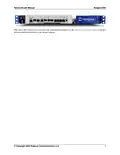
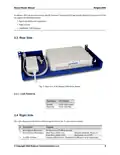
Fig. 1: Front view of the Netgate 8200 Secure Router ports
The numbered labels in this image refer to entries in Networking Ports and Non-Networking Ports.
3.1 Non-Networking Ports
Port Description
1
6
7
Serial Console
Power
Fan intake (Do not block)
• Clients can access the Serial Console using either the built in serial interface with a Micro-USB B cable or an
RJ45 “Cisco” style cable and separate serial adapter.
Note: Only one type of console connection will work at a time and the RJ45 console connection has priority.
If both ports are connected only the RJ45 console port will function.
• The Power connector is 12VDC with threaded locking connector. Power Consumption 20W (idle)
• The Netgate 8200 Secure Router is actively cooled by a fan located on the bottom of the device as mentioned in
Active Cooling. The portion of the fan intake under the networking ports is where it draws in air when mounted
against another device. Do not block this part of the air intake.
6

| General | Details |
|---|---|
| Name | netgate 8200 Secure Router User Manual |
| Make | netgate |
| Language | English |
| Filetype | PDF (Download) |
| File size | 0.25 MB |
 (1 votes, average: 5.00 out of 5)
 Loading...
If you have any questions regarding netgate 8200 Secure Router User Manual, please ask here and describe the problem in detail.

netgate 6100 MAX Secure Router User Manual


LANCOM 883+ VoIP Single Site Router Installation Guide

ASUS RT-AX57GO Dual Band WiFi 6 Router User Guide

WAVLINK 575A3 Dual Band WiFi Extender Repeater Access Point Router Instruction Manual

MikroTik C52iG-5HaxD2HaxD-TC Wireless Router User Guide

TP-Link AX95 AX7800 Tri Band 8 Stream WiFi 6 Router User Guide

vantiva MGA5331 Unveils FWA Modem and Wi-Fi Router User Manual

ASUS ZenWiFi Pro ET12 AXE11000 Tri Band Router User Guide

BEC MX-241NP 4G LTE CBRS Wi-Fi Router User Guide

TELTONIKA RUT300 Router User Guide

ASUS RT-AX59U Dual Band WiFi 6 AiMesh Router User Guide