
NETGEAR RAX36 Nighthawk WiFi 6 Router User Guide



Contents
Overview
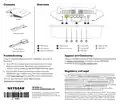
Router
A
B
C
D
E
Ethernet cable
1
2
3
4
5
1
2
3
4
5
A
D
E
WPS button
Reset button
Power connection
Power LED
Internet LED
WiFi LED
Ethernet LED
WPS LED
B
Internet port
Power adapter
C
Ethernet LAN ports
(varies by region)
Troubleshooting
Support and Community
If you’re having problems with the installation, you can try
these tips:
Get your questions answered and access the latest downloads
at netgear.com/support, and check out our NETGEAR
Community at community.netgear.com.
•
•
Turn off your modem and router and disconnect them.
Reboot your modem. Reconnect your router to your
modem and try installing with the Nighthawk app again.
Regulatory and Legal
If you’re still unable to install your router using the
Nighthawk app, install it using the router web interface.
Visit routerlogin.net to access the router web interface.
Si ce produit est vendu au Canada, vous pouvez accéder à ce document en
français canadien à netgear.com/support/download/. (If this product is sold
in Canada, you can access this document in Canadian French at netgear.com/
support/download/.) For regulatory compliance information including the
EU Declaration of Conformity, visit netgear.com/about/regulatory/. See the
regulatory compliance document before connecting the power supply. For
NETGEAR’s Privacy Policy, visit netgear.com/about/privacy-policy. By using this
device, you are agreeing to NETGEAR’s Terms and Conditions at
You can also find more setup help online at
netgear.com/routerhelp.
NETGEAR, Inc.
netgear.com/about/terms-and-conditions. If you do not agree, return the
device to your place of purchase within your return period.
NETGEAR INTERNATIONAL LTD
November 2024
Applicable to 6 GHz devices only: Only use the device indoors. The operation
of 6 GHz devices is prohibited on oil platforms, cars, trains, boats, and aircraft,
except that operation of this device is permitted in large aircraft while flying
above 10,000 feet. Operation of transmitters in the 5.925-7.125 GHz band is
prohibited for control of or communications with unmanned aircraft systems.
© NETGEAR, Inc., NETGEAR and the NETGEAR
Logo are trademarks of NETGEAR, Inc. Any
non-NETGEAR trademarks are used for reference
purposes only.

| General | Details |
|---|---|
| Name | NETGEAR RAX36 Nighthawk WiFi 6 Router User Guide |
| Make | NETGEAR |
| Language | English |
| Filetype | PDF (Download) |
| File size | 0.11 MB |
 (1 votes, average: 5.00 out of 5)
 Loading...
If you have any questions regarding NETGEAR RAX36 Nighthawk WiFi 6 Router User Guide, please ask here and describe the problem in detail.

NETGEAR RAX40v2 Nighthawk AX4 4-Stream AX3000 WiFi Router User Manual

NETGEAR RAX10 AX1800 WiFi 6 Router User Guide

NETGEAR XR1000v2 Nighthawk WiFi 6 Pro Gaming Router User Guide

NETGEAR PR60X Pro 10G Multi Gigabit Dual WAN Pro Router Installation Guide

NETGEAR AC2600 Wi-Fi Router User Guide

NETGEAR AX6 Stream Wi-Fi Router User Manual

NETGEAR MR6110 M6 5G WiFi 6 Mobile Router User Manual

NETGEAR RBR20 Orbi Mesh WiFi Router User Guide

NETGEAR RS280S Nighthawk WiFi 7 Tri-Band Router Owner’s Manual

NETGEAR BE9200 WiFi 7 Router Instruction Manual


Cudy WR3600E Gigabit Wi-Fi 7 Router Installation Guide

TP-Link TL-WR802N 300Mbps Wireless N Nano Router User Manual

D-Link DWR-933M Mobile Router Installation Guide

ELPRO 645M-4 Cellular and WiFi IIoT Router Installation Guide

Spectrum WiFi 6 Router: User Guide & Troubleshooting Tips

TELTONIKA Networks QSG RUT956 Cellular Router Instruction Manual

MERCKU M6S Ms Router User Guide

ASUS BE25000 Quad Band WiFi Router User Guide

COMCAST CGA4332COM Advanced WiFi Gateway Router User Guide

zpe Nodegrid Virtual Services Router Owner’s Manual