
Home > NIRAD Networks > NIRAD Networks N200-I-SDWAN-EDGE EDGE Router Installation Guide
NIRAD Networks N200-I-SDWAN-EDGE EDGE Router Installation Guide


User Guide – N200-I-SDWAN-EDGE
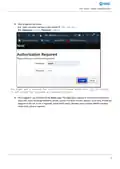
3. How to log into the router:
3.1. Open a browser and type in the Default IP: 192.168.99.1
3.2. Username = admin; Password = admin;
it and access the username and password prompt.
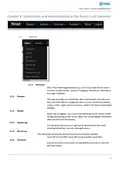
4. Once logged in, you would be at the Status page. This page gives a glance of various vital information
about the router including Hostname, Model, Current Firmware Version, Uptime, Local Time, IP Address
assigned to the sim (if sim is inserted), active DHCP Leases, Wireless status and the MWAN interface
status (if its active or inactive)
3

| General | Details |
|---|---|
| Name | NIRAD Networks N200-I-SDWAN-EDGE EDGE Router Installation Guide |
| Make | NIRAD Networks |
| Language | English |
| Filetype | PDF (Download) |
| File size | 0.48 MB |
 (1 votes, average: 5.00 out of 5)
 Loading...
If you have any questions regarding NIRAD Networks N200-I-SDWAN-EDGE EDGE Router Installation Guide, please ask here and describe the problem in detail.


BILLION MX-220-UT-5G Advanced 5G Router Installation Guide

ADVANTECH SL302 SmartStart LTE Router User Manual

Cudy WR3000H AX3000 2.5G Mesh Wi-Fi 6 Router Installation Guide

TP-Link AC1200 Dual Band Wi-Fi Router Installation Guide

TP-Link NX200 5G CPE Router Installation Guide

Cudy WR3000S Gigabit Mesh Wi-Fi 6 Router Installation Guide

NETGEAR RS100 Wi-Fi 7 Router Instructions

Sagemcom Broadband FAST 5290 Fiber Wireless Router Installation Guide

ADVANTECH ICR-2041 LTE Router User Manual

Smawave SRG821 Ruggedized Router User Guide