
robustel R2000 Dual SIM Cellular VPN Router Instruction Manual






Hardware Installation
Note:
1. Insert or Remove SIM Card
1. Recommended torque for inserting is 0.5 N.m, and the maximum
allowed is 0.7 N.m.
2. Use the specific card when the device is working in extreme
temperature (temperature exceeding 40 °C), because the regular card
for long-time working in harsh environment will be disconnected
frequently.
3. Do not forget to twist the cover tightly to avoid being stolen.
4. Do not touch the metal of the card surface in case information in the
card will lose or be destroyed.
5. Do not bend or scratch the card.
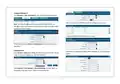
Insert or remove the SIM card as shown in the following steps.
6. Keep the card away from electricity and magnetism.
7. Make sure router is powered off before inserting or removing the card.
Insert SIM card
1. Make sure router is powered off.
2. To remove cover, loosen the screws associated with the cover by using
a screwdriver and then find the SIM card slot.
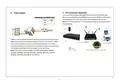
2. Attach External Antenna (SMA Type)
Attach an external SMA antenna to the router’s antenna connector and
twist tightly. Make sure the antenna is within the correct frequency range
provided by the ISP and with 50 Ohm impedance.
3. To insert SIM card, press the card with finger until your hear a click and
then tighten the screws associated with the cover by using a
screwdriver.
Note: Recommended torque for mounting is 0.35 N.m.
4. To put back the cover and tighten the screws associated with the cover
by using a screwdriver.
Remove SIM card
3. Ground the Router
1. Make sure router is powered off.
Router grounding helps prevent the noise effect due to electromagnetic
interference (EMI). Connect the router to the site ground wire by the
ground screw before powering on.
2. To remove slot cover, loosen the screws associated with the cover by
using a screwdriver and then find the SIM card slot.
3. To remove SIM card, press the card with finger until it pops out and
then take out the card.
Note: This product is appropriate to be mounted on a sound grounded
device surface, such as a metal panel.
4. To put back the cover and tighten the screws associated with the cover
by using a screwdriver.
-4-

| General | Details |
|---|---|
| Name | robustel R2000 Dual SIM Cellular VPN Router Instruction Manual |
| Make | robustel |
| Language | English |
| Filetype | PDF (Download) |
| File size | 0.37 MB |
 (1 votes, average: 5.00 out of 5)
 Loading...
If you have any questions regarding robustel R2000 Dual SIM Cellular VPN Router Instruction Manual, please ask here and describe the problem in detail.

robustel R5020 5G WiFi Wireless Router Owner’s Manual

robustel R5020 Lite 5G Router Instruction Manual

robustel R2010 Dual SIM VPN IoT Router Instruction Manual

robustel R1520LG Dual SIM LTE Router User Manual

robustel R3000 Lite Dual-SIM VPN Router User Manual

robustel R2011 Cellular Router Instruction Manual

robustel R1510 4G LTE Router User Manual

robustel R1510-4L VPN Router Owner’s Manual


Harvilon MF302 4G LTE Wi-Fi Router User Guide

D-Link DIR-601 Wireless-N 150 Home Router Instructions

Adtran 834-5 SDG PlumeOS Dual-Band Wi-Fi 5 Plume Enabled Ethernet Router User Manual

HERCULES HE042 Compact Trim Router Owner’s Manual

Vigor 2136 Series Gigabit Broadband Router User Guide

Woodpeckers Multi Router Instruction Manual

UBIQUITI ER-6P EdgeRouter 6P Gigabit Router User Guide

Cudy WR1500 Wi-Fi 6 Router Installation Guide

ZYXEL NR5307 5G NR Router Owner’s Manual

Digital Alert Systems R232 Multi Port RF Router Installation Guide