
STARLINK 02633101 Gen 3 Wi-Fi Router User Guide




GEN 3 ROUTER SETUP GUIDE (STANDARD CIRCULAR)
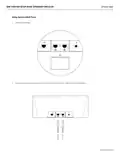
Using the Extra RJ45 Ports
1.
Remove the RJ45 cover.
2.
Plug in your own ethernet cable to port 1 or 2. Connect the other end of your cable to your 3rd party hardware.
support.starlink.com

| General | Details |
|---|---|
| Name | STARLINK 02633101 Gen 3 Wi-Fi Router User Guide |
| Make | Starlink |
| Language | English |
| Filetype | PDF (Download) |
| File size | 0.24 MB |
 (1 votes, average: 5.00 out of 5)
 Loading...
If you have any questions regarding STARLINK 02633101 Gen 3 Wi-Fi Router User Guide, please ask here and describe the problem in detail.

STARLINK Mini Kit Dish With Built In Router User Guide

STARLINK GEN 3 WIFI ROUTER Enhancing Homes Router Installation Guide

UTR-231 Starlink Router User Manual

UTR-232 WiFi 6 Starlink Router Instruction Manual

STARLINK LJ439RBIV3M5 Mini Router Installation Guide

STARLINK Router Installation Guide

STARLINK Mini Kit Dish With Router User Guide

STARLINK Standard Gen 3 Router User Guide


hitron CHITA3.1 CHITA-RES Cable Modem Router User Guide

DrayTek Vigor2927ac Dual WAN Security Router User Guide

Doonink FW40-WIFI Wi-Fi Router User Manual

ASUS RT-BE96U BE19000 Tri Band WiFi Router User Guide

FESTOOL OF 1400 EB Router User Manual

NETGEAR R6700AX 4 Stream WiFi 6 Router Instructions

airlive XPON ONU Wifi6 MESH Router User Manual

Cudy GP1200 AC1200 Pon Wi-Fi Router Installation Guide

Aetheros ESRMKV2C AOS Edge Server Router User Manual

MOFI5500 AdvancedHigh Performance Router User Manual