
tehnoteka AX3000 V2 TUF Gaming WiFi Router User Guide
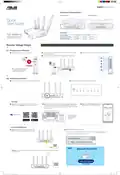


Hardware Explanations
I/O Ports Overview
LED Lights Overview
USB 3.2 Gen 1x1 port
5GHz LED
Power LED
2.4GHz LED
2.5G/1G WAN (Internet) LED
Power button
Power (DCIN) port
2.5G/1G WAN (Internet) port
LAN 1~4 ports WPS button
Reset button
LAN 1~4 LEDs
Quick
Start Guide
Specifications:
TUF-AX3000 V2
TUF Gaming AX3000 V2
Dual Band WiFi 6 Router
DC Power adapter
DC Output: +12V with 1.5A current
Operating Temperature
Operating Humidity
0~40oC
Storage
Storage
0~70oC
50~90%
20~90%
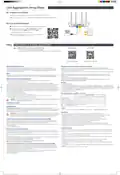
Router Setup Steps
Prepare your Modem
1
01
Unplug the power of cable / DSL modem.
2
3
Connect your modem to WAN port at the back side of the router with the
network cable provided.
4
Check the modem LED lights to ensure the connection is active.
Power on the modem. Plug modem to the power outlet and power on.
Unplug
If you are using DSL for internet, you will
need your username / password from
your Internet service provider (ISP) to
properly configure your router.
Modem back
Modem back
Modem front
Install your Router
1
02
Plug the adapter into the DCIN port, and press the Power button.
2
The power LED will light up when the hardware is ready.
– via App
3
[App] On your iOS or Android mobile device, go to the app
store, search for ASUS Router, and download the app.
4
[App] On your iOS or Android mobile device, tap Settings > Wi-Fi, connect
to the default network SSID shown on the product label on the bottom
side of the router. Or scan the QR code on the product label to connect the
default network SSID.
5
[App] Launch ASUS Router App and follow
the instructions to complete the setup.
ꢀꢁꢂꢃꢄꢅꢁ
ꢆꢇꢈꢃꢉꢊꢋꢌꢍꢁꢎꢌꢁꢍꢊꢏꢁꢍꢇꢐ
ꢀꢁꢂꢃꢄꢅꢆꢇꢀꢈꢉꢁꢇꢊꢋꢋꢌꢍꢎꢏ
* XX refers to the last two
ꢐꢋꢑꢋ_ꢒꢒ
digits of MAC address.
You can find it on the
label on the back of
your router.
ꢏꢑꢒꢓꢑ
– or via Web Browser
[Wired] Connect your PC to a LAN port at the back
side of the router using an additional network cable.
3
4
[Wired / Wireless] Open a web browser.
Follow the instructions to complete the setup.
ꢀꢁꢂꢃꢄꢅꢁꢆꢇꢄꢆꢈꢉꢊꢋꢌꢍꢎꢏꢏꢏꢆꢐꢑ
[Wireless] Connect to the network with default SSID shown on the product label on the back side of your
router “ASUS_XX”.
ꢒꢓꢁꢔꢇꢁꢆꢔꢆꢕꢁ ꢆꢕꢁꢇ ꢄꢓꢖ
ꢌꢗꢘꢔꢙꢃꢁꢗꢆꢚꢁꢇꢇꢛꢙꢜꢝ
ꢀꢁꢂꢃꢄꢅ_ꢆꢇꢈꢉꢊꢋꢌꢄꢄꢄ_ꢍꢎ_ꢏꢐꢑꢉꢒꢓꢔꢑ_ꢕꢖꢗꢘꢙꢐꢚꢚꢛꢛꢛꢁ
ꢎꢄꢎꢎꢜꢎꢜꢎꢎꢛꢛꢛꢁꢁꢝꢄꢅꢝꢄꢞ

| General | Details |
|---|---|
| Name | tehnoteka AX3000 V2 TUF Gaming WiFi Router User Guide |
| Make | tehnoteka |
| Language | English |
| Filetype | PDF (Download) |
| File size | 0.45 MB |
 (1 votes, average: 5.00 out of 5)
 Loading...
If you have any questions regarding tehnoteka AX3000 V2 TUF Gaming WiFi Router User Guide, please ask here and describe the problem in detail.


NETGEAR MR6110 5G WiFi 6 Mobile Router User Guide

Juniper NETWORKS PTX10001-36MR Packet Transport Router User Guide

more eero 6+ TrueMesh Wi-Fi 6 Dual-Band Router User Guide

EE HH10E 4G Hub 2 WiFi Router User Guide

YINUOLINK Y7 AC1200 Wi-Fi Nano Router Installation Guide

STRONG 4G LTE Wi-Fi Router Installation Guide

Milesight Routers Installation Guide

TELTONIKA RUT976 5G Router User Guide

ASUS GT-AX11000 Pro ROG Rapture Tri-band Gaming Router User Guide

D-Link M60 AX6000 Wi-Fi 6 Smart Mesh Router Installation Guide