
WEWINS M46Q 5G Mobile Router User Manual

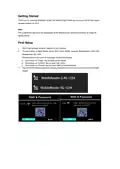




“Power”/”LCD ON/OFF” Key Function:
1. Long press (6~7 seconds) on any page, will turn on/off the device.
2. Short press to wake up/turn off the screen.
“Confirm” Key Function:
1. Main function to enter different menu or enable/disable the option.
“Scroll” Key Function:
1. Main function to scroll down to select the option on the screen.
WPS/Menu Button Function:
1. Short press on “Power” Key to wake up the screen, then short press on the “Confirm” Key to enter
main menu
2. Short press on “Scroll” Key to choose WPS menu, then short press on the “Confirm” Key to enter the
menu.
3. Short press on “Confirm” Key to make WPS on.

| General | Details |
|---|---|
| Name | WEWINS M46Q 5G Mobile Router User Manual |
| Make | WEWINS |
| Language | English |
| Filetype | PDF (Download) |
| File size | 0.37 MB |
 (1 votes, average: 5.00 out of 5)
 Loading...
If you have any questions regarding WEWINS M46Q 5G Mobile Router User Manual, please ask here and describe the problem in detail.

MERCUSYS MB112-4G 300Mbps Wireless N 4G LTE Router User Guide

Zbtlink AX1800 Wi-Fi 6 4G LTE Router User Manual

TP-Link Archer MR400 4G LTE 300 Mbps Router Installation Guide

NEXXT NCM-X3000 Bolt AX3000 Router User Guide

MERCUSYS MB110-4G Mbps Wireless N 4G LTE Router Installation Guide

ERICSSON S400-C6-NA Wireless Router User Guide

Edge-core AS7926-40XKFB 100G Aggregation Router User Guide

caravansplus RV WI-FI Dishydock Router User Guide

ASUS ExpertWiFi EBG15 Gigabit VPN Router User Guide

ZYXEL LTE3301-PLUS 4G LTE-A Router User Guide