
aparian A-DH485R/B Router User Guide




Revision 1.5
01/2023
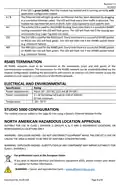
If the LED is green (solid), then the module has booted and is running correctly with
application configuration loaded.
A / B
Act
The Ethernet LED will light up when an Ethernet link has been detected (by plugging
in a connected Ethernet cable). The LED will flash every time traffic is detected. This
module has two Ethernet ports A and B. Each LEDs represents each specific port.
The activity LED is used for the DH485 Routing. Every time there is a successful DH485
routing transaction the LED will flash green. The LED will flash red if the routing was
unsuccessful (e.g. Logix Tag does not exist).
232
485
The 232 LED is used for the RS232 port. Every time there is a successful DH485 packet
on RS232 the LED will flash green. The LED will flash red if the DH485 packet failed
(e.g. checksum failure).
The 485 LED is used for the RS485 port. Every time there is a successful DH485 packet
on RS485 the LED will flash green. The LED will flash red if the DH485 packet failed
(e.g. checksum failure).
RS485 TERMINATION
All RS485 networks need to be terminated at the extremities (start and end point) of the
communication conductor. The termination for the RS485 network can be enabled/disabled via the
module configuration. Enabling the termination will connect an internal 125 Ohm resistor across the
positive (+) and negative (-) conductors of the RS485 network.
ELECTRICAL AND ENVIRONMENTAL
Specification
Power requirements
Power consumption
Rating
Input: 10 – 32V DC, (121 mA @ 24 VDC)
3.1 W (Including full load on USB of 200mA)
67 mA maximum
Temperature
-20 – 70 °C
STUDIO 5000 CONFIGURATION
The module must be added to the Logix IO tree using a Generic Ethernet Module Profile.
NORTH AMERICAN HAZARDOUS LOCATION APPROVAL
SUITABLE FOR USE IN CLASS I, DIVISION 2, GROUPS A, B, C AND D HAZARDOUS LOCATIONS, OR
NONHAZARDOUS LOCATIONS ONLY.
WARNING - EXPLOSION HAZARD - DO NOT DISCONNECT EQUIPMENT WHILE THE CIRCUIT IS LIVE OR
UNLESS THE AREA IS KNOW TO BE FREE OF IGNITABLE CONCENTRATIONS.
WARNING - EXPLOSION HAZARD - SUBSTITUTION OF ANY COMPONENT MAY IMPAIR SUITABILITY FOR
CLASS I, DIVISION 2.
For professional users in the European Union
If you wish to discard electrical and electronic equipment (EEE), please contact your dealer
or supplier for further information.
Document No. D120-018
Page 3 of 4

| General | Details |
|---|---|
| Name | aparian A-DH485R/B Router User Guide |
| Make | aparian |
| Language | English |
| Filetype | PDF (Download) |
| File size | 0.11 MB |
 (1 votes, average: 5.00 out of 5)
 Loading...
If you have any questions regarding aparian A-DH485R/B Router User Guide, please ask here and describe the problem in detail.

aparian A-CNTR ControlNet Router Module User Guide


NETGEAR RAX9 4-Stream WiFi 6 Router Owner’s Manual

TP-LINK AX1500 Dual Band Wi-Fi 6 Router Installation Guide

ASUS XT8 ZenWiFi Tri Band WiFi Router User Guide

D-Link DIR-882 EXO AC2600 MU-MIMO Wifi Router Installation Guide

Siretta QUARTZ-ONYX 5G NR Router User Guide

Milesight UR75 UltraSeries Router User Guide

NETGEAR RS100 Wi-Fi 7 Router Instructions

DrayTek 2620 Series LTE Router User Guide

OptConnect neo2 dura 4 Multi Carrier Cellular Router User Guide

NETGEAR Nighthawk BE6500 BE5000 Dual Band Wi-Fi Router User Guide