
ARRIS M6 Wireless Router User Manual


M6 Use Steps
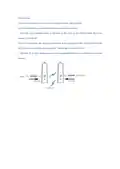
a. Connect the M6 to your home router using the Ethernet cable provided.
b. Connect the M6 to a power outlet using the power cable provided.
c. Enter the user credentials (refer to the label on this card) on your 6GHz-capable devices to
connect to the M6 AP.
d. If you have another M6 acting as subordinate device, pushing the WPS (Sync) button of the
M6 AP and the subordinate device together. They will get connected via Wi-Fi.
e. The Xbox, PC or other devices connect to the subordinate M6 device via LAN port to access the
internet.

| General | Details |
|---|---|
| Name | ARRIS M6 Wireless Router User Manual |
| Make | Arris |
| Language | English |
| Filetype | PDF (Download) |
| File size | 0.12 MB |
 (1 votes, average: 5.00 out of 5)
 Loading...
If you have any questions regarding ARRIS M6 Wireless Router User Manual, please ask here and describe the problem in detail.

ARRIS G34 Multi Gigabit Cable Modem and Wi-Fi Router User Guide


TP-Link GE550 Tri Band Wi-Fi 7 Gaming Router Installation Guide

DrayTek Vigor2766 Series GFast Security Router User Guide

Westermo Merlin 4100 Series Cellular Router User Guide

MOXA EDR-8010-2GSFP Secure Router Installation Guide

Juniper NETWORKS SSR1300 Router User Guide

CME H2MIDI PRO Compact USB Host MIDI Interface Plus Router User Manual

FiberHome SR120CC Router User Manual

DrayTek 2136axx Multi Gigabit Ethernet Router Owner’s Manual

TELTONIKA Networks QSG RUT951 Wi-Fi Dual SIM Router Instruction Manual

robustel R1510-4L VPN Router Owner’s Manual