
Cisco RV320 Small Gigabit Dual WAN VPN Router User Manual


Logging In
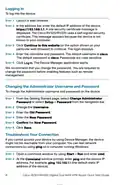
To l o g i n to t h e d e v i c e :
STEP 1 Launch a web browser.
STEP 2 In the address bar, enter the default IP address of the device,
https://192.168.1.1. A site security certificate message is
displayed. The Cisco RV320/RV325 uses a self-signed security
certificate. This message appears because the device is not
known to your computer.
STEP 3 Click Continue to this website (or the option shown on your
particular web browser) to continue. The login displays.
STEP 4 Enter the username and password. The default username is cisco.
The default password is cisco. Passwords are case sensitive.
STEP 5 Click Log In. The Device Manager application starts.
We recommend that you change the password. You are required to
change the password before enabling features such as remote
management.
Changing the Administrator Username and Password
To change the Administrator username and password on the device:
STEP 1 From the Getting Started page, select Change Administrator
Password or select Setup > Password from the navigation bar.
STEP 2 Change the Username.
STEP 3 Enter the Old Password.
STEP 4 Enter the New Password.
STEP 5 Confirm the New Password.
STEP 6 Click Save.
Troubleshoot Your Connection
If you cannot access your device by using Device Manager, the device
might not be reachable from your computer. You can test network
connections by using ping on a computer running Windows:
STEP 1 Open a command window by using Start > Run and enter cmd.
STEP 2 At the Command window prompt, enter ping and the device IP
address. For example, ping 192.168.1.1 (the default static IP
address of the device).
8
Cisco RV320/RV325 Gigabit Dual WAN VPN Router Quick Start Guide

| General | Details |
|---|---|
| Name | Cisco RV320 Small Gigabit Dual WAN VPN Router User Manual |
| Make | Cisco |
| Language | English |
| Filetype | PDF (Download) |
| File size | 0.15 MB |
 (1 votes, average: 5.00 out of 5)
 Loading...
If you have any questions regarding Cisco RV320 Small Gigabit Dual WAN VPN Router User Manual, please ask here and describe the problem in detail.

CISCO cBR Series Converged Broadband Router User Guide

Cisco Router RV345 / RV345P User Guide

Cisco RV160W Router User Guide

Cisco RV260W Router User Guide

Cisco RV260P Router User Guide

CISCO RV320 Gigabit Dual WAN VPN Router User Guide

Cisco RV160 Router User Guide

Cisco Router RV345/RV345P User Guide

cisco RV340 Router User Guide


Cudy AC1200 4G LTE Wi-Fi Router Instruction Manual

STRONG REPEATERAX3000 Wi-Fi 6 Repeater 3000 Router User Guide

GUDE OF 1200 E Router Instructions

Cudy X6 AX1800 1800mbps Dual Band Smart Wi-Fi 6 Router Installation Guide

ASUS RT-BE86U Wireless Router User Guide

D-Link DIR-882 EXO AC2600 MU-MIMO Wifi Router Installation Guide

ASUS ZenWiFi BD4 Dual Band Wi-Fi Router User Guide

TP-Link ER605W Omada AC1350 Gigabit VPN Router Installation Guide

ZYXEL NBG7510 Dual Band WiFi 6 AX1800 Router User Guide

SKYWORTH GN630 GPON ONT Wi-Fi Router Installation Guide