
CP PLUS CP-XR-DE21-S 4G Router Installation Guide


Installation steps
Router installation steps
This router has a built-in 3G/4G modem. Before using the 4G router, you need to purchase
a 4G SIM card from a local operator.
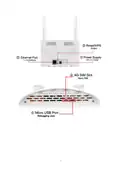
Insert the 4G SIM card into the SIM card slot of the device.
Please pay attention to the insertion instructions near the SIM card slot. This router only
supports NANO SIM cards. If you need to replace the SIM card, please turn off the device
power first to prevent damage to the SIM card.
Power on
Please use the original factory standard power adapter to power the 4G router, plug in the
power supply and wait a while, because the device will take some time to start up.
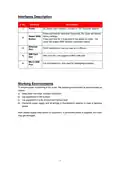
After startup, the 4G indicator and WIFI indicator are Flashing. After successfully registering
to the 4G network, the 4G indicator will always be on. Now you can use computers, mobile
phones and other terminals to connect to this machine through WIFI (refer to the body label
for the WI-FI SSID) or network cable and use 4G data to surf the Internet.
Router Configuration
If you need to manage and configure this router, you can connect to the 4G router wirelessly
or weirdly. For the default gateway address, please refer to the label on the router.
These network parameters can be modified according to the actual situation, and the
default values will be explained in the text.
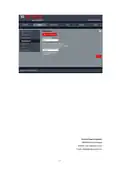
Log in to the router configuration page
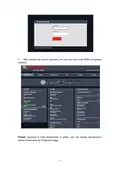
1.
Open the browser of your computer or smartphone/tablet, enter the IP address on
the router body sticker in the address bar, and then press Enter to enter the background
login interface.
2.
In the login window that pops up, enter the Username: admin, Password: admin; then
click "Sign In."
5

| General | Details |
|---|---|
| Name | CP PLUS CP-XR-DE21-S 4G Router Installation Guide |
| Make | CP PLUS |
| Language | English |
| Filetype | PDF (Download) |
| File size | 0.22 MB |
 (1 votes, average: 5.00 out of 5)
 Loading...
If you have any questions regarding CP PLUS CP-XR-DE21-S 4G Router Installation Guide, please ask here and describe the problem in detail.

CP PLUS DN211-S Dual-Band 4G Router Installation Guide

CP PLUS CP-GR-DE412 Dual-Band 4G Router Installation Guide

CP PLUS CP-GR-DE413-S Dual-Band 4G Router Installation Guide


OptConnect neo2 dura 4 Multi Carrier Cellular Router User Guide

ELPRO 645M-4 Cellular and WiFi IIoT Router Installation Guide

BOSSPAC EA000405 Border Router Instruction Manual

SNRMD2 Wi-Fi Router User Manual

Teltonika Networks RUTM50 Router User Manual

TP-Link AC1200 Wireless Mu-Mimo Gigabit Router User Manual

MERCURY 6220 Wireless Dual-Band Router Instructions

ASUS ROG Rapture GT6 Router User Guide

ASUS GT6 ROG Rapture AX10000 Tri band Gaming Mesh Router User Guide

audiocodes Mediant 500L Multi Service Router User Guide