
×
- 1. Quick Install (Installation Guide → Guide Dinstallation Rapide → Guía De Instalación Rápida → Hurtiginstallationsguide → Navodila Za Hitro Namestitev → Ghid De Instalare Rapidă)
- 2.
- 3. D-link Wi-fi App Setup (Quick Installation Card → Install New Device → Scan The Qr Code → On-screen Instructions → Connect Devices To Your Network)
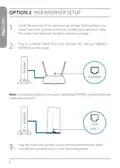
- 4. Web Browser Setup (Install The Antennas → Plug An Ethernet Cable From Your Modem → Plug The Router Into A Power Source)
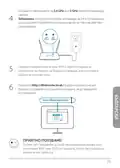
- 5. Connect Your Computer To The Wi-fi Name And Password Printed On The Quick Installation Card (Type Http://dlinkrouter.local./ Into The Address Bar Of A Web Browser → Follow The On-screen Instructions To Complete The Setup → Connect Devices To Your Network Using The Wi-fi Name (ssid) And Password)
- 6. Accessing The Web-based Configuration Utility (Troubleshooting Internet Access → Resetting Your Device Password → Restoring The Router To Factory Default Settings)
- 7. Einrichtung Mittels D-link Wi-fi App (Installationskarte)
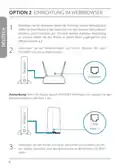
- 8. Einrichtung Im Webbrowser (Montieren Sie Die Antennen → Verbinden Sie Ein Ethernet-kabel Von Ihrem Modem → Verbinden Sie Den Router Mit Einer Steckdose Und Schalten Sie Ihn Ein)
- 9. Verbinden Sie Ihren Computer Mit Dem Auf Der Installationskarte Oder Der Unterseite Des Geräts Abgedruckten Wlan-namen Und Kennwort. (Geben Sie Http://dlinkrouter.local./ In Die Adresszeile Eines Webbrowsers Ein. → Folgen Sie Den Anweisungen Auf Dem Bildschirm, Um Die Einrichtung Abzuschließen. → Verbinden Sie Geräte Unter Verwendung Des Wi-fi-namens (ssid) Und Des Kennworts, Das Sie Während Des Einrichtungsverfahrens Erstellt Haben, Mit Ihrem Netzwerk.)
- 10. Zugriff Auf Das Webbasierte Konfigurationsprogramm (Internetzugang Überprüfen → Gerätekennwort/wlan-kennwort Vergessen → Router Auf Werkseitige Standardeinstellungen Zurücksetzen)
- 11. Configuration De L'application Wi-fi D-link (Carte Dinstallation Rapide)
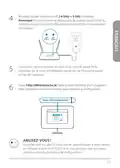
- 12. Configuration Du Navigateur (Installez Les Antennes → Branchez Un Câble Ethernet → Branchez Le Routeur Sur Une Source D'alimentation)
- 13. Attendez Que Les Voyants Sans Fil 2.4 Ghz Et 5 Ghz Sallument. (Connectez Votre Ordinateur Au Nom Et Au Mot De Passe Wi-fi Imprimés Sur La Carte D'installation Rapide Ou Sur L'étiquette Située En Bas De L'appareil. → Tapez Http://dlinkrouter.local./ Dans La Barre D'adresse D'un Navigateur Web. → Suivez Les Instructions À L'écran Pour Terminer La Configuration. → Connectez Les Périphériques À Votre Réseau En Utilisant Le Nom Wi-fi (ssid) Et Le Mot De Passe Que Vous Avez Créés Au Cours Du Processus De Configuration.)
- 14. Pourquoi Nai-je Pas Accès À Lutilitaire De Configuration Web ? (Pourquoi Ne Puis-je Pas Accéder À Internet ? → Que Dois-je Faire Si J'ai Oublié Le Mot De Passe De Mon Appareil/mon Mot De Passe Du Réseau Sans Fil ? → Comment Restaurer Les Paramètres D'usine Du Routeur ?)
- 15. Instalación De La Aplicación D-link Wi-fi (Tarjeta De Instalación Rápida)
- 16. Instalación Del Navegador Web (Instale Las Antenas. → Conecte Un Cable Ethernet Del Módem Al Puerto Que Lleva La Etiqueta Internet Del Router. → Conecte El Router A Una Toma De Alimentación Para Encenderlo.)
- 17. Conecte El Ordenador A La Red Wi-fi (Escriba Http://dlinkrouter.local./ En La Barra De Direcciones → Siga Las Instrucciones En Pantalla Para Completar La Instalación → Disfrute! → Conecte Los Dispositivos A La Red)
- 18. Acceso A La Utilidad De Configuración Basada En Web (Acceso A Internet → Olvido De La Contraseña Del Dispositivo O De La Red Inalámbrica → Restablecimiento De La Configuración Predeterminada De Fábrica Del Router)
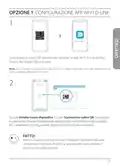
- 19. Configurazione App Wi-fi D-link (Scheda Di Installazione Rapida)
- 20. Configurazione Del Browser Web (Installare Le Antenne → Collegare Un Cavo Ethernet Al Modem → Nota: Se Nel Router Non È Presente Alcuna Porta Contrassegnata Con Internet → Collegare Il Router A Una Presa Elettrica)
- 21. Attendere L'accensione Dei Led Wireless (Connettere Il Computer Con Il Nome Wi-fi E La Password → Digitare Http://dlinkrouter.local./ Nella Barra Degli Indirizzi → Seguire Le Istruzioni Sulla Schermata → Collegare I Dispositivi Alla Rete)
- 22. Accesso All'utilità Di Configurazione Basata Sul Web (Problemi Di Connessione A Internet → Reimpostazione Della Password Del Dispositivo → Ripristino Delle Impostazioni Predefinite Del Router)
- 23. D-link Wi-fi App Setup (Scheda Di Installazione Rapida → Nieuw Apparaat Installeren → De Qr-code Scannen → Volg De Scherminstructies → Klaar Voor Gebruik)
- 24. Webbrowserinstallatie (Plaats De Antennes → Sluit Een Ethernetkabel Van Uw Modem Aan Op De Poort Met Label Internet Op De Router → Sluit De Router Aan Op Een Stroombron Om De Router In Te Schakelen)
- 25. Wacht Tot De 2.4 Ghz En 5 Ghz Draadloze Leds Oplichten (Sluit Uw Computer Aan Met Behulp Van Wifinaam En Wachtwoord → Typ Http://dlinkrouter.local./ In De Adresbalk Van Uw Router → Volg De Scherminstructies Om Het Installatieproces Te Voltooien → Sluit Apparaten Aan Op Uw Netwerk Met Behulp Van Gebruikersnaam (ssid) En Wachtwoord)
- 26. Waarom Heb Ik Geen Toegang Tot Het Webgebaseerde Configuratieprogramma? (Waarom Heb Ik Geen Toegang Tot Het Internet? → Wat Als Ik Het Wachtwoord Van Mijn Apparaat Of Van Het Draadloos Netwerk Ben Vergeten? → Hoe Moet Ik De Fabrieksstandaardinstellingen Terugzetten?)
- 27. Konfiguracja Aplikacji D-link Wi-fi (Scheda Di Installazione Rapida → Instalacja Nowego Urządzenia → Zeskanuj Kod Qr → Konfigurację → Nazwy Sieci Wi-fi (ssid) → Hasła Utworzonych Podczas Konfiguracji)
- 28. Opcja 2 (Konfiguracja Przy Użyciu Przeglądarki Internetowej → Zamontuj Anteny → Ustaw Router W Pobliżu Modemu → Podłącz Modem Do Portu W Routerze → Podłącz Router Do Źródła Zasilania)
- 29. Połączenie Z Siecią Wi-fi (Konfiguracja Routera → Instrukcje Wyświetlane Na Ekranie → Dioda Led Sieci Bezprzewodowej → Nazwa I Hasło Sieci Wi-fi → Karta Szybkiej Instalacji → Podłączanie Urządzeń Do Sieci)
- 30. Dlaczego Nie Mogę Uzyskać Dostępu Do Aplikacji Konfiguracyjnej W Przeglądarce? (Dlaczego Nie Mam Dostępu Do Internetu? → Co Zrobić, Jeśli Zapomnę Hasła Do Urządzenia / Hasła Do Sieci Bezprzewodowej? → Jak Mogę Przywrócić Ustawienia Fabryczne Mojego Routera?)
- 31. Možnost 1 (Nastavení Aplikace D-link Wi-fi → Scheda Di Installazione Rapida → Instalovat Nové Zařízení → Skenovat Qr Kód → Dokončete Nastavení Podle Pokynů Na Obrazovce)
- 32. Možnos (Nastaveníwebového Prohlížeče → Nainstalujte Antény → Umístěte Router → Připojte Kabel Sítě Ethernet → Zapojte Router Ke Zdroji Napájení)
- 33. Připojte Počítač K Wi-fi Síti (Zadejte Adresu Do Webového Prohlížeče → Dokončete Nastavení Podle Pokynů Na Obrazovce → Užijte Si To!)
- 34. Proč Nefunguje Přístup K Nástroji Webové Konfigurace? (Proč Přístup K Internetu Nefunguje? → Co Mám Dělat, Když Zapomenu Heslo K Zařízení / Heslo K Bezdrátové Síti? → Jak Obnovím Výchozí Výrobní Nastavení Routeru?)
- 35. Lehetőség Beállítás A D-link Wi-fi Alkalmazással (Scheda Di Installazione Rapida → Új Eszköz Telepítése → Qr-kód Beolvasása → Telepítési Folyamat Során Létrehozott Wi-fi Hálózatnév (ssid) És Jelszó)
- 36. Lehetőség (Beállítás Webböngészővel → Szerelje Be Az Antennákat → Helyezze A Routert Az Internethez Csatlakoztatott Modem És Számítógép Közelébe → Egy Ethernet-kábellel Kösse Össze A Modemet A Router Internet Jelölésű Portjával → Csatlakoztassa A Routert Az Áramforráshoz, Majd Kapcsolja Be)
- 37. Várja Meg, Amíg A 2.4 Ghz És Az 5 Ghz Vezeték Nélküli Led-ek Bekapcsolnak. Megjegyzés: Ha A Routeren Nincs 2.4 És 5g Vezeték Nélküli Led, A …
- 38. Gyakran Feltett Kérdések (Miért Nem Férek Hozzá A Webalapú Konfigurációs Segédprogramhoz? → Miért Nincs Internet-hozzáférésem? → Mit Tegyek, Ha Elfelejtettem Az Eszköz Jelszavát / A Vezeték Nélküli Hálózat Jelszavát? → Hogyan Állíthatom Vissza A Routert Alapértelmezett Gyári Beállításokra?)
- 39. Konfigurering I D-link Wi-fi-app (Scheda Di Installazione Rapida → Installer Ny Enhet → Skann Qr-koden → Følg Instruksjonene På Skjermen → Koble Enheter Til Nettverket)
- 40. Konfigurering I Nettleser (Monter Antennene → Koble Til En Ethernet-kabelen → Koble Ruteren Til En Strømkilde)
- 41. Koble Datamaskinen Til Internett (Skriv Inn Http://dlinkrouter.local./ I Adresselinjen → Følg Instruksjonene På Skjermen → Koble Enheter Til Nettverket)
- 42. Hvorfor Får Jeg Ikke Tilgang Til Det Nettbaserte Konfigurasjonsverktøyet? (Hva Gjør Jeg Hvis Jeg Har Glemt Enhetspassordet / Passordet Til Det Trådløse Nettverket? → Hvordan Gjenoppretter Jeg Ruteren Til Fabrikksinnstillingene?)
- 43. Opsætning Af D-link Wi-fi App (Scheda Di Installazione Rapida → Tryk På Installer Ny Enhed → Tryk På Scan Qr-koden → Følg Vejledningen På Skærmen For Fuldføre Indstillingen → Tilslut Enheder Til Netværk)
- 44. Opsætning Med Webbrowser (Monter Antennerne → Sæt Et Ethernetkabel Fra Dit Modem Til Porten, Mærket Internet På Routeren → Sæt Routeren Til En Strømkilde For At Tænde For Routeren)
- 45. Tilslut Din Computer Til Wi-fi-navnet Og Adgangskoden (Skriv Http://dlinkrouter.local./ I Adresselinjen På En Webbrowser → Følg Vejledningen På Skærmen For Fuldføre Indstillingen → Du Er Klar Til At Komme I Gang!)
- 46. Web-baserede Konfiguration (Adgang Til Internettet → Glemt Adgangskode → Nulstilling Af Routeren → Fabriksindstillinger Gendannes)
- 47. D-link Wi-fi Sovelluksen Asennus (Scheda Di Installazione Rapida → Asenna Uusi Laite → Skannaa Qr-koodi → Yhdistä Laitteet Verkkoosi)
- 48. Verkkoselaimella Määritys (Asenna Antennit → Kytke Modeemisi Ethernet-kaapelilla Reitittimen Internet-nimiseen Porttiin → Kytke Reititin Virtalähteeseen)
- 49. Yhdistä Tietokoneesi Pika-asennuskorttiin Tai Laitteen Pohjan Laitettarraan Painettuun Wi-fi-nimeen Ja Salasanaan. (Kirjoita Http://dlinkrouter.local./ Verkkoselaimen Osoiteriville. → Suorita Asennus Loppuun Noudattamalla Näytön Ohjeita. → Nyt Voit Aloittaa Käytön! Yhdistä Laitteet Verkkoosi Käyttäen Wi-fi-käyttäjänimeä (ssid) Ja Salasanaa, Jotka Loit Asennusprosessin Aikana.)
- 50. Miksi En Saa Yhteyttä Verkkopohjaiseen Määritysapuohjelmaan? (Miksi En Saa Yhteyttä Internetiin? → Mitä Minun Pitää Tehdä, Jos Unohdan Laitteeni Salasanan Tai Langattoman Verkkoni Salasanan? → Miten Saan Palautettua Reitittimen Tehdasasetukset?)
- 51. Installation Av D-link Wi-fi-app (Scheda Di Installazione Rapida → Klar Att Använda!)
- 52. Webbläsarinstallation (Montera Antennerna → Koppla In En Ethernetkabel → Koppla In Routern Till En Strömkälla)
- 53. Anslut Din Dator Till Wi-fi-namnet Och Lösenordet (Skriv Http://dlinkrouter.local./ I En Webbläsares Adressfält → Följ Instruktionerna På Skärmen För Att Slutföra Installationsprocessen → Anslut Enheter Till Ditt Nätverk)
- 54. Varför Kommer Jag Inte Åt Det Webbaserade Konfigurationsverktyget? (Vad Gör Jag Om Jag Har Glömt Lösenordet Till Min Enhet/lösenordet Till Mitt Trådlösa Nätverk? → Hur Återställer Jag Routern Till Fabriksinställningarna?)
- 55. Configuração Da Aplicação D-link Wi-fi (Scheda Di Installazione Rapida → Instalar Novo Dispositivo → Digitalizar O Código Qr → Concluir O Processo De Configuração → Ligar Dispositivos À Sua Rede)
- 56. Configuração Do Navegador De Internet (Instale As Antenas → Ligue Um Cabo Ethernet Do Seu Modem → Nota: Se O Seu Router Não Tiver Uma Porta Identificada Como Internet → Ligue O Router A Uma Fonte De Alimentação)
- 57. Ligue O Seu Computador Ao Nome E Palavra-passe De Wi-fi (Escreva Http://dlinkrouter.local./ Na Barra De Endereços Do Navegador → Siga As Instruções No Ecrã Para Concluir O Processo De Configuração → Ligue Dispositivos À Sua Rede Usando O Nome De Wi-fi (ssid) E A Palavra-passe)
- 58. Aceder Ao Utilitário De Configuração (Aceder À Internet → Esqueci A Palavra-passe Do Dispositivo → Restaurar O Router Para As Predefinições De Fábrica)
- 59. Διαμορφωση Με Την Εφαρμογη D-link Wi-fi (Scheda Di Installazione Rapida → Απολαύστε!)
- 60. Διαμορφωση Μεσω Προγραμματος Περιηγησης (Εγκαταστήστε Τις Κεραίες → Τοποθετήστε Τον Δρομολογητή Κοντά Στο Μόντεμ → Συνδέστε Ένα Καλώδιο Ethernet Από Το Μόντεμ → Σημείωση: Εάν Ο Δρομολογητής Δεν Διαθέτει Θύρα Με Ένδειξη Internet → Συνδέστε Τον Δρομολογητή Σε Μια Παροχή Ρεύματος)
- 61. Συνδέστε Τον Υπολογιστή Σας Στο Δίκτυο Wi-fi (Πληκτρολογήστε Http://dlinkrouter.local./ Στη Γραμμή Διευθύνσεων → Ακολουθήστε Τις Οδηγίες Στην Οθόνη Για Να Ολοκληρώσετε Τη Διαμόρφωση → Συνδέστε Συσκευές Στο Δίκτυό Σας Χρησιμοποιώντας Το Όνομα Wi-fi (ssid) → Εγχειρίδιο Χρήστη Για Πληροφορίες Σχετικά Με Τη Συμπεριφορά Των Ενδείξεων Led → Ενδείξεις Led Ασύρματης Επικοινωνίας 2.4 Και 5 Ghz → Κάρτα Γρήγορης Εγκατάστασης)
- 62. Γιατί Δεν Μπορώ Να Αποκτήσω Πρόσβαση Στο Βασιζόμενο Σε Τεχνολογίες Web Βοηθητικό Πρόγραμμα; (Γιατί Δεν Μπορώ Να Αποκτήσω Πρόσβαση Στο Internet; → Τι Μπορώ Να Κάνω Εάν Ξεχάσω Τον Κωδικό Πρόσβασης Για Τη Συσκευή/το Ασύρματο Δίκτυό Μου; → Πώς Μπορώ Να Επαναφέρω Τον Δρομολογητή Στις Προεπιλεγμένες Εργοστασιακές Ρυθμίσεις;)
- 63. Postavljanje D-link Wi-fi Aplikacije (Scheda Di Installazione Rapida)
- 64. Postavljanje Pomoću Web Preglednika (Instalirajte Antene → Priključite Isporučeni Ethernet Kabel → Napomena → Priključite Usmjernik U Izvor Napajanja)
- 65. Priključite Vaše Računalo Na Wi-fi Mrežu (Utipkajte Http://dlinkrouter.local./ U Polje Za Adresu Web Preglednika → Slijedite Upute Na Zaslonu Kako Biste Dovršili Postavljanje → Povežite Uređaje Na Vašu Mrežu)
- 66. Često Postavljana Pitanja (Zašto Ne Mogu Pristupiti Web Uslužnom Programu Za Konfiguraciju? → Zašto Ne Mogu Pristupiti Internetu? → Što Ako Zaboravim Zaporku Za Moj Uređaj / Moju Zaporku Za Bežičnu Mrežu? → Kako Mogu Vratiti Usmjernik Na Njegove Zadane Tvorničke Postavke?)
- 67. Namestitev Aplikacije D-link Wi-fi (Scheda Di Installazione Rapida → Namestite Novo Napravo → Skeniraj Kodo Qr → Zaslonska Navodila → Povežite Naprave S Svojim Omrežjem)
- 68. Možnost 2 (Namestitev Prek Spletnega Brskalnika → Namestite Antene. Če So Antene Že Nameščene, Postavite Usmerjevalnik → Ethernetni Kabel Iz Modema Priključite V Vrata Na Usmerjevalniku Z Oznako Internet. → Usmerjevalnik Priključite V Vir Napajanja, Da Zagotovite Napajanje. → Preverite, Ali Je Gumb Nastavljen Na On (vklopljeno).)
- 69. Povezava Z Wi-fi (Dostop Do Usmerjevalnika → Dokončanje Namestitve → Uživajte!)
- 70. Zakaj Ne Morem Dostopati Do Spletnega Konfiguracijskega Pripomočka? (Zakaj Ne Morem Dostopati Do Interneta? → Kaj Naj Naredim, Če Pozabim Geslo Naprave/geslo Brezžičnega Omrežja? → Kako Ponastavim Usmerjevalnik Na Tovarniške Privzete Nastavitve?)
- 71. Configurare Apl. D-link Wi-fi (Scheda Di Installazione Rapida → Instalare Dispozitiv Nou → Scanați Codul Qr → Instrucțiuni De Pe Ecran → Conectați Dispozitivele → Bucurați-vă De Produs!)
- 72. Configurare Din Browser Web (Instalați Antenele. Dacă Antenele Sunt Deja Fixate, Poziționați Routerul Lângă Modemul Conectat La Internet Și Computer. Mențineți Routerul Într-un Spațiu Deschis Pentru O Mai Bună Acoperire Fără Fir. → Conectați Un Cablu Ethernet De La Modem La Portul Etichetat Internet De La Router. → Conectați Routerul La O Sursă De Alimentare. Asigurați-vă Că Butonul De Pornire Este În Poziția On.)
- 73. Așteptați Ca Led-urile Wireless (Conectați Computerul La Wi-fi → Tastați Http://dlinkrouter.local./ → Urmați Instrucțiunile De Pe Ecran → Bucurați-vă De Produs! → Conectați Dispozitivele La Rețeaua Dvs.)
- 74. Întrebări Frecvente (De Ce Nu Pot Să Accesez Utilitarul De Configurare Web? → De Ce Nu Pot Accesa Internetul? → Ce Fac Dacă Mi-am Uitat Parola Dispozitivului Sau Parola Rețelei Wireless? → Cum Readuc Routerul La Setările Implicite Din Fabrică?)
- 75. Настройка На Приложение D-link Wi-fi (Сcheda Di Installazione Rapida → Инсталиране На Ново Устройство → Сканирай Qr Кода → Готови Сте!)
- 76. Настройване През Уеб Браузър (Инсталирайте Антените → Позиционирайте Рутера Близо До Модема За Интернет Връзка → Включете Ethernet Кабел От Модема В Порта, Означен Internet → Свържете Рутера Към Източник На Захранване)
- 77. Свържете Компютъра Си Към Wi-fi (Напишете Http://dlinkrouter.local./ В Адресната Лента → Следвайте Инструкциите На Екрана → Готови Сте! Свързвайте Устройства Към Вашата Мрежа)
- 78. Често Задавани Въпроси (Как Да Върна Фабричните Настройки По Подразбиране На Рутера? → Какво Да Правя, Ако Забравя Паролата За Устройството / Паролата За Безжичната Мрежа? → Защо Нямам Достъп До Интернет? → Защо Нямам Достъп До Инструмента За Уеб-базирано Конфигуриране?)
- 79. Možnosť: Inštalácia Aplikácie D-link Wi-fi (Scheda Di Installazione Rapida → Nainštalovať Nové Zariadenie → Naskenovať Kód Qr → Inštaláciu Vykonajte Podľa Pokynov Na Obrazovke → Pripojte Zariadenia K Svojej Sieti)
- 80. Možnosť: Inštalácia Cez Webový Prehľadávač (Nainštalujte Antény → Zapojte Kábel Siete Ethernet Z Modemu Do Portu Na Smerovači Označeného Nápisom Internet → Zapojte Smerovač Do Elektrickej Zásuvky, Aby Sa Zapol)
- 81. Pripojte Počítač K Sieti Wi-fi (Do Panel S Adresou Vo Webovom Prehľadávači Napíšte Adresu → Inštaláciu Vykonajte Podľa Pokynov Na Obrazovke → Vychutnajte Si To!)
- 82. Prečo Nemám Prístup Ku Konfiguračnej Webovej Pomôcke Smerovača? (Prečo Nemám Prístup Na Internet? → Čo Mám Robiť, Ak Si Nepamätám Heslo Zariadenia Alebo Heslo K Svojej Bezdrôtovej Sieti? → Ako Obnovím Predvolené Nastavenia Smerovača?)
×
D-Link DIR-2660 AC2600 Mesh Wifi Router Installation Guide




















FREQUENTLY ASKED QUESTIONS
Why can’t I access the web-based configuration utility?
At this stage, you are not connecting to a website, nor do you have to be
connected to the Internet. The device has the utility built-in to a ROM chip in
the device itself. Your computer must be connected to the router’s network
and in the same IP subnet to connect to the web-based utility.
Why can’t I access the Internet?
Verify that your router is working by rebooting the router. If you still can not
connect to the Internet, contact your Internet service provider.
What do I do if I forgot my device password / my wireless network
password?
If you forgot your password, you must reset your router. This process will
change all your settings back to the factory defaults.
How do I restore the router to its factory default settings?
Locate the reset button on the rear panel of the unit. With the router powered
on, use a paper clip to hold the button down for 10 seconds. Release the
button and the router will go through its reboot process.
For technical support, product documentation and other information,
please visit our website.
4

| General | Details |
|---|---|
| Name | D-Link DIR-2660 AC2600 Mesh Wifi Router Installation Guide |
| Make | D-Link |
| Language | English |
| Filetype | PDF (Download) |
| File size | 0.56 MB |
 (1 votes, average: 5.00 out of 5)
 Loading...
If you have any questions regarding D-Link DIR-2660 AC2600 Mesh Wifi Router Installation Guide, please ask here and describe the problem in detail.

D-Link BE3600 Mesh Gigabit Wireless Router Installation Guide

D-Link DBR-700 Router Installation Guide

D Link DIR-822 AC1200 WiFi Router User Guide

D-Link EXO AX AX1800 Wi-Fi Router User Guide

D-Link N300 4G Router User Guide

D-Link M60 AX6000 Wi-Fi 6 Mesh Router Installation Guide

D-Link AX3200 Router Owner’s Manual

D-Link M30 2-pack Mesh Router User Guide

D-Link M30 AQUILA PRO AI AX3000 Wi-Fi 6 Mesh Router User Manual

D-Link M60 AX6000 WiFi 6 Mesh Router User Guide


TP-Link TL-WR802N 300Mbps Wireless N Nano Router User Manual

Ibex-RT-630-5G Series EN 50155 5G and WLAN Router User Manual

Ruijie 42301 Dual Band Gigabit Wireless Router Installation Guide

GRANDSTREAM HT812 Powerful 2 Port ATA with Gigabit NAT Router User Guide

acer W6M Vero Wi-Fi Router User Manual

ASUS RT-BE96U Wi-Fi 7 Ethernet Wireless Router User Guide

D-Link DWR-M930DS 4G Dual SIM LTE Router Installation Guide

Beijer CloudVPN Gateway Router User Guide

Xiaomi CB0401V2 5G CPE Pro V2 Wi-Fi 6 Router User Manual

GRANDSTREAM GWN700x VPN Router User Guide
Table of Contents
- 1. Quick Install - Installation Guide →
- 2. Page 2 →
- 3. D-link Wi-fi App Setup - Quick Installation Card →
- 4. Web Browser Setup - Install The Antennas →
- 5. Connect Your Computer To The Wi-fi Name And Password Printed... →
- 6. Accessing The Web-based Configuration Utility - Troubleshoot... →
- 7. Einrichtung Mittels D-link Wi-fi App - Installationskarte →
- 8. Einrichtung Im Webbrowser - Montieren Sie Die Antennen →
- 9. Verbinden Sie Ihren Computer Mit Dem Auf Der Installationska... →
- 10. Zugriff Auf Das Webbasierte Konfigurationsprogramm - Interne... →
- 11. Configuration De L'application Wi-fi D-link - Carte Dinstall... →
- 12. Configuration Du Navigateur - Installez Les Antennes →
- 13. Attendez Que Les Voyants Sans Fil 2.4 Ghz Et 5 Ghz Sallument... →
- 14. Pourquoi Nai-je Pas Accès À Lutilitaire De Configuration Web... →
- 15. Instalación De La Aplicación D-link Wi-fi - Tarjeta De Insta... →
- 16. Instalación Del Navegador Web - Instale Las Antenas. →
- 17. Conecte El Ordenador A La Red Wi-fi - Escriba Http://dlinkro... →
- 18. Acceso A La Utilidad De Configuración Basada En Web - Acceso... →
- 19. Configurazione App Wi-fi D-link - Scheda Di Installazione Ra... →
- 20. Configurazione Del Browser Web - Installare Le Antenne →
- 21. Attendere L'accensione Dei Led Wireless - Connettere Il Comp... →
- 22. Accesso All'utilità Di Configurazione Basata Sul Web - Probl... →
- 23. D-link Wi-fi App Setup - Scheda Di Installazione Rapida →
- 24. Webbrowserinstallati... - Plaats De Antennes →
- 25. Wacht Tot De 2.4 Ghz En 5 Ghz Draadloze Leds Oplichten - Slu... →
- 26. Waarom Heb Ik Geen Toegang Tot Het Webgebaseerde Configurati... →
- 27. Konfiguracja Aplikacji D-link Wi-fi - Scheda Di Installazion... →
- 28. Opcja 2 - Konfiguracja Przy Użyciu Przeglądarki Internetowej →
- 29. Połączenie Z Siecią Wi-fi - Konfiguracja Routera →
- 30. Dlaczego Nie Mogę Uzyskać Dostępu Do Aplikacji Konfiguracyjne... →
- 31. Možnost 1 - Nastavení Aplikace D-link Wi-fi →
- 32. Možnos - Nastaveníwebového Prohlížeče →
- 33. Připojte Počítač K Wi-fi Síti - Zadejte Adresu Do Webového P... →
- 34. Proč Nefunguje Přístup K Nástroji Webové Konfigurace? - Proč... →
- 35. Lehetőség Beállítás A D-link Wi-fi Alkalmazással - Scheda Di... →
- 36. Lehetőség - Beállítás Webböngészővel →
- 37. Várja Meg, Amíg A 2.4 Ghz És Az 5 Ghz Vezeték Nélküli Led-ek... →
- 38. Gyakran Feltett Kérdések - Miért Nem Férek Hozzá A Webalapú ... →
- 39. Konfigurering I D-link Wi-fi-app - Scheda Di Installazione R... →
- 40. Konfigurering I Nettleser - Monter Antennene →
- 41. Koble Datamaskinen Til Internett - Skriv Inn Http://dlinkrou... →
- 42. Hvorfor Får Jeg Ikke Tilgang Til Det Nettbaserte Konfigurasj... →
- 43. Opsætning Af D-link Wi-fi App - Scheda Di Installazione Rapi... →
- 44. Opsætning Med Webbrowser - Monter Antennerne →
- 45. Tilslut Din Computer Til Wi-fi-navnet Og Adgangskoden - Skri... →
- 46. Web-baserede Konfiguration - Adgang Til Internettet →
- 47. D-link Wi-fi Sovelluksen Asennus - Scheda Di Installazione R... →
- 48. Verkkoselaimella Määritys - Asenna Antennit →
- 49. Yhdistä Tietokoneesi Pika-asennuskorttiin Tai Laitteen Pohja... →
- 50. Miksi En Saa Yhteyttä Verkkopohjaiseen Määritysapuohjelmaan?... →
- 51. Installation Av D-link Wi-fi-app - Scheda Di Installazione R... →
- 52. Webbläsarinstallatio... - Montera Antennerna →
- 53. Anslut Din Dator Till Wi-fi-namnet Och Lösenordet - Skriv Ht... →
- 54. Varför Kommer Jag Inte Åt Det Webbaserade Konfigurationsverk... →
- 55. Configuração Da Aplicação D-link Wi-fi - Scheda Di Installaz... →
- 56. Configuração Do Navegador De Internet - Instale As Antenas →
- 57. Ligue O Seu Computador Ao Nome E Palavra-passe De Wi-fi - Es... →
- 58. Aceder Ao Utilitário De Configuração - Aceder À Internet →
- 59. Διαμορφωση Με Την Εφαρμογη D-link Wi-fi - Scheda Di Installa... →
- 60. Διαμορφωση Μεσω Προγραμματος Περιηγησης - Εγκαταστήστε Τις Κ... →
- 61. Συνδέστε Τον Υπολογιστή Σας Στο Δίκτυο Wi-fi - Πληκτρολογήστ... →
- 62. Γιατί Δεν Μπορώ Να Αποκτήσω Πρόσβαση Στο Βασιζόμενο Σε Τεχνο... →
- 63. Postavljanje D-link Wi-fi Aplikacije - Scheda Di Installazio... →
- 64. Postavljanje Pomoću Web Preglednika - Instalirajte Antene →
- 65. Priključite Vaše Računalo Na Wi-fi Mrežu - Utipkajte Http://... →
- 66. Često Postavljana Pitanja - Zašto Ne Mogu Pristupiti Web Usl... →
- 67. Namestitev Aplikacije D-link Wi-fi - Scheda Di Installazione... →
- 68. Možnost 2 - Namestitev Prek Spletnega Brskalnika →
- 69. Povezava Z Wi-fi - Dostop Do Usmerjevalnika →
- 70. Zakaj Ne Morem Dostopati Do Spletnega Konfiguracijskega Prip... →
- 71. Configurare Apl. D-link Wi-fi - Scheda Di Installazione Rapi... →
- 72. Configurare Din Browser Web - Instalați Antenele. Dacă Anten... →
- 73. Așteptați Ca Led-urile Wireless - Conectați Computerul La Wi... →
- 74. Întrebări Frecvente - De Ce Nu Pot Să Accesez Utilitarul De ... →
- 75. Настройка На Приложение D-link Wi-fi - Сcheda Di Installazio... →
- 76. Настройване През Уеб Браузър - Инсталирайте Антените →
- 77. Свържете Компютъра Си Към Wi-fi - Напишете Http://dlinkroute... →
- 78. Често Задавани Въпроси - Как Да Върна Фабричните Настройки П... →
- 79. Možnosť: Inštalácia Aplikácie D-link Wi-fi - Scheda Di Insta... →
- 80. Možnosť: Inštalácia Cez Webový Prehľadávač - Nainštalujte An... →
- 81. Pripojte Počítač K Sieti Wi-fi - Do Panel S Adresou Vo Webov... →
- 82. Prečo Nemám Prístup Ku Konfiguračnej Webovej Pomôcke Smerovač... →