
dahua N300 Wireless Router User Guide


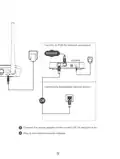


Figure 1-3 Connect the router
Wireless connection
The network name (SSID) and
wireless password are printed on the
label at the bottom of the router.
OR
Wired connection
Power off the modem.
1
2
Connect the modem's LAN port with an Ethernet cable(RJ45) to the router's WAN port.
lf your Internet is connected through the Ethernet cable directly from the wall, connect
the other end of Ethernet cable to the router's WAN port.
8

| General | Details |
|---|---|
| Name | dahua N300 Wireless Router User Guide |
| Make | Dahua |
| Language | English |
| Filetype | PDF (Download) |
| File size | 0.15 MB |
 (1 votes, average: 5.00 out of 5)
 Loading...
If you have any questions regarding dahua N300 Wireless Router User Guide, please ask here and describe the problem in detail.

dahua AX1500 Wi-Fi6 Wireless Router Instruction Manual

dahua DH-MAX18-3 MAX18 Mesh Wireless Router User Guide

dahua DH-AX30 Wireless Router User Manual


ZTE MC801A 5G WiFi CPE Router User Manual

ZYXEL NR2301 NR Portable Router User Guide

D-Link DIR-X5460 AX5400 Wi-Fi 6 Router User Guide

netgate 8200 Secure Router User Manual

ADVANTECH ICR-2041 LTE Router User Manual

NETGEAR RAX40v2 Nighthawk AX4 4-Stream AX3000 WiFi Router User Manual

ASUS ROG Rapture GT-BE98 Pro BE30000 Quad Band Gaming Router User Guide

prolink DL-7306 4G LTE Wireless Router Installation Guide

ASUS RT-AX86U Pro Wireless-AX5700 Dual-Band Gigabit Router User Guide

ASUS TUF-AX5400 TUF Gaming Wi-Fi 6 Router User Guide