
dahua N300 Wireless Router User Guide


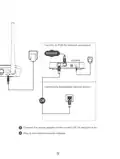


Figure 1-2 Rear Side
1
2
3
4
Table 1-2 Button and Port descriptions
NO.
Port and Button
Description
Press the button for 1s to start the WPS process.
Press and hold the button for 5s to reset the device.
1
Reset/WPS Button
Connects to wired devices such as computers and
set top boxes. You can switch between the WAN
port and LAN port.
2
3
LAN ports
WAN ports
Connects to the Internet modem or Ethernet port.
You can switch between the WAN port and LAN port.
4
Power port
Connects to the power supply.
7

| General | Details |
|---|---|
| Name | dahua N300 Wireless Router User Guide |
| Make | Dahua |
| Language | English |
| Filetype | PDF (Download) |
| File size | 0.15 MB |
 (1 votes, average: 5.00 out of 5)
 Loading...
If you have any questions regarding dahua N300 Wireless Router User Guide, please ask here and describe the problem in detail.

dahua AX1500 Wi-Fi6 Wireless Router Instruction Manual

dahua DH-MAX18-3 MAX18 Mesh Wireless Router User Guide

dahua DH-AX30 Wireless Router User Manual


D-Link G530 5G NR AX3000 Wi-Fi 6 Router User Guide

zpe Nodegrid Virtual Services Router Owner’s Manual

ASUS RT-AC86U AC2900 WiFi Gaming Router User Guide

Cudy WR3600 Gigabit Mesh Wi-Fi 7 Router Installation Guide

ZTE MF937 4G Mobile WiFi Router User Guide

Adtran 854-(v)6 Service Delivery Gateway WiFi 6 2.5G Router User Guide

BEC MX-241NP 4G LTE CBRS Wi-Fi Router User Guide

D-Link N300 4G Smart Router User Guide

ASUS RT-BE88U Dual Band WiFi Router User Guide

DrayTek Vigor2762 Series ADSL2-2+ and VDSL2 Router User Guide