
Adtran 854-(v)6 Service Delivery Gateway WiFi 6 2.5G Router User Guide


854-(v)6 Service Delivery Gateway
Wi-Fi 6 2.5G Router
Quick Start
Guide
October 2022
P/N: 17600028F1, 17600028F2, 17600028F3, 17600028F4
6SDG8546V6-13A
Overview
WARNING!
f
Read all warnings, cautions, notes and installation instructions before installing or servicing this equipment.
The 854-(v)6 is a carrier-class, dual-band, Wi-Fi 6 2.5G Router designed to deliver top-end Wi-Fi 6 performance, Gigabit throughput, and advanced
service delivery capabilities.
Features
The features of the 854-(v)6 include the following:
■ Combo WAN Uplink (one at a time)
♦ SFP WAN interface
♦ 2.5G Ethernet WAN interface
■ 4x Gigabit Ethernet LAN interfaces (RJ-45)
■ 2x Voice (RJ-11) interfaces (854-v6 only)
This quick start describes how to install and connect to the device.
■ “Installing the 854-(v)6 2.5G Router” on page 2
■ “Understanding the Status LEDs” on page 3
■ “Logging Into the 854-(v)6” on page 5
■ “Product Specifications” on page 6
■ “Safety and Regulatory” on page 6
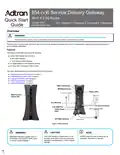
USB 3.0 Host Port
WPS/Reset Reset
Status LEDs
Multi-function
Status LED
4x LAN Ports
2x Voice Interfaces
2.5G WAN Port
12VDC Power
Input
SFP WAN Interface
Figure 1. 854-(v)6 Router
f
CAUTION!
f
WARNING!
g
NOTES inform the user of additional, but
important, information or features.
NOTE
CAUTION indicates a hazard which, if not
avoided, could result in service interruption,
damage to the equipment, or minor property
damage.
WARNING indicates a hazard which, if
not avoided, could result in death, injury
or serious property damage.


| General | Details |
|---|---|
| Name | Adtran 854-(v)6 Service Delivery Gateway WiFi 6 2.5G Router User Guide |
| Make | ADTRAN |
| Language | English |
| Filetype | PDF (Download) |
| File size | 0.78 MB |
 (1 votes, average: 5.00 out of 5)
 Loading...

Adtran SDG-8610 Service Delivery Gateway WiFi 6 Gigabit Router Instruction Manual

Adtran 834-5 SDG PlumeOS Dual-Band Wi-Fi 5 Plume Enabled Ethernet Router User Manual

ADTRAN 17600021F1 834-5 Service Delivery Gateway Wi-Fi 5 Gigabit Router User Guide

ADTRAN 1200824G1 Netvanta 3458 Access Router User Guide

Adtran 854-(v)6 Service Delivery Gateway WiFi 6 2.5G Router User Guide Overview
Summary of Contents
- Page 1: Overview Read all warnings, cautions, notes and installation instructions before installing or servicing this equipment. The 854-(v)6 is a carrier-class, dual-band, Wi-Fi 6 2.5G Router designed to deliver top-end Wi-Fi 6 performance, Gigabit throughput, and advanced service delivery capabilities. The features of the 854-(v)6 include a combo WAN uplink, SFP WAN interface, 2.5G Ethernet WAN interface, 4x Gigabit Ethernet LAN interfaces, and 2x Voice interfaces. This quick start describes how to install and connect to the device. Safety and regulatory information is included in the document. Caution indicates a hazard which, if not avoided, could result in service interruption or damage to the equipment. Warning indicates a hazard which, if not avoided, could result in death, injury or serious property damage.
- Page 2: Installing the 854-(v)6 2.5G Router Refer to the national, state and local electrical codes for the requirements for power, grounding, wiring, and installation methods. The product is intended for indoor use only. Ethernet, Voice, and attached equipment are intended for use within the same building. Before installing the equipment, inspect the device. If damage has occurred during shipping, file a claim with the carrier. No special tools are required for installing the 854-(v)6. There are two options to install the 854-(v)6: desktop and wall mount. The 854-(v)6 can be placed on a desk or table. Ensure that the 854-(v)6 does not come in contact with water or other liquids. Ensure that the 854-(v)6 is not located in direct sunlight or next to any thermal obstructions.
- Page 3: Understanding the status LEDs The 854-(v)6 can be mounted on a wall. Wall mount kit can be ordered for mounting the 854-(v)6. Connect the end of the power adapter to the power port on the back panel of the device. The multifunction status LED should be lit on the front of the device. The following subscriber connections are available on the 854-(v)6: 2.5G Ethernet port, SFP WAN port, 4x Ethernet port, USB 3.0, and 2x voice interfaces. Only one WAN port may be connected at a time. A reset button is available if the 854-(v)6 needs to be rebooted or restored to factory defaults. Wi-Fi Protected Setup™ is designed to simplify the pairing process between devices. The WPS LED on the back of the unit indicates the status of WPS. The multifunction status LED indicates the device status, with different meanings depending on the operating system.
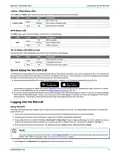
- Page 4: Understanding the status LEDs provides essential information about the device's connectivity and operational state. The multifunction status LED for SmartOS includes various color indicators such as red, green, and amber, each representing different events like poor satellite signal or reverting states. Table 3 defines the multifunction status LED state when running PlumeOS, with colors like blue and green indicating power status and connection attempts. The back panel of the 854-(v)6 features six status LEDs that provide real-time feedback on device connectivity. The fiber status LED indicates the status of fiber connectivity, with a green light showing an active connection and flashing indicating data transfer. The WAN status LED reflects the status of the WAN connection, with a green light indicating activity and flashing showing data transfer. Descriptions for each LED state help users understand the operational status of the device. The document includes figures to visually represent the status LEDs and their locations on the device. Understanding these indicators is crucial for troubleshooting and ensuring optimal device performance.
- Page 5: Quick setup for the 854-(v)6 The 2.4GHz and 5GHz status LEDs indicate the state of the wireless connections on the gateway. The WPS status LED indicates the status of WPS (Wi-Fi protected setup). The Tel 1/2 status LED indicates the state of the voice connections on the gateway. The SDG product line can ship with two possible firmware options: PlumeOS and SmartOS. For devices shipped with PlumeOS installed, the setup requires installation of the HomePass smartphone app by Plume. For devices shipped with SmartOS installed, scan the QR code labeled WiFi QuickStart located on the back of the unit. A browser-based graphical user interface (GUI) is used to manually configure the 854-(v)6. Ensure your computer is connected to the 854-(v)6 either via Wi-Fi or Ethernet connection to one of the LAN ports. Enter the default username and password. The default username is admin and the default password is admin.
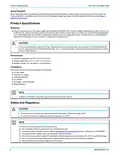
- Page 6: Product specifications Power is provided by a 12V DC power adapter that is included with the 854-(v)6. The power adapter operates from a power source of 100 to 240V AC, 50 - 60 Hz. An external AC Surge Protection Device is recommended at the AC input connection. Operating temperature: 32°F to 104°F (0°C to 40°C). Storage temperature: -40°F to 158°F (-40°C to 70°C). Relative humidity: 10 to 95 percent, non-condensing. This product meets UL/cUL Listed and FCC Part 15, Class B compliance requirements. Changes or modifications not expressly approved by Adtran will void the warranty. This product contains no parts that can be serviced by the user. The RJ-45 jacks are not used for telephone line connection.
- Page 7: Safety and Regulatory Regulatory Compliance This section includes user requirements for operating this product in accordance with national laws for usage of radio spectrum and operation of radio devices. This product's firmware limits operation to only the channels allowed in a particular region or country. Products bearing the marking comply with the following EU directives: EMC Directive 2014/30/EU, Low Voltage Directive 2014/35/EU, WEEE Directive reference: 2012/19/EU. If this product has telecommunications functionality, it also complies with the requirements of the RED 2014/53/EU. This device may not be used for setting up outdoor radio links in France. This product does not contain any user serviceable components. This equipment complies with FCC radiation exposure limits set forth for an uncontrolled environment. This device complies with Part 15 of the FCC rules. This equipment has been tested and found to comply with the limits for a Class B digital device. This digital apparatus does not exceed the Class B limits for radio-noise emissions from digital apparatus as set out in the Radio Interference Regulations of the Canadian Department of Communications.
- Page 8: Safety and regulatory information is provided for the 854-(v)6 2.5G Router. The equipment complies with radiation exposure limits established for uncontrolled environments. A minimum distance of 20 cm should be maintained between the radiation source and the body. The radio transmitter has been approved by Industry Canada for specific antenna types. Devices operating in the 5150-5250 MHz band are for indoor use only to reduce interference. Maximum antenna gain must comply with specified EIRP limits for different operation types. Users should be aware that high-power radars are primary users of certain frequency bands and may cause interference. Documentation for Adtran Network Solutions products is available online. Adtran offers a warranty for product replacement or repair if specifications are not met. Handling precautions are required to prevent electrostatic damage.

triton TMNRTR Electric Router Instruction Manual

EnGenius XG60-FIT FitXpress 4 port Gigabit PoE plus VPV Router Owner’s Manual

D-Link DIR-X5460 AX5400 Wi-Fi 6 Router User Guide

Cudy WR3000 Wireless WiFi Router Installation Guide
westermo 4400 Cellular Router User Guide

Cudy LT18 4G LTE Dual Band WiFi 6 Gigabit Cellular Hotspot Router Installation Guide

LINOVISION IOT-R32W Rugged and Versatile Cellular Router Instructions

DrayTek Vigor2762 Series ADSL2-2+ and VDSL2 Router User Guide

TELTONIKA Networks RUT906 E-Mark 4G Router Owner’s Manual

LINKSYS N600 Dual Band Router User Guide