
ESUNSTAR AF792 Portable Router User Manual
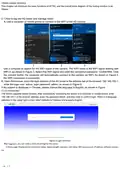
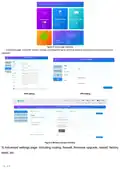




Figure 7 Advanced Settings Interface
2.3 Soft restart function
Support web based restart routers; The restart time is about 40 seconds, and after 40 seconds, the device fully starts successfully.
2.4 Restore Factory Settings Function
Support web based restoration of factory settings.
Figure 9 Restore Factory Settings Page
The module can also be restored to factory parameters by pressing the Reload button (hardware reset button).
Method: Press and hold for 5 seconds to release, and the router will automatically restore its factory parameter settings
and restart
.contact information
EsunStar Technology Co., Ltd.
Address: B505-2, Zerun Center, No. 4088 Banxuegang Avenue, Bantian Street, Longgang District, Shenzhen, Guangdong,
China,518129
- 6 - / 7

| General | Details |
|---|---|
| Name | ESUNSTAR AF792 Portable Router User Manual |
| Make | ESUNSTAR |
| Language | English |
| Filetype | PDF (Download) |
| File size | 0.72 MB |
 (1 votes, average: 5.00 out of 5)
 Loading...
If you have any questions regarding ESUNSTAR AF792 Portable Router User Manual, please ask here and describe the problem in detail.

ESUNSTAR AF792 Portable 4G Router User Manual


TP-Link TL-WR3002X Wi-Fi 6 Portable Router Installation Guide

Tenda Wi-Fi 6 Router Installation Guide

TP-Link 7106511948 Outdoor Router Installation Guide

TP-Link AC1900 Wi-Fi Router Installation Guide

CSG M519 5G Gateway Router User Guide

TP-Link NE200 Outdoor Router Installation Guide

SENWA 4G LTE CPE Router User Guide
Cradlepoint E102 Series Enterprise Router User Guide

Tenda AXE5700 Smart Wi-Fi 6E Router User Manual

TCL HH515V 5G Home Station Router User Guide