
MikroTik RBMetalG-52SHPacn Metal Wireless Router User Manual




User Manual - Metal 52 ac
The RBMetalG-52SHPacn Metal comes preinstalled in an outdoor case, with a built-in wireless
interface, an N-Male antenna connector, and one 10/100/1000 Ethernet connector which supports MDI-
X auto-detection. The device is packaged with a 24 V power adapter, a PoE injector, and two mounting
loops. Several models are available (dual-band, single band, AP and CPE variants).
Safety Warnings
Before you work on any equipment, be aware of the hazards involved with electrical circuitry, and be
familiar with standard practices for preventing accidents.
Ultimate disposal of this product should be handled according to all national laws and regulations.
The Installation of the equipment must comply with local and national electrical codes.
This product is intended to be mounted outdoors on a pole. Please read the mounting instructions
carefully before beginning installation. Failure to use the correct hardware and configuration or to
follow the correct procedures could result in a hazardous situation for people and damage to the
system.
Use only the power supply and accessories approved by the manufacturer, and which can be found in
the original packaging of this product.
Read the installation instructions before connecting the system to the power source.
We cannot guarantee that no accidents or damage will occur due to the improper use of the device.
Please use this product with care and operate at your own risk!
In the case of device failure, please disconnect it from power. The fastest way to do so is by unplugging
the power plug from the power outlet.
Exposure to Radio Frequency Radiation: This MikroTik equipment complies with the FCC, IC, and
European Union radiation exposure limits set forth for an uncontrolled environment. This MikroTik
device should be installed and operated no closer than 20 centimeters from your body, occupational
user, or the general public.
Connecting
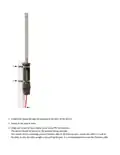
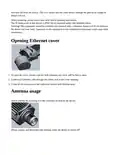
1. Connect the antenna to the N-Male connector (see "Antenna usage");
2. Open the cover of the Ethernet port (see "Opening Ethernet cover");
3. Guide your cable through the cover and connect to the Ethernet port. (see "Opening Ethernet cover");
4. The device accepts 10-30 V Passive PoE from a PoE injector. The included injector should be
connected with the "Data" end into a PC, the "Data + Power" port should be connected to the device,
by using an Ethernet cable of the desired length (not included);
5. Use the provided rubber insulator to put on the Ethernet cable, and push it into the case opening, so that
the opening is tightly closed;


| General | Details |
|---|---|
| Name | MikroTik RBMetalG-52SHPacn Metal Wireless Router User Manual |
| Make | Mikrotik |
| Language | English |
| Filetype | PDF (Download) |
| File size | 0.14 MB |
 (1 votes, average: 5.00 out of 5)
 Loading...
If you have any questions regarding MikroTik RBMetalG-52SHPacn Metal Wireless Router User Manual, please ask here and describe the problem in detail.

mikrotik RB960PGS Hex PoE 5-Port Router User Manual

MikroTik Cloud Hosted Router User Guide

MikroTik C52iG-5HaxD2HaxD-TC Wireless Router User Guide

MikroTik RBcAPGi-5acD2nD-XL Wireless Router User Guide

MikroTik RB750r2 hEX Lite Router User Guide

MikroTik hAP ax³ Wireless Network Router User Manual

MikroTik wAP ac Wireless Router User Manual

MikroTik Chateau LTE18 ax Dual Band Wireless Router User Manual

MIKROTIK 2004-1G-12S+2XS Cloud Core Router User Manual

MikroTik RBwAPG-5HacD2HnD Wireless Router User Guide


HERCULES HCB043 20V Brushless Compact Router Owner’s Manual

ASUS ET12 ZenWiFi Pro AXE11000 Tri Band WiFi Router User Guide

Tenda AC9 AC1200 Dual Band Gigabit WiFi Router Installation Guide

WM Systems DIN Rail Router User Guide

ASUS RT-AX57 AX3000 Dual Band WiFi Router User Guide

Pix-Link AX02 Wi-Fi 6 Router Installation Guide

SKIL RT1323-00 10 Amp Fixed Base Corded Router Owner’s Manual

DrayTek Vigor2766 Series GFast Security Router User Guide

ELPRO 641M-2 4G LTE Router Installation Guide

robustel R2010 Dual SIM VPN IoT Router Instruction Manual