
RGBlink 202304030620516871 Bond 6 Bonding Network Router User Guide







How to Config
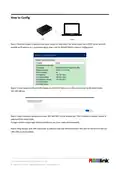
Step 1: Directly connect a laptop to the bond router via LAN cable. The bond router has a DHCP server and will
provide an IP address to a connected laptop that is set for default (DHCP) network configuration.
Step 2: Check network settings in the laptop to confirm IP address is in the same subnet as the bond router -
192.168.100.xxx.
Step 3: Open a browser window and enter 192.168.100.1 in the address bar. This IP address is default, preset IP
address of the bond router.
To login use the unique login details provided to you (User name and Password).
Step 4: Plug Dongles with SIM card inside to USB port and then directly connect TAO 1pro to the bond router via
LAN cable as shown below.
© Xiamen RGBlink Science & Technology Co., Ltd.
5

| General | Details |
|---|---|
| Name | RGBlink 202304030620516871 Bond 6 Bonding Network Router User Guide |
| Make | RGBlink |
| Language | English |
| Filetype | PDF (Download) |
| File size | 0.31 MB |
 (1 votes, average: 5.00 out of 5)
 Loading...
If you have any questions regarding RGBlink 202304030620516871 Bond 6 Bonding Network Router User Guide, please ask here and describe the problem in detail.


SDMC NE1611B WiFi Cable Modem Router User Manual

netis N4 Wireless Dual Band Router Installation Guide

NETGEAR RS100 Nighthawk Dual Band WiFi 7 Router User Guide

Urant UNT300M Wireless Router Installation Guide

Cudy WR3000H AX3000 2.5G Mesh Wi-Fi 6 Router Installation Guide

neptronic RPB11 RPB BACnet Router Instruction Manual

Edge-corE AS9947-36XKB AC Ethernet Switch and Router User Guide

xiaomi BE3600-2.5G Router User Manual

mafell LO 55 Hand Router Instruction Manual

TP-Link Archer AX80 AX6000 8-Stream Wi-Fi 6 Router Installation Guide