
×
- 1. Installation Guide (N300 Wi-fi 4g Lte Router → G03 Pro/4g05)
- 2.
- 3. Package Contents (Set Up The Router → Insert A Nano Sim Card → Use The Included Power Adapter → All Led Indicators Light Up → Tips)
- 4. Connect Clients To The Internet (Tenda Wifi App → Configure The Router → Log In To The Web Ui → Change The Wi-fi Name And Wi-fi Key → Troubleshooting Login Issues)
- 5. Led Indicators (Internet Led Indicator → Wi-fi Led Indicator → Ethernet Port Led Indicator → Signal Strength Led Indicator)
- 6. Button & Port (Wps/rst → Wan/lan → Lan → Nano Sim)
- 7. Internet Settings (Data Roaming → Troubleshooting Page → Accessing The Web Ui → Wireless Device Connection → Ip Address Configuration → Clearing Browser Cache)
- 8. How To Reset The Router? (How Do I Access The Internet Through The Sim Card Or Wan Port? → Internet Settings → Internet Status)
- 9. Get Support And Services (For Technical Specifications, User Guides And More Information, Please Visit The Product Page Or Service Page On Www.tendacn.com.)
- 10. Contenuto Della Confezione (Configurare Il Router → Suggerimenti)
- 11. Collegare I Client A Internet (Configurare Ulteriormente Il Router → Accedere All'interfaccia Web Del Router → Scaricare L'app Tenda Wifi → Suggerimenti → Faq)
- 12. Spie Led (Spia Led → Stato → Descrizione → Indicatore Led → Dispositivo Collegato Alla Porta Ethernet → Segnale Di Potenza Del Segnale)
- 13. Pulsante/porte (Descrizione → Pwr → Wps/rst → Wan/lan → Nano Sim)
- 14. Indicatore Led Di Internet (Verifiche Della Scheda Sim → Risoluzione Dei Problemi → Accesso All'interfaccia Web Del Router → Connessione Alla Rete Wi-fi Del Router → Disattivazione Della Rete Cellulare → Cancellazione Della Cache Del Browser)
- 15. Assicurarsi (Cancellare La Cache Del Browser Web O Cambiare Browser → Q3: Come Resettare Il Router? → Q4: Come Posso Accedere A Internet Tramite La Scheda Sim O(e) Porta Wan? → Impostazioni Internet → Stato Internet → Failover)
- 16. Per Specifiche Tecniche, Guide Per L'utente E Ulteriori Informazioni, Visitare La Pagina Del Prodotto O La Pagina Del Servizio Su Www.tendac…
- 17. Pengaturan Router (Isi Kemasan → Tips)
- 18. Hubungkan Klien Ke Internet (Sambungkan Perangkat Berkabel Anda → Sambungkan Perangkat Nirkabel Anda → Mengkonfigurasi Router Lebih Lanjut → Masuk Ke Ui Web Router → Unduh Aplikasi Tenda Wifi → Jika Anda Tidak Dapat Login Ke Ui Web Router)
- 19. Indikator Led (Status → Deskripsi → Menyala Solid → Berkedip → Mati → Sinyal Sangat Bagus)
- 20. Pwr (Wps/rst → Wan/lan → Lan → Nano Sim)
- 21. Pengaturan Internet (Roaming Data → Troubleshooting → Akses Ui Web Router → Jaringan Wi-fi Router → Dukungan Teknis)
- 22. Pastikan Alamat Ip Komputer Anda Adalah 192.168.0.x (Kosongkan Cache Browser Web Anda Atau Ubah Ke Browser Web Lain → Cara Mengatur Ulang Router? → Bagaimana Cara Mengakses Internet Melalui Kartu Sim Atau(dan) Port Wan? → Pengaturan Internet → Status Internet)
- 23. Dapatkan Dukungan Dan Layanan (Untuk Spesifikasi Teknis, Panduan Pengguna, Dan Informasi Lebih Lanjut, Silakan Kunjungi Halaman Produk Atau Halaman Layanan Di Www.tendacn.com.)
- 24. Conţinutul Pachetului (Configuraţi Routerul → Introduceţi O Cartelă Nano Sim → Utilizaţi Adaptorul De Alimentare Inclus → Sugestii)
- 25. Conectarea Clienților La Internet (Configurarea Routerului → Aplicație Wi-fi Tenda → Sugestii → Întrebări Adresate Frecvent)
- 26. Indicatoare Led (Indicator Led → Stare → Descriere → Conectat La Internet → Wi-fi Activat → Dispozitiv Conectat La Portul Ethernet)
- 27. Buton&port (Wps/rst → Wan/lan → Lan → Nano Sim)
- 28. Întrebări Adresate Frecvent (Setări Internet → Asistenţă Tehnică)
- 29. Asiguraţi-vă Că Adresa Ip A Computerului Dvs. Este 192.168.0.x (x Variază De La 2 La 254). În Caz Contrar, Deconectaţi Și Reconectaţi Un Cap…
- 30. Obțineți Asistență Și Servicii (Specificaţii Tehnice → Ghiduri De Utilizare → Pagina Produsului → Pagina De Service)
- 31. Nội Dung Đóng Gói (Hướng Dẫn Cài Đặt Nhanh → Thiết Lập Bộ Định Tuyến → Lắp Thẻ Nano Sim → Sử Dụng Bộ Chuyển Đổi Điện → Câu Hỏi Thường Gặp (faq))
- 32. Kết Nối Thiết Bị Với Internet (Để Định Cấu Hình Thêm Cho Bộ Định Tuyến → Ứng Dụng Tenda Wifi → Câu Hỏi Thường Gặp (faq))
- 33. Đèn Led Báo Hiệu (Đã Kết Nối Với Internet → Không Có Truy Cập Internet → Đã Bật Wi-fi → Sẵn Sàng Cho Wps Đàm Phán → Thiết Bị Được Kết Nối Với Cổng Ethernet → Không Có Thiết Bị Nào Được Kết Nối Với Cổng Ethernet)
- 34. Button & Port (Wps → Wps/rst → Wan/lan → Lan → Nano Sim)
- 35. Cài Đặt Internet (Chuyển Vùng Dữ Liệu → Giao Diện Người Dùng Web → Khắc Phục Sự Cố → Kết Nối Mạng Wi-fi → Xóa Bộ Nhớ Cache → Hỗ Trợ Kỹ Thuật)
- 36. Đảm Bảo Rằng Máy Tính Đã Kết Nối Đúng Cách Với Bộ Định Tuyến. (Đảm Bảo Rằng Địa Chỉ Ip Của Máy Tính Của Bạn Là 192.168.0.x. → Xóa Bộ Nhớ Cache Của Trình Duyệt Web Của Bạn Hoặc Thay Đổi Một Trình Duyệt Web Khác. → Làm Thế Nào Để Thiết Lập Lại Bộ Định Tuyến? → Làm Cách Nào Để Truy Cập Internet Qua Thẻ Sim Hoặc (và) Cổng Wan? → Cài Đặt Internet → Trạng Thái Internet)
- 37. Nhận Hỗ Trợ Và Dịch Vụ (Thông Số Kỹ Thuật → Hướng Dẫn Sử Dụng → Thông Tin Sản Phẩm → Trang Sản Phẩm → Trang Dịch Vụ → Nhiều Ngôn Ngữ Có Sẵn)
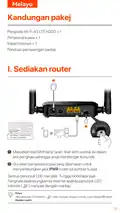
- 38. Kandungan Pakej (Sediakan Router → Petua → Soalan Lazim)
- 39. Sambungkan Peranti Ke Internet (Sambungkan Peranti Berwayar → Sambungkan Peranti Wayarles → Mengkonfigurasi Lanjut Penghala → Log Masuk Ke Antara Muka Web Penghala → Aplikasi Tenda Wifi → Petua)
- 40. Penunjuk Led (Status → Menyala → Berkedip → Padam → Dimatikan → Persediaan Dilindungi Wi-fi (wps))
- 41. Butang & Port (Persediaan Dilindungi Wi-fi (wps) → Mengeset Semula → Port Pemultipleksan Wan/lan → Wan/lan → Lan → Nano Sim)
- 42. Penunjuk Led Internet (Penyelesaian Masalah → Sahkan Dengan Pembekel Khidmat Internet → Akses Antara Muka Pengguna (ui) Web Penghala → Sambungan Rangkaian Wi-fi Penghala)
- 43. Pastikan Komputer Telah Disambungkan Ke Penghala Dengan Betul (Kosongkan Cache Pelayar Web Anda Atau Tukar Pelayar Web Lain → S3: Bagaimana Untuk Mengeset Semula Penghala? → S4: Bagaimanakah Cara Saya Mengakses Internet Melalui Kad Sim Atau (dan) Port Wan? → Tetapan Internet (internet Settings) → Status Internet (internet Status) → Failover)
- 44. Dapatkan Sokongan Dan Perkhidmatan (Untuk Spesifikasi Teknikal, Panduan Pengguna Dan Maklumat Lanjut → Www.tendacn.com → Anda Boleh Melihat Nama Produk Dan Model Pada Label Produk.)
- 45. I. Konfigurace Routeru (Obsah Balení → Tipy)
- 46. Připojení Klientů K Internetu (Aplikace Tenda Wifi → Tipy)
- 47. Kontrolky Led (Led Kontrolka → Stav → Popis → Led Ukazatel → Wi-fi → Ukazatel)
- 48. Konektor Napájení (Wps/rst → Wan/lan → Lan → Nano Sim)
- 49. Odpovědi Na Časté Dotazy (faq) (Nastavení Internetu → Nastavení Webového Uživatelského Rozhraní Routeru)
- 50. Ujistěte Se, Že Adresa Ip Vašeho Počítače Je 192.168.0.x (Jak Vyresetovat Router? → Jak Se Dostanu K Internetu Přes Sim Kartu Nebo (a) Port Wan? → Nastavení Internetu (internet Settings) → Stav Internetu (internet Status))
- 51. Získejte Podporu A Služby (Technické Specifikace, Uživatelské Příručky A Další Informace → Název A Model Produktu Můžete Vidět Na Štítku Produktu.)
- 52. Contenu Du Pack (Régler Le Routeur → Astuces)
- 53. Connectez Vos Clients À Internet (Application Wi-fi Tenda → Faq)
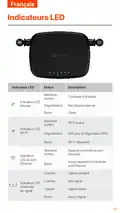
- 54. Indicateurs Led (Connecté À L'internet → Pas D'accès Internet → Wi-fi Activé → Prêt Pour La Négociation Wps → Appareil Connecté Au Port Ethernet → Signal Excellent)
- 55. Boutons&ports (Pwr → Wps/rst → Wan/lan → Lan → Nano Sim)
- 56. Vérifiez Que Votre Carte Sim Prend En Charge Lte Ou Wcdma (Vérifiez Que Votre Carte Sim Se Trouve Dans La Zone De Service De Votre Fai → Démarrez Un Navigateur Web Sur L'appareil Connecté Au Routeur → Vérifiez Auprès De Votre Fai Si Vous Vous Trouvez Dans Une Zone De Service D'itinérance → Assurez-vous Que Votre Appareil Sans Fil Est Connecté Au Réseau Wi-fi Du Routeur → Videz Le Cache De Votre Navigateur Web Ou Réessayez Avec Un Autre Navigateur Web → Assurez-vous Que L'ordinateur Est Correctement Connecté Au Routeur)
- 57. Assurez-vous Que L'adresse Ip De Votre Ordinateur Est 192.168.0.x (x Va De 2 À 254). Si Ce N'est Pas Le Cas, Débranchez Et Rebranchez Une Ex…
- 58. Obtenir De L'aide Et Des Services (Pour Les Spécifications Techniques → Les Guides D'utilisation → Plus D'informations → Visiter La Page Du Produit → La Page De Service → Plusieurs Langues Sont Disponibles)
- 59. Contenido Del Paquete (Configura Tu Router → Consejos)
- 60. Conecta Dispositivos A Internet (Aplicación Tenda Wifi → Consejos)
- 61. Indicadores Led (Estado → Descripción → Conectado A Internet → Wifi Habilitado → Dispositivo Conectado Al Puerto Ethernet → Indicador De Potencia De La Señal)
- 62. Pwr (Wps/rst → Wan/lan → Lan → Nano Sim)
- 63. Configuración De Internet (Itinerancia De Datos → Acceso A La Interfaz Web Del Router → Soluciones Para Problemas De Conexión → Verificación De Compatibilidad De Tarjeta Sim → Cobertura De Servicio En La Zona → Contacto Con Servicio Técnico)
- 64. Asegúrate De Que La Dirección Ip De Tu Ordenador Sea 192.168.0.x (x Varía De 2 A 254). De Lo Contrario, Desconecta Y Conecta De Nuevo El Cab…
- 65. No Headings Found. The First Sentence Trimmed To 160 Characters Is: 'para Obtener Asesoramiento, Visita La Página Del Producto En Www.tendac…
- 66. Lieferumfang (Konfigurieren Sie Den Router → Tipps)
- 67. Clients Mit Dem Internet Verbinden (Tenda Wlan-app → Wlan-name Und Wlan-passwort → Router Konfigurieren → Web-benutzeroberfläche Des Routers → Wlan-namen Und Wlan-schlüssel Ändern → Faq)
- 68. Led-anzeige (Status → Beschreibung → Wlan Aktiviert → Wlan Deaktiviert → Ethernet-anschluss → Signalstärke)
- 69. Taste&anschluss (Pwr → Wps/rst → Wan/lan-multiplex-port → Wan/lan → Nano Sim)
- 70. Überprüfen Sie, Ob Ihre Sim-karte Lte Oder Wcdma Unterstützt. (Überprüfen Sie, Ob Sich Ihre Sim-karte Im Versorgungsbereich Ihres Internetanbieters Befindet. → Überprüfen Sie, Ob Das Guthaben Ihrer Sim-karte Ausreichend Ist. → Öffnen Sie Einen Webbrowser Auf Einem Mit Dem Router Verbundenen Gerät Und Gehen Sie Auf Http://tendawifi.com. → Erkundigen Sie Sich Bei Ihrem Internetanbieter, Ob Sie Sich In Einem Roaming-gebiet Befinden. → Stellen Sie Sicher, Dass Ihr Wlan-gerät Mit Dem Wlan-netzwerk Des Routers Verbunden Ist. → Deaktivieren Sie Das Mobilfunknetz Ihres Drahtlosen Geräts.)
- 71. Wenn Sie Sich Mit Einem Computer Anmelden (Wie Setze Ich Den Router Zurück? → Wie Greife Ich Über Die Sim-karte Oder (und) Den Wan-port Auf Das Internet Zu? → Internet-einstellungen → Internet-status)
- 72. Erhalten Sie Support Und Services (Technische Spezifikationen → Benutzerhandbücher → Produktseite Oder Serviceseite → Produktnamen Und Modell)
- 73. Wi-fi Name: Tenda_xxxxxx (Wi-fi Key: Xxxxxxxx)
- 74.
- 75.
- 76. The Html Code Does Not Contain Any Subheadings Related To Installation/setup/configuration. Therefore, I Will Take The First Sentence From T…
- 77.
- 78.
- 79. Zawartość Opakowania (Konfiguracja Routera → Wskazówki)
- 80. Połącz Klientów Z Internetem (Tenda Wifi App → Wskazówki)
- 81. Kontrolki Led (Opis → Stan → Ciągłe Światło → Miganie → Wi-fi Włączone → Urządzenie Podłączone Do Portu Ethernet)
- 82. Gniazdo Zasilania (Wps → Reset → Port Multipleksowania Wan/lan → Domyślny Port Lan → Wan/lan → Slot Na Kartę Nanosim)
- 83. Ustawienia Internetowe (Roaming Danych → Troubleshooting Page → Wsparciem Technicznym → Siecią Wi-fi Routera → Pamięć Podręczną Przeglądarki → Karta Sim)
- 84. Upewnij Się, Że Komputer Jest Prawidłowo Podłączony Do Routera (Jak Zresetować Router? → Jak Uzyskać Dostęp Do Internetu Za Pośrednictwem Karty Sim Lub (i) Portu Wan? → Wyczyść Pamięć Podręczną Przeglądarki Internetowej Lub Zmień Inną Przeglądarkę Internetową → Włóż Kartę Sim (jeśli Jest), Podłącz Port Wan/lan Do Internetu Za Pomocą Kabla Ethernet → W Razie Potrzeby Możesz Ręcznie Przełączyć Kartę Sim Lub Port Wan Na Bieżący Tryb Połączenia Internetowego → Gdy Urządzenie Zakończy Uruchamianie, Naciśnij Przycisk Wps/rst Przez Około 8 Sekund)
- 85. Uzyskaj Wsparcie I Usługi (Specyfikacje Techniczne, Instrukcje Obsługi I Więcej Informacji → Można Znaleźć Na Stronie Produktu Lub Stronie Usługi W Witrynie → Www.tendacn.com → Dostępnych Jest Wiele Języków. → Możesz Zobaczyć Nazwę Produktu I Model Na Etykiecie Produktu.)
- 86. Съдържание На Комплекта (Настройте Рутера → Поставете Nano Sim Карта → Използвайте Включения За½ранващ Адаптер → Рутерът Е Свързан Към Интернет → Чзв)
- 87. Свържете Клиенти Към Интернет (Конфигуриране На Рутера → Вход В Уеб Интерфейса На Рутера → Изтеглете Приложението Tenda Wifi → Съвети → Чзв)
- 88. Led Индикатори (Wi-fi Активиран → Интернет Led Индикатор → Устройство, Свързано Към Ethernet Порта → Led Индикатор За Ethernet Порт → G За Силата На Сигнала → Няма Устройство, Свързано Към Ethernet Порта)
- 89. Бутон И Порт (Описание → Wps → Wps/rst → Wan/lan → Nano Sim)
- 90. Светодиодният Индикатор За Интернет (Опитайте Следните Решения → Проверете Дали Вашата Sim Карта Поддържа Lte Или Wcdma → Проверете Дали Вашата Sim Карта Е В Зоната На Обслужване → Проверете Дали Балансът На Вашата Sim Карта Е Достатъчен → Стартирайте Уеб Браузър На Устройството → Потвърдете С Вашия Интернет Доставчик)
- 91. Как Да Нулирам Рутера? (Как Да Вляза В Интернет През Sim Картата Или (и) Wan Порта? → Интернет Настройки → Интернет Състояние)
- 92. Получете Поддръжка И Услуги (Технически Спецификации → Ръководства За Потребителя → Продуктова Страница → Страница За Услуги)
- 93. Csomag Tartalma (A Router Beállítása → Helyezzen Be Egy Nano Sim-kártyát → A Mellékelt Hálózati Adapterrel Csatlakoztassa Az Útválasztót → Tippek)
- 94. Csatlakoztassa Az Ügyfeleket Az Internethez (Tenda Wifi App → Az Útválasztó További Konfigurálásához → Ha Nem Tud Bejelentkezni A Router Internetes Felhasználói Felületére)
- 95. Led-visszajelzők (Internet Led Jelzőfény → Wi-fi Led Kijelző → Ethernet Port Led Jelzőfény → Jelerősségjelző)
- 96. Pwr (Wps/rst → Wan/lan → Lan → Nano Sim)
- 97. Internetbeállítások (Hibaelhárítási Oldal → Műszaki Támogatás → Vezeték Nélküli Eszköz Csatlakoztatása → Böngésző Gyorsítótár Törlése)
- 98. Győződjön Meg Arról, Hogy A Számítógép Megfelelően Csatlakozik Az Útválasztóhoz. (Hogyan Lehet Visszaállítani A Routert? → Hogyan Érhetem El Az Internetet Sim-kártyán Vagy (és) Wan-porton Keresztül? → Internet Beállítások (internet Settings) → Internet Állapot (internet Status))
- 99. Szerezzen Támogatást És Szolgáltatásokat (Műszaki Adatokért, Használati Útmutatókért És További Információkért Látogasson El A Termékoldalra Vagy A Szolgáltatás Oldalára → A Termék Nevét És Modelljét A Termék Címkéjén Láthatja.)
- 100. Wi-fi Name: Tenda_xxxxxx (Wi-fi Key: Xxxxxxxx → Led Internet → Nano Sim → Pwr)
- 101. Εγκατάσταση (Ρύθμιση → Διαμόρφωση → Σύνδεση Στο Wi-fi → Χρήση Της Διεπαφής Ιστού → Εγχειρίδιο Χρήστη Tenda Wifi)
- 102. Wi-fi Æ}æþ`ýþýõ|μ@}ý (Wps → Ethernet → G)
- 103. Wps (Wps/rst → Wan/lan → Failover → Nano Sim)
- 104. Led Internet (Web Ui → Isp Configuration → Wi-fi Setup → Installation Instructions)
- 105. Ethernet Configuration (Internet Settings → Wan/lan Setup → Failover Configuration → Wps/rst Setup → Sim Configuration → Internet Status)
- 106. The Html Code Does Not Contain Any Identifiable Subheadings Related To Installation/setup/configuration. Therefore, I Will Take The First Se… ('ελληνικά Ssôûç¹ç Óº¹â½ö Ðï Ó½çñçè # Õ Çæ_}õø@= Þþý^õ`þ&@=, Ý^|`ýÿ= _þëï|= Øõ')
- 107. Sadržaj Pakiranja (Postavite Ruter → Umetnite Nano Sim Karticu → Upotrijebite Isporučeni Strujni Adapter → Savjeti → Često Postavljana Pitanja)
- 108. Povežite Klijente S Internetom (Spojite Svoj Žičani Uređaj → Povežite Svoj Bežični Uređaj → Daljnja Konfiguracija Usmjerivača → Tenda Wifi Aplikacija → Savjeti → Često Postavljana Pitanja)
- 109. Led Indikator (Wi-fi Omogućen → Wi-fi Onemogućen → Uređaj Spojen Na Ethernet → Nijedan Uređaj Nije Spojen Na Ethernet Priključak → Isključeno → Spremno Za Wps Pregovore)
- 110. Pwr (Wps → Resetiranje → Wan/lan → Nano Sim)
- 111. Led Indikator Interneta (Ne Mogu Pristupiti Web Sučelju Usmjerivača → Internetske Postavke → Tehnička Podrška → Rješavanje Problema → Sim Kartica → Wi-fi Mreža)
- 112. Kako Resetirati Ruter? (Kako Mogu Pristupiti Internetu Putem Sim Kartice Ili(i) Wan Priključka? → Internetske Postavke (internet Settings) → Internetski Status (internet Status) → Failover Funkcija)
- 113. Dostupno Je Više Jezika. (Naziv Proizvoda I Model Možete Vidjeti Na Etiketi Proizvoda.)
- 114. Nastavenie Smerovača (Obsah Balenia → Vložte Kartu Nano Sim → Pomocou Dodávaného Napájacieho Adaptéra Pripojte Konektor Pwr → Led Indikátory → Tipy → Často Kladených Otázok)
- 115. Ii. Pripojte Klientov K Internetu (Pre Ďalšiu Konfiguráciu Smerovača → Aplikácia Tenda Wifi → Otázka Č.2 V Sekcii Často Kladených Otázok)
- 116. Led Indikátory (Popis → Wi-fi Povolené → Wi-fi Vypnuté → Zariadenie Pripojené K Portu Ethernet → K Ethernetovému Portu Nie Je Pripojené Žiadne Zariadenie → Led Indikátor Sily Signálu)
- 117. Pwr (Wps → Reset → Wan/lan → Lan → Nano Sim)
- 118. Nastavenia Internetu (Dátový Roaming → Riešenia Problémov → Prístup K Webovému Používateľskému Rozhraniu → Bezdrôtové Zariadenie Pripojené K Sieti Wi-fi → Adresa Ip Vášho Počítača → Technická Podpora)
- 119. Ako Resetovať Router? (Ako Sa Dostanem Na Internet Cez Sim Kartu Alebo (a) Port Wan? → Nastavenia Internetu (internet Settings) → Stav Internetu (internet Status))
- 120. Získajte Podporu A Služby (Technické Špecifikácie → Používateľské Príručky → Ďalšie Informácie → Názov A Model Produktu)
- 121. Nastavite Usmerjevalnik (Vsebina Paketa → Vstavite Kartico Nano Sim → Povežite Usmerjevalnik Z Virom Napajanja → Internetni Led Indikator → Nasveti → Pogosta Vprašanja)
- 122. Povežite Stranke Z Internetom (Aplikacija Tenda Wifi → Nasveti → Pogosta Vprašanja)
- 123. Led-indikatorji (Wi-fi Omogočen → Naprava Je Priključena Na Vrata → Led Indikator Jakosti Signala → Internetni Led Indikator → Wi-fi Onemogočen → Pripravljen Na Wps Pogajanja)
- 124. Pwr (Wps → Wps/rst → Wan/lan → Lan → Nano Sim)
- 125. Indikator Led Za Internet (Ne Morem Dostopati Do Spletnega Uporabniškega Vmesnika Usmerjevalnika)
- 126. Prepričajte Se, Da Je Naslov Ip Vašega Računalnika (Kako Ponastaviti Usmerjevalnik? → Kako Dostopam Do Interneta Prek Kartice Sim Ali(in) Vrat Wan? → Internetne Nastavitve (internet Settings) → Internetno Stanje (internet Status))
- 127. Pridobite Podporo In Storitve (Za Tehnične Specifikacije, Navodila Za Uporabo In Več Informacij → Obiščite Stran Izdelka Ali Storitev Na Www.tendacn.com → Ime Izdelka In Model Lahko Vidite Na Etiketi Izdelka.)
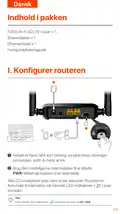
- 128. I. Konfigurer Routeren (Indhold I Pakken → Indsæt Et Nano Sim-kort → Brug Den Medfølgende Strømadapter)
- 129. Forbind Klienter Til Internettet (Tenda Wifi-app → Konfigurere Routeren → Ændre Wi-fi-navnet Og Wi-fi-nøglen → Logge Ind På Routerens Web-ui → Tilslutning Af Kablede Enheder → Tilslutning Af Trådløse Enheder)
- 130. Led Indikator (Status → Beskrivelse → Internet → Wi-fi → Ethernet-port → Signalstyrke)
- 131. Wps-forhandling Af Routeren (Nulstil → Wan/lan Multipleksingsport → Wan/lan → Nano Sim Card Slot)
- 132. Internet Led-indikatoren Lyser Ikke Konstant (Jeg Kan Ikke Få Adgang Til Routerens Web-ui Ved At Besøge Tendawifi.com → Kontroller, At Dit Sim-kort Understøtter Lte Eller Wcdma → Bekræft Med Din Internetudbyder, Hvis Du Er I Et Roaming-serviceområde → Sørg For, At Din Trådløse Enhed Er Forbundet Til Routerens Wi-fi-netværk → Ryd Din Webbrowsers Cache, Eller Prøv Igen Med En Anden Webbrowser → Sørg For, At Computeren Er Tilsluttet Routeren Korrekt)
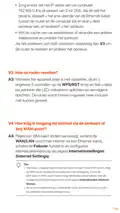
- 133. Hvordan Nulstiller Jeg Routeren? (Hvordan Får Jeg Adgang Til Internettet Via Sim-kortet Eller (og) Wan-porten? → Internetindstillinger (internet Settings) → Internetstatus (internet Status))
- 134. Få Support Og Tjenester (For Tekniske Specifikationer, Brugervejledninger Og Mere → Information, Besøg Venligst Produktsiden Eller Servicesiden P Å)
- 135. De Router Instellen (Tips)
- 136. Verbind Klanten Met Internet (Tenda Wifi-app → Tips)
- 137. Led-indicatoren (Beschrijving → Wi-fi → Ethernet-poort → Signaalsterkte)
- 138. Pwr (Wps/rst → Wan/lan → Nano Sim)
- 139. Internetinstellingen (Probleemoplossing → Toegang Tot De Webinterface → Dataroaming → Verbinding Met Het Wi-fi-netwerk → Technische Ondersteuning)
- 140. Hoe De Router Resetten? (Hoe Krijg Ik Toegang Tot Internet Via De Simkaart Of (en) Wan-poort?)
- 141. Krijg Ondersteuning En Services (Ga Voor Technische Specificaties, Gebruikershandleidingen En Meer Informatie Naar De Productpagina Of Servicepagina Op Www.tendacn.com.)
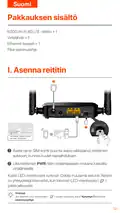
- 142. Pakkauksen Sisältö (Asenna Reititin → Vinkkejä → Usein Kysyttyä)
- 143. Yhdistä Asiakkaat Internetiin (Liitä Langallinen Laite → Yhdistä Langaton Laitteesi → Määritä Reitittimen Lisämäärityksiä → Kirjaudu Sisään Reitittimen Verkkokäyttöliittymään → Lataa Tenda Wifi -sovellus → Vinkkejä)
- 144. Internet-yhteys Muodostettu (Ei Internet-yhteyttä → Wi-fi Käytössä → Valmiina Wps-neuvotteluihin → Laite Liitetty Ethernet-porttiin → Ethernet-porttiin Ei Ole Kytketty Laitetta → Signaalin Voimakkuuden)
- 145. Wps (Wps/rst → Wan/lan → Lan → Nano Sim)
- 146. Internet-led-merkkivalo (Sim-kortin Tarkistus → Verkkoselaimen Käyttö → Reitittimen Verkkokäyttöliittymä → Langattoman Laitteen Yhdistäminen → Tietokoneen Liittäminen → Data Roaming Käyttöön Ottaminen)
- 147. Kysymys 3: Kuinka Nollata Reititin? (Kysymys 4: Kuinka Pääsen Internetiin Sim-kortin Tai (ja) Wan-portin Kautta? → Internet-asetukset (internet Settings) → Internet-tila (internet Status))
- 148. Hanki Tukea Ja Palveluita (Tekniset Tiedot → Käyttöoppaat → Lisätietoja → Tuotesivulta → Palvelusivulta → Saatavilla Useita Kieliä)
- 149. Komplekti Sisu (Seadistage Ruuter → Sisestage Nano-sim-kaart → Kasutage Kaasasolevat Toiteadapterit → Oodake Mõni Sekund → Internetiga Ühendatud → Näpunäited)
- 150. Ühendage Kliendid Internetiga (Ruuteri Edasiseks Konfigureerimiseks → Tenda Wifi Rakendus → Näpunäited)
- 151. Led Märgutuli (Olek → Kirjeldus → Wi-fi → Wps-i Läbirääkimisteks Valmis → Etherneti Porti Ühendatud → Suurepärane Signaal)
- 152. Pwr (Wps/rst → Wan/lan → Nano Sim)
- 153. Interneti-led-indikaator Ei Põle Pidevalt (Ma Ei Pääse Ruuteri Veebiliidesele Juurde, Külastades Aadressi Tendawifi.com)
- 154. Veenduge, Et Teie Arvuti Ip-aadress On 192.168.0.x (K3: Kuidas Ruuterit Lähtestada? → K4: Kuidas Pääsen Internetti Sim-kaardi Või (ja) Wan-pordi Kaudu? → Interneti Sätted (internet Settings) → Interneti Olek (internet Status))
- 155. Hankige Tuge Ja Teenuseid (Tehniliste Kirjelduste, Kasutusjuhendite Ja Lisateabe Saamiseks → Toote- Või Teeninduslehte Aadressil)
- 156. I. Maršrutētāja Iestatīšana (Ievietojiet Nano Sim Karti → Izmantojiet Komplektā Iekļauto Strāvas Adapteri → Maršrutētājs Ir Savienots Ar Internetu → Padomi → Biežāk Uzdotie Jautājumi)
- 157. Savienojiet Klientus Ar Internetu (Lai Tālāk Konfigurētu Maršrutētāju → Tenda Wifi Lietotne → Padomi → Biežāk Uzdotie Jautājumi)
- 158. Pievienojieties Internetam. (Wi-fi Iespējots → Ierīce Pievienota Ethernet Portam → Ethernet Porta Led Indikators → Signāla Stipruma Led Indikators)
- 159. Poga/ports (Atrastīšana → Wps/rst → Wan/lan → Nano Sim)
- 160. Interneta Led Indikators (Kā Man Rīkoties? → Sazinieties Ar Savu Isp → Es Nevaru Piekļūt Maršrutētāja Tīmekļa Lietotāja Saskarnei → Izskatīt Tālāk Norādītos Risinājumus → Pārliecinieties, Vai Bezvadu Ierīce Ir Savienota → Atspējojiet Bezvadu Ierīces Mobilo Tīklu)
- 161. Kā Atiestatīt Maršrutētāju? (Kā Piekļūt Internetam, Izmantojot Sim Karti Vai (un) Wan Portu?)
- 162. Lai Iegūtu Tehniskās Specifikācijas, Lietotāja Rokasgrāmatas Un Vairāk Informācijas, Lūdzu, Apmeklējiet Produkta Lapu Vai Servisa Lapu Vietn…
- 163. Pakuotės Turinys (Nustatykite Maršruto Parinktuvą → Įkiškite Nano Sim Kortelę → Prijungti Maršrutizatoriaus Pwr Lizdą → Maršrutizatorius Prijungtas Prie Interneto → Patarimai)
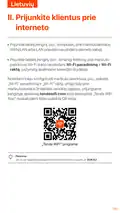
- 164. Prijunkite Klientus Prie Interneto (Prijunkite Laidinį Įrenginį → Prijunkite Belaidį Įrenginį → Norėdami Toliau Konfigūruoti Maršruto Parinktuvą → Tenda Wifi' Programa → Patarimai)
- 165. Led Indikatorius (Wi-fi Indikatorius → Ethernet Prievado Led Indikatorius → Signalo Stiprumo Led)
- 166. Wps (Wps/rst → Wan/lan → Lan → Nano Sim)
- 167. Interneto Led Indikatorius (Negaliu Pasiekti Maršrutizatoriaus Žiniatinklio Vartotojo Sąsajos)
- 168. K3: Kaip Iš Naujo Nustatyti Maršrutizatorių? (K4: Kaip Pasiekti Internetą Per Sim Kortelę Arba (ir) Wan Prievadą? → Interneto Nustatymai (internet Settings) → Interneto Būsena (internet Status) → Failover → Patarimai)
- 169. Gaukite Palaikymo Ir Paslaugų (Jei Reikia Techninių Specifikacijų, Vartotojo Vadovų Ir Daugiau Informacijos → Apsilankykite Gaminio Puslapyje Arba Paslaugų Puslapyje)
- 170. Conteúdo Do Pacote (Configurar O Router → Dicas)
- 171. Conectar Clientes À Internet (Aplicação Tenda Wifi → Dicas)
- 172. Indicadores Led (Estado → Descrição → Led Indicador → Wi-fi Led → Led Indicador Da Porta Ethernet → Led Indicador De 4g)
- 173. Pwr (Wps/rst → Wan/lan → Lan → Nano Sim)
- 174. Verifique Se O Seu Cartão Sim Suporta Lte Ou Wcdma (Inicie Um Navegador Da Web No Dispositivo Conectado Ao Roteador → Confirme Com Seu Isp Se Você Estiver Em Uma Área De Serviço De Roaming → Acesse Configurações Da Internet Para Ativar O Roaming De Dados → Certifique-se De Que Seu Dispositivo Sem Fio Esteja Conectado À Rede Wi-fi Do Roteador → Desative A Rede Celular Do Seu Dispositivo Sem Fio → Limpe O Cache Do Seu Navegador Ou Tente Novamente Com Outro Navegador)
- 175. Certifique-se (Limpe O Cache Do Navegador → Como Resetar O Roteador? → Como Faço Para Acessar A Internet Através Do Cartão Sim Ou (e) Porta Wan? → Configurações Da Internet → Estado Da Internet)
- 176. Você Pode Ver O Nome E O Modelo Do Produto Na Etiqueta Do Produto.
- 177. Paketinnehåll (Ställ In Routern → Sätt I Ett Nano Sim-kort → Använd Den Medföljande Strömadaptern → Led-indikatorer → Tips)
- 178. Anslut Klienter Till Internet (Tenda Wifi-app → För Att Ytterligare Konfigurera Routern → Tips)
- 179. Led-indikator (Status → Beskrivning → Ansluten Till Internet → Wi-fi Aktiverat → Enhet Ansluten Till Ethernet-porten → Signalstyrka)
- 180. Pwr (Wps/rst → Wan/lan-multiplexport → Wan/lan → Nano Sim-kortplats)
- 181. Internet-led-indikatorn Lyser Inte Med Fast Sken (Jag Kan Inte Komma Åt Routerns Webbgränssnitt Genom Att Besöka Tendawifi.com)
- 182. F3: Hur Återställer Jag Routern? (F4: Hur Får Jag Åtkomst Till Internet Via Sim-kortet Eller (och) Wan-porten? → Internetinställningar (internet Settings) → Internetstatus (internet Status))
- 183. Få Support Och Tjänster (För Tekniska Specifikationer, Användarguider Och Mer Information → Besök Produktsidan Eller Servicesidan)
- 184. Technical Support (Installation → Setup → Configuration)
×
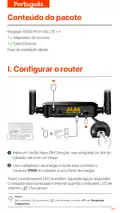
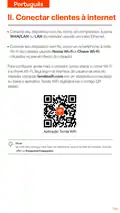
Tenda 4G05 Wi-Fi 4G LTE Router Installation Guide































English
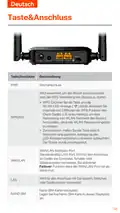
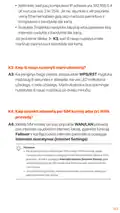
Button & port
Button/Port
Description
PWR
Power jack
Used to reset the router, or start WPS negotiation of
the router.
• WPS: Press the button, and the Wi-Fi LED indicator
(
) blinks. Within 2 minutes, you can enable the
WPS function of the client device (such as a
smartphone) to connect to the Wi-Fi network of the
router without entering the Wi-Fi password.
• Reset: Hold down the button for about 8 seconds,
and release it when all LED indicators light off and
then light up. The router is reset.
WPS/RST
WAN/LAN multiplexing port.
LAN port by default. Used to connect to such devices
as computers, switches or game machines. When the
Failover function is enabled, the WAN/LAN port only
serves as a WAN port.
WAN/LAN
Used to connect to computers, switches or game
machines, etc.
LAN
Nano SIM card slot.
NANO SIM
Insert your Nano SIM card into this slot.
04

| General | Details |
|---|---|
| Name | Tenda 4G05 Wi-Fi 4G LTE Router Installation Guide |
| Make | Tenda |
| Language | English |
| Filetype | PDF (Download) |
| File size | 7.27 MB |
 (1 votes, average: 5.00 out of 5)
 Loading...
If you have any questions regarding Tenda 4G05 Wi-Fi 4G LTE Router Installation Guide, please ask here and describe the problem in detail.

Tenda AXE5700 Wi-Fi 6E Router User Manual

Tenda AX1800 Wi-Fi 6 5G NR Router User Manual

Tenda RX2LP Dual Band Gigabit Wi-Fi 6 Router Installation Guide

Tenda TX2L ProV1.0 WiFi 6 Router Installation Guide

Tenda RX12V1.0 Wi-Fi 6 6E Router Installation Guide

Tenda 4G09V1.0 Wifi Router User Manual

Tenda AC19 Dual Band Gigabit WiFi Router Installation Guide

Tenda 4G06V1.0 4G LTE and VoLTE Router User Guide

Tenda 4G03 N300 Wi-Fi 4G LTE Router Installation Guide

Tenda N300 WiFi VDSL/ADSL Modem Router V300 Installation Guide


Cisco Router RV345 / RV345P User Guide

TRENDnet TEW-929DRU Dual Band Wireless Gigabit Dual WAN VPN SMB Router Installation Guide

EDiMAX EW-7489WAX Wireless Router Installation Guide

TANGERINE eero 6+ Router User Guide

ZYXEL NR2301 5G NR Portable Router User Guide

MALMBERGS 2700490DK 4G Network Router Instruction Manual

DrayTek Vigor 1000B Multi WAN Load Balancing Router User Guide

ADVANTECH ICR-2531 LTE Router User Manual

Cisco RV260P Router User Guide

ERICSSON R980-5GD Mobile Router User Manual
Table of Contents
- 1. Installation Guide - N300 Wi-fi 4g Lte Router →
- 2. Page 2 →
- 3. Package Contents - Set Up The Router →
- 4. Connect Clients To The Internet - Tenda Wifi App →
- 5. Led Indicators - Internet Led Indicator →
- 6. Button & Port - Wps/rst →
- 7. Internet Settings - Data Roaming →
- 8. How To Reset The Router? - How Do I Access The Internet Thro... →
- 9. Get Support And Services - For Technical Specifications, Use... →
- 10. Contenuto Della Confezione - Configurare Il Router →
- 11. Collegare I Client A Internet - Configurare Ulteriormente Il... →
- 12. Spie Led - Spia Led →
- 13. Pulsante/porte - Descrizione →
- 14. Indicatore Led Di Internet - Verifiche Della Scheda Sim →
- 15. Assicurarsi - Cancellare La Cache Del Browser Web O Cambiare... →
- 16. Per Specifiche Tecniche, Guide Per L'utente E Ulteriori Info... →
- 17. Pengaturan Router - Isi Kemasan →
- 18. Hubungkan Klien Ke Internet - Sambungkan Perangkat Berkabel ... →
- 19. Indikator Led - Status →
- 20. Pwr - Wps/rst →
- 21. Pengaturan Internet - Roaming Data →
- 22. Pastikan Alamat Ip Komputer Anda Adalah 192.168.0.x - Kosong... →
- 23. Dapatkan Dukungan Dan Layanan - Untuk Spesifikasi Teknis, Pa... →
- 24. Conţinutul Pachetului - Configuraţi Routerul →
- 25. Conectarea Clienților La Internet - Configurarea Routerului →
- 26. Indicatoare Led - Indicator Led →
- 27. Buton&port - Wps/rst →
- 28. Întrebări Adresate Frecvent - Setări Internet →
- 29. Asiguraţi-vă Că Adresa Ip A Computerului Dvs. Este 192.168.0... →
- 30. Obțineți Asistență Și Servicii - Specificaţii Tehnice →
- 31. Nội Dung Đóng Gói - Hướng Dẫn Cài Đặt Nhanh →
- 32. Kết Nối Thiết Bị Với Internet - Để Định Cấu Hình Thêm Cho Bộ... →
- 33. Đèn Led Báo Hiệu - Đã Kết Nối Với Internet →
- 34. Button & Port - Wps →
- 35. Cài Đặt Internet - Chuyển Vùng Dữ Liệu →
- 36. Đảm Bảo Rằng Máy Tính Đã Kết Nối Đúng Cách Với Bộ Định Tuyến... →
- 37. Nhận Hỗ Trợ Và Dịch Vụ - Thông Số Kỹ Thuật →
- 38. Kandungan Pakej - Sediakan Router →
- 39. Sambungkan Peranti Ke Internet - Sambungkan Peranti Berwayar →
- 40. Penunjuk Led - Status →
- 41. Butang & Port - Persediaan Dilindungi Wi-fi (wps) →
- 42. Penunjuk Led Internet - Penyelesaian Masalah →
- 43. Pastikan Komputer Telah Disambungkan Ke Penghala Dengan Betu... →
- 44. Dapatkan Sokongan Dan Perkhidmatan - Untuk Spesifikasi Tekni... →
- 45. I. Konfigurace Routeru - Obsah Balení →
- 46. Připojení Klientů K Internetu - Aplikace Tenda Wifi →
- 47. Kontrolky Led - Led Kontrolka →
- 48. Konektor Napájení - Wps/rst →
- 49. Odpovědi Na Časté Dotazy (faq) - Nastavení Internetu →
- 50. Ujistěte Se, Že Adresa Ip Vašeho Počítače Je 192.168.0.x - J... →
- 51. Získejte Podporu A Služby - Technické Specifikace, Uživatels... →
- 52. Contenu Du Pack - Régler Le Routeur →
- 53. Connectez Vos Clients À Internet - Application Wi-fi Tenda →
- 54. Indicateurs Led - Connecté À L'internet →
- 55. Boutons&ports - Pwr →
- 56. Vérifiez Que Votre Carte Sim Prend En Charge Lte Ou Wcdma - ... →
- 57. Assurez-vous Que L'adresse Ip De Votre Ordinateur Est 192.16... →
- 58. Obtenir De L'aide Et Des Services - Pour Les Spécifications ... →
- 59. Contenido Del Paquete - Configura Tu Router →
- 60. Conecta Dispositivos A Internet - Aplicación Tenda Wifi →
- 61. Indicadores Led - Estado →
- 62. Pwr - Wps/rst →
- 63. Configuración De Internet - Itinerancia De Datos →
- 64. Asegúrate De Que La Dirección Ip De Tu Ordenador Sea 192.168... →
- 65. No Headings Found. The First Sentence Trimmed To 160 Charact... →
- 66. Lieferumfang - Konfigurieren Sie Den Router →
- 67. Clients Mit Dem Internet Verbinden - Tenda Wlan-app →
- 68. Led-anzeige - Status →
- 69. Taste&anschluss - Pwr →
- 70. Überprüfen Sie, Ob Ihre Sim-karte Lte Oder Wcdma Unterstützt... →
- 71. Wenn Sie Sich Mit Einem Computer Anmelden - Wie Setze Ich De... →
- 72. Erhalten Sie Support Und Services - Technische Spezifikation... →
- 73. Wi-fi Name: Tenda_xxxxxx - Wi-fi Key: Xxxxxxxx →
- 74. Page 74 →
- 75. Page 75 →
- 76. The Html Code Does Not Contain Any Subheadings Related To In... →
- 77. Page 77 →
- 78. Page 78 →
- 79. Zawartość Opakowania - Konfiguracja Routera →
- 80. Połącz Klientów Z Internetem - Tenda Wifi App →
- 81. Kontrolki Led - Opis →
- 82. Gniazdo Zasilania - Wps →
- 83. Ustawienia Internetowe - Roaming Danych →
- 84. Upewnij Się, Że Komputer Jest Prawidłowo Podłączony Do Route... →
- 85. Uzyskaj Wsparcie I Usługi - Specyfikacje Techniczne, Instruk... →
- 86. Съдържание На Комплекта - Настройте Рутера →
- 87. Свържете Клиенти Към Интернет - Конфигуриране На Рутера →
- 88. Led Индикатори - Wi-fi Активиран →
- 89. Бутон И Порт - Описание →
- 90. Светодиодният Индикатор За Интернет - Опитайте Следните Реше... →
- 91. Как Да Нулирам Рутера? - Как Да Вляза В Интернет През Sim Ка... →
- 92. Получете Поддръжка И Услуги - Технически Спецификации →
- 93. Csomag Tartalma - A Router Beállítása →
- 94. Csatlakoztassa Az Ügyfeleket Az Internethez - Tenda Wifi App →
- 95. Led-visszajelzők - Internet Led Jelzőfény →
- 96. Pwr - Wps/rst →
- 97. Internetbeállítások - Hibaelhárítási Oldal →
- 98. Győződjön Meg Arról, Hogy A Számítógép Megfelelően Csatlakoz... →
- 99. Szerezzen Támogatást És Szolgáltatásokat - Műszaki Adatokért... →
- 100. Wi-fi Name: Tenda_xxxxxx - Wi-fi Key: Xxxxxxxx →
- 101. Εγκατάσταση - Ρύθμιση →
- 102. Wi-fi Æ}æþ`ýþýõ|μ@}ý - Wps →
- 103. Wps - Wps/rst →
- 104. Led Internet - Web Ui →
- 105. Ethernet Configuration - Internet Settings →
- 106. The Html Code Does Not Contain Any Identifiable Subheadings ... →
- 107. Sadržaj Pakiranja - Postavite Ruter →
- 108. Povežite Klijente S Internetom - Spojite Svoj Žičani Uređaj →
- 109. Led Indikator - Wi-fi Omogućen →
- 110. Pwr - Wps →
- 111. Led Indikator Interneta - Ne Mogu Pristupiti Web Sučelju Usm... →
- 112. Kako Resetirati Ruter? - Kako Mogu Pristupiti Internetu Pute... →
- 113. Dostupno Je Više Jezika. - Naziv Proizvoda I Model Možete Vi... →
- 114. Nastavenie Smerovača - Obsah Balenia →
- 115. Ii. Pripojte Klientov K Internetu - Pre Ďalšiu Konfiguráciu ... →
- 116. Led Indikátory - Popis →
- 117. Pwr - Wps →
- 118. Nastavenia Internetu - Dátový Roaming →
- 119. Ako Resetovať Router? - Ako Sa Dostanem Na Internet Cez Sim ... →
- 120. Získajte Podporu A Služby - Technické Špecifikácie →
- 121. Nastavite Usmerjevalnik - Vsebina Paketa →
- 122. Povežite Stranke Z Internetom - Aplikacija Tenda Wifi →
- 123. Led-indikatorji - Wi-fi Omogočen →
- 124. Pwr - Wps →
- 125. Indikator Led Za Internet - Ne Morem Dostopati Do Spletnega ... →
- 126. Prepričajte Se, Da Je Naslov Ip Vašega Računalnika - Kako Po... →
- 127. Pridobite Podporo In Storitve - Za Tehnične Specifikacije, N... →
- 128. I. Konfigurer Routeren - Indhold I Pakken →
- 129. Forbind Klienter Til Internettet - Tenda Wifi-app →
- 130. Led Indikator - Status →
- 131. Wps-forhandling Af Routeren - Nulstil →
- 132. Internet Led-indikatoren Lyser Ikke Konstant - Jeg Kan Ikke ... →
- 133. Hvordan Nulstiller Jeg Routeren? - Hvordan Får Jeg Adgang Ti... →
- 134. Få Support Og Tjenester - For Tekniske Specifikationer, Brug... →
- 135. De Router Instellen - Tips →
- 136. Verbind Klanten Met Internet - Tenda Wifi-app →
- 137. Led-indicatoren - Beschrijving →
- 138. Pwr - Wps/rst →
- 139. Internetinstellingen - Probleemoplossing →
- 140. Hoe De Router Resetten? - Hoe Krijg Ik Toegang Tot Internet ... →
- 141. Krijg Ondersteuning En Services - Ga Voor Technische Specifi... →
- 142. Pakkauksen Sisältö - Asenna Reititin →
- 143. Yhdistä Asiakkaat Internetiin - Liitä Langallinen Laite →
- 144. Internet-yhteys Muodostettu - Ei Internet-yhteyttä →
- 145. Wps - Wps/rst →
- 146. Internet-led-merkkiv... - Sim-kortin Tarkistus →
- 147. Kysymys 3: Kuinka Nollata Reititin? - Kysymys 4: Kuinka Pääs... →
- 148. Hanki Tukea Ja Palveluita - Tekniset Tiedot →
- 149. Komplekti Sisu - Seadistage Ruuter →
- 150. Ühendage Kliendid Internetiga - Ruuteri Edasiseks Konfiguree... →
- 151. Led Märgutuli - Olek →
- 152. Pwr - Wps/rst →
- 153. Interneti-led-indikaator Ei Põle Pidevalt - Ma Ei Pääse Ruut... →
- 154. Veenduge, Et Teie Arvuti Ip-aadress On 192.168.0.x - K3: Kui... →
- 155. Hankige Tuge Ja Teenuseid - Tehniliste Kirjelduste, Kasutusj... →
- 156. I. Maršrutētāja Iestatīšana - Ievietojiet Nano Sim Karti →
- 157. Savienojiet Klientus Ar Internetu - Lai Tālāk Konfigurētu Ma... →
- 158. Pievienojieties Internetam. - Wi-fi Iespējots →
- 159. Poga/ports - Atrastīšana →
- 160. Interneta Led Indikators - Kā Man Rīkoties? →
- 161. Kā Atiestatīt Maršrutētāju? - Kā Piekļūt Internetam, Izmanto... →
- 162. Lai Iegūtu Tehniskās Specifikācijas, Lietotāja Rokasgrāmatas... →
- 163. Pakuotės Turinys - Nustatykite Maršruto Parinktuvą →
- 164. Prijunkite Klientus Prie Interneto - Prijunkite Laidinį Įren... →
- 165. Led Indikatorius - Wi-fi Indikatorius →
- 166. Wps - Wps/rst →
- 167. Interneto Led Indikatorius - Negaliu Pasiekti Maršrutizatori... →
- 168. K3: Kaip Iš Naujo Nustatyti Maršrutizatorių? - K4: Kaip Pasi... →
- 169. Gaukite Palaikymo Ir Paslaugų - Jei Reikia Techninių Specifi... →
- 170. Conteúdo Do Pacote - Configurar O Router →
- 171. Conectar Clientes À Internet - Aplicação Tenda Wifi →
- 172. Indicadores Led - Estado →
- 173. Pwr - Wps/rst →
- 174. Verifique Se O Seu Cartão Sim Suporta Lte Ou Wcdma - Inicie ... →
- 175. Certifique-se - Limpe O Cache Do Navegador →
- 176. Você Pode Ver O Nome E O Modelo Do Produto Na Etiqueta Do Pr... →
- 177. Paketinnehåll - Ställ In Routern →
- 178. Anslut Klienter Till Internet - Tenda Wifi-app →
- 179. Led-indikator - Status →
- 180. Pwr - Wps/rst →
- 181. Internet-led-indikatorn Lyser Inte Med Fast Sken - Jag Kan I... →
- 182. F3: Hur Återställer Jag Routern? - F4: Hur Får Jag Åtkomst T... →
- 183. Få Support Och Tjänster - För Tekniska Specifikationer, Anvä... →
- 184. Technical Support - Installation →