
×
- 1. Installation Guide (Wi-fi 6 5g Nr Router)
- 2.
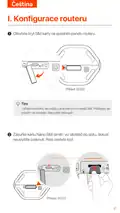
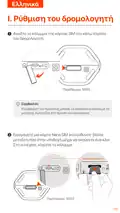
- 3. Set Up The Router (Insert A Nano Sim Card)
- 4. Tips (Ensure Performance And Avoid Damage To The Sim Card → Remove The Sim Card → Connect The Power Jack Of The Router → Turn On The Router → Led Indicators Light Up)
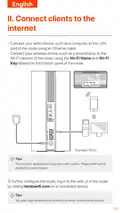
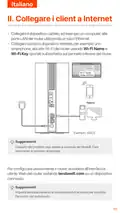
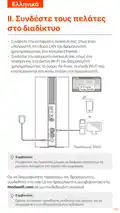
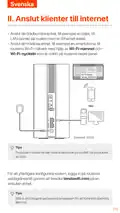
- 5. Connect Clients To The Internet (To Further Configure The Router → Set Your Login Password Promptly)
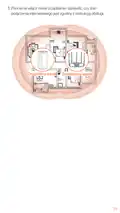
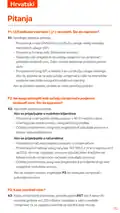
- 6. (optional) Extend Your Network (Power On The Router And Connect It To The Internet Properly → Place The New Device In An Elevated And Open Position → Press The Mesh Button Of The Router → Refer To The Following Relocation Tips → Power On The New Device Again And Check That Its Internet Connection Status Is Correct)
- 7. Original Node (Add-on Node)
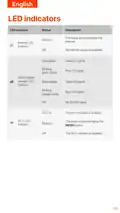
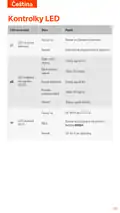
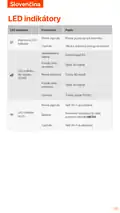
- 8. Led Indicators (Internet Led Indicator → G/4g Signal Strength Led Indicator → Wi-fi Led Indicator)
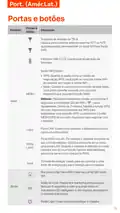
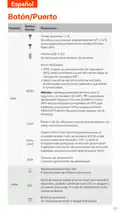
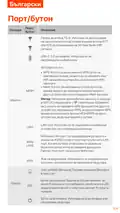
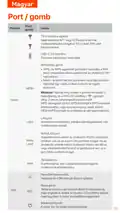
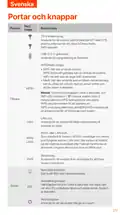
- 9. Ports & Buttons (Usb-c 3.0 Interface → Wps/mesh Button → Lan Port → Wan Or Lan Port → Power Jack → Nano Sim Card Slot)
- 10. Internet Settings (Data Roaming → Accessing The Web Ui → Resetting The Router)
- 11. Configurar O Roteador (Insira Um Cartão Nano Sim)
- 12. Dicas (Conectar A Fonte De Alimentação → Ligar O Roteador → Indicadores Led)
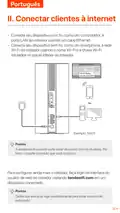
- 13. Conectar Clientes À Internet (Configurar O Roteador → Login Na Interface Web Do Roteador → Definir Senha De Login)
- 14. Amplie Sua Rede (Dicas → Ligue O Roteador E Conecte-o À Internet Corretamente → Coloque O Novo Dispositivo Em Uma Posição Elevada E Aberta → Pressione O Botão Mesh Do Roteador → Consulte As Seguintes Dicas De Relocação)
- 15. Ligue Novamente O Novo Dispositivo E Verifique Se Seu Estado De Conexão À Internet Está Correto De Acordo Com Seu Guia Do Usuário.
- 16. Indicadores Led (Indicador Led De Internet → Indicador Led De Intensidade De Sinal 5g/4g → Indicador Led Wifi)
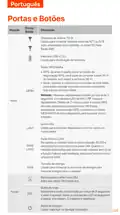
- 17. Portas E Botões (Interface Usb-c 3.0 → Botão Wps/mesh → Porta Lan → Porta Wan Ou Lan → Tomada De Energia → Slot Para Cartão Nano Sim)
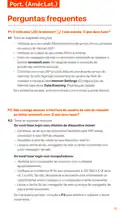
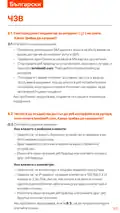
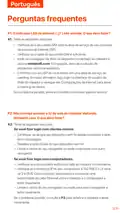
- 18. Perguntas Frequentes (Configurações Da Internet → Roaming De Dados → Acesso À Interface Do Usuário Da Web)
- 19. Como Redefinir O Roteador?
- 20. I. Skonfiguruj Router
- 21. Wygląd Produktu Może Się Różnić W Zależności Od Modelu. (Aby Zapewnić Wydajność I Uniknąć Uszkodzenia Karty Sim → Użyj Dołączonego Zasilacza, By Podłączyć Gniazdo Zasilania Routera Do Źródła Zasilania → Naciśnij Przycisk Na Routerze, Aby Go Włączyć → Gdy Router Jest Prawidłowo Podłączony Do Internetu)
- 22. Połącz Klientów Z Internetem (Podłącz Urządzenie Przewodowe → Podłącz Urządzenie Przewodowe Do Sieci Wi-fi → Zaloguj Się Do Interfejsu Przeglądarki → Ustaw Hasło Logowania)
- 23. Wskazówki (Włącz Router I Połącz Go Prawidłowo Z Internetem → Naciśnij Przycisk Mesh Routera Przez Około 1-3 Sekundy → Zaznaj Się Z Poniższymi Wskazówkami, Aby Umieścić Nowe Urządzenie W Odpowiednim Miejscu)
- 24. Oryginalny Węzeł (Dodatkowy Węzeł)
- 25. Kontrolki Led (Opis → Stan → Wi-fi Włączone → Router Łączy Się Z Siecią Za Pomocą → Brak Dostępu Do Internetu → Dobra Siła Sygnału 5g.)
- 26. Gniazda Antenowe Ts-9 (Interfejs Usb-c 3.0 → Przycisk Wps/mesh → Port Lan → Port Wan Lub Lan → Gniazdo Zasilania → Slot Na Kartę Nano Sim)
- 27. Ustawieniainternetowe (Roamingdanych → P3)
- 28. Jak Zresetować Router? (Gdy Urządzenie Zakończy Uruchamianie, Naciśnij Przycisk Rst/wps Przez Około 8 Sekund I Zwolnij Go, Gdy Wszystkie Wskaźniki Led Zgasną.)
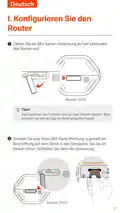
- 29. Konfigurieren Sie Den Router (Ziehen Sie Die Sim-karten-abdeckung Auf Der Unterseite Des Routers Auf → Stecken Sie Eine Nano Sim-karte In Den Steckplatz)
- 30. Tipps (Sim-karte Einlegen Oder Entfernen → Netzteil Anschließen → Router Einschalten → Led-anzeigen Überprüfen)
- 31. Clientsmitdeminternetverbinden (Verbindensieihrkabelgebundenesgerät → Verbindensieihrgerätmitdemwlan-netzwerk → Zurweiterenkonfigurationdesrouters → Meldensie Sichbeiderweb-benutzeroberflächean → Ändernsieihrlogin-passwortrechtzeitig)
- 32. Ihr Netzwerk Erweitern (Tipps → Den Router Einschalten Und Ihn Ordnungsgemäß Mit Dem Internet Verbinden → Platzieren Sie Das Neue Gerät An Einer Erhöhten Und Offenen Ort → Drücken Sie Die Mesh-taste Des Routers → Bitte Beachten Sie Folgenden Tipps Zur Verlagerung)
- 33. Platzieren (Das Neue Gerät Wieder Einschalten Und Prüfen, Ob Der Status Der Internetverbindung Gemäß Der Bedienungsanleitung Korrekt Ist.)
- 34. Led-anzeige (Internet-led-anzeige → Signalstärke-led-anzeige → Wlan-led-anzeige → Vernetzung Des Routers → Wlan Deaktiviert)
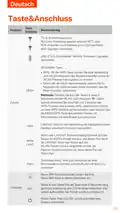
- 35. Taste&anschluss (Wps/mesh-taste → Mesh → Lan Port → Wan Oder Lan Port → Stromanschluss → Nano-sim-kartensteckplatz)
- 36. Internet-led-anzeige Leuchtet Nicht Dauerhaft (Zugriff Auf Die Web-benutzeroberfläche Des Routers)
- 37. F3: Wie Setze Ich Den Router Zurück? (A3: Wenn Das Gerät Hochgefahren Ist, Drücken Sie Die Rst/wps-taste Etwa 8 Sekunden Lang, Bis Alle Led-anzeigen Erlöschen Und Wieder Aufleuchten.)
- 38. Настройте Роутер (Вставьте Карту Nano Sim → Внешний Вид Продукта Может Различаться)
- 39. Советы (Внешний Вид Продукта Может Различаться В Зависимости От Модели. → Для Обеспечения Производительности И Предотвращения Повреждения Sim-карты Не Вставляйте И Не Извлекайте Sim-карту Во Время Работы Роутера. → Чтобы Извлечь Sim-карту, Аккуратно Нажмите На Sim-карту До Щелчка. → Используйте Водящий В Комплект Адаптер Питания Для Подключения Разъема Pwr Маршрутизатора К Источнику Питания. → Нажмите Кнопку На Роутере, Чтобы Включить Его.)
- 40. Подключение Клиентов К Интернету (Советы → Для Дальнейшей Настройки Роутера Войдите В Пользовательский Веб-интерфейс Роутера → Установите Пароль Для Ввода В Систему)
- 41. Расширьтевашусеть (Установитеновоеустройство → Нажмитекнопкуmesh → Советыпоразмещению)
- 42. Держите Блоки Вдали От Электроники С Сильными Помехами (Разместите Блоки На Возвышенности Без Препятствий Поблизости → Снова Включите Новое Устройство И Проверьте Правильность Состояния Подключения К Интернету)
- 43. Светодиодные Индикаторы (Описание Индикатор → Маршрутизатор Подключен К Интернету → Функция Wi-fi Включена → Сеть Wi-fi Отключена)
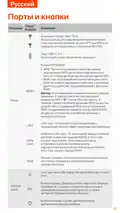
- 44. Порты И Кнопки (Кнопка Wps/mesh → Lan-порт → Wan Или Lan-порт → Разъем Питания → Слот Для Нано-sim-карты → Кнопка Сброса)
- 45. Светодиодный Индикатор Интернета (Доступ К Веб-интерфейсу Маршрутизатора → Устранение Неисправностей Подключения → Проверка Sim-карты И Баланса → Настройки Интернета → Включение Функции Роуминга Данных → Подключение К Сети Wi-fi Маршрутизатора)
- 46. Как Выполнить Сброс Маршрутизатора? (Когда Устройство Завершит Запуск, Нажмите Кнопку Rst Примерно На 8 Секунд И Отпустите Ее, Как Только Все Светодиодные Индикаторы Погаснут, А Затем Загорятся.)
- 47. Configurer Le Routeur (Ouvrez Le Couvercle De La Carte Sim Sur Le Panneau Inférieur → Insérez Une Carte Nano Sim (sens : Voir Sérigraphie) Dans La Fente Jusqu'à Ce Que Vous Entendiez Un Clic. → Fermez Ensuite Le Couvercle.)
- 48. Installation Du Routeur (Connexion À Une Source D'alimentation → Allumage Du Routeur → Vérification Des Voyants Led)
- 49. Connectez Vos Clients À Internet (Configurer Le Routeur → Interface Web Du Routeur → Définir Le Mot De Passe De Connexion)
- 50. Étendre Votre Réseau (Astuces → Allumez Le Routeur Et Connectez-le Correctement À Internet → Placez Le Nouvel Appareil Dans Une Position Élevée Et Ouverte → Appuyez Sur Le Bouton Mesh Du Routeur → Référez-vous Aux Conseils De Relocalisation Suivants → Assurez-vous Que La Distance Entre Deux Nœuds Se Situe Dans Leur Zone De Couverture)
- 51. Nœud D'origine (Nœud Additionnel)
- 52. Indicateurs Led (Indicateur Led → Statut → Description → Connecté À L'internet → Pas D'accès Internet → Wi-fi Activé)
- 53. Boutons & Ports (Prises D'antenne Ts-9 → Interface Usb-c 3.0 → Bouton Wps/mesh → Port Lan → Port Wan Ou Lan → Fente Pour Carte Nano Sim)
- 54. Vérifiez Que Votre Carte Sim Se Trouve Dans La Zone De Service De Votre Fai. (Démarrez Un Navigateur Web Sur L'appareil Connecté Au Routeur. → Vérifiez Auprès De Votre Fai Si Vous Vous Trouvez Dans Une Zone De Service D'itinérance. → Assurez-vous Que Votre Appareil Sans Fil Est Connecté Au Réseau Wi-fi Du Routeur. → Videz Le Cache De Votre Navigateur Web Ou Réessayez Avec Un Autre Navigateur Web. → Assurez-vous Que L'ordinateur Est Correctement Connecté Au Routeur. → Videz Le Cache De Votre Navigateur Web Ou Changez De Navigateur Web Et Réessayez.)
- 55. Q3: Comment Réinitialiser Le Routeur ?
- 56. I.configuracióndelenrutador (Abra La Cubierta De La Tarjeta Sim Situada En La Parte Trasera → Inserte Una Tarjeta Nano Slm (dirección: Vea La Serigrafía) En La Ranura Hasta Que Escuche Un Clic. Luego Cierre La Tapa.)
- 57. Consejos (Inserción Y Extracción De La Tarjeta Sim → Conexión Del Enrutador A La Fuente De Alimentación → Encendido Del Enrutador → Indicadores Led Y Conexión A Internet)
- 58. Conecta Dispositivos A Internet (Consejos → Para Seguir Configurando El Enrutador → Establezca Una Contraseña De Inicio De Sesión)
- 59. Iii.(opcional)amplíe Su Red (Consejos → Encienda El Enrutador Y Conéctelo A Internet → Ubique El Nuevo Dispositivo En Una Posición Elevada Y Sin Obstáculos → Mantenga Presionado El Botón Mesh Del Enrutador → Por Favor, Consulte Estas Sugerencias De Ubicación)
- 60. Nodo Original (Nodo Adicional)
- 61. Indicadores Led (Estado → Descripción → Conectado A Internet → No Hay Acceso A Internet → Wifi Habilitado → Wifi Deshabilitado)
- 62. Tomas De Antena Ts-9 (Interfaz Usb-c 3.0 → Botón Wps/mesh → Puerto Lan → Puerto Wan O Lan → Ranura Para Tarjeta Nano Sim → Botón De Reinicio)
- 63. Configuración De Internet (Acceso A La Interfaz Web Del Router → Soluciones Para Problemas De Conexión → Verificación De La Tarjeta Sim → Habilitar La Itinerancia De Datos → Conexión A La Red Wifi Del Router → Reinicio Del Enrutador)
- 64. Cómo Reiniciar El Router?
- 65. I. Configurare Il Router
- 66. Aspetto Del Prodotto (Inserimento/rimozione Scheda Sim → Utilizzo Dell'adattatore Di Alimentazione → Accensione Del Router)
- 67. Collegare I Client A Internet (Configurare Ulteriormente Il Router → Accesso All'interfaccia Utente Web → Imposta Tempestivamente La Tua Password Di Accesso)
- 68. Estendi La Tua Rete (Suggerimenti → Accendere Il Router E Collegarlo Correttamente A Internet → Posizionare Il Nuovo Dispositivo → Premere Il Pulsante Mesh Del Router → Fare Riferimento Ai Seguenti Consigli Di Ricollocazione)
- 69. Riacendi Il Nuovo Dispositivo E Controlla Che Lo Stato Della Sua Connessione Internet Sia Corretto Secondo La Sua Guida Per L'utente.
- 70. Spie Led (Stato → Descrizione → Indicatore Led → Wi-fi Abilitato → Wi-fi Disattivato)
- 71. Pulsante Wps/mesh (Porta Lan → Porta Wan O Lan → Presa Di Alimentazione → Slot Per Scheda Nano Sim → Pulsante Di Ripristino → Pulsante Di Accensione)
- 72. Impostazioni Internet (Roaming Dati → Accesso All'interfaccia Web Del Router → Collegamento Alla Rete Wi-fi → Indirizzo Ip Del Computer → Cancellare La Cache Del Browser)
- 73. Come Resettare Il Router?
- 74. The Provided Html Code Does Not Contain Any Relevant Headings Or Sentences That Pertain To Installation, Setup, Or Configuration. Therefore,…
- 75.
- 76. Mesh (Lan1 → Wan/lan2 → Pwr)
- 77.
- 78.
- 79.
- 80. Mesh (Lan1 → Wan/ → Lan2 → Pwr → Rst)
- 81.
- 82.
- 83. I. Konfigurace Routeru (Zasuňte Kartu Nano Slm (směr: Viz Sítotisk) Do Slotu, Dokud Neuslyšíte Cvaknutí. Poté Zavřete Kryt.)
- 84. Vzhled Produktu Se Může U Jednotlivých Modelů Lišit. (Chcete-li Zajistit Výkon A Zabránit Poškození Sim Karty, Nevkládejte Ani Nevyjímejte Sim Kartu, Když Je Router Spuštěný. → Pomocí Dodaného Napájecího Adaptéru Připojte Napájecí Konektor Routeru Ke Zdroji Napájení. → Zapněte Směrovač Stisknutím Tlačítka.)
- 85. Připojení Klientů K Internetu (Připojte Své Kabelové Zařízení → Připojte Vaše Bezdrátové Zařízení → Pro Další Konfiguraci Routeru → Přihlaste Do Webového Uživatelského Rozhraní → Okamžitě Nastavte Své Přihlašovací Heslo)
- 86. Rozšiřte Svou Síť (Ujistěte Se, Že Nové Zařízení → Zapněte Směrovač → Umístěte Nové Zařízení → Stiskněte Tlačítko Mesh → Podle Následujících Tipů Pro Přemístění → Znovu Zapněte Nové Zařízení)
- 87. Původní Uzel (Doplňkový Uzel)
- 88. Kontrolky Led (Router Je Připojen K Internetu. → Internetové Připojení Není K Dispozici. → Síť Wi-fi Je Povolena. → Síť Wi-fi Je Zakázána.)
- 89. Porty A Tlačítka (Anténní Zásuvky Ts-9 → Rozhraní Usb-c 3.0 → Tlačítko Wps/mesh → Lan Port → Wan Nebo Lan Port → Tlačítko Reset)
- 90. Internetový Led Indikátor (Nastavení Internetu → Datový Roaming → Webové Uživatelské Rozhraní Routeru → Připojení K Síti Wi-fi → Adresa Ip Počítače → Resetování Routeru)
- 91. Jak Vyresetovat Router?
- 92. I.configuraţi Routerul (Card Nano Sim (4ff))
- 93. Aspectul Produsului Poate Varia În Funcţie De Model. Vă Rugăm Să Consultaţi Produsul Pe Care L-aţi Achiziţionat.
- 94. Conectarea Clienţilor La Internet (Configurarea Routerului → Interfaţa De Utilizare Web → Setarea Parolei De Conectare)
- 95. Extindeţi-vă Reţeaua (Sfaturi → Porniţi Routerul Și Conectaţi-l Corect La Internet → Așezaţi Noul Dispozitiv Într-o Poziţie Ridicată → Apăsaţi Butonul Mesh Al Routerului → Consultaţi Următoarele Sfaturi De Relocare → Porniţi Din Nou Noul Dispozitiv)
- 96. Nodul Original (Nod Suplimentar)
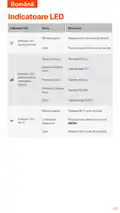
- 97. Indicatoare Led (Routerul Este Conectat La Internet. → Reţeaua Wi-fi Este Activată. → Routerul Face Reţea Prin Butonul Mesh.)
- 98. Porturi Și Butoane (Interfaţă Usb-c 3.0 → Buton Wps/mesh → Port Lan → Port Wan/lan → Mufă De Alimentare → Slotul Pentru Cartela Nano Sim)
- 99. Setări Internet (Roaming De Date → Accesarea Interfaţei Web A Routerului → Resetarea Routerului)
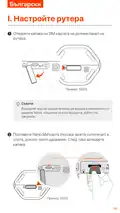
- 100. I. Настройте Рутера
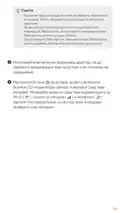
- 101. Външният Вид На Продукта Може Да Варира В Зависимост От Модела. (За Да Осигурите Производителност И Да Избегнете Повреда На Sim Картата. → За Да Извадите Sim Картата, Леко Натиснете Sim Картата. → Използвайте Включения Заранващ Адаптер. → Натиснете Бутона На Рутера, За Да Го Включите.)
- 102. Свържете Клиенти Към Интернет (Конфигуриране На Рутера → Вход В Уеб Интерфейса На Рутера → Задайте Парола За Влизане)
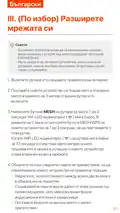
- 103. Разширете Мрежата Си (Съвети → Включете Рутера И Го Свържете Правилно Към Интернет → Поставете Новото Устройство На Повдигнато И Отворено Място → Натиснете Бутона Mesh На Рутера → Обърнете Се Към Следните Съвети За Преместване)
- 104. Включете Новото Устройство Отново И Проверете Дали Състоянието На Интернет Връзката Му Е Правилно Според Ръководството За Потребителя.
- 105. Led Индикатори (Интернет Led Индикатор → Wifi Мрежата Е Активирана → Рутерът Е Свързан Към Интернет → Няма Достъп До Интернет → Рутерът Работи В Мрежа → Led Индикатор За Силата На 5g/4g)
- 106. Гнезда За Антена Ts-9 (Usb-c 3.0 Интерфейс → Wps/mesh Бутон → Mesh Метод → Lan Порт → Wan Или Lan Порт → Слот За Nano Sim Карта)
- 107. Светодиодният Индикатор За Интернет Не Свети (Не Мога Да Осъществя Достъп До Уеб Интерфейса На Рутера)
- 108. Как Да Нулирам Рутера?
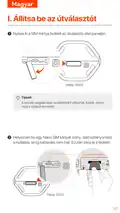
- 109. I. Állítsa Be Az Útválasztót (Helyezzen Be Egy Nano Slm Kártyát)
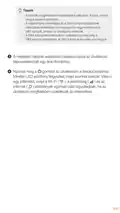
- 110. A Termék Megjelenése Modellenként Változhat. (A Teljesítmény Biztosítása És A Sim-kártya Sérülésének Elkerülése Érdekében Ne Helyezze Be Vagy Távolítsa El A Sim-kártyát, Amikor Az Útválasztó Működik. → A Sim-kártya Eltávolításához Óvatosan Nyomja Meg A Sim-kártyát Kattanásig. → A Mellékelt Hálózati Adapterrel Csatlakoztassa Az Útválasztó Tápcsatlakozóját Egy Áramforráshoz. → Nyomja Meg A Gombot Az Útválasztón A Bekapcsoláshoz.)
- 111. Csatlakoztassa Az Ügyfeleket Az Internethez (Az Útválasztó További Konfigurálásához Jelentkezzen Be Az Útválasztó Webes Felhasználói Felületére → Az Illetéktelen Hozzáférés Elkerülése Érdekében Azonnal Állítsa Be Bejelentkezési Jelszavát)
- 112. Bővítse Ki Hálózatát (Kapcsolja Be Az Útválasztót → Helyezze Az Új Eszközt Emelt És Nyitott Helyzetbe → Nyomja Le Az Útválasztó Mesh Gombját → Tekintse Meg A Következő Áthelyezési Tippeket → Kapcsolja Be Újra Az Új Eszközt)
- 113.
- 114. Led-visszajelzők (Internet Led Jelzőfény → Wi-fi Led Kijelző → A Router Csatlakozik Az Internethez → A Wi-fi Hálózat Engedélyezve Van → A Wi-fi Hálózat Le Van Tiltva → Az Útválasztó A Mesh Gombbal)
- 115. Usb-c 3.0 Interfész (Wps/mesh Gomb → Lan Port → Wan/lan Port → Tápcsatlakozó → Nano Sim Kártya Nyílás → Reset Gomb)
- 116. Internet Led Jelzőfénye Nem Világít (Nem Tudom Elérni Az Útválasztó Webes Felhasználói Felületét)
- 117. K3:hogyan Lehet Visszaállítani A Routert? (V3:amikor Az Eszköz Befejezte Az Indítást, Nyomja Meg Az Rst Gombot Körülbelül 8 Másodpercig, Majd Engedje El, Amikor Az Összes Led Jelzőfény Kialszik, Majd Kigyullad.)
- 118. Sim Installation (Configuration For 5g03 → Nano Sim Requirements → Setup Instructions)
- 119. Installation Of Sim Card (Configuration Of Device Settings → Wi-fi Setup → Internet Connection Configuration → Device Power Management → Troubleshooting Steps → Safety Information)
- 120. Εγκατάσταση Μέσω Lan (Εγκατάσταση Μέσω Wi-fi → Ρυθμίσεις Web Ui → Σύνδεση Στο Smartphone → Ρυθμίσεις Ethernet)
- 121. Installation (Configuration → Mesh Setup → Led Wifi Indicator → Warning → Easymesh R2 → User Manual)
- 122. The Html Code Does Not Contain Any Clear Subheadings Related To Installation/setup/configuration. Therefore, I Will Take The First Sentence … ('ô¹µâí¾à¾ºó½µ Ðè¹ ½¼ ¹ëè ѵó Ñèº Μìëí𽵠Žº ¼')
- 123. Led (Internet → G/4g → Wi-fi → Mesh)
- 124. Wps/mesh (Mesh → Lan → Wan → Pwr → Rst)
- 125. Δ¾ñºμ½µ ½ºæ Àèâèñ½ò Ìõµºæ: (Δ³ Μµªï ³ Âñ Μª¼ Web Ui → Ôññº¹ó½µ → Ï൹µâí¾à¾ºó½µ → Ôີèºì½µ → ½³ ³ Μ Μ²)
- 126. Installation Instructions (Configuration Settings → Setup Requirements → Troubleshooting Guide → Safety Information → Led Indicators → User Support)
- 127. I. Postavite Ruter (Umetnite Nano Slm Karticu (smjer: Pogledajte Sitotisak) U Utor)
- 128. Izgled Proizvoda Može Se Razlikovati Ovisno O Modelu. (Kako Biste Osigurali Performanse I Izbjegli Oštećenje Sim Kartice → Upotrijebite Isporučeni Strujni Adapter Za Spajanje Strujne Utičnice Rutera Na Izvor Napajanja. → Pritisnite Gumb Na Ruteru Da Ga Uključite.)
- 129. Povežite Klijente S Internetom (Za Daljnju Konfiguraciju Usmjerivača, Prijavite Se Na Web Sučelje Usmjerivača → Odmah Postavite Lozinku Za Prijavu Kako Biste Spriječili Neovlašteni Pristup)
- 130. Uključite Ruter I Pravilno Ga Povežite S Internetom. (Postavite Novi Uređaj Na Povišeno I Otvoreno Mjesto Unutar 3 Metra Od Vašeg Usmjerivača I Uključite Ga. → Pritisnite Tipku Mesh Na Ruteru Oko 1 Do 3 Sekunde. → Pogledajte Sljedeće Savjete Za Premještanje Kako Biste Locirali Novi Uređaj Na Odgovarajuću Poziciju. → Ponovno Uključite Novi Uređaj I Provjerite Je Li Status Njegove Internetske Veze Ispravan U Skladu S Korisničkim Priručnikom.)
- 131. Izvorni Čvor
- 132. Led Indikatori (Wi-fi Mreža Je Omogućena. → Wi-fi Mreža Je Onemogućena. → Ruter Se Umrežava Pomoću → Isključeno → Nema Pristupa Internetu. → Usmjerivač Je Spojen Na Internet.)
- 133. Priključci I Gumbi (Priključak → Usb-c 3.0 Sučelje → Gumb Wps/mesh → Lan Priključak → Utičnica Za Napajanje → Gumb Za Resetiranje)
- 134. Led Indikator Interneta Ne Svijetli (Ne Mogu Pristupiti Web Sučelju Usmjerivača → Kako Resetirati Ruter)
- 135. I. Nastavte Smerovač (Vložte Kartu Nano Slm)
- 136. Vzhľad Produktu Sa Môže Líšiť V Závislosti Od Modelu (Aby Ste Zabezpečili Výkon A Predišli Poškodeniu Karty Sim → Pomocou Dodaného Napájacieho Adaptéra Pripojte Napájací Konektor Smerovača K Zdroju Napájania → Zapnite Smerovač Stlačením Tlačidla)
- 137. Pripojte Klientov K Internetu (Pre Ďalšiu Konfiguráciu Smerovača → Nastavte Svoje Prihlasovacie Heslo)
- 138. Rozšírte Svoju Sieť (Uistite Sa, Že Nové Zariadenie, Ktoré Chcete Pridať, Nebolo Nikdy Použité → Zapnite Smerovač A Správne Ho Pripojte K Internetu → Stlačte Tlačidlo Mesh Na Smerovači → Umiestnite Nové Zariadenie Do Správnej Polohy → Skontrolujte Stav Internetového Pripojenia Nového Zariadenia)
- 139. Pôvodný Uzol (Doplnkový Uzol)
- 140. Led Indikátory (Popis → Router Je Pripojený K Internetu. → Internetový Led Indikátor → Sieť Wi-fi Je Povolená. → Smerovač Sa Pripája Do Siete Pomocou Tlačidla Mesh.)
- 141. Porty A Tlačidlá (Anténne Zásuvky Ts-9 → Rozhranie Usb-c 3.0 → Tlačidlo Wps/mesh → Mesh → Lan Port → Napájací Konektor)
- 142. Internetový Led Indikátor (Prístup K Webovému Používateľskému Rozhraniu Smerovača → Nastavenia Internetu → Dátový Roaming → Technická Podpora)
- 143. Ako Resetovať Smerovač?
- 144. I. Nastavite Usmerjevalnik (Vstavite Kartico Nano Slm (smer: Glejte Sitotisk) V Režo, Dokler Ne Zaslišite Klika.)
- 145. Videz Izdelka Se Lahko Razlikuje Glede Na Model. (Da Zagotovite Delovanje In Preprečite Poškodbe Kartice Sim, Ne Vstavljajte Ali Odstranjujte Kartice Sim, Ko Usmerjevalnik Deluje. → S Priloženim Napajalnikom Povežite Napajalni Priključek Usmerjevalnika Z Virom Napajanja. → Pritisnite Gumb Na Usmerjevalniku, Da Ga Vklopite.)
- 146. Povežite Stranke Z Internetom (Za Nadaljnjo Konfiguracijo Usmerjevalnika Se Prijavite V Spletni Uporabniški Vmesnik Usmerjevalnika)
- 147. Razširite Svoje Omrežje (Vklopite Usmerjevalnik → Postavite Novo Napravo → Pritisnite Gumb Mesh → Upoštevajte Nasvete Za Premestitev → Preverite Stanje Internetne Povezave)
- 148. Prvotno Vozlišče (Dodatno Vozlišče)
- 149. Led Indikatorji (Usmerjevalnik Je Povezan Z Internetom. → Internetni Led Indikator → Omrežje Wi-fi Je Omogočeno. → Wi-fi Led Indikator)
- 150. Vrata In Gumbi (Vmesnik Usb-c 3.0 → Gumb Wps/mesh → Vrata Lan → Vrata Wan Ali Lan → Vtičnica Za Napajanje → Reža Za Kartico Nano Sim)
- 151. Internetni Led Indikator Ne Sveti. Kaj Naj Naredim? (Prek Tendawifi.com Ne Morem Dostopati Do Spletnega Uporabniškega Vmesnika Usmerjevalnika. Kaj Naj Naredim?)
- 152. Kako Ponastaviti Usmerjevalnik? (Ko Se Naprava Konča Z Zagonom, Pritisnite Gumb Rst Za Približno 8 Sekund In Ga Spustite, Ko Se Vse Lučke Led Ugasnejo In Nato Prižgejo.)
- 153. I. Konfigurer Routeren (Indsæt Et Nano Sim-kort (retning: Se Silkscreen) I Åbningen)
- 154. Installation Af Sim-kort (Tilslutning Af Strømadapter → Tænding Af Router → Indikatorer For Wi-fi, Signalstyrke Og Internet)
- 155. Forbind Klienter Til Internettet (Tilslut Din Trådløse Enhed → Konfigurere Routeren → Log Ind På Routerens Web-ui → Indstil Din Login-adgangskode)
- 156. Udvid Dit Netværk (Tænd For Routeren → Placer Den Nye Enhed → Tryk På Mesh-knappen → Se Følgende Flytningstip → Tænd For Den Nye Enhed Igen)
- 157. Original Node (Add-on Node)
- 158. Led Indikatorer (Routeren Er Forbundet Til Internettet. → Der Er Ingen Internetadgang → Wi-fi-netværket Er Aktiveret. → Wi-fi-netværket Er Deaktiveret. → Intet 5g/4g-signal. → Dårligt 5g-signal.)
- 159. Port/position (Usb-c 3.0 Interface → Wps/mesh Knap → Lan-port → Wan- Eller Lan-port → Strømkilde → Nano Sim-kortslot)
- 160. Internet Led-indikatoren Lyser Ikke (Adgang Til Routerens Web-ui → Nulstilling Af Routeren)
- 161. I. Stel De Router In (Plaats Een Nano Slm-kaart (richting: Zie Zeefdruk) In De Sleuf Totdat U Een Klik Hoort. Sluit Vervolgens Het Deksel.)
- 162. Tips (Om De Prestaties Te Garanderen En Schade Aan De Sim-kaart Te Voorkomen, Mag U De Sim-kaart Niet Plaatsen Of Verwijderen Terwijl De Router Actief Is. → Gebruik De Meegeleverde Voedingsadapter Om De Voedingsaansluiting Van De Router Aan Te Sluiten Op Een Voedingsbron. → Druk Op De Knop Op De Router Om Deze In Te Schakelen.)
- 163. Verbind Klanten Met Internet (Om De Router Verder Te Configureren → Stel Uw Inlogwachtwoord Onmiddellijk In)
- 164. Breid Uw Netwerk Uit (Tips → Schakel De Router In En Verbind Deze Correct Met Internet → Plaats Het Nieuwe Apparaat In Een Verhoogde En Open Positie → Houd De Mesh-knop Van De Router Ingedrukt → Raadpleeg De Volgende Verhuistips Om Het Nieuwe Apparaat Op De Juiste Plaats Te Plaatsen)
- 165. Origineel Knooppunt (Add-on Knooppunt)
- 166. Led-indicatoren (Internet Led-indicator → G/4g Signaalsterkte → Wi-fi → Mesh-knop)
- 167. Ts-9 Antenne-aansluitingen (Usb-c 3.0-interface → Wps/mesh-knop → Lan-poort → Wan- Of Lan-poort → Stroomaansluiting → Sleuf Voor Nano-simkaart)
- 168. Internetinstellingen (Toegang Tot De Webinterface Van De Router → Probleemoplossing Met De Simkaart → Verbinding Met Het Wi-fi-netwerk → Ip-adres Configuratie → Technische Ondersteuning → Dataroaming Inschakelen)
- 169. Hoe Reset Ik De Router?
- 170. I. Asenna Reititin
- 171. Tuotteen Ulkonäkö Voi Vaihdella Malleittain. Katso Ostamaasi Tuotetta. (Varmistaaksesi Suorituskyvyn Ja Välttääksesi Sim-kortin Vahingoittumisen, Älä Aseta Tai Poista Sim-korttia, Kun Reititin On Käynnissä. → Poista Sim-kortti Painamalla Sim-korttia Varovasti, Kunnes Se Napsahtaa. → Käytä Mukana Toimitettua Virtalähdettä Liittääksesi Reitittimen Virtaliittimen Virtalähteeseen. → Käynnistä Reititin Painamalla -painiketta.)
- 172. Yhdistäasiakkaatinternetiin (Liitälangallinenlaite → Yhdistälangatonlaitteesi → Määritäreititin → Kirjaudusisäänreitittimenverkkokäyttöliittymään → Asetakirjautumissalasanasi)
- 173. Kytke Reitittimeen Virta Ja Yhdistä Se Internetiin Oikein. (Aseta Uusi Laite Korkeaan Ja Avoimeen Asentoon Enintään 3 Metrin Päähän Reitittimestä Ja Käynnistä Se. → Paina Reitittimen Mesh-painiketta Noin 13 Sekunnin Ajan. → Paikanna Uusi Laite Oikeaan Paikkaan Seuraavien Siirtovinkkien Avulla. → Kytke Uuteen Laitteeseen Uudelleen Virta Ja Tarkista, Että Sen Internet-yhteyden Tila On Oikea Käyttöoppaan Mukaan.)
- 174. The Provided Html Code Does Not Contain Any Relevant Headings Or Sentences That Can Be Extracted.
- 175. Led-ilmaisimet (Led-merkkivalo → Reititin On Yhdistetty Internetiin → Internetyhteyttä Ei Ole Saatavilla → Wi-fi-verkko On Käytössä → Wi-fi-verkko On Poistettu Käytöstä → Mesh-painikkeella)
- 176. Portit & Painikkeet (Usb-c 3.0 -liitäntä → Wps/mesh-painike → Lan-portti → Wan- Tai Lan-portti → Virtaliitin → Nano Sim-korttipaikka)
- 177. Internetin Merkkivalo Ei Syty (En Voi Käyttää Reitittimen Verkkokäyttöliittymää → Kuinka Nollata Reititin)
- 178. I.seadistage Ruuter
- 179. Toote Välimus (Sim-kaardi Sisestamine Ja Eemaldamine → Ruuteri Toiteadapteri Ühendamine → Ruuteri Sisselülitamine → Led-indikaatorite Funktsioonid)
- 180. Ühendage Kliendid Internetiga (Ruuteri Edasiseks Konfigureerimiseks Logige Sisse Ruuteri Veebi Kasutajaliidesesse → Seadistage Oma Sisselogimisparool Kohe)
- 181. Laiendage Oma Võrku (Uue Seadme Lisamine → Ruuteri Sisselülitamine Ja Ühendamine → Uue Seadme Paigutamine → Ümberpaigutamisnõuanded → Uue Seadme Kontrollimine)
- 182.
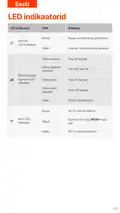
- 183. Led Indikaatorid (Wi-fi-võrk On Lubatud. → Wi-fi-võrk On Keelatud. → Ruuter On Internetiga Ühendatud. → Interneti-ühendust Pole Saadaval. → Hea 5g Signaal. → Kehv 5g Signaal.)
- 184. Pordid Ja Nupud (Usb-c 3.0 Liides → Wps/mesh Nupp → Lan-port → Wan- Või Lan-port → Toitepesa → Nano Sim-kaardi Pesa)
- 185. Interneti-led-indikaator Ei Sütti (Ei Pääse Ruuteri Veebiliidesele Juurde)
- 186. Kuidas Ruuterit Lähtestada? (Kui Seade On Käivitamise Lõpetanud, Vajutage Nuppu Rst Umbes 8 Sekundit Ja Vabastage See, Kui Kõik Led-indikaatorid Kustuvad Ja Seejärel Süttivad.)
- 187. I. Uzstādiet Maršrutētāju (Ievietojiet Nano Slm Karti (virziens: Skatiet Sietspiedes) Slotā, Līdz Dzirdat Klikšķi.)
- 188. Produkta Izskats Var Atšķirties Atkarībā No Modeļiem (Lai Nodrošinātu Veiktspēju Un Izvairītos No Sim Kartes Bojājumiem → Lai Izņemtu Sim Karti, Uzmanīgi Nospiediet Sim Karti → Izmantojiet Komplektācijā Iekļauto Strāvas Adapteri → Nospiediet Pogu Uz Maršrutētāja, Lai To Ieslēgtu → Uzgaidiet Brīdi, Un Pēc Tam Wi-fi, Signāla Stipruma Un Interneta Indikatori Iedegas Secīgi)
- 189. Savienojiet Klientus Ar Internetu (Savienojiet Savu Vadu Ierīci → Savienojiet Savu Bezvadu Ierīci → Lai Tālāk Konfigurētu Maršrutētāju → Piesakieties Maršrutētāja Tīmekļa Lietotāja Saskarnē → Nekavējoties Iestatiet Savu Pieteikšanās Paroli)
- 190. Ieslēdziet Maršrutētāju Un Pareizi Pievienojiet To Internetam. (Novietojiet Jauno Ierīci Paceltā Un Atvērtā Pozīcijā. → Nospiediet Maršrutētāja Mesh Pogu Un Turiet Apmēram 13 Sekundes. → Lai Atrastu Jauno Ierīci Pareizā Vietā, Skatiet Tālāk Sniegtos Pārvietošanas Padomus. → Vēlreiz Ieslēdziet Jauno Ierīci Un Pārbaudiet, Vai Tās Interneta Savienojuma Statuss Ir Pareizs.)
- 191.
- 192. Led Indikatori (Maršrutētājs Ir Savienots Ar Internetu → Interneta Led Indikators → Wi-fi Tīkls Ir Iespējots → Wi-fi Led Indikators)
- 193. Ports Un Pogas (Usb-c 3.0 Interfeiss → Wps/mesh Poga → Lan Ports → Wan Vai Lan Ports → Strāvas Ligzda → Nano Sim Kartes Slots)
- 194. Interneta Led Indikators Neiedegas. Ko Man Darīt? (Es Nevaru Piekļūt Maršrutētāja Tīmekļa Lietotāja Saskarnei, Apmeklējot Vietni Tendawifi.com. Ko Man Darīt? → Kā Atiestatīt Maršrutētāju?)
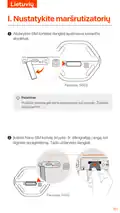
- 195. Nustatykite Maršrutizatorių (Atidarykite Sim Kortelės Dangtelį Apatiniame Kelvedžio Skydelyje → Įkiškite Nano Slm Kortelę → Uždarykite Dangtelį)
- 196. Produkto Išvaizda Gali Skirtis Atsižvelgiant Į Modelius. Žiūrėkite Įsigytą Gaminį. Kad Užtikrintumėte Veikimą Ir Išvengtumėte Sim Kortelės S…
- 197. Prijunkite Klientus Prie Interneto (Konfigūruoti Maršruto Parinktuvą → Prisijunkite Prie Maršrutizatoriaus Žiniatinklio Vartotojo Sąsajos → Nustatykite Prisijungimo Slaptažodį)
- 198. Įjunkite Maršruto Parinktuvą Ir Tinkamai Prijunkite Jį Prie Interneto (Pastatykite Naują Įrenginį Į Pakeltą Ir Atvirą Padėtį → Paspauskite Maršrutizatoriaus Mesh Mygtuką → Vadovaukitės Šiais Perkėlimo Patarimais → Įsitikinkite, Kad Atstumas Tarp Bet Kurių Dviejų Mazgų Yra Jų Aprėpties Diapazone → Saugokite Savo Mazgus Nuo Stiprių Trukdžių Elektronikos → Patikrinkite, Ar Naujo Įrenginio Interneto Ryšio Būsena Yra Teisinga)
- 199. Originalusmazgas (Papildomasmazgas)
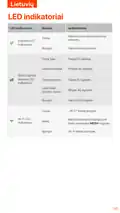
- 200. Led Indikatoriai (Maršrutizatorius Prijungtas Prie Interneto → Interneto Led Indikatorius → G/4g Signalo Stiprumo Led Indikatorius → Wi-fi Tinklas Įjungtas → Wi-fi Led Indikatorius → Maršrutizatorius Prisijungia Prie Tinklo)
- 201. Prievadai Ir Mygtukai (Usb-c 3.0 Sąsaja → Wps/mesh Mygtukas → Lan Prievadas → Wan Arba Lan Prievadas → Maitinimo Lizdas → Nano Sim Kortelės Lizdas)
- 202. Interneto Led Indikatorius (Negaliu Pasiekti Maršrutizatoriaus Žiniatinklio Vartotojo Sąsajos)
- 203. Kaip Iš Naujo Nustatyti Maršrutizatorių?
- 204. I.configureoroteador
- 205. Instalação Do Cartão Sim (Conexão À Fonte De Alimentação → Ligando O Roteador → Indicadores Led)
- 206. Conectar Clientes À Internet (Configurar O Roteador → Login Na Interface Do Usuário → Definir Senha De Login)
- 207. Amplie Sua Rede (Ligue O Roteador E Conecte-o À Internet Corretamente → Coloque O Novo Dispositivo Em Uma Posição Elevada E Aberta → Pressione O Botão Mesh Do Roteador → Consulte As Seguintes Dicas De Realocação → Verifique O Status Da Conexão Com A Internet)
- 208.
- 209. Leds Indicadores (Led Indicador De Internet → Indicador Led De Força Do Sinal → A Rede Wi-fi Está Habilitada → A Rede Wi-fi Está Desativada → O Roteador Está Conectado À Internet → O Roteador Está Em Rede Pelo Botão Mesh)
- 210. Portas E Botões (Soquetes De Antena Ts-9 → Interface Usb-c 3.0 → Botão Wps/malha → Porta Lan → Porta Wan Ou Lan → Ranhura Para Cartão Nano Sim)
- 211. Verifique Se O Seu Cartão Sim Está Na Área De Serviço Do Seu Provedor De Serviços De Internet (isp). (Confirme Com Seu Isp Se Você Estiver Em Uma Área De Serviço De Roaming. → Desative A Rede Celular Do Seu Dispositivo Sem Fio. → Limpe O Cache Do Seu Navegador Ou Tente Novamente Com Outro Navegador. → Verifique Se O Computador Está Conectado Ao Roteador Corretamente. → Verifique Se O Endereço Ip Do Seu Computador É 192.168.0.)
- 212. Como Redefinir O Roteador?
- 213. I. Ställ In Routern (Sätt In Ett Nano Sim-kort (riktning: Se Silkscreen) I Kortplatsen Tills Du Hör Ett Klick. Stäng Sedan Locket.)
- 214. Installation Av Sim-kort (Anslutning Av Strömadapter → Slå På Routern → Led-indikatorer Och Deras Betydelse)
- 215. Anslut Klienter Till Internet (För Att Ytterligare Konfigurera Routern → Logga In På Routerns Webbgränssnitt → Ställ In Ditt Inloggningslösenord)
- 216. Utöka Ditt Nätverk (Sätta På Routern Och Ansluta Till Internet → Placera Den Nya Enheten → Tryck På Mesh-knappen → Se Följande Flytttips → Kontrollera Internetanslutningsstatus)
- 217. Ursprunglignod (Tilläggsnod)
- 218. Led-indikatorer (Routern Är Ansluten Till Internet. → Wi-fi-nätverket Är Aktiverat. → Led-indikator För 5g/4g-signalstyrka)
- 219. Portar Och Knappar (Usb-c 3.0-gränssnitt → Wps/mesh-knapp → Lan-port → Wan- Eller Lan-port → Strömuttag → Nano Sim-kortplats)
- 220. Internetinställningar (Återställning Av Routern → Åtkomst Till Routerns Webbgränssnitt → Kontroll Av Sim-kort Och Saldo → Felsökning Av Anslutning → Dataroaming Aktivering → Anslutning Av Enheter)
- 221. Installation (Setup → Configuration → Technical Specifications → User Guides → Support And Services → Product Information)
- 222. Technické Specifikace (Uživatelské Příručky → Další Informace → Názov Produktu A Model → Produktová Stránka → Servisní Stránka → Dostupné Jazyky)
- 223. Iegūstiet Atbalstu Un Pakapojumus (Gaukite Pagalbą Ir Paslaugas → Obter Apoio E Serviços → Få Stöd Och Tjänster)
- 224. Technical Support (Installation → Setup → Configuration → Troubleshooting → Warranty Information → Safety Information)
×
Tenda 5G03 Wi-Fi 6 5G NR Router Installation Guide
































































































English
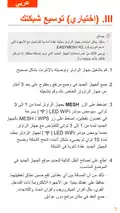
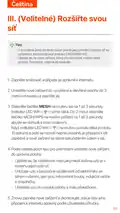
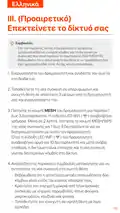
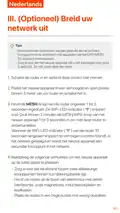
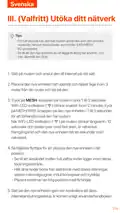
III. (Optional) Extend your
network
Tips
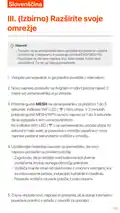
- Currently, this router can be used as the primary node to network
with devices that support the EASYMESH R2 protocol.
- Please ensure that the new device you want to add has never been
used. If not, reset it first.
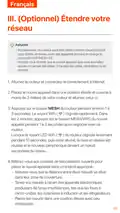
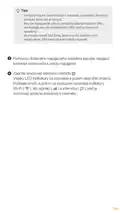
1. Power on the router and connect it to the internet properly.
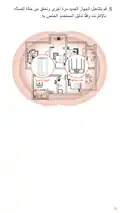
2. Place the new device in an elevated and open position within 3
meters from your router and power it on.
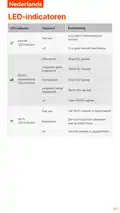
3.Press the MESH button of the router for about 1 to 3 seconds.
The WiFi LED indicator ( ) blinks fast. Within 2 minutes,
press the MESH/WPS button of the new device for 1 to 3
seconds to negotiate with this router.
When the WiFi LED indicator ( ) of the router blinks slowly
for 10 seconds and then lights solid on, the networking is
successful and the new device becomes a secondary node in
the network.
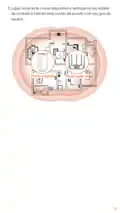
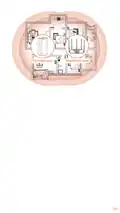
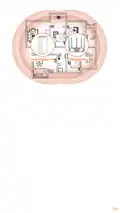
4.Refer to the following relocation tips to locate the new device to
a proper position:
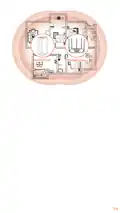
- Ensure that the distance between any two nodes is within
their coverage range.
- Keep your nodes away from electronics with strong
interference, such as microwave ovens, induction cookers,
and refrigerators.
- Place the nodes in a high position with few obstacles.
5.Power on the new device again and check that its internet
connection status is correct according to its user guide.
04

| General | Details |
|---|---|
| Name | Tenda 5G03 Wi-Fi 6 5G NR Router Installation Guide |
| Make | Tenda |
| Language | English |
| Filetype | PDF (Download) |
| File size | 6.94 MB |
 (1 votes, average: 5.00 out of 5)
 Loading...
If you have any questions regarding Tenda 5G03 Wi-Fi 6 5G NR Router Installation Guide, please ask here and describe the problem in detail.

Tenda AXE5700 Wi-Fi 6E Router User Manual

Tenda AX1800 Wi-Fi 6 5G NR Router User Manual

Tenda RX2LP Dual Band Gigabit Wi-Fi 6 Router Installation Guide

Tenda RX12V1.0 Wi-Fi 6 6E Router Installation Guide

Tenda TX2L ProV1.0 WiFi 6 Router Installation Guide

Tenda 4G09V1.0 Wifi Router User Manual

Tenda AC19 Dual Band Gigabit WiFi Router Installation Guide

Tenda 4G06V1.0 4G LTE and VoLTE Router User Guide

Tenda 4G03 N300 Wi-Fi 4G LTE Router Installation Guide

Tenda N300 WiFi VDSL/ADSL Modem Router V300 Installation Guide


MERCUSYS BE3600 Dual-Band Wi-Fi 7 Router Installation Guide

acer W6M W-Fi 6E Mesh Router User Manual

TCL HH63AF Router User Guide

tp-Link BE6500 Dual Band Wi-Fi 7 Router Installation Guide

PREDATOR W6X Connect W6x Wi-Fi 6 Router Owner’s Manual

TIANZHI LNN788 Dual Band Wireless Router Installation Guide

Winstars NM3015 AX3000 Dual Band Wi-Fi 6 Mesh Router Installation Guide

MERCUSYS EU2_16 Wireless Router Installation Guide

SNRMD2 Wi-Fi Router User Manual

TP-Link EU_V3.2 MU MIMO Wi-Fi Router User Guide
Table of Contents
- 1. Installation Guide - Wi-fi 6 5g Nr Router →
- 2. Page 2 →
- 3. Set Up The Router - Insert A Nano Sim Card →
- 4. Tips - Ensure Performance And Avoid Damage To The Sim Card →
- 5. Connect Clients To The Internet - To Further Configure The R... →
- 6. (optional) Extend Your Network - Power On The Router And Con... →
- 7. Original Node - Add-on Node →
- 8. Led Indicators - Internet Led Indicator →
- 9. Ports & Buttons - Usb-c 3.0 Interface →
- 10. Internet Settings - Data Roaming →
- 11. Configurar O Roteador - Insira Um Cartão Nano Sim →
- 12. Dicas - Conectar A Fonte De Alimentação →
- 13. Conectar Clientes À Internet - Configurar O Roteador →
- 14. Amplie Sua Rede - Dicas →
- 15. Ligue Novamente O Novo Dispositivo E Verifique Se Seu Estado... →
- 16. Indicadores Led - Indicador Led De Internet →
- 17. Portas E Botões - Interface Usb-c 3.0 →
- 18. Perguntas Frequentes - Configurações Da Internet →
- 19. Como Redefinir O Roteador? →
- 20. I. Skonfiguruj Router →
- 21. Wygląd Produktu Może Się Różnić W Zależności Od Modelu. - Ab... →
- 22. Połącz Klientów Z Internetem - Podłącz Urządzenie Przewodowe →
- 23. Wskazówki - Włącz Router I Połącz Go Prawidłowo Z Internetem →
- 24. Oryginalny Węzeł - Dodatkowy Węzeł →
- 25. Kontrolki Led - Opis →
- 26. Gniazda Antenowe Ts-9 - Interfejs Usb-c 3.0 →
- 27. Ustawieniainternetow... - Roamingdanych →
- 28. Jak Zresetować Router? - Gdy Urządzenie Zakończy Uruchamiani... →
- 29. Konfigurieren Sie Den Router - Ziehen Sie Die Sim-karten-abd... →
- 30. Tipps - Sim-karte Einlegen Oder Entfernen →
- 31. Clientsmitdeminternetverbinden - Verbindensieihrkabelgebunde... →
- 32. Ihr Netzwerk Erweitern - Tipps →
- 33. Platzieren - Das Neue Gerät Wieder Einschalten Und Prüfen, O... →
- 34. Led-anzeige - Internet-led-anzeige →
- 35. Taste&anschluss - Wps/mesh-taste →
- 36. Internet-led-anzeige Leuchtet Nicht Dauerhaft - Zugriff Auf ... →
- 37. F3: Wie Setze Ich Den Router Zurück? - A3: Wenn Das Gerät Ho... →
- 38. Настройте Роутер - Вставьте Карту Nano Sim →
- 39. Советы - Внешний Вид Продукта Может Различаться В Зависимост... →
- 40. Подключение Клиентов К Интернету - Советы →
- 41. Расширьтевашусеть - Установитеновоеустро... →
- 42. Держите Блоки Вдали От Электроники С Сильными Помехами - Раз... →
- 43. Светодиодные Индикаторы - Описание Индикатор →
- 44. Порты И Кнопки - Кнопка Wps/mesh →
- 45. Светодиодный Индикатор Интернета - Доступ К Веб-интерфейсу М... →
- 46. Как Выполнить Сброс Маршрутизатора? - Когда Устройство Завер... →
- 47. Configurer Le Routeur - Ouvrez Le Couvercle De La Carte Sim ... →
- 48. Installation Du Routeur - Connexion À Une Source D'alimentat... →
- 49. Connectez Vos Clients À Internet - Configurer Le Routeur →
- 50. Étendre Votre Réseau - Astuces →
- 51. Nœud D'origine - Nœud Additionnel →
- 52. Indicateurs Led - Indicateur Led →
- 53. Boutons & Ports - Prises D'antenne Ts-9 →
- 54. Vérifiez Que Votre Carte Sim Se Trouve Dans La Zone De Servi... →
- 55. Q3: Comment Réinitialiser Le Routeur ? →
- 56. I.configuracióndelenrutador - Abra La Cubierta De La Tarjeta... →
- 57. Consejos - Inserción Y Extracción De La Tarjeta Sim →
- 58. Conecta Dispositivos A Internet - Consejos →
- 59. Iii.(opcional)amplíe Su Red - Consejos →
- 60. Nodo Original - Nodo Adicional →
- 61. Indicadores Led - Estado →
- 62. Tomas De Antena Ts-9 - Interfaz Usb-c 3.0 →
- 63. Configuración De Internet - Acceso A La Interfaz Web Del Rou... →
- 64. Cómo Reiniciar El Router? →
- 65. I. Configurare Il Router →
- 66. Aspetto Del Prodotto - Inserimento/rimozion... Scheda Sim →
- 67. Collegare I Client A Internet - Configurare Ulteriormente Il... →
- 68. Estendi La Tua Rete - Suggerimenti →
- 69. Riacendi Il Nuovo Dispositivo E Controlla Che Lo Stato Della... →
- 70. Spie Led - Stato →
- 71. Pulsante Wps/mesh - Porta Lan →
- 72. Impostazioni Internet - Roaming Dati →
- 73. Come Resettare Il Router? →
- 74. The Provided Html Code Does Not Contain Any Relevant Heading... →
- 75. Page 75 →
- 76. Mesh - Lan1 →
- 77. Page 77 →
- 78. Page 78 →
- 79. Page 79 →
- 80. Mesh - Lan1 →
- 81. Page 81 →
- 82. Page 82 →
- 83. I. Konfigurace Routeru - Zasuňte Kartu Nano Slm (směr: Viz S... →
- 84. Vzhled Produktu Se Může U Jednotlivých Modelů Lišit. - Chcet... →
- 85. Připojení Klientů K Internetu - Připojte Své Kabelové Zaříze... →
- 86. Rozšiřte Svou Síť - Ujistěte Se, Že Nové Zařízení →
- 87. Původní Uzel - Doplňkový Uzel →
- 88. Kontrolky Led - Router Je Připojen K Internetu. →
- 89. Porty A Tlačítka - Anténní Zásuvky Ts-9 →
- 90. Internetový Led Indikátor - Nastavení Internetu →
- 91. Jak Vyresetovat Router? →
- 92. I.configuraţi Routerul - Card Nano Sim (4ff) →
- 93. Aspectul Produsului Poate Varia În Funcţie De Model. Vă Rugă... →
- 94. Conectarea Clienţilor La Internet - Configurarea Routerului →
- 95. Extindeţi-vă Reţeaua - Sfaturi →
- 96. Nodul Original - Nod Suplimentar →
- 97. Indicatoare Led - Routerul Este Conectat La Internet. →
- 98. Porturi Și Butoane - Interfaţă Usb-c 3.0 →
- 99. Setări Internet - Roaming De Date →
- 100. I. Настройте Рутера →
- 101. Външният Вид На Продукта Може Да Варира В Зависимост От Моде... →
- 102. Свържете Клиенти Към Интернет - Конфигуриране На Рутера →
- 103. Разширете Мрежата Си - Съвети →
- 104. Включете Новото Устройство Отново И Проверете Дали Състояние... →
- 105. Led Индикатори - Интернет Led Индикатор →
- 106. Гнезда За Антена Ts-9 - Usb-c 3.0 Интерфейс →
- 107. Светодиодният Индикатор За Интернет Не Свети - Не Мога Да Ос... →
- 108. Как Да Нулирам Рутера? →
- 109. I. Állítsa Be Az Útválasztót - Helyezzen Be Egy Nano Slm Kár... →
- 110. A Termék Megjelenése Modellenként Változhat. - A Teljesítmén... →
- 111. Csatlakoztassa Az Ügyfeleket Az Internethez - Az Útválasztó ... →
- 112. Bővítse Ki Hálózatát - Kapcsolja Be Az Útválasztót →
- 113. Page 113 →
- 114. Led-visszajelzők - Internet Led Jelzőfény →
- 115. Usb-c 3.0 Interfész - Wps/mesh Gomb →
- 116. Internet Led Jelzőfénye Nem Világít - Nem Tudom Elérni Az Út... →
- 117. K3:hogyan Lehet Visszaállítani A Routert? - V3:amikor Az Esz... →
- 118. Sim Installation - Configuration For 5g03 →
- 119. Installation Of Sim Card - Configuration Of Device Settings →
- 120. Εγκατάσταση Μέσω Lan - Εγκατάσταση Μέσω Wi-fi →
- 121. Installation - Configuration →
- 122. The Html Code Does Not Contain Any Clear Subheadings Related... →
- 123. Led - Internet →
- 124. Wps/mesh - Mesh →
- 125. Δ¾ñºμ½µ ½ºæ Àèâèñ½ò Ìõµºæ: - Δ³ Μµªï ³ Âñ Μª¼ Web Ui →
- 126. Installation Instructions - Configuration Settings →
- 127. I. Postavite Ruter - Umetnite Nano Slm Karticu (smjer: Pogle... →
- 128. Izgled Proizvoda Može Se Razlikovati Ovisno O Modelu. - Kako... →
- 129. Povežite Klijente S Internetom - Za Daljnju Konfiguraciju Us... →
- 130. Uključite Ruter I Pravilno Ga Povežite S Internetom. - Posta... →
- 131. Izvorni Čvor →
- 132. Led Indikatori - Wi-fi Mreža Je Omogućena. →
- 133. Priključci I Gumbi - Priključak →
- 134. Led Indikator Interneta Ne Svijetli - Ne Mogu Pristupiti Web... →
- 135. I. Nastavte Smerovač - Vložte Kartu Nano Slm →
- 136. Vzhľad Produktu Sa Môže Líšiť V Závislosti Od Modelu - Aby S... →
- 137. Pripojte Klientov K Internetu - Pre Ďalšiu Konfiguráciu Smer... →
- 138. Rozšírte Svoju Sieť - Uistite Sa, Že Nové Zariadenie, Ktoré ... →
- 139. Pôvodný Uzol - Doplnkový Uzol →
- 140. Led Indikátory - Popis →
- 141. Porty A Tlačidlá - Anténne Zásuvky Ts-9 →
- 142. Internetový Led Indikátor - Prístup K Webovému Používateľské... →
- 143. Ako Resetovať Smerovač? →
- 144. I. Nastavite Usmerjevalnik - Vstavite Kartico Nano Slm (smer... →
- 145. Videz Izdelka Se Lahko Razlikuje Glede Na Model. - Da Zagoto... →
- 146. Povežite Stranke Z Internetom - Za Nadaljnjo Konfiguracijo U... →
- 147. Razširite Svoje Omrežje - Vklopite Usmerjevalnik →
- 148. Prvotno Vozlišče - Dodatno Vozlišče →
- 149. Led Indikatorji - Usmerjevalnik Je Povezan Z Internetom. →
- 150. Vrata In Gumbi - Vmesnik Usb-c 3.0 →
- 151. Internetni Led Indikator Ne Sveti. Kaj Naj Naredim? - Prek T... →
- 152. Kako Ponastaviti Usmerjevalnik? - Ko Se Naprava Konča Z Zago... →
- 153. I. Konfigurer Routeren - Indsæt Et Nano Sim-kort (retning: S... →
- 154. Installation Af Sim-kort - Tilslutning Af Strømadapter →
- 155. Forbind Klienter Til Internettet - Tilslut Din Trådløse Enhe... →
- 156. Udvid Dit Netværk - Tænd For Routeren →
- 157. Original Node - Add-on Node →
- 158. Led Indikatorer - Routeren Er Forbundet Til Internettet. →
- 159. Port/position - Usb-c 3.0 Interface →
- 160. Internet Led-indikatoren Lyser Ikke - Adgang Til Routerens W... →
- 161. I. Stel De Router In - Plaats Een Nano Slm-kaart (richting: ... →
- 162. Tips - Om De Prestaties Te Garanderen En Schade Aan De Sim-k... →
- 163. Verbind Klanten Met Internet - Om De Router Verder Te Config... →
- 164. Breid Uw Netwerk Uit - Tips →
- 165. Origineel Knooppunt - Add-on Knooppunt →
- 166. Led-indicatoren - Internet Led-indicator →
- 167. Ts-9 Antenne-aansluitinge... - Usb-c 3.0-interface →
- 168. Internetinstellingen - Toegang Tot De Webinterface Van De Ro... →
- 169. Hoe Reset Ik De Router? →
- 170. I. Asenna Reititin →
- 171. Tuotteen Ulkonäkö Voi Vaihdella Malleittain. Katso Ostamaasi... →
- 172. Yhdistäasiakkaatinte... - Liitälangallinenlait... →
- 173. Kytke Reitittimeen Virta Ja Yhdistä Se Internetiin Oikein. -... →
- 174. The Provided Html Code Does Not Contain Any Relevant Heading... →
- 175. Led-ilmaisimet - Led-merkkivalo →
- 176. Portit & Painikkeet - Usb-c 3.0 -liitäntä →
- 177. Internetin Merkkivalo Ei Syty - En Voi Käyttää Reitittimen V... →
- 178. I.seadistage Ruuter →
- 179. Toote Välimus - Sim-kaardi Sisestamine Ja Eemaldamine →
- 180. Ühendage Kliendid Internetiga - Ruuteri Edasiseks Konfiguree... →
- 181. Laiendage Oma Võrku - Uue Seadme Lisamine →
- 182. Page 182 →
- 183. Led Indikaatorid - Wi-fi-võrk On Lubatud. →
- 184. Pordid Ja Nupud - Usb-c 3.0 Liides →
- 185. Interneti-led-indikaator Ei Sütti - Ei Pääse Ruuteri Veebili... →
- 186. Kuidas Ruuterit Lähtestada? - Kui Seade On Käivitamise Lõpet... →
- 187. I. Uzstādiet Maršrutētāju - Ievietojiet Nano Slm Karti (virz... →
- 188. Produkta Izskats Var Atšķirties Atkarībā No Modeļiem - Lai N... →
- 189. Savienojiet Klientus Ar Internetu - Savienojiet Savu Vadu Ie... →
- 190. Ieslēdziet Maršrutētāju Un Pareizi Pievienojiet To Interneta... →
- 191. Page 191 →
- 192. Led Indikatori - Maršrutētājs Ir Savienots Ar Internetu →
- 193. Ports Un Pogas - Usb-c 3.0 Interfeiss →
- 194. Interneta Led Indikators Neiedegas. Ko Man Darīt? - Es Nevar... →
- 195. Nustatykite Maršrutizatorių - Atidarykite Sim Kortelės Dangt... →
- 196. Produkto Išvaizda Gali Skirtis Atsižvelgiant Į Modelius. Žiū... →
- 197. Prijunkite Klientus Prie Interneto - Konfigūruoti Maršruto P... →
- 198. Įjunkite Maršruto Parinktuvą Ir Tinkamai Prijunkite Jį Prie ... →
- 199. Originalusmazgas - Papildomasmazgas →
- 200. Led Indikatoriai - Maršrutizatorius Prijungtas Prie Internet... →
- 201. Prievadai Ir Mygtukai - Usb-c 3.0 Sąsaja →
- 202. Interneto Led Indikatorius - Negaliu Pasiekti Maršrutizatori... →
- 203. Kaip Iš Naujo Nustatyti Maršrutizatorių? →
- 204. I.configureoroteador →
- 205. Instalação Do Cartão Sim - Conexão À Fonte De Alimentação →
- 206. Conectar Clientes À Internet - Configurar O Roteador →
- 207. Amplie Sua Rede - Ligue O Roteador E Conecte-o À Internet Co... →
- 208. Page 208 →
- 209. Leds Indicadores - Led Indicador De Internet →
- 210. Portas E Botões - Soquetes De Antena Ts-9 →
- 211. Verifique Se O Seu Cartão Sim Está Na Área De Serviço Do Seu... →
- 212. Como Redefinir O Roteador? →
- 213. I. Ställ In Routern - Sätt In Ett Nano Sim-kort (riktning: S... →
- 214. Installation Av Sim-kort - Anslutning Av Strömadapter →
- 215. Anslut Klienter Till Internet - För Att Ytterligare Konfigur... →
- 216. Utöka Ditt Nätverk - Sätta På Routern Och Ansluta Till Inter... →
- 217. Ursprunglignod - Tilläggsnod →
- 218. Led-indikatorer - Routern Är Ansluten Till Internet. →
- 219. Portar Och Knappar - Usb-c 3.0-gränssnitt →
- 220. Internetinställninga... - Återställning Av Routern →
- 221. Installation - Setup →
- 222. Technické Specifikace - Uživatelské Příručky →
- 223. Iegūstiet Atbalstu Un Pakapojumus - Gaukite Pagalbą Ir Pasla... →
- 224. Technical Support - Installation →