
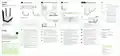
ZYXEL NBG6615 AC1200 MU MIMO Dual Band Wireless Gigabit Router User Guide




1
Hardware Installation
2
WiFi or Ethernet Cable Connection
3
Initial Setup
Optional WiFi Connection via WPS
LEDs
White -
White -
On - System is ready
3A
NBG6615
AC1200 MU-MIMO Dual-Band Wireless
Gigabit Router
4
Off - Power off
Power
Blinking - Upgrading firmware, restoring
1
configurations, rebooting system
On - An IP connection is available but
there is no traffic
User Name : admin
Password : 1234
(default)
Internet
Off - IP connection is not available
Blinking - Transmitting/receiving traffic
WPS ON
WAN
DC IN
WiFi
On - WLAN interface is enabled
Off - WLAN interface is disabled
Blinking - Transmitting/receiving data
White -
Zyxelxxxxxx
Zyxelxxxxx.speed
Zyxelxxxxxx
WLAN
2.4G
Password XXXXXXXX
Connect
Off - WPS process is inactive
Amber -
Blinking - WPS process in progress
2
Solid for 5 seconds - Successful WPS
NBG6615
connection
tlet
Or
2
On - WLAN interface is enabled
Off - WLAN interface is disabled
Blinking - Transmitting/receiving data
3B
White -
Check the LEDs
admin
User Name
Password
WiFi
WLAN
5G
Zyxelxxxxxx
1234
Connect
Off - WPS process is inactive
Amber -
Login
Wait for the LEDs to turn on.
Blinking - WPS process in progress
Solid for 5 seconds - Successful WPS
connection
LAN
Computer
WPS button can trigger both 2.4G and 5G
Quick Start Guide
- WPS can be used to connect on either a 2.4G WiFi
network or a 5G WiFi network
ENGLISH | DEUTSCH | FRANÇAIS | ITALIANO
ESPAÑOL
- If the WPS connection is successful, the
NBG6615’s amber light will stop blinking and turn
solid for 5 seconds.
WPS
Power On
2.4G On
5G On
Plug one end of an Ethernet cable into the blue WAN port of the
NBG6615. Plug the other end into a LAN port of a broadband
modem that has Internet access.
To set up a WiFi connection, use the WiFi name (SSID) and WiFi
password on the cover of this Quick Start Guide.
To set up a wired connection, connect a computer to a yellow LAN
port of the NBG6615.
To configure your Internet settings, open a web browser on your
name and 1234 as the password. Click Login and follow the
on-screen prompts to set up your Internet connection.
Öffnen Sie einen Webbrowser auf dem angeschlossenen
als den Anwendernamen und 1234 als das Passwort ein. Klicken
Sie auf Login (Anmelden). Folgen Sie den Anweisungen des
Assistenten, um Ihre Internetverbindung einzurichten.
Depuis l'ordinateur connecté, ouvrez un navigateur Web et
et 1234 comme mot de passe. Cliquez sur Login (Ouvrir une
session). Suivez les instructions de l'assistant pour installer votre
connexion Internet.
Press the WPS button on the NBG6615’s front panel for about 2
seconds to activate the discovery of new devices.
1
3A
3B
4
4
1
2
1
EN
DE
FR
EN
DE
EN
EN
DE
Support Information
Within 2 minutes, push the WPS button on the hardware or screen of
your wireless device.
France
North America
USA
Use the included power adaptor to connect the NBG6615's power
jack to a power outlet.
2
1
DE
FR
IT
Drücken Sie die WPS-Taste an der Vorderseite des NBG6615 ca. 2
Sekunden lang, um die Erkennung neuer Geräte zu aktivieren.
3A Suchen Sie mit iOS und anderen drahtlosen Geräten nach dem
WLAN-Namen (SSID) und geben Sie das WLAN-Passwort ein.
+ 1 800 255 4101
+33 (0) 892 692 610
Schließen Sie ein Breitbandmodem oder Router mit
Internetzugang über ein. Ethernetkabel an den blauen WAN Port
des NBG6615 an.
3B
Schließen Sie einen Computer an einen gelben LAN Port des
NBG6615 an.
Drücken Sie innerhalb von 2 Minuten die WPS-Taste an der Hardware
oder dem Bildschirm Ihres drahtlosen Geräts.
2
1
UK
Italy
FR
IT
+ 39 011 2308000
3A
Pour les terminaux sans fil, trouvez le nom du réseau WiFi (SSID)
et saisissez le mot de passe.
Appuyez sur le bouton WPS sur le panneau avant du NBG6615
pendant environ 2 secondes pour activer la découverte de nouveaux
appareils.
+ 44 (0) 118 912 1700
FR
Verwenden Sie das mitgelieferte Netzteil, um den Netzstecker des
NBG6615 an eine Steckdose anzuschließen.
2
1
4
3B
3A
Connectez un ordinateur à l'un des ports LAN jaunes du NBG6615.
Per iOS e altri dispositivi wireless, trova il nome WiFi (SSID) e
immetti la password WiFi.
Branchez un modem ou un routeur haut debit, connecté à
internet, sur le port WAN bleu du NBG6615 à l'aide d'un câble
Ethernet.
Dans les 2 minutes qui suivent, appuyez sur le bouton WPS sur le
matériel ou l'écran de votre appareil sans fil.
2
1
Germany
Spain
+ 34 911 792 100
+ 49 (0) 2405 69 09 69
3B
Premere il pulsante WPS sul pannello frontale dell'unità NBG6615 per
circa 2 secondi per attivare la ricerca di nuovi dispositivi.
Collegare un computer a una porta LAN gialla dell'NBG6615.
IT
Utilisez l'adaptateur d'alimentation inclus pour connecter la prise
d'alimentation à une prise de courant.
2
Dal computer collegato, aprire un browser e immettere l'indirizzo
come password. Fare clic su Login (Accesso).Seguire le Istruzioni
della procedura guidata per configurare la connessione a
Internet.
4
4
ES 3A Para iOS y otros dispositivos inalámbricos, busque el nombre WiFi
2
Entro 2 minuti, premere il pulsante WPS sull'hardware o sullo schermo
del dispositivo wireless.
(SSID) y escriba la contraseña WiFi.
Collegare un modem a banda larga o router dotato di accesso a
Internet alla porta WAN blu dell'NBG6615 con un cavo Ethernet.
Utilizzare l'alimentatore fornito a corredo per collegare la presa di
alimentazione a una presa della corrente.
1
IT
3B
Conecte un equipo a un puerto LAN amarillo del NBG6615.
Presione el botón WPS en el panel frontal del NBG6615 durante
aproximadamente 2 segundos para activar la detección de nuevos
dispositivos.
1
ES
2
En el equipo conectado, abra un explorador web y escriba
como contraseña. Haga clic en Login (Entrar). Siga las indica-
ciones del asistente para configurar la conexión a Internet.
ES
2
En 2 minutos, presione el botón WPS en el hardware o la pantalla de
su dispositivo inalámbrico.
Conecte un módem o router de banda ancha con acceso a
Internet al puerto WAN azul del NBG6615 con un cable Ethernet.
Utilice el adaptador de alimentación incluido para conectar el
enchufe de alimentación a una toma de corriente.
1
ES
for more information, including customer
support and safety warnings.
2
EU Importer
Zyxel Communications A/S
Gladsaxevej 378, 2. th. 2860 Søborg, Denmark
US Importer
Zyxel Communications, Inc
1130 North Miller Street Anaheim, CA 92806-2001
Copyright © 2018 Zyxel Communications Corp. All Rights Reserved.


| General | Details |
|---|---|
| Name | ZYXEL NBG6615 AC1200 MU MIMO Dual Band Wireless Gigabit Router User Guide |
| Make | ZYXEL |
| Language | English |
| Filetype | PDF (Download) |
| File size | 0.95 MB |
 (1 votes, average: 5.00 out of 5)
 Loading...
If you have any questions regarding ZYXEL NBG6615 AC1200 MU MIMO Dual Band Wireless Gigabit Router User Guide, please ask here and describe the problem in detail.

ZYXEL SCR 50AXE Secure Cloud-Managed Router with AXE5400 Tri-Band Wifi 6E User Guide

ZYXEL USG LITE 60AX Security Router User Guide

Zyxel Nebula FWA510 5G LTE Modem Router User Guide

ZYXEL NR2301 NR Portable Router User Guide

ZYXEL NR7302,NR7303 5G NR Outdoor Router Instruction Manual

ZYXEL NBG7510 Dual Band WiFi 6 AX1800 Router User Guide

ZYXEL NR5103EV2 5G NR Router User Guide

ZYXEL EX5601 Hyperhub Router User Guide

ZYXEL 1WSM20 Multy M1 Router Instructions

ZYXEL LTE5388-M804 4G LTE-A Pro Router User Guide


ASUS RT-AX82U Dual Band Wi-Fi Router User Guide

SEALEY CP20VTR 20V SV20 Series Cordless Trimming Router Instructions

cisco RV340 Router User Guide

TP-Link Archer BE800 BE19000 Tri-Band Wi-Fi 7 Router Installation Guide

msi RadiX AX6600 WiFi 6 Tri-Band Gaming Router User Guide

PRISMXR P1411 Streaming Link Air Bridge WiFi6 Router User Guide

SENWA 4G LTE CPE Router User Guide

LINOVISION IOT-R32W 4G LTE Cat4 Cellular Router Owner’s Manual

KMC CONTROLS BAC-5051AE BACnet Router Owner’s Manual

MERCUSYS MR62X Wireless Router Installation Guide