×
- 1. Quick Start Guide (Router → Awe-5310 → Awe-5510 → Arista Networks)
- 2. Quick Start Guide: Router
- 3. Chapter 1: Overview (Chapter 2: Specifications → Chapter 3: Preparation → Chapter 4: Mounting The Router → Chapter 5: Led Status Indicators → Chapter 6: Parts List → Chapter 7: Front Panel)
- 4. Overview (Scope → Intended Audience → Receiving And Inspecting The Equipment → Installation Process → Safety Information → Obtaining Technical Assistance)
- 5. Select And Prepare The Installation Site. (Assemble The Installation Tools Listed. → Attach The Mounting Brackets And Install The Router In An Equipment Rack. → Connect The Router To The Power Source And Network Devices. → Configure The Router. → Safety Information → Obtaining Technical Assistance)
- 6. Preparation (Site Selection → Tools And Parts Required For Installation → Electrostatic Discharge (esd) Precautions)
- 7. Electrostatic Discharge (esd) Precautions
- 8. Removing The Mounting Bracket From The Chassis (Two-post Rack Mount (optional) → Attaching Mounting Brackets To The Chassis)
- 9. Mounting The Router (Inserting The Router Into The Rack)
- 10. Led Status Indicators (Cloud Connect Status Led → Fan Status Led → Power Supply Status Led)
- 11. Parts List (Default Accessories → Optional Accessories → Sku And Product Details)
- 12. Sku And Product Details (Product Description)
- 13. Front Panel (Awe-5310)
- 14. Awe-5510 (System Status Leds → Usb Port Type-a → Lcd Panel → Lcd Upper Button → Lcd Lower Button → X10g Sfp+ Ports)
- 15. Chapter 8 (Rear Panel → Awe-5310)
- 16. Awe-5510 Rear Panel (Fan Modules → Power Supply → Earth Grounding Point → Fan Status Led)
- 17. Regulatory Model Numbers (Table 7: Rmns)
- 18. Appendix A (Emc Class A Notices And Warnings → Traditional Chinese Class A Emc Statement (taiwan) → Federal Communication Commission Interference Statement → Radiation Exposure Statement → Canada Statement)
- 19. Radiation Exposure Statement (Class A (korean) Statement → Traditional Chinese Statement → Brazil Statement → Mexico Statement → Class A Notice For Eu)
- 20. Emc Class A Notices And Warnings (Declaration Of Conformity → Vcci Class A Warning For Japan)
×
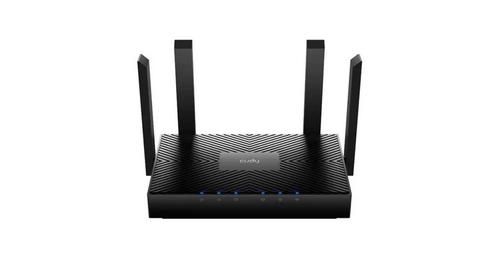
ARISTA AWE-5510 Wifi Router User Guide
| General | Details |
|---|---|
| Name | ARISTA AWE-5510 Wifi Router User Guide |
| Make | ARISTA |
| Language | English |
| Filetype | PDF (Download) |
| File size | 0.33 MB |
If you have any questions regarding ARISTA AWE-5510 Wifi Router User Guide, please ask here and describe the problem in detail.

ARISTA 7220R Series Enterprise WAN Router Instruction Manual


Cudy WR3000 AX3000 Wi-Fi 6 Mesh Router User Guide

SEALEY CP20VTR Cordless Trimming Router Instruction Manual

TP-Link AXE7800 Tri-Band Wi-Fi 6E Router Installation Guide

LINOVISION IOT-R32W Rugged and Versatile Cellular Router Instructions

PROSCEND 850G-6PI 6 Port GbE Managed PoE Switch 5G Cellular Router Installation Guide

TP-Link AX1800 Wireless Router User Manual

Quamtum HS2 HotSpot Wireless Portable Router User Manual

LINOVISION IOT-R32W Unlocked 4G LTE Router User Manual

CNCU E550 EasyRoute CNC Router Instructions

TP-Link AX5400 Multi Gigabit Wi-Fi 6 Router Installation Guide
Table of Contents
- 1. Quick Start Guide - Router →
- 2. Quick Start Guide: Router →
- 3. Chapter 1: Overview - Chapter 2: Specifications →
- 4. Overview - Scope →
- 5. Select And Prepare The Installation Site. - Assemble The Ins... →
- 6. Preparation - Site Selection →
- 7. Electrostatic Discharge (esd) Precautions →
- 8. Removing The Mounting Bracket From The Chassis - Two-post Ra... →
- 9. Mounting The Router - Inserting The Router Into The Rack →
- 10. Led Status Indicators - Cloud Connect Status Led →
- 11. Parts List - Default Accessories →
- 12. Sku And Product Details - Product Description →
- 13. Front Panel - Awe-5310 →
- 14. Awe-5510 - System Status Leds →
- 15. Chapter 8 - Rear Panel →
- 16. Awe-5510 Rear Panel - Fan Modules →
- 17. Regulatory Model Numbers - Table 7: Rmns →
- 18. Appendix A - Emc Class A Notices And Warnings →
- 19. Radiation Exposure Statement - Class A (korean) Statement →
- 20. Emc Class A Notices And Warnings - Declaration Of Conformity →