
ASUS AXE7800 ZenWiFi Tri Band WiFi Router User Guide
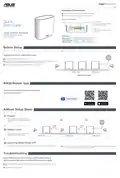


Relocation
THE BEST PERFORMANCE
Locate the AiMesh router and nodes at the best place.
ZenWiFi AXE7800 LED indications
Solid blue:
Your ZenWiFi AXE7800 is ready for setup.
Solid white:
Your ZenWiFi AXE7800 is online and works well.
Solid yellow:
The signal between your ZenWiFi AXE7800 router and the node is weak.
NOTES: To minimize interference, keep the routers away from devices like cordless phones, Bluetooth devices and
Solid red:
microwave ovens.
Your ZenWiFi AXE7800 router has no Internet connection. / Your node is disconnected from the router.
We recommend that you place the routers in an open or spacious location.
FAQ
FREQUENTLY ASKED QUESTIONS
Does the AiMesh router support Access Point mode?
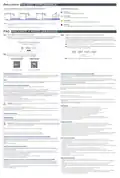
Could I setup wired connection between AiMesh routers (Ethernet backhaul)?
Q2:
Q1:
A: Yes. You can choose to set the AiMesh router as router mode or access point mode. Please go to web
A: Yes. AiMesh system supports both wireless and wired connection between AiMesh router and
nodes to maximize throughput and stability. AiMesh analyzes the wireless signal strength for each
frequency band available, and then determines automatically whether a wireless or wired connection
is best to serve as the inter-router connection backbone.
1
Follow the setup steps to establish a connection between the AiMesh router and nodes via WiFi first.
Place the nodes in the ideal locations for best coverage. Run an Ethernet cable from the LAN port of the
AiMesh router to the WAN port of AiMesh nodes.
2
Modem
Where can I find more information about Mesh WiFi system?
Q3:
LAN-WAN
LAN-WAN
3
AiMesh system will auto-select the best path for data transmission, whether wired or wireless.
Service and Support
Video Tutorials
ASUS Recycling/Takeback Services
Informations concernant l’exposition aux fréquences radio (RF)
ASUS recycling and takeback programs come from our commitment to the highest standards for protecting our environment. We believe in
providing solutions for you to be able to responsibly recycle our products, batteries, other components, as well as the packaging materials.
La puissance de sortie émise par cet appareil sans fil est inférieure à la limite d’exposition aux fréquences radio d’Innovation, Sciences
et Développement économique du Canada (ISED). Utilisez l’appareil sans fil de façon à minimiser les contacts humains lors d’un
fonctionnement normal.
Cet équipement doit être installé et utilisé avec un minimum de 30 cm de distance entre la source de rayonnement et votre corps.
L’utilisation de cet appareil est autorisée au Canada. Pour consulter l’entrée correspondant à l’appareil dans la liste d’équipement radio (REL
- Radio Equipment List) d’Innovation, Sciences et Développement économique du Canada, rendez-vous sur :
eic/site/smt-gst.nsf/eng/sf08792.html
REACH
Complying with the REACH (Registration, Evaluation, Authorisation, and Restriction of Chemicals) regulatory framework, we published the
Federal Communications Commission Statement
This device complies with Part 15 of the FCC Rules. Operation is subject to the following two conditions:
For product available in the US/Canada market, only channel 1~11 can be operated. Selection of other channels is not possible.
•
•
This device may not cause harmful interference.
This device must accept any interference received, including interference that may cause undesired operation.
Pour les produits disponibles aux États-Unis et au Canada, seuls les canaux 1 à 11 peuvent être utilisés. La sélection d’autres canaux n’est
pas possible.
This equipment has been tested and found to comply with the limits for a class B digital device, pursuant to part 15 of the FCC Rules. These
limits are designed to provide reasonable protection against harmful interference in a residential installation.
Devices shall not be used for control of or communications with unmanned aircraft systems.
This equipment generates, uses and can radiate radio frequency energy and, if not installed and used in accordance with the instructions,
may cause harmful interference to radio communications. However, there is no guarantee that interference will not occur in a particular
installation. If this equipment does cause harmful interference to radio or television reception, which can be determined by turning the
equipment off and on, the user is encouraged to try to correct the interference by one or more of the following measures:
Les appareils ne doivent pas être utilisés pour contrôler ou communiquer avec des systèmes d'aéronefs sans pilote.
Operation shall be limited to indoor use only.
Le fonctionnement doit être limité à une utilisation en intérieur uniquement.
•
•
•
•
Reorient or relocate the receiving antenna.
Increase the separation between the equipment and receiver.
Connect the equipment into an outlet on a circuit different from that to which the receiver is connected.
Consult the dealer or an experienced radio/TV technician for help.
Operation on oil platforms, automobiles, trains, maritime vessels and aircraft shall be prohibited except for on large aircraft flying above
3,048 m (10,000 ft).
L'exploitation sur les plates-formes pétrolières, les automobiles, les trains, les navires maritimes et les aéronefs est interdite, sauf sur les gros
aéronefs volant au-dessus de 3,048 m (10,000 pi).
WARNING! Any changes or modifications not expressly approved by the party responsible for compliance could void the user’s
authority to operate the equipment.
Safety Notices
FCC regulations restrict the operation of this device to indoor use only.
The operation of this device is prohibited on oil platforms, cars, trains, boats, and aircraft, except that operation of this device is permitted
in large aircraft while flying above 10,000 feet.
•
•
•
•
•
•
•
•
•
•
Use this product in environments with ambient temperatures between 0°C(32°F) and 40°C(104°F).
Refer to the rating label on the bottom of your product and ensure your power adapter complies with this rating.
DO NOT place on uneven or unstable work surfaces. Seek servicing if the casing has been damaged.
DO NOT place or drop objects on top and do not shove any foreign objects into the product.
DO NOT expose to or use near liquids, rain, or moisture. DO NOT use the modem during electrical storms.
DO NOT cover the vents on the product to prevent the system from getting overheated.
DO NOT use damaged power cords, accessories, or other peripherals.
If the Adapter is broken, do not try to fix it by yourself. Contact a qualified service technician or your retailer.
To prevent electrical shock hazard, disconnect the power cable from the electrical outlet before relocating the system.
DO NOT mount this equipment higher than 2 meters.
Operation of transmitters in the 5.925-7.125 GHz band is prohibited for control of or Communications with unmanned aircraft systems.
Prohibition of Co-location
This device and its antenna(s) must not be co-located or operating in conjunction with any other antenna or transmitter.
IMPORTANT NOTE:
Radiation Exposure Statement: This equipment complies with FCC radiation exposure limits set forth for an uncontrolled environment.
End users must follow the specific operating instructions for satisfying RF exposure compliance. To maintain compliance with FCC exposure
compliance requirement, please follow operation instruction as documented in this manual.
Consignes de sécurité
WARNING! This equipment must be installed and operated in accordance with provided instructions and the antenna(s) used for
this transmitter must be installed to provide a separation distance of at least 50 cm from all persons and must not be co-located
or operating in conjunction with any other antenna or transmitter.
•
•
•
•
•
•
•
•
•
•
Utilisez ce produit dans un environnement dont la température ambiante est comprise entre 0˚C (32°F) et 40˚C (104°F).
Référez-vous à l’étiquette située au dessous du produit pour vérifier que l’adaptateur secteur répond aux exigences de tension.
NE PAS placer sur une surface irrégulière ou instable. Contactez le service après-vente si le châssis a été endommagé.
NE PAS placer, faire tomber ou insérer d’objets sur/dans le produit.
NE PAS exposer l’appareil à la pluie ou à l’humidité, tenez-le à distance des liquides. NE PAS utiliser le modem lors d’un orage.
NE PAS bloquer les ouvertures destinées à la ventilation du système pour éviter que celui-ci ne surchauffe.
NE PAS utiliser de cordons d’alimentation, d’accessoires ou autres périphériques endommagés.
Si l’adaptateur est endommagé, n’essayez pas de le réparer vous-même. Contactez un technicien électrique qualifié ou votre revendeur.
Pour éviter tout risque de choc électrique, débranchez le câble d’alimentation de la prise électrique avant de toucher au système.
Ne placez pas cet appareil à une hauteur supérieure à 2 mètres.
FCC:
Please note that the separation distance should be changed to 247cm when the USB port is used.
IC:
Please note that the separation distance should be changed to 67cm when the USB port is used.
Veuillez noter que la distance de séparation doit être modifiée à 67 cm lorsque le port USB est utilisé.
Compliance Statement of Innovation, Science and Economic Development Canada (ISED)
This device complies with Innovation, Science and Economic Development Canada licence exempt RSS standard(s). Operation is subject
to the following two conditions: (1) this device may not cause interference, and (2) this device must accept any interference, including
interference that may cause undesired operation of the device.
Información de seguridad
•
•
Use este producto en entornos sometidos a una temperatura ambiente comprendida entre 0 ˚C (32 ˚F) y 40 ˚C (104 ˚F).
Consulte la etiqueta de valores nominales situada en la parte inferior del producto y asegúrese de que su adaptador de alimentación
cumple con dichos valores.
Operation in the band 5150–5250 MHz is only for indoor use to reduce the potential for harmful interference to co-channel mobile satellite
systems.
CAN ICES-003(B)/NMB-003(B)
•
•
•
NO coloque el equipo sobre una superficie irregular o inestable. Solicite asistencia técnica si la carcasa resulta dañada.
NO coloque ni deje caer objetos en la parte superior del producto y no introduzca objetos extraños dentro de él.
NO exponga el equipo a líquidos, lluvia o humedad, ni lo use cerca de ninguno de tales elementos. NO use el módem durante tormentas
eléctricas.
Radio Frequency (RF) Exposure Information
The radiated output power of the ASUS Wireless Device is below the Innovation, Science and Economic Development Canada radio
frequency exposure limits. The ASUS Wireless Device should be used in such a manner such that the potential for human contact during
normal operation is minimized.
•
•
•
Para evitar que el sistema se sobrecaliente, no cubra las ranuras de ventilación del producto.
NO cubra los orificios de ventilación del equipo de sobremesa para evitar que el sistema se caliente en exceso.
No intente reparar la fuente de alimentación personalmente si se avería. Póngase en contacto con un técnico de mantenimiento
autorizado o con su distribuidor.
This equipment should be installed and operated with a minimum distance of 30 cm between the radiator any part of your body.
This device has been certified for use in Canada. Status of the listing in the Innovation, Science and Economic Development Canada’s REL
(Radio Equipment List) can be found at the following web address:
Additional Canadian information on RF exposure also can be found at the following web:
•
•
A fin de evitar posibles descargas eléctricas, desconecte el cable de alimentación de la toma de suministro eléctrico antes de cambiar la
posición del sistema.
NO monte este equipo a una altura superior a 2 metros.
Informações de segurança
•
•
Utilize este equipamento em ambientes com temperaturas entre 0˚C (32˚F) e 40˚C (104˚F).
Verifique a etiqueta relativa à tensão na parte inferior do seu dispositivo e assegure-se de que o seu transformador corresponde a essa
tensão.
Déclaration de conformité de Innovation, Sciences et Développement économique Canada (ISED)
Le présent appareil est conforme aux CNR d’Innovation, Sciences et Développement économique Canada applicables aux appareils radio
exempts de licence. L’exploitation est autorisée aux deux conditions suivantes : (1) l’appareil ne doit pas produire de brouillage, et (2)
l’utilisateur de l’appareil doit accepter tout brouillage radioélectrique subi, même si le brouillage est susceptible d’en compromettre le
fonctionnement.
•
•
•
NÃO coloque o computador em superfícies irregulares ou instáveis. Envie para reparação se a caixa se encontrar danificada.
NÃO coloque nem deixe cair objetos em cima do aparelho e não introduza quaisquer objetos estranhos no produto.
NÃO exponha o equipamento nem o utilize próximo de líquidos, chuva ou humidade. NÃO utilize o modem durante tempestades
eléctricas.
La bande 5150 – 5250 MHz est réservée uniquement pour une utilisation à l’intérieur afin de réduire les risques de brouillage préjudiciable
aux systèmes de satellites mobiles utilisant les mêmes canaux.
•
•
•
•
•
NÃO tape os orifícios de ventilação do produto para impedir o sobreaquecimento do sistema.
NÃO utilize cabos de alimentação, acessórios ou outros periféricos danificados.
Se a fonte de alimentação estiver avariada, não tente repará-la por si próprio. Contacte um técnico qualificado ou o seu revendedor.
Para evitar o risco de choque eléctrico, desligue o cabo de alimentação da tomada eléctrica antes de deslocar o sistema.
NÃO instale este equipamento a uma altura superior a 2 metros.
CAN ICES-003(B)/NMB-003(B)

| General | Details |
|---|---|
| Name | ASUS AXE7800 ZenWiFi Tri Band WiFi Router User Guide |
| Make | Asus |
| Language | English |
| Filetype | PDF (Download) |
| File size | 0.61 MB |
 (1 votes, average: 5.00 out of 5)
 Loading...
If you have any questions regarding ASUS AXE7800 ZenWiFi Tri Band WiFi Router User Guide, please ask here and describe the problem in detail.

ASUS RT-AC86U AC2900 WiFi Gaming Router User Guide

ASUS AC1750 WiFi Dual Band Wireless Internet Router User Guide

ASUS TUF-AX5400 Dual Band WiFi 6 Router User Guide

ASUS ET12 ZenWiFi Pro AXE11000 Tri Band Router User Guide

ASUS RT-AX82U V2 AX5400 Dual Band WiFi Router User Guide

ASUS TUF-AX4200 Dual Band WiFi Router User Guide

ASUS RT-N10U 150 mbps Wireless Router Instructions

ASUS RT-BE96U Tri Band WiFi Router User Guide

ASUS GT-AX6000 Dual Band WiFi 6 Extendable Gaming Router User Guide

ASUS RT-BE88U Dual Band WiFi Router User Guide


Tenda 4G185 4G/3G Portable Mobile Hotspot Router User Guide

Westermo Merlin 4100 Series Cellular Router User Guide

Cudy WR1200 Dual Band Wi-Fi Router Installation Guide

HUAWEI 5G CPE Pro 2 WiFi 6 Router User Guide

MERCUSYS MR62X Wireless Router Installation Guide

TP-Link VR2100v Wireless Mu Mimo VDSL ADSL Modem Router Instruction Manual

TP-Link Archer NX600 5G CPE Router Installation Guide

ASUS EBG19P Gigabit PoE Plus VPN Wired Router User Guide

FALCON 150 Mbps 4G LTE Portable Router User Manual

Cudy WR1300 Gigabit Dual Band Wi-Fi Router Installation Guide