
×
- 1. Rt-ax89x Dual-band Wi-fi Router (Quick Start Guide)
- 2. English (Български → Français Canadien → Hrvatski → Čeština → Dansk → Nederlands)
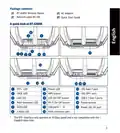
- 3. Package Contents (A Quick Look At Rt-ax89x → Sfp+ Led → Power Led → Wps Button → G Base T Port → G Sfp+ Port)
- 4. Position Your Wireless Router (Preparing Your Modem)
- 5. Power On Your Cable/dsl Modem. (Setting Up Your Rt-ax89x → Wired Connection → Wireless Connection)
- 6. Connect To The Network With Ssid Shown On The Product Label On The Back Side Of The Router. For Better Network Security, Change To A Unique …
- 7. Бърз Преглед (Адаптер За Променлив Ток → Ръководство За Бърз Старт → Мрежов Кабел (rj-45) → Индикатор На Захранването → Порт 10g Base T → Usb 3.1 Gen 1 Портове)
- 8. Разположение На Безжичния Рутер (Технически Характеристики → Подготовка На Модема)
- 9. Включете Вашия Кабел/dsl Модема (Настройка На Rt-ax89x Рутер → Кабелна Връзка → Безжична Връзка)
- 10. Свържете Се Към На Мрежата (ssid) (Настройка На Уеб Интерфейс → Настройка На Приложението → Faq → Запаметяване На Безжичните Настройки На Вашия Рутер)
- 11. Contenu De La Boîte (Aperçu Rapide De Votre Routeur Rt-ax89x → Voyant Sfp+ → Voyant Réseau Local (lan) → Port 10g Base-t → Ports Usb 3.1 Gen1 → Port Réseau Étendu (wan) (internet))
- 12. Placez Le Routeur Wi-fi Dans Un Emplacement Central Pour Obtenir Une Couverture Wi-fi Optimale. (Mettez Toujours Le Routeur À Jour Dans La Version De Firmware La Plus Récente. → Pour Assurer Le Meilleur Signal Wi-fi, Orientez Les Huit Antennes Externes Comme Illustré Sur Le Schéma Ci-dessous. → Préparer Votre Modem)
- 13. Configurer Votre Rt-ax89x (Connexion Filaire → Connexion Wi-fi)
- 14. Connectez-vous Au Réseau Dont Le Nom (ssid) Est Affiché Sur L'étiquette Du Produit Située À L'arrière Du Routeur. Pour Garantir Une Plus Gra… (Configuration Via L'interface De Gestion → Configuration Via L'application → Se Rappeler Des Paramètres De Votre Routeur Wi-fi → Faq)
- 15. Sadržaj (Brzi Pregled Uređaja Rt-ax89x → Adapter Izmjeničnog Napajanja → Vodič Za Brzi Početak Rada → Mrežni Kabel (rj-45) → Usb 3.1 Gen 1 Priključci → Wan (internet) Priključak)
- 16. Postavljanje Bežičnog Usmjerivača (Kako Biste Ostvarili Najbolji Prijenos Signala → Tehnički Podaci → Pripremanje Modema)
- 17. Povežite Modem Na Usmjerivač (Postavljanje Uređaja Rt-ax89x → Žična Veza → Bežična Veza)
- 18. Asus Router (Podešavanje Web Gui → Podešavanje Aplikacije → Čpp → Pamćenje Postavki Bežičnog Usmjerivača)
- 19. Obsah Krabice (Stručný Popis Přístroje Rt-ax89x → Kontrolka Sfp+ → Kontrolka 10ge → Port 10g Base T → Port Wan (internet))
- 20. Umístění Směrovače (Udržujte Zařízení Mimo Kovové Překážky A Mimo Přímé Sluneční Záření. → Vždy Zaktualizujte Na Nejnovější Firmware. → Technické Údaje: → Příprava Modemu)
- 21. Nastavení Zařízení Rt-ax89x (Drátové Připojení → Bezdrátové Připojení)
- 22. Připojte Se K Názvu Sítě (ssid) (Nastavení Přes Webové Grafické Uživatelské Rozhraní → Nastavení Pomocí Aplikace → Zapamatování Nastavení Bezdrátového Směrovače → Faq (odpovědi Na Časté Dotazy))
- 23. Pakkens Indhold (Et Hurtigt Kik På → Sfp+ Led → Ge Led → Lan Led → Strøm Led → Wps Knap)
- 24. Placering Af Din Router (Forberedelse Af Dit Modem)
- 25. Sådan Indstilles Din Router (Kableforbundet Forbindelse → Trådløs Forbindelse)
- 26. Opret Forbindelse Til Netværksnavnet (ssid) (Opsætning Via Webgrænsefladen → Opsætning Via Appen → Sådan Husker Du Dine Trådløse Routerindstillinger → Ofte Stillede Spørgsmål (faq))
- 27. Inhoud Verpakking (Een Snelle Blik → Sfp+ Led → Voedings-led → G Baset Poort → G Sfp+ Poort → Wps-knop → Lan-led)
- 28. Uw Draadloze Router Plaatsen (Uw Modem Voorbereiden)
- 29. De Router Installeren (Bekabelde Aansluiting → Draadloze Verbinding)
- 30. Maak Verbinding Met De Netwerknaam (ssid) (Instelling Grafische Webinterface → App-instelling → Veelgestelde Vragen (faqs) → Onthoud Uw Draadloze Instellingen)
- 31. Pakendi Sisu (Kiire Ülevaade Ruuterile Rt-ax89x → Sfp+ Led-märgutuli → Ge Led-märgutuli → Lan Led Indikaatorid → Toite Led Indikaator → Wan-i Led Indikaator)
- 32. Traadita Ruuteri Paigutamine (Traadita Signaali Parimaks Edastuseks → Värskendage Süsteemi Alati Uusima Püsivaraga → Parima Kvaliteediga Traadita Signaali Tagamiseks → Teie Modemi Ettevalmistus)
- 33. Lülitage Kaabel/dsl-modem Sisse (Ruuteri Häälestamine → Traadiga Ühendus → Traadita Ühendus)
- 34. Looge Ühendus Võrguga, Mille Nimi (ssid) On Toodud Ruuteri Tagaküljel Asuval Tootesildil. Võrgu Turvalisuse Suurendamiseks Valige Kordumatu … (Veebis Saadaolev Gui → Rakenduse Seadistamine → Traadita Ruuteri Sätete Meeles Pidamine → Korduma Kippuvad Küsimused (kkk))
- 35. Pakkauksen Sisältö (Katsaus Rt-ax89x-sovellukseen → Sfp+ Led → Virran Led-valo → Wps-painike → G Base T -portti → G Sfp+ -portti)
- 36. Reitittimen Sijoittaminen (Modeemin Valmistelu → Tekniset Tiedot)
- 37. Rt-ax89x:n Asettaminen (Langallinen Yhteys → Langaton Yhteys → Graafinen Web-käyttöliittymä)
- 38. Koble Til Nettverksnavnet (ssid) Som Står Etiketten På Baksiden (Asus Router → Graafisen Web-käyttöliittymän Asetus → Sovelluksen Asetus → Langattoman Reitittimen Asetusten Muistaminen → Usein Kysyttyä (faq))
- 39. Verpackungsinhalt (Ihr Rt-ax89x Auf Einen Blick → Sfp+ Led → Betriebs-led → Wps-taste → G Base T-anschluss → G Sfp+ Anschluss)
- 40. Platzieren Sie Ihren Wlan-router (Ihr Modem Vorbereiten)
- 41. Einrichten Ihres Rt-ax89x (Kabelverbindung → Drahtlosverbindung)
- 42. Einrichtung Über Die Web-benutzeroberfläche (Einrichtung Über Die App → Notieren Der Wlan-einstellungen Ihres Routers → Faq (häufig Gestellte Fragen))
- 43. Contenido Del Paquete (Gyors Üzembe Helyezési Útmutató → Led Sfp+ → Led 10ge → G Base T Port → G Sfp+ Port → Port Wan (internet))
- 44. A Router Elhelyezése (A Vezeték Nélküli Router És A Hálózati Eszközök Közötti Legjobb Vezeték Nélküli Jelátvitel → A Firmware-t Mindig A Legújabb Verzióra Frissítse. → Műszaki Adatok → A Modem Előkészítése)
- 45. Kapcsolja Be A Kábel-/dsl-modemet (Ellenőrizze A Kábel-/dsl-modem Led Jelzőfényeit → Csatlakoztassa A Modemet A Routerhez → Az Beállítása → Vezetékes Kapcsolat → Vezeték Nélküli Kapcsolat → Állítson Be Jelszót A Routerhez)
- 46. Csatlakozzon A Router Hátlapján Lévő Címkén Feltüntetett Hálózathoz (ssid) (Beállítás A Webes Grafikus Felhasználói Felületen → Beállítás Az Alkalmazással → Gyakran Ismételt Kérdések (gyik) → A Vezeték Nélküli Router Beállításainak Megjegyzése)
- 47. Contenuto Della Confezione (Aspetto Del Vostro Rt-ax89x → Led Alimentazione → Porte Usb 3.1 Gen 1 → Pulsante Di Accensione/spegnimento → Porta Internet (wan))
- 48. Posizionamento Del Vostro Router Wireless (Aggiornate Sempre All'ultimo Firmware Disponibile → Per Assicurarvi La Migliore Qualità Del Segnale Wireless Orientate Le Otto Antenne Non Rimovibili → Preparazione Del Modem)
- 49. Collegate Il Vostro Modem Al Router (Installazione Del Vostro Rt-ax89x → Connessione Cablata → Connessione Senza Fili)
- 50. Configurazione Tramite Interfaccia Web Gui (Configurazione Tramite App → Asus Router → Prendete Nota Delle Impostazioni Del Router Wireless → Faq)
- 51. Innhold I Pakken (En Snartitt → Sfp+-led → Strøm Led → G Base T-port → Usb 3.1 Gen 1-porter → Wan (internett) Port)
- 52. Plassere Ruteren (Forbereder Modemet)
- 53. Slå På Kabel-/dsl-modemet (Sette Opp Rt-ax89x → Kablet Tilkobling → Trådløs Tilkobling)
- 54. Koble Til Nettverksnavnet (ssid) (Oppsett Med Web-brukergrensesnitt → Oppsett Med App → Huske Innstillinger For Den Trådløse Ruteren → Spørsmål Og Svar)
- 55. Conteúdo Da Embalagem (Visão Geral Do Seu Rt-ax89x → Led Sfp+ → Porta 10g Base T → Porta 10g Sfp+ → Portas Usb 3.1 Gen 1 → Porta Wan (internet))
- 56. Colocação Do Router (Preparar O Modem → Especificações)
- 57. Configurar O Rt-ax89x (Ligação Com Fios → Ligação Sem Fios)
- 58. Configuração Com A Interface Web (Configuração Com A Aplicação → Memorizar As Definições Do Seu Router Sem Fios → Perguntas Frequentes)
- 59. Zawartość Opakowania (Szybki Przegląd Routera Rt-ax89x → Wskaźnik Led Sfp+ → Dioda Led Zasilania → Port 10g Base-t → Port Wan (internet))
- 60. Pozycjonowanie Routera (Przechowywanie → Temperatura Pracy → Wilgotność Działania → Przygotowanie Modemu)
- 61. Włączenie Modemu (Konfiguracja Rt-ax89x → Połączenie Przewodowe → Połączenie Bezprzewodowe)
- 62. Nawiąż Połączenie Z Siecią (Konfiguracja Przez Graficzny Interfejs Użytkownika (gui) Strony Sieci Web → Konfiguracja Przez Aplikację → Zapisanie Ustawień Routera Bezprzewodowego → Często Zadawane Pytania (faq))
- 63. Комплект Поставки (Быстрый Обзор Rt-ax89x → Индикатор Sfp+ → Индикатор 10ge → Индикатор Lan → Кнопка Wps → Порты Usb 3.1 Gen 1)
- 64. Расположение Беспроводного Роутера (Подготовка Модема)
- 65. Включите Кабельный / Dsl Модем (Настройка Rt-ax89x → Проводное Подключение → Беспроводное Подключение)
- 66. Подключитесь К Сети (Настройка Через Веб-интерфейс → Настройка Через Приложение → Запоминание Настроек Беспроводного Роутера → Faq)
- 67. Conteúdo Da Embalagem (Ghid Rapid De Pornire → O Privire Rapidă Asupra Dispozitivului Rt-ax89x → Led Sfp+ → Port 10g Base T → Port Wan (internet))
- 68. Poziţionarea Ruterului (Pregătirea Modemului)
- 69. Configurarea Dispozitivului Rt-ax89x (Conexiune Cu Fir → Conexiune Fără Fir)
- 70. Conectaţi-vă La Reţea (ssid) Afişat Pe Eticheta De Produs De Pe Partea Din Spate A Ruterului. Pentru O Securitate De Reţea Mai Bună, Modific…
- 71. Contenido Del Paquete (Un Vistazo Rápido A Su Rt-ax89x → Led Sfp+ → Led 10ge → Led Lan → Puerto 10g Base T → Puertos Usb 3.1 Gen 1)
- 72. Ubicar El Router Inalámbrico (Especificaciones → Preparar El Módem)
- 73. Encienda Su Módem De Cable O Dsl. (Compruebe Las Luces De Los Led Del Módem De Cable O Dls Para Asegurarse De Que La Conexión Está Activa. → Configurar El Rt-ax89x → Conexión Cableada → Conexión Inalámbrica)
- 74. Conexión Al Nombre De Red (ssid) (Configuración Mediante Gui Web → Configuración Mediante La App → Faq → Recuerde La Configuración Del Router Inalámbrico)
- 75. Sadržaj Paketa (Kratak Pregled Vašeg Rt-ax89x → Svetleća Dioda Za → Usb 3.1 Gen 1 Portovi → Wan (internet) → Prekidač Za Napajanje)
- 76. Postavljanje Vašeg Bežičnog Rutera (Za Najbolji Prenos Bežičnog Signala → Postavite Bežični Ruter U Centralni Prostor → Uvek Ažurirajte Na Najnoviji Firmver → Da Biste Obezbedili Najbolji Mogući Bežični Signal → Priprema Vašeg Modema)
- 77. Uključite Svoj Kabl/dsl Modem. (Podešavanje Vašeg Rt-ax89x → Povezivanje Kablom → Bežično Povezivanje)
- 78. Povežite Se Za Ime Mreže (ssid) Prikazano Na Etiketi Proizvoda Na Poleđini Rutera. Za Bolju Bezbednost Mreže, Pređite Na Jedinstveni Ssid I …
- 79. Vsebina Paketa (Hiter Pogled Na Vaš Rt-ax89x → Led-diode Vmesnika → Priključek 10g Base T → Gumb Za Wps → Vhodi Usb 3.1 Prve Generacije → Vhod Wan (internet))
- 80. Nastavitev Položaja Vašega Brezžičnega Usmerjevalnika (Postavite Brezžični Usmerjevalnik V Središčno Območje Za Najboljšo Brezžično Pokritost → Vedno Posodabljajte Na Najnovejšo Strojno Programsko Opremo → Tehnični Podatki → Prioprava Modema)
- 81. Vklopite Kabelski Modem/modem Dsl (Nastavitev Usmerjevalnika Rt-ax89x → Žična Povezava → Brezžična Povezava)
- 82. Vzpostavite Povezavo Z Omrežjem (Nastavitev S Spletnim Gui → Nastavitev Z Aplikacijo → Shranjevanje Nastavitev Brezžičnega Usmerjevalnika → Pogosto Zastavljena Vprašanja (faqs))
- 83. Förpackningens Innehåll (En Snabbtitt På Din Rt-ax89x → Sfp+ Led-indikator → Ge Led-indikator → Lan Led-indikator → Wan (internet) Led → Ghz Led)
- 84. Placera Din Router (Förbered Ditt Modem)
- 85. Anslut Ditt Modem Till Routern (Inställning Av Router → Kabelanslutning → Trådlös Anslutning)
- 86. Anslut Till Nätverkets Namn (ssid) (Inställning Av Webbanvändargränssnitt → App-inställning → Vanliga Frågor → Kom Ihåg Dina Trådlösa Routerinställningar)
- 87. Paket Içeriği (Rt-ax89x Cihazınıza Hızlı Bir Bakış → G Baz T Bağlantı Noktası → G Sfp+ Bağlantı Noktası → Usb 3.1 Gen 1 Bağlantı Noktası → Wan (internet) Bağlantı Noktaları → Wi-fi Açık/kapalı Düğmesi)
- 88. Yönlendiricinizi Yerleştirme (Kablosuz Yönlendirici Ve Yönlendiriciye Bağlı Ağ Aygıtları Arasında En Iyi Kablosuz Sinyal Aktarımı Için Aşağıdakileri Sağlayınız: → Modeminizi Hazırlama)
- 89. Kablo/dsl Modemi Açın (Bağlantının Etkin Olduğundan Emin Olmak → Rt-ax89x Aygıtınızı Kurma → Kablolu Bağlantı → Kablosuz Bağlantı)
- 90. Asus Router (Yönlendiriciyi Kurmak Için → Web Grafiksel Kullanıcı Arayüzü Kurulumu → Uygulama Kurulumu → Kablosuz Yönlendirici Ayarlarınızı Anımsama → Sık Sorulan Sorular (ssslar))
- 91. До Комплекту Входять (Швидкий Огляд → Адаптер Змінного Струму → Керівництво Для Початку Експлуатації → Порти Usb 3.1 Gen 1 → Порти Lan 1~8 → Порт Wan (internet))
- 92. Розташування Бездротового Маршрутизатора (Постійно Оновлюйте Первинне Пз → Технічні Характеристики → Підготовка Модема)
- 93. Підключіть До Електромережі Шнур Живлення/модем Dsl. (Налаштування Rt-ax89x → Дротове Підключення → Бездротове Підключення)
- 94. Підключіться До Мережевої Назви (ssid) (Налаштування Через Графічний Веб-інтерфейс → Налаштування Через Програму → Розповсюджені Питання → Завершуючи Налаштування Маршрутизатора, Запамятайте Бездротові Налаштування)
- 95. Asus Recycling/takeback Services (Reach → Federal Communications Commission Statement)
- 96. Prohibition Of Co-location (Radiation Exposure Statement → Compliance Statement Of Innovation, Science And Economic Development Canada → Radio Frequency (rf) Exposure Information)
- 97. Déclaration De Conformité De Innovation, Sciences Et Développement Économique Canada (ised) (Informations Concernant Lexposition Aux Fréquences Radio (rf) → Precautions For The Use Of The Device → Précautions Demploi De Lappareil)
- 98. Условия Эксплуатации (Температура Эксплуатации Устройства → Использование Несовместимого Или Несертифицированного Адаптера Питания → Утилизация Устройства → Данное Устройство Не Предназначено Для Детей → Cihazın Ayrıntılı Kurulum Rehberi)
- 99. Asustek Computer Inc. (Manufacturer → Authorised Representative In Europe → Authorised Distributors In Turkey)
- 100. Networks Global Hotline Information (Country/ Region → Hotline Number → Service Hours)
- 101. Networks Global Hotline Information (Country/ Region → Hotline Numbers → Service Hours → Asia-pacific → Americas)
- 102. Networks Global Hotline Information (Hotline Numbers → Service Hours → Middle East & Africa → Balkan Countries → Baltic Countries → Notes)
- 103. Ce Statement (Simplified Eu Declaration Of Conformity → Declaration Of Conformity For Ecodesign Directive 2009/125/ec → Safety Notices → All Operational Modes → The Frequency, Mode And The Maximum Transmitted Power In Eu)
- 104. Изявление Относно Ce (Опростена Декларация За Съответствие На Ес → Декларация За Съответствие За Директива За Екодизайна 2009/125/ео → Всички Режими На Работа → Бележки За Безопасност)
- 105. Ce Izjava (Izjava O Sukladnosti Za Direktivu O Ekodizajnu 2009/125/ez → Sigurnosne Napomene)
- 106. Prohlášení Ce (Zjednodušené Prohlášení O Shodě S Eu → Prohlášení O Shodě Se Směrnicí O Ekodesignu 2009/125/es → Všechny Provozní Režimy → Bezpečnostní Informace)
- 107. Ce-kinnitus (Vastavuse Kinnitus → Kõik Töörežiimid → Teave Sageduse, Režiimi Ja Maksimaalse Edastatava Võimsuse Kohta → Ohutusmärkused)
- 108. Ce-nyilatkozat (Eu-megfelelőségi Nyilatkozat → Megfelelőségi Nyilatkozat A Környezettudatos Tervezésről → Biztonsági Információ)
- 109. Oświadczenie Dotyczące Oznaczenia Ce (Deklaracja Zgodności Dotycząca Dyrektywy → Informacje Dotyczące Bezpieczeństwa)
- 110. Declarație De Conformitate Ue (Testarea Pentru Cerințele De Proiectare Ecologică → Informaţii Pentru Utilizarea În Condiţii De Siguranţă)
- 111. Ce Izjava (Eu Deklaracija O Saglasnosti → Deklaracija O Saglasnosti Za Ekodizajn Direktivu 2009/125/ec → Svi Radni Režimi → Frekvencija, Režim I Maksimalna Snaga Prenosa U Eu → Bezbednosna Obaveštenja)
- 112. Izjava Ce (Poenostavljena Izjava O Skladnosti Eu → Izjava O Skladnosti Za Direktivo O Okoljsko Primerni Zasnovi 2009/125/es → Varnostna Opozorila)
- 113. Ce Beyanı (Ab Uygunluk Bildirimi → Çevreye Duyarlı Tasarım → Güvenlik Bilgileri)
- 114. Ce-erklæring (Overensstemmelseserklæring For Miljøvenligt Design → Sikkerhedsinformation → Brug)
- 115. Ce-verklaring (Conformiteitsverklaring Voor Ecodesign Richtlijn 2009/125/eg → Alle Bedrijfsmodi → Veiligheidsinformatie)
- 116. Déclaration De Conformité De L'ue (Déclaration De Conformité (directive Sur L'écoconception 2009/125/ce) → Tous Les Modes De Fonctionnement → Avertissements De Sécurité)
- 117. Ce-merkintä (Eu-vaatimustenmukaisuusvakuutus → Ekologisen Suunnittelun Direktiivin Vaatimustenmukaisuusvakuutus → Käyttötilat → Turvallisuustietoja)
- 118. Ce-erklärung (Eu-konformitätserklärung → Konformitätserklärung Für Ökodesign-richtlinie 2009/125/ec → Sicherheitshinweise)
- 119. Dichiarazione Di Conformità Ce (Dichiarazione Di Conformità Con La Direttiva Ecodesign 2009/125/ec → Tutte Le Modalità Operative → Comunicazioni Sulla Sicurezza)
- 120. Ce-erklæring (Eu-samsvarserklæring → Samsvarserklæring For Direktiv Om Miljøvennlig Design → Sikkerhetsinformsjon)
- 121. Declaração Ce (Declaração De Conformidade Para A Diretiva Conceção Ecológica 2009/125/ce → Todos Os Modos Operacionais → Safety Notices)
- 122. Declaración De La Ce (Declaración De Conformidad Simplificada Para La Ue → Declaración De Conformidad Para La Directiva De Ecodiseño 2009/125/ce → Información De Seguridad)
- 123. Ce-meddelande (Försäkran Om Överensstämmelse För Ecodesign-direktivet → Säkerhetsinformation)
- 124.
×
ASUS RT-AX89X Dual-band Wi-Fi Router Instruction Manual





Position your wireless router
For optimal wireless transmission between the wireless router and connected wireless
devices, ensure that you:
Place the wireless router in a centralized area for a maximum wireless coverage for the
•
network
devices.
Keep the wireless router away from metal obstructions and away from direct sunlight.
Keep the wireless router away from 802.11g or 20MHz only Wi-Fi devices, 2.4GHz
computer peripherals, Bluetooth devices, cordless phones, transformers, heavy-
duty motors, fluorescent lights, microwave ovens, refrigerators, and other industrial
equipment to prevent signal interference or loss.
•
•
Always update to the latest firmware. Visit the ASUS website at
•
•
latest
firmware
updates.
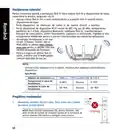
To ensure the best wireless signal,
orient the eight non-detachable
antennas as shown in the drawing
below.
NOTES:
Use only the adapter that came with your package. Using other adapters may damage
the device.
Specifications:
•
•
DC Power adapter
DC Output: +19V with 3.42A current
Operating Temperature
Operating Humidity
0~40oC
Storage
Storage
0~70oC
50~90%
20~90%
Preparing your modem
Unplug the power cable/DSL modem. If it has a battery backup,
remove the battery.
1.
NOTE: If you are using DSL for Internet, you will need your
username/password from your Internet Service Provider (ISP)
to properly configure the router.
Unplug
4

| General | Details |
|---|---|
| Name | ASUS RT-AX89X Dual-band Wi-Fi Router Instruction Manual |
| Make | Asus |
| Language | English |
| Filetype | PDF (Download) |
| File size | 3.31 MB |
 (1 votes, average: 5.00 out of 5)
 Loading...
If you have any questions regarding ASUS RT-AX89X Dual-band Wi-Fi Router Instruction Manual, please ask here and describe the problem in detail.

ASUS RT-AC86U AC2900 WiFi Gaming Router User Guide

ASUS AC1750 WiFi Dual Band Wireless Internet Router User Guide

ASUS TUF-AX5400 Dual Band WiFi 6 Router User Guide

ASUS ET12 ZenWiFi Pro AXE11000 Tri Band Router User Guide

ASUS RT-AX82U V2 AX5400 Dual Band WiFi Router User Guide

ASUS TUF-AX4200 Dual Band WiFi Router User Guide

ASUS RT-N10U 150 mbps Wireless Router Instructions

ASUS RT-BE96U Tri Band WiFi Router User Guide

ASUS GT-AX6000 Dual Band WiFi 6 Extendable Gaming Router User Guide

ASUS RT-BE88U Dual Band WiFi Router User Guide


WiFi SKY M0305405 Wireless Router Installation Guide

D-Link DIR-825 Xtreme N Dual Band Gigabit Router Instruction Manual

TELTONIKA RUT142 Router User Guide

Cudy TR3000 AX3000 2.5G Wi-Fi 6 Mini VPN Router Installation Guide

NETGEAR Orbi RBR350 WiFi 6 Dual-band Mesh Router User Manual

MERCUSYS MB230-4G Wireless 4G LTE Router Installation Guide

AntennaGear P5 5G Router Owner’s Manual

acer 952483 WAVE 7 Wi-Fi Mesh Router User Guide

Ruijie EG105GWT Wi-Fi 5 1267Mbps Wireless All-in-One Router User Manual

D-Link DWR-933M Router Owner’s Manual
Table of Contents
- 1. Rt-ax89x Dual-band Wi-fi Router - Quick Start Guide →
- 2. English - Български →
- 3. Package Contents - A Quick Look At Rt-ax89x →
- 4. Position Your Wireless Router - Preparing Your Modem →
- 5. Power On Your Cable/dsl Modem. - Setting Up Your Rt-ax89x →
- 6. Connect To The Network With Ssid Shown On The Product Label ... →
- 7. Бърз Преглед - Адаптер За Променлив Ток →
- 8. Разположение На Безжичния Рутер - Технически Характеристики →
- 9. Включете Вашия Кабел/dsl Модема - Настройка На Rt-ax89x Руте... →
- 10. Свържете Се Към На Мрежата (ssid) - Настройка На Уеб Интерфе... →
- 11. Contenu De La Boîte - Aperçu Rapide De Votre Routeur Rt-ax89... →
- 12. Placez Le Routeur Wi-fi Dans Un Emplacement Central Pour Obt... →
- 13. Configurer Votre Rt-ax89x - Connexion Filaire →
- 14. Connectez-vous Au Réseau Dont Le Nom (ssid) Est Affiché Sur ... →
- 15. Sadržaj - Brzi Pregled Uređaja Rt-ax89x →
- 16. Postavljanje Bežičnog Usmjerivača - Kako Biste Ostvarili Naj... →
- 17. Povežite Modem Na Usmjerivač - Postavljanje Uređaja Rt-ax89x →
- 18. Asus Router - Podešavanje Web Gui →
- 19. Obsah Krabice - Stručný Popis Přístroje Rt-ax89x →
- 20. Umístění Směrovače - Udržujte Zařízení Mimo Kovové Překážky ... →
- 21. Nastavení Zařízení Rt-ax89x - Drátové Připojení →
- 22. Připojte Se K Názvu Sítě (ssid) - Nastavení Přes Webové Graf... →
- 23. Pakkens Indhold - Et Hurtigt Kik På →
- 24. Placering Af Din Router - Forberedelse Af Dit Modem →
- 25. Sådan Indstilles Din Router - Kableforbundet Forbindelse →
- 26. Opret Forbindelse Til Netværksnavnet (ssid) - Opsætning Via ... →
- 27. Inhoud Verpakking - Een Snelle Blik →
- 28. Uw Draadloze Router Plaatsen - Uw Modem Voorbereiden →
- 29. De Router Installeren - Bekabelde Aansluiting →
- 30. Maak Verbinding Met De Netwerknaam (ssid) - Instelling Grafi... →
- 31. Pakendi Sisu - Kiire Ülevaade Ruuterile Rt-ax89x →
- 32. Traadita Ruuteri Paigutamine - Traadita Signaali Parimaks Ed... →
- 33. Lülitage Kaabel/dsl-modem Sisse - Ruuteri Häälestamine →
- 34. Looge Ühendus Võrguga, Mille Nimi (ssid) On Toodud Ruuteri T... →
- 35. Pakkauksen Sisältö - Katsaus Rt-ax89x-sovelluksee... →
- 36. Reitittimen Sijoittaminen - Modeemin Valmistelu →
- 37. Rt-ax89x:n Asettaminen - Langallinen Yhteys →
- 38. Koble Til Nettverksnavnet (ssid) Som Står Etiketten På Baksi... →
- 39. Verpackungsinhalt - Ihr Rt-ax89x Auf Einen Blick →
- 40. Platzieren Sie Ihren Wlan-router - Ihr Modem Vorbereiten →
- 41. Einrichten Ihres Rt-ax89x - Kabelverbindung →
- 42. Einrichtung Über Die Web-benutzeroberfläche - Einrichtung Üb... →
- 43. Contenido Del Paquete - Gyors Üzembe Helyezési Útmutató →
- 44. A Router Elhelyezése - A Vezeték Nélküli Router És A Hálózat... →
- 45. Kapcsolja Be A Kábel-/dsl-modemet - Ellenőrizze A Kábel-/dsl... →
- 46. Csatlakozzon A Router Hátlapján Lévő Címkén Feltüntetett Hál... →
- 47. Contenuto Della Confezione - Aspetto Del Vostro Rt-ax89x →
- 48. Posizionamento Del Vostro Router Wireless - Aggiornate Sempr... →
- 49. Collegate Il Vostro Modem Al Router - Installazione Del Vost... →
- 50. Configurazione Tramite Interfaccia Web Gui - Configurazione ... →
- 51. Innhold I Pakken - En Snartitt →
- 52. Plassere Ruteren - Forbereder Modemet →
- 53. Slå På Kabel-/dsl-modemet - Sette Opp Rt-ax89x →
- 54. Koble Til Nettverksnavnet (ssid) - Oppsett Med Web-brukergre... →
- 55. Conteúdo Da Embalagem - Visão Geral Do Seu Rt-ax89x →
- 56. Colocação Do Router - Preparar O Modem →
- 57. Configurar O Rt-ax89x - Ligação Com Fios →
- 58. Configuração Com A Interface Web - Configuração Com A Aplica... →
- 59. Zawartość Opakowania - Szybki Przegląd Routera Rt-ax89x →
- 60. Pozycjonowanie Routera - Przechowywanie →
- 61. Włączenie Modemu - Konfiguracja Rt-ax89x →
- 62. Nawiąż Połączenie Z Siecią - Konfiguracja Przez Graficzny In... →
- 63. Комплект Поставки - Быстрый Обзор Rt-ax89x →
- 64. Расположение Беспроводного Роутера - Подготовка Модема →
- 65. Включите Кабельный / Dsl Модем - Настройка Rt-ax89x →
- 66. Подключитесь К Сети - Настройка Через Веб-интерфейс →
- 67. Conteúdo Da Embalagem - Ghid Rapid De Pornire →
- 68. Poziţionarea Ruterului - Pregătirea Modemului →
- 69. Configurarea Dispozitivului Rt-ax89x - Conexiune Cu Fir →
- 70. Conectaţi-vă La Reţea (ssid) Afişat Pe Eticheta De Produs De... →
- 71. Contenido Del Paquete - Un Vistazo Rápido A Su Rt-ax89x →
- 72. Ubicar El Router Inalámbrico - Especificaciones →
- 73. Encienda Su Módem De Cable O Dsl. - Compruebe Las Luces De L... →
- 74. Conexión Al Nombre De Red (ssid) - Configuración Mediante Gu... →
- 75. Sadržaj Paketa - Kratak Pregled Vašeg Rt-ax89x →
- 76. Postavljanje Vašeg Bežičnog Rutera - Za Najbolji Prenos Beži... →
- 77. Uključite Svoj Kabl/dsl Modem. - Podešavanje Vašeg Rt-ax89x →
- 78. Povežite Se Za Ime Mreže (ssid) Prikazano Na Etiketi Proizvo... →
- 79. Vsebina Paketa - Hiter Pogled Na Vaš Rt-ax89x →
- 80. Nastavitev Položaja Vašega Brezžičnega Usmerjevalnika - Post... →
- 81. Vklopite Kabelski Modem/modem Dsl - Nastavitev Usmerjevalnik... →
- 82. Vzpostavite Povezavo Z Omrežjem - Nastavitev S Spletnim Gui →
- 83. Förpackningens Innehåll - En Snabbtitt På Din Rt-ax89x →
- 84. Placera Din Router - Förbered Ditt Modem →
- 85. Anslut Ditt Modem Till Routern - Inställning Av Router →
- 86. Anslut Till Nätverkets Namn (ssid) - Inställning Av Webbanvä... →
- 87. Paket Içeriği - Rt-ax89x Cihazınıza Hızlı Bir Bakış →
- 88. Yönlendiricinizi Yerleştirme - Kablosuz Yönlendirici Ve Yönl... →
- 89. Kablo/dsl Modemi Açın - Bağlantının Etkin Olduğundan Emin Ol... →
- 90. Asus Router - Yönlendiriciyi Kurmak Için →
- 91. До Комплекту Входять - Швидкий Огляд →
- 92. Розташування Бездротового Маршрутизатора - Постійно Оновлюйт... →
- 93. Підключіть До Електромережі Шнур Живлення/модем Dsl. - Налаш... →
- 94. Підключіться До Мережевої Назви (ssid) - Налаштування Через ... →
- 95. Asus Recycling/takeback Services - Reach →
- 96. Prohibition Of Co-location - Radiation Exposure Statement →
- 97. Déclaration De Conformité De Innovation, Sciences Et Dévelop... →
- 98. Условия Эксплуатации - Температура Эксплуатации Устройства →
- 99. Asustek Computer Inc. - Manufacturer →
- 100. Networks Global Hotline Information - Country/ Region →
- 101. Networks Global Hotline Information - Country/ Region →
- 102. Networks Global Hotline Information - Hotline Numbers →
- 103. Ce Statement - Simplified Eu Declaration Of Conformity →
- 104. Изявление Относно Ce - Опростена Декларация За Съответствие ... →
- 105. Ce Izjava - Izjava O Sukladnosti Za Direktivu O Ekodizajnu 2... →
- 106. Prohlášení Ce - Zjednodušené Prohlášení O Shodě S Eu →
- 107. Ce-kinnitus - Vastavuse Kinnitus →
- 108. Ce-nyilatkozat - Eu-megfelelőségi Nyilatkozat →
- 109. Oświadczenie Dotyczące Oznaczenia Ce - Deklaracja Zgodności ... →
- 110. Declarație De Conformitate Ue - Testarea Pentru Cerințele De... →
- 111. Ce Izjava - Eu Deklaracija O Saglasnosti →
- 112. Izjava Ce - Poenostavljena Izjava O Skladnosti Eu →
- 113. Ce Beyanı - Ab Uygunluk Bildirimi →
- 114. Ce-erklæring - Overensstemmelseserklæring For Miljøvenligt D... →
- 115. Ce-verklaring - Conformiteitsverklaring Voor Ecodesign Richt... →
- 116. Déclaration De Conformité De L'ue - Déclaration De Conformit... →
- 117. Ce-merkintä - Eu-vaatimustenmukais... →
- 118. Ce-erklärung - Eu-konformitätserklä... →
- 119. Dichiarazione Di Conformità Ce - Dichiarazione Di Conformità... →
- 120. Ce-erklæring - Eu-samsvarserklæring →
- 121. Declaração Ce - Declaração De Conformidade Para A Diretiva C... →
- 122. Declaración De La Ce - Declaración De Conformidad Simplifica... →
- 123. Ce-meddelande - Försäkran Om Överensstämmelse För Ecodesign-... →
- 124. Page 124 →