
×
- 1. Rt-ax89x Dual-band Wi-fi Router (Quick Start Guide)
- 2. English (Български → Français Canadien → Hrvatski → Čeština → Dansk → Nederlands)
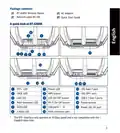
- 3. Package Contents (A Quick Look At Rt-ax89x → Sfp+ Led → Power Led → Wps Button → G Base T Port → G Sfp+ Port)
- 4. Position Your Wireless Router (Preparing Your Modem)
- 5. Power On Your Cable/dsl Modem. (Setting Up Your Rt-ax89x → Wired Connection → Wireless Connection)
- 6. Connect To The Network With Ssid Shown On The Product Label On The Back Side Of The Router. For Better Network Security, Change To A Unique …
- 7. Бърз Преглед (Адаптер За Променлив Ток → Ръководство За Бърз Старт → Мрежов Кабел (rj-45) → Индикатор На Захранването → Порт 10g Base T → Usb 3.1 Gen 1 Портове)
- 8. Разположение На Безжичния Рутер (Технически Характеристики → Подготовка На Модема)
- 9. Включете Вашия Кабел/dsl Модема (Настройка На Rt-ax89x Рутер → Кабелна Връзка → Безжична Връзка)
- 10. Свържете Се Към На Мрежата (ssid) (Настройка На Уеб Интерфейс → Настройка На Приложението → Faq → Запаметяване На Безжичните Настройки На Вашия Рутер)
- 11. Contenu De La Boîte (Aperçu Rapide De Votre Routeur Rt-ax89x → Voyant Sfp+ → Voyant Réseau Local (lan) → Port 10g Base-t → Ports Usb 3.1 Gen1 → Port Réseau Étendu (wan) (internet))
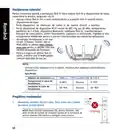
- 12. Placez Le Routeur Wi-fi Dans Un Emplacement Central Pour Obtenir Une Couverture Wi-fi Optimale. (Mettez Toujours Le Routeur À Jour Dans La Version De Firmware La Plus Récente. → Pour Assurer Le Meilleur Signal Wi-fi, Orientez Les Huit Antennes Externes Comme Illustré Sur Le Schéma Ci-dessous. → Préparer Votre Modem)
- 13. Configurer Votre Rt-ax89x (Connexion Filaire → Connexion Wi-fi)
- 14. Connectez-vous Au Réseau Dont Le Nom (ssid) Est Affiché Sur L'étiquette Du Produit Située À L'arrière Du Routeur. Pour Garantir Une Plus Gra… (Configuration Via L'interface De Gestion → Configuration Via L'application → Se Rappeler Des Paramètres De Votre Routeur Wi-fi → Faq)
- 15. Sadržaj (Brzi Pregled Uređaja Rt-ax89x → Adapter Izmjeničnog Napajanja → Vodič Za Brzi Početak Rada → Mrežni Kabel (rj-45) → Usb 3.1 Gen 1 Priključci → Wan (internet) Priključak)
- 16. Postavljanje Bežičnog Usmjerivača (Kako Biste Ostvarili Najbolji Prijenos Signala → Tehnički Podaci → Pripremanje Modema)
- 17. Povežite Modem Na Usmjerivač (Postavljanje Uređaja Rt-ax89x → Žična Veza → Bežična Veza)
- 18. Asus Router (Podešavanje Web Gui → Podešavanje Aplikacije → Čpp → Pamćenje Postavki Bežičnog Usmjerivača)
- 19. Obsah Krabice (Stručný Popis Přístroje Rt-ax89x → Kontrolka Sfp+ → Kontrolka 10ge → Port 10g Base T → Port Wan (internet))
- 20. Umístění Směrovače (Udržujte Zařízení Mimo Kovové Překážky A Mimo Přímé Sluneční Záření. → Vždy Zaktualizujte Na Nejnovější Firmware. → Technické Údaje: → Příprava Modemu)
- 21. Nastavení Zařízení Rt-ax89x (Drátové Připojení → Bezdrátové Připojení)
- 22. Připojte Se K Názvu Sítě (ssid) (Nastavení Přes Webové Grafické Uživatelské Rozhraní → Nastavení Pomocí Aplikace → Zapamatování Nastavení Bezdrátového Směrovače → Faq (odpovědi Na Časté Dotazy))
- 23. Pakkens Indhold (Et Hurtigt Kik På → Sfp+ Led → Ge Led → Lan Led → Strøm Led → Wps Knap)
- 24. Placering Af Din Router (Forberedelse Af Dit Modem)
- 25. Sådan Indstilles Din Router (Kableforbundet Forbindelse → Trådløs Forbindelse)
- 26. Opret Forbindelse Til Netværksnavnet (ssid) (Opsætning Via Webgrænsefladen → Opsætning Via Appen → Sådan Husker Du Dine Trådløse Routerindstillinger → Ofte Stillede Spørgsmål (faq))
- 27. Inhoud Verpakking (Een Snelle Blik → Sfp+ Led → Voedings-led → G Baset Poort → G Sfp+ Poort → Wps-knop → Lan-led)
- 28. Uw Draadloze Router Plaatsen (Uw Modem Voorbereiden)
- 29. De Router Installeren (Bekabelde Aansluiting → Draadloze Verbinding)
- 30. Maak Verbinding Met De Netwerknaam (ssid) (Instelling Grafische Webinterface → App-instelling → Veelgestelde Vragen (faqs) → Onthoud Uw Draadloze Instellingen)
- 31. Pakendi Sisu (Kiire Ülevaade Ruuterile Rt-ax89x → Sfp+ Led-märgutuli → Ge Led-märgutuli → Lan Led Indikaatorid → Toite Led Indikaator → Wan-i Led Indikaator)
- 32. Traadita Ruuteri Paigutamine (Traadita Signaali Parimaks Edastuseks → Värskendage Süsteemi Alati Uusima Püsivaraga → Parima Kvaliteediga Traadita Signaali Tagamiseks → Teie Modemi Ettevalmistus)
- 33. Lülitage Kaabel/dsl-modem Sisse (Ruuteri Häälestamine → Traadiga Ühendus → Traadita Ühendus)
- 34. Looge Ühendus Võrguga, Mille Nimi (ssid) On Toodud Ruuteri Tagaküljel Asuval Tootesildil. Võrgu Turvalisuse Suurendamiseks Valige Kordumatu … (Veebis Saadaolev Gui → Rakenduse Seadistamine → Traadita Ruuteri Sätete Meeles Pidamine → Korduma Kippuvad Küsimused (kkk))
- 35. Pakkauksen Sisältö (Katsaus Rt-ax89x-sovellukseen → Sfp+ Led → Virran Led-valo → Wps-painike → G Base T -portti → G Sfp+ -portti)
- 36. Reitittimen Sijoittaminen (Modeemin Valmistelu → Tekniset Tiedot)
- 37. Rt-ax89x:n Asettaminen (Langallinen Yhteys → Langaton Yhteys → Graafinen Web-käyttöliittymä)
- 38. Koble Til Nettverksnavnet (ssid) Som Står Etiketten På Baksiden (Asus Router → Graafisen Web-käyttöliittymän Asetus → Sovelluksen Asetus → Langattoman Reitittimen Asetusten Muistaminen → Usein Kysyttyä (faq))
- 39. Verpackungsinhalt (Ihr Rt-ax89x Auf Einen Blick → Sfp+ Led → Betriebs-led → Wps-taste → G Base T-anschluss → G Sfp+ Anschluss)
- 40. Platzieren Sie Ihren Wlan-router (Ihr Modem Vorbereiten)
- 41. Einrichten Ihres Rt-ax89x (Kabelverbindung → Drahtlosverbindung)
- 42. Einrichtung Über Die Web-benutzeroberfläche (Einrichtung Über Die App → Notieren Der Wlan-einstellungen Ihres Routers → Faq (häufig Gestellte Fragen))
- 43. Contenido Del Paquete (Gyors Üzembe Helyezési Útmutató → Led Sfp+ → Led 10ge → G Base T Port → G Sfp+ Port → Port Wan (internet))
- 44. A Router Elhelyezése (A Vezeték Nélküli Router És A Hálózati Eszközök Közötti Legjobb Vezeték Nélküli Jelátvitel → A Firmware-t Mindig A Legújabb Verzióra Frissítse. → Műszaki Adatok → A Modem Előkészítése)
- 45. Kapcsolja Be A Kábel-/dsl-modemet (Ellenőrizze A Kábel-/dsl-modem Led Jelzőfényeit → Csatlakoztassa A Modemet A Routerhez → Az Beállítása → Vezetékes Kapcsolat → Vezeték Nélküli Kapcsolat → Állítson Be Jelszót A Routerhez)
- 46. Csatlakozzon A Router Hátlapján Lévő Címkén Feltüntetett Hálózathoz (ssid) (Beállítás A Webes Grafikus Felhasználói Felületen → Beállítás Az Alkalmazással → Gyakran Ismételt Kérdések (gyik) → A Vezeték Nélküli Router Beállításainak Megjegyzése)
- 47. Contenuto Della Confezione (Aspetto Del Vostro Rt-ax89x → Led Alimentazione → Porte Usb 3.1 Gen 1 → Pulsante Di Accensione/spegnimento → Porta Internet (wan))
- 48. Posizionamento Del Vostro Router Wireless (Aggiornate Sempre All'ultimo Firmware Disponibile → Per Assicurarvi La Migliore Qualità Del Segnale Wireless Orientate Le Otto Antenne Non Rimovibili → Preparazione Del Modem)
- 49. Collegate Il Vostro Modem Al Router (Installazione Del Vostro Rt-ax89x → Connessione Cablata → Connessione Senza Fili)
- 50. Configurazione Tramite Interfaccia Web Gui (Configurazione Tramite App → Asus Router → Prendete Nota Delle Impostazioni Del Router Wireless → Faq)
- 51. Innhold I Pakken (En Snartitt → Sfp+-led → Strøm Led → G Base T-port → Usb 3.1 Gen 1-porter → Wan (internett) Port)
- 52. Plassere Ruteren (Forbereder Modemet)
- 53. Slå På Kabel-/dsl-modemet (Sette Opp Rt-ax89x → Kablet Tilkobling → Trådløs Tilkobling)
- 54. Koble Til Nettverksnavnet (ssid) (Oppsett Med Web-brukergrensesnitt → Oppsett Med App → Huske Innstillinger For Den Trådløse Ruteren → Spørsmål Og Svar)
- 55. Conteúdo Da Embalagem (Visão Geral Do Seu Rt-ax89x → Led Sfp+ → Porta 10g Base T → Porta 10g Sfp+ → Portas Usb 3.1 Gen 1 → Porta Wan (internet))
- 56. Colocação Do Router (Preparar O Modem → Especificações)
- 57. Configurar O Rt-ax89x (Ligação Com Fios → Ligação Sem Fios)
- 58. Configuração Com A Interface Web (Configuração Com A Aplicação → Memorizar As Definições Do Seu Router Sem Fios → Perguntas Frequentes)
- 59. Zawartość Opakowania (Szybki Przegląd Routera Rt-ax89x → Wskaźnik Led Sfp+ → Dioda Led Zasilania → Port 10g Base-t → Port Wan (internet))
- 60. Pozycjonowanie Routera (Przechowywanie → Temperatura Pracy → Wilgotność Działania → Przygotowanie Modemu)
- 61. Włączenie Modemu (Konfiguracja Rt-ax89x → Połączenie Przewodowe → Połączenie Bezprzewodowe)
- 62. Nawiąż Połączenie Z Siecią (Konfiguracja Przez Graficzny Interfejs Użytkownika (gui) Strony Sieci Web → Konfiguracja Przez Aplikację → Zapisanie Ustawień Routera Bezprzewodowego → Często Zadawane Pytania (faq))
- 63. Комплект Поставки (Быстрый Обзор Rt-ax89x → Индикатор Sfp+ → Индикатор 10ge → Индикатор Lan → Кнопка Wps → Порты Usb 3.1 Gen 1)
- 64. Расположение Беспроводного Роутера (Подготовка Модема)
- 65. Включите Кабельный / Dsl Модем (Настройка Rt-ax89x → Проводное Подключение → Беспроводное Подключение)
- 66. Подключитесь К Сети (Настройка Через Веб-интерфейс → Настройка Через Приложение → Запоминание Настроек Беспроводного Роутера → Faq)
- 67. Conteúdo Da Embalagem (Ghid Rapid De Pornire → O Privire Rapidă Asupra Dispozitivului Rt-ax89x → Led Sfp+ → Port 10g Base T → Port Wan (internet))
- 68. Poziţionarea Ruterului (Pregătirea Modemului)
- 69. Configurarea Dispozitivului Rt-ax89x (Conexiune Cu Fir → Conexiune Fără Fir)
- 70. Conectaţi-vă La Reţea (ssid) Afişat Pe Eticheta De Produs De Pe Partea Din Spate A Ruterului. Pentru O Securitate De Reţea Mai Bună, Modific…
- 71. Contenido Del Paquete (Un Vistazo Rápido A Su Rt-ax89x → Led Sfp+ → Led 10ge → Led Lan → Puerto 10g Base T → Puertos Usb 3.1 Gen 1)
- 72. Ubicar El Router Inalámbrico (Especificaciones → Preparar El Módem)
- 73. Encienda Su Módem De Cable O Dsl. (Compruebe Las Luces De Los Led Del Módem De Cable O Dls Para Asegurarse De Que La Conexión Está Activa. → Configurar El Rt-ax89x → Conexión Cableada → Conexión Inalámbrica)
- 74. Conexión Al Nombre De Red (ssid) (Configuración Mediante Gui Web → Configuración Mediante La App → Faq → Recuerde La Configuración Del Router Inalámbrico)
- 75. Sadržaj Paketa (Kratak Pregled Vašeg Rt-ax89x → Svetleća Dioda Za → Usb 3.1 Gen 1 Portovi → Wan (internet) → Prekidač Za Napajanje)
- 76. Postavljanje Vašeg Bežičnog Rutera (Za Najbolji Prenos Bežičnog Signala → Postavite Bežični Ruter U Centralni Prostor → Uvek Ažurirajte Na Najnoviji Firmver → Da Biste Obezbedili Najbolji Mogući Bežični Signal → Priprema Vašeg Modema)
- 77. Uključite Svoj Kabl/dsl Modem. (Podešavanje Vašeg Rt-ax89x → Povezivanje Kablom → Bežično Povezivanje)
- 78. Povežite Se Za Ime Mreže (ssid) Prikazano Na Etiketi Proizvoda Na Poleđini Rutera. Za Bolju Bezbednost Mreže, Pređite Na Jedinstveni Ssid I …
- 79. Vsebina Paketa (Hiter Pogled Na Vaš Rt-ax89x → Led-diode Vmesnika → Priključek 10g Base T → Gumb Za Wps → Vhodi Usb 3.1 Prve Generacije → Vhod Wan (internet))
- 80. Nastavitev Položaja Vašega Brezžičnega Usmerjevalnika (Postavite Brezžični Usmerjevalnik V Središčno Območje Za Najboljšo Brezžično Pokritost → Vedno Posodabljajte Na Najnovejšo Strojno Programsko Opremo → Tehnični Podatki → Prioprava Modema)
- 81. Vklopite Kabelski Modem/modem Dsl (Nastavitev Usmerjevalnika Rt-ax89x → Žična Povezava → Brezžična Povezava)
- 82. Vzpostavite Povezavo Z Omrežjem (Nastavitev S Spletnim Gui → Nastavitev Z Aplikacijo → Shranjevanje Nastavitev Brezžičnega Usmerjevalnika → Pogosto Zastavljena Vprašanja (faqs))
- 83. Förpackningens Innehåll (En Snabbtitt På Din Rt-ax89x → Sfp+ Led-indikator → Ge Led-indikator → Lan Led-indikator → Wan (internet) Led → Ghz Led)
- 84. Placera Din Router (Förbered Ditt Modem)
- 85. Anslut Ditt Modem Till Routern (Inställning Av Router → Kabelanslutning → Trådlös Anslutning)
- 86. Anslut Till Nätverkets Namn (ssid) (Inställning Av Webbanvändargränssnitt → App-inställning → Vanliga Frågor → Kom Ihåg Dina Trådlösa Routerinställningar)
- 87. Paket Içeriği (Rt-ax89x Cihazınıza Hızlı Bir Bakış → G Baz T Bağlantı Noktası → G Sfp+ Bağlantı Noktası → Usb 3.1 Gen 1 Bağlantı Noktası → Wan (internet) Bağlantı Noktaları → Wi-fi Açık/kapalı Düğmesi)
- 88. Yönlendiricinizi Yerleştirme (Kablosuz Yönlendirici Ve Yönlendiriciye Bağlı Ağ Aygıtları Arasında En Iyi Kablosuz Sinyal Aktarımı Için Aşağıdakileri Sağlayınız: → Modeminizi Hazırlama)
- 89. Kablo/dsl Modemi Açın (Bağlantının Etkin Olduğundan Emin Olmak → Rt-ax89x Aygıtınızı Kurma → Kablolu Bağlantı → Kablosuz Bağlantı)
- 90. Asus Router (Yönlendiriciyi Kurmak Için → Web Grafiksel Kullanıcı Arayüzü Kurulumu → Uygulama Kurulumu → Kablosuz Yönlendirici Ayarlarınızı Anımsama → Sık Sorulan Sorular (ssslar))
- 91. До Комплекту Входять (Швидкий Огляд → Адаптер Змінного Струму → Керівництво Для Початку Експлуатації → Порти Usb 3.1 Gen 1 → Порти Lan 1~8 → Порт Wan (internet))
- 92. Розташування Бездротового Маршрутизатора (Постійно Оновлюйте Первинне Пз → Технічні Характеристики → Підготовка Модема)
- 93. Підключіть До Електромережі Шнур Живлення/модем Dsl. (Налаштування Rt-ax89x → Дротове Підключення → Бездротове Підключення)
- 94. Підключіться До Мережевої Назви (ssid) (Налаштування Через Графічний Веб-інтерфейс → Налаштування Через Програму → Розповсюджені Питання → Завершуючи Налаштування Маршрутизатора, Запамятайте Бездротові Налаштування)
- 95. Asus Recycling/takeback Services (Reach → Federal Communications Commission Statement)
- 96. Prohibition Of Co-location (Radiation Exposure Statement → Compliance Statement Of Innovation, Science And Economic Development Canada → Radio Frequency (rf) Exposure Information)
- 97. Déclaration De Conformité De Innovation, Sciences Et Développement Économique Canada (ised) (Informations Concernant Lexposition Aux Fréquences Radio (rf) → Precautions For The Use Of The Device → Précautions Demploi De Lappareil)
- 98. Условия Эксплуатации (Температура Эксплуатации Устройства → Использование Несовместимого Или Несертифицированного Адаптера Питания → Утилизация Устройства → Данное Устройство Не Предназначено Для Детей → Cihazın Ayrıntılı Kurulum Rehberi)
- 99. Asustek Computer Inc. (Manufacturer → Authorised Representative In Europe → Authorised Distributors In Turkey)
- 100. Networks Global Hotline Information (Country/ Region → Hotline Number → Service Hours)
- 101. Networks Global Hotline Information (Country/ Region → Hotline Numbers → Service Hours → Asia-pacific → Americas)
- 102. Networks Global Hotline Information (Hotline Numbers → Service Hours → Middle East & Africa → Balkan Countries → Baltic Countries → Notes)
- 103. Ce Statement (Simplified Eu Declaration Of Conformity → Declaration Of Conformity For Ecodesign Directive 2009/125/ec → Safety Notices → All Operational Modes → The Frequency, Mode And The Maximum Transmitted Power In Eu)
- 104. Изявление Относно Ce (Опростена Декларация За Съответствие На Ес → Декларация За Съответствие За Директива За Екодизайна 2009/125/ео → Всички Режими На Работа → Бележки За Безопасност)
- 105. Ce Izjava (Izjava O Sukladnosti Za Direktivu O Ekodizajnu 2009/125/ez → Sigurnosne Napomene)
- 106. Prohlášení Ce (Zjednodušené Prohlášení O Shodě S Eu → Prohlášení O Shodě Se Směrnicí O Ekodesignu 2009/125/es → Všechny Provozní Režimy → Bezpečnostní Informace)
- 107. Ce-kinnitus (Vastavuse Kinnitus → Kõik Töörežiimid → Teave Sageduse, Režiimi Ja Maksimaalse Edastatava Võimsuse Kohta → Ohutusmärkused)
- 108. Ce-nyilatkozat (Eu-megfelelőségi Nyilatkozat → Megfelelőségi Nyilatkozat A Környezettudatos Tervezésről → Biztonsági Információ)
- 109. Oświadczenie Dotyczące Oznaczenia Ce (Deklaracja Zgodności Dotycząca Dyrektywy → Informacje Dotyczące Bezpieczeństwa)
- 110. Declarație De Conformitate Ue (Testarea Pentru Cerințele De Proiectare Ecologică → Informaţii Pentru Utilizarea În Condiţii De Siguranţă)
- 111. Ce Izjava (Eu Deklaracija O Saglasnosti → Deklaracija O Saglasnosti Za Ekodizajn Direktivu 2009/125/ec → Svi Radni Režimi → Frekvencija, Režim I Maksimalna Snaga Prenosa U Eu → Bezbednosna Obaveštenja)
- 112. Izjava Ce (Poenostavljena Izjava O Skladnosti Eu → Izjava O Skladnosti Za Direktivo O Okoljsko Primerni Zasnovi 2009/125/es → Varnostna Opozorila)
- 113. Ce Beyanı (Ab Uygunluk Bildirimi → Çevreye Duyarlı Tasarım → Güvenlik Bilgileri)
- 114. Ce-erklæring (Overensstemmelseserklæring For Miljøvenligt Design → Sikkerhedsinformation → Brug)
- 115. Ce-verklaring (Conformiteitsverklaring Voor Ecodesign Richtlijn 2009/125/eg → Alle Bedrijfsmodi → Veiligheidsinformatie)
- 116. Déclaration De Conformité De L'ue (Déclaration De Conformité (directive Sur L'écoconception 2009/125/ce) → Tous Les Modes De Fonctionnement → Avertissements De Sécurité)
- 117. Ce-merkintä (Eu-vaatimustenmukaisuusvakuutus → Ekologisen Suunnittelun Direktiivin Vaatimustenmukaisuusvakuutus → Käyttötilat → Turvallisuustietoja)
- 118. Ce-erklärung (Eu-konformitätserklärung → Konformitätserklärung Für Ökodesign-richtlinie 2009/125/ec → Sicherheitshinweise)
- 119. Dichiarazione Di Conformità Ce (Dichiarazione Di Conformità Con La Direttiva Ecodesign 2009/125/ec → Tutte Le Modalità Operative → Comunicazioni Sulla Sicurezza)
- 120. Ce-erklæring (Eu-samsvarserklæring → Samsvarserklæring For Direktiv Om Miljøvennlig Design → Sikkerhetsinformsjon)
- 121. Declaração Ce (Declaração De Conformidade Para A Diretiva Conceção Ecológica 2009/125/ce → Todos Os Modos Operacionais → Safety Notices)
- 122. Declaración De La Ce (Declaración De Conformidad Simplificada Para La Ue → Declaración De Conformidad Para La Directiva De Ecodiseño 2009/125/ce → Información De Seguridad)
- 123. Ce-meddelande (Försäkran Om Överensstämmelse För Ecodesign-direktivet → Säkerhetsinformation)
- 124.
×
ASUS RT-AX89X Dual-band Wi-Fi Router Instruction Manual





Connect to the network with SSID shown on the product label on the
back side of the router. For better network security, change to a unique
SSID and assign a password.
2.
ASUS router
Wi-Fi Name (SSID):
ASUS_XX
*
XX refers to the last two digits of the MAC
address. You can find it on the label on the
back of your RT-AX89X.
You can choose either the web GUI or ASUS Router app to set up your router.
a. Web GUI Setup
3.
Once connected, the web GUI launches automatically when you open a web browser.
If it does not auto-launch, enter
•
Set up a password for your router
to prevent unauthorized access.
•
b.
App Setup
Download ASUS Router App to set up your router via
your mobile devices.
•
Turn on Wi-Fi on your mobile devices and
connect to your RT-AX89X’s network.
ASUS
Router
Follow ASUS Router App setup instructions to
complete the setup.
•
ASUS Router
Remembering your wireless router
settings
Remember your wireless settings as you complete the
router setup.
FAQ
1. Where can I find more information
about the wireless router?
•
•
•
Online FAQ site: https://www.asus.
com/support/faq
Router Name:
Password:
Technical support site: https://
Customer hotline: refer to the
Support Hotline section in this
Quick Start Guide
2.4 GHz network SSID: Password:
5GHz network SSID:
•
You can get the user manual
support
Password:
6

| General | Details |
|---|---|
| Name | ASUS RT-AX89X Dual-band Wi-Fi Router Instruction Manual |
| Make | Asus |
| Language | English |
| Filetype | PDF (Download) |
| File size | 3.31 MB |
 (1 votes, average: 5.00 out of 5)
 Loading...
If you have any questions regarding ASUS RT-AX89X Dual-band Wi-Fi Router Instruction Manual, please ask here and describe the problem in detail.

ASUS RT-AC86U AC2900 WiFi Gaming Router User Guide

ASUS AC1750 WiFi Dual Band Wireless Internet Router User Guide

ASUS TUF-AX5400 Dual Band WiFi 6 Router User Guide

ASUS ET12 ZenWiFi Pro AXE11000 Tri Band Router User Guide

ASUS RT-AX82U V2 AX5400 Dual Band WiFi Router User Guide

ASUS TUF-AX4200 Dual Band WiFi Router User Guide

ASUS RT-N10U 150 mbps Wireless Router Instructions

ASUS RT-BE96U Tri Band WiFi Router User Guide

ASUS GT-AX6000 Dual Band WiFi 6 Extendable Gaming Router User Guide

ASUS RT-BE88U Dual Band WiFi Router User Guide


HFCL 4XIHMR Home Mesh Router User Guide

TP-Link Archer AX53 AX3000 Gigabit Wi-Fi 6 Router User Guide

TP-Link AX5400 Multi Gigabit Wi-Fi 6 Router Installation Guide

DrayTek Vigor2927 Dual-WAN VPN Firewall Router User Manual

ELPRO 645M-4 Cellular and WiFi IIoT Router Installation Guide

TELTONIKA RUT361 Cellular Router Instruction Manual

Edge-corE AS9947-36XKB AC Ethernet Switch and Router User Guide

ASKEY NCM2000B2-D299 5G Home Router User Guide

Taiko TAP0016 Audio Extreme Router User Manual

REYEE RG-R4 Mesh Router User Manual
Table of Contents
- 1. Rt-ax89x Dual-band Wi-fi Router - Quick Start Guide →
- 2. English - Български →
- 3. Package Contents - A Quick Look At Rt-ax89x →
- 4. Position Your Wireless Router - Preparing Your Modem →
- 5. Power On Your Cable/dsl Modem. - Setting Up Your Rt-ax89x →
- 6. Connect To The Network With Ssid Shown On The Product Label ... →
- 7. Бърз Преглед - Адаптер За Променлив Ток →
- 8. Разположение На Безжичния Рутер - Технически Характеристики →
- 9. Включете Вашия Кабел/dsl Модема - Настройка На Rt-ax89x Руте... →
- 10. Свържете Се Към На Мрежата (ssid) - Настройка На Уеб Интерфе... →
- 11. Contenu De La Boîte - Aperçu Rapide De Votre Routeur Rt-ax89... →
- 12. Placez Le Routeur Wi-fi Dans Un Emplacement Central Pour Obt... →
- 13. Configurer Votre Rt-ax89x - Connexion Filaire →
- 14. Connectez-vous Au Réseau Dont Le Nom (ssid) Est Affiché Sur ... →
- 15. Sadržaj - Brzi Pregled Uređaja Rt-ax89x →
- 16. Postavljanje Bežičnog Usmjerivača - Kako Biste Ostvarili Naj... →
- 17. Povežite Modem Na Usmjerivač - Postavljanje Uređaja Rt-ax89x →
- 18. Asus Router - Podešavanje Web Gui →
- 19. Obsah Krabice - Stručný Popis Přístroje Rt-ax89x →
- 20. Umístění Směrovače - Udržujte Zařízení Mimo Kovové Překážky ... →
- 21. Nastavení Zařízení Rt-ax89x - Drátové Připojení →
- 22. Připojte Se K Názvu Sítě (ssid) - Nastavení Přes Webové Graf... →
- 23. Pakkens Indhold - Et Hurtigt Kik På →
- 24. Placering Af Din Router - Forberedelse Af Dit Modem →
- 25. Sådan Indstilles Din Router - Kableforbundet Forbindelse →
- 26. Opret Forbindelse Til Netværksnavnet (ssid) - Opsætning Via ... →
- 27. Inhoud Verpakking - Een Snelle Blik →
- 28. Uw Draadloze Router Plaatsen - Uw Modem Voorbereiden →
- 29. De Router Installeren - Bekabelde Aansluiting →
- 30. Maak Verbinding Met De Netwerknaam (ssid) - Instelling Grafi... →
- 31. Pakendi Sisu - Kiire Ülevaade Ruuterile Rt-ax89x →
- 32. Traadita Ruuteri Paigutamine - Traadita Signaali Parimaks Ed... →
- 33. Lülitage Kaabel/dsl-modem Sisse - Ruuteri Häälestamine →
- 34. Looge Ühendus Võrguga, Mille Nimi (ssid) On Toodud Ruuteri T... →
- 35. Pakkauksen Sisältö - Katsaus Rt-ax89x-sovelluksee... →
- 36. Reitittimen Sijoittaminen - Modeemin Valmistelu →
- 37. Rt-ax89x:n Asettaminen - Langallinen Yhteys →
- 38. Koble Til Nettverksnavnet (ssid) Som Står Etiketten På Baksi... →
- 39. Verpackungsinhalt - Ihr Rt-ax89x Auf Einen Blick →
- 40. Platzieren Sie Ihren Wlan-router - Ihr Modem Vorbereiten →
- 41. Einrichten Ihres Rt-ax89x - Kabelverbindung →
- 42. Einrichtung Über Die Web-benutzeroberfläche - Einrichtung Üb... →
- 43. Contenido Del Paquete - Gyors Üzembe Helyezési Útmutató →
- 44. A Router Elhelyezése - A Vezeték Nélküli Router És A Hálózat... →
- 45. Kapcsolja Be A Kábel-/dsl-modemet - Ellenőrizze A Kábel-/dsl... →
- 46. Csatlakozzon A Router Hátlapján Lévő Címkén Feltüntetett Hál... →
- 47. Contenuto Della Confezione - Aspetto Del Vostro Rt-ax89x →
- 48. Posizionamento Del Vostro Router Wireless - Aggiornate Sempr... →
- 49. Collegate Il Vostro Modem Al Router - Installazione Del Vost... →
- 50. Configurazione Tramite Interfaccia Web Gui - Configurazione ... →
- 51. Innhold I Pakken - En Snartitt →
- 52. Plassere Ruteren - Forbereder Modemet →
- 53. Slå På Kabel-/dsl-modemet - Sette Opp Rt-ax89x →
- 54. Koble Til Nettverksnavnet (ssid) - Oppsett Med Web-brukergre... →
- 55. Conteúdo Da Embalagem - Visão Geral Do Seu Rt-ax89x →
- 56. Colocação Do Router - Preparar O Modem →
- 57. Configurar O Rt-ax89x - Ligação Com Fios →
- 58. Configuração Com A Interface Web - Configuração Com A Aplica... →
- 59. Zawartość Opakowania - Szybki Przegląd Routera Rt-ax89x →
- 60. Pozycjonowanie Routera - Przechowywanie →
- 61. Włączenie Modemu - Konfiguracja Rt-ax89x →
- 62. Nawiąż Połączenie Z Siecią - Konfiguracja Przez Graficzny In... →
- 63. Комплект Поставки - Быстрый Обзор Rt-ax89x →
- 64. Расположение Беспроводного Роутера - Подготовка Модема →
- 65. Включите Кабельный / Dsl Модем - Настройка Rt-ax89x →
- 66. Подключитесь К Сети - Настройка Через Веб-интерфейс →
- 67. Conteúdo Da Embalagem - Ghid Rapid De Pornire →
- 68. Poziţionarea Ruterului - Pregătirea Modemului →
- 69. Configurarea Dispozitivului Rt-ax89x - Conexiune Cu Fir →
- 70. Conectaţi-vă La Reţea (ssid) Afişat Pe Eticheta De Produs De... →
- 71. Contenido Del Paquete - Un Vistazo Rápido A Su Rt-ax89x →
- 72. Ubicar El Router Inalámbrico - Especificaciones →
- 73. Encienda Su Módem De Cable O Dsl. - Compruebe Las Luces De L... →
- 74. Conexión Al Nombre De Red (ssid) - Configuración Mediante Gu... →
- 75. Sadržaj Paketa - Kratak Pregled Vašeg Rt-ax89x →
- 76. Postavljanje Vašeg Bežičnog Rutera - Za Najbolji Prenos Beži... →
- 77. Uključite Svoj Kabl/dsl Modem. - Podešavanje Vašeg Rt-ax89x →
- 78. Povežite Se Za Ime Mreže (ssid) Prikazano Na Etiketi Proizvo... →
- 79. Vsebina Paketa - Hiter Pogled Na Vaš Rt-ax89x →
- 80. Nastavitev Položaja Vašega Brezžičnega Usmerjevalnika - Post... →
- 81. Vklopite Kabelski Modem/modem Dsl - Nastavitev Usmerjevalnik... →
- 82. Vzpostavite Povezavo Z Omrežjem - Nastavitev S Spletnim Gui →
- 83. Förpackningens Innehåll - En Snabbtitt På Din Rt-ax89x →
- 84. Placera Din Router - Förbered Ditt Modem →
- 85. Anslut Ditt Modem Till Routern - Inställning Av Router →
- 86. Anslut Till Nätverkets Namn (ssid) - Inställning Av Webbanvä... →
- 87. Paket Içeriği - Rt-ax89x Cihazınıza Hızlı Bir Bakış →
- 88. Yönlendiricinizi Yerleştirme - Kablosuz Yönlendirici Ve Yönl... →
- 89. Kablo/dsl Modemi Açın - Bağlantının Etkin Olduğundan Emin Ol... →
- 90. Asus Router - Yönlendiriciyi Kurmak Için →
- 91. До Комплекту Входять - Швидкий Огляд →
- 92. Розташування Бездротового Маршрутизатора - Постійно Оновлюйт... →
- 93. Підключіть До Електромережі Шнур Живлення/модем Dsl. - Налаш... →
- 94. Підключіться До Мережевої Назви (ssid) - Налаштування Через ... →
- 95. Asus Recycling/takeback Services - Reach →
- 96. Prohibition Of Co-location - Radiation Exposure Statement →
- 97. Déclaration De Conformité De Innovation, Sciences Et Dévelop... →
- 98. Условия Эксплуатации - Температура Эксплуатации Устройства →
- 99. Asustek Computer Inc. - Manufacturer →
- 100. Networks Global Hotline Information - Country/ Region →
- 101. Networks Global Hotline Information - Country/ Region →
- 102. Networks Global Hotline Information - Hotline Numbers →
- 103. Ce Statement - Simplified Eu Declaration Of Conformity →
- 104. Изявление Относно Ce - Опростена Декларация За Съответствие ... →
- 105. Ce Izjava - Izjava O Sukladnosti Za Direktivu O Ekodizajnu 2... →
- 106. Prohlášení Ce - Zjednodušené Prohlášení O Shodě S Eu →
- 107. Ce-kinnitus - Vastavuse Kinnitus →
- 108. Ce-nyilatkozat - Eu-megfelelőségi Nyilatkozat →
- 109. Oświadczenie Dotyczące Oznaczenia Ce - Deklaracja Zgodności ... →
- 110. Declarație De Conformitate Ue - Testarea Pentru Cerințele De... →
- 111. Ce Izjava - Eu Deklaracija O Saglasnosti →
- 112. Izjava Ce - Poenostavljena Izjava O Skladnosti Eu →
- 113. Ce Beyanı - Ab Uygunluk Bildirimi →
- 114. Ce-erklæring - Overensstemmelseserklæring For Miljøvenligt D... →
- 115. Ce-verklaring - Conformiteitsverklaring Voor Ecodesign Richt... →
- 116. Déclaration De Conformité De L'ue - Déclaration De Conformit... →
- 117. Ce-merkintä - Eu-vaatimustenmukais... →
- 118. Ce-erklärung - Eu-konformitätserklä... →
- 119. Dichiarazione Di Conformità Ce - Dichiarazione Di Conformità... →
- 120. Ce-erklæring - Eu-samsvarserklæring →
- 121. Declaração Ce - Declaração De Conformidade Para A Diretiva C... →
- 122. Declaración De La Ce - Declaración De Conformidad Simplifica... →
- 123. Ce-meddelande - Försäkran Om Överensstämmelse För Ecodesign-... →
- 124. Page 124 →