
ASUS TUF-BE6500 TUF Gaming Dual Band WiFi 7 Router User Guide


E24386
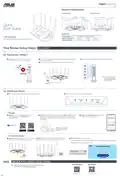
Hardware Explanations
I/O Ports Overview
LED Lights Overview
2.5G WAN
(Internet) port
2.5G LAN 1-3 ports
USB 3.2 Gen 1 port
(USB 3.0)
5GHz LED
2.4GHz LED
WAN (Internet) LED
Power LED
Power button
LAN LED
WPS button
DCIN port
Reset button
Quick
Start Guide
Specifications:
DC Power adapter
DC Output: +12V with 2.5A current
TUF-BE6500
TUF Gaming BE6500 Dual Band WiFi 7 Router
Operating Temperature
Operating Humidity
0~40oC
Storage
Storage
0~70oC
50~90%
20~90%
WE SUGGEST...
One Router Setup Steps
Prepare your Modem
01
1
Unplug the power of cable / DSL modem. If it
has a battery backup, remove the battery.
2
3
Connect your modem to WAN port at the back side of the router with the
network cable provided.
4
Check the modem LED lights to ensure the connection is active.
Power on the modem. Plug modem to the power outlet and power on.
Unplug
If you are using DSL for internet,
you will need your username
/ password from your Internet
service provider (ISP) to properly
configure your router.
Modem back
Modem front
Modem back
Install your Router
1
02
Plug the adapter into the DCIN port, and press the Power switch.
2
The power LED will light up when the hardware is ready.
– Via app
3
[App] On your iOS or Android mobile device, go
to the app store, search for ASUS Router, and
download the app.
4
[App] On your iOS or Android mobile device, tap Settings > Wi-Fi, connect
to the default network SSID shown on the product label on the back side
of the router. Or scan the code on the product label to connect the default
network SSID.
5
[App] Launch ASUS Router App and follow the
instructions to complete the setup.
ꢀꢁꢂꢃꢄꢅꢁ
ꢆꢇꢈꢃꢉꢊꢋꢌꢍꢁꢎꢌꢁꢍꢊꢏꢁꢍꢇꢐ
* XX refers to the last two digits
of MAC address. You can find
ꢏꢑꢒꢓꢑ
ꢀꢁꢂꢃꢄꢅꢆꢇꢀꢈꢉꢁꢇꢊꢋꢋꢌꢍꢎꢏ
ꢐꢋꢑꢋ_ꢒꢒ
it on the label on the back of
your router.
– Or via web browser
[Wireless] Connect to the network with default SSID shown on
4
[Wired / Wireless] Open a web browser.
3
[Wired] Connect your PC to LAN port at the back side
the product label on the back side of your router “ASUS_XX”.
of the router using an additional network cable.
Follow the instructions to complete the setup.
ꢓꢂꢔꢎꢈꢕꢂꢅꢄꢈꢅ ꢖꢗꢘꢙꢚꢛꢜꢝꢝ
ꢀꢁꢂꢃꢄꢂꢅꢃꢅꢆꢂꢇꢅꢆꢂꢄꢇꢈꢁꢉ
ꢊꢋꢌꢃꢍꢎꢂꢋꢅꢏꢂꢄꢄꢐꢍꢑꢒ
FREQUENTLY ASKED QUESTIONS
FAQ
Service and Support
Video Tutorials
Where can I find more information about the wireless router?
Q1:


| General | Details |
|---|---|
| Name | ASUS TUF-BE6500 TUF Gaming Dual Band WiFi 7 Router User Guide |
| Make | Asus |
| Language | English |
| Filetype | PDF (Download) |
| File size | 0.43 MB |
 (1 votes, average: 5.00 out of 5)
 Loading...
If you have any questions regarding ASUS TUF-BE6500 TUF Gaming Dual Band WiFi 7 Router User Guide, please ask here and describe the problem in detail.

ASUS RT-AC86U AC2900 WiFi Gaming Router User Guide

ASUS AC1750 WiFi Dual Band Wireless Internet Router User Guide

ASUS TUF-AX5400 Dual Band WiFi 6 Router User Guide

ASUS ET12 ZenWiFi Pro AXE11000 Tri Band Router User Guide

ASUS RT-AX82U V2 AX5400 Dual Band WiFi Router User Guide

ASUS TUF-AX4200 Dual Band WiFi Router User Guide

ASUS RT-N10U 150 mbps Wireless Router Instructions

ASUS RT-BE96U Tri Band WiFi Router User Guide

ASUS GT-AX6000 Dual Band WiFi 6 Extendable Gaming Router User Guide

ASUS RT-BE88U Dual Band WiFi Router User Guide


ZYXEL FWA710 Wireless Router User Guide

Falcon FN-4G-300P 4G LTE Portable 300MBPS Router User Manual

TP-Link BE3600 Wi-Fi 7 Portable Router User Guide

HAUS AWM55 Portable 5G Router User Guide

Tenda N300 Wi-Fi 4G LTE Router User Guide

MERCUSYS MB110-4G LTE Router User Guide

Ruijie Reyee RG-EW1200 Dual-Band Wireless Router Installation Guide

TP-Link TL-WR846N 300Mbps Wireless Router Instruction Manual

SEALEY CP20VTR Cordless Trimming Router Instruction Manual

TP-Link VR2100v Wireless Mu Mimo VDSL ADSL Modem Router Instruction Manual