
ATEL WB550 5G Fixed Wireless Access Router User Guide
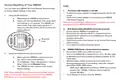


Factory Resetting of Your WB550
FAQ:
You can reset your WB550 5G Fixed Wireless Access Router
to factory default settings in two ways:
1.
The Power LED indicator is not ON.
•
Confirm the power adapter is plugged properly into the AC
socket.
1.
Using the Reset Button
•
Confirm the power adapter is connected to the WB550
FWA Router properly.
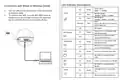
A. Make sure your WB550 is powered on.
B. Insert a pin into the Reset pin hole, push down
and hold up to 2-4 seconds. The WB550 will
then reboot. Push down and hold up to 5
more seconds, the device will then restore the
factory defaults.
Note: Use only the Power Adaptor that is provided and comes
packaged with the WB550 FWA Router.
2. Web Based Utility (WebGUI) cannot be accessed.
•
•
Ensure that the WB550 is powered on.
Ensure that your wireless client is connected and has
acquired the IP address from the WB550 over Wired or
wireless connection.
Check with another web browser or try to reset the browser
cache memory.
Try to Reboot or factory reset the device.
Reset pin
hole
•
•
3. WB550 FWA Router cannot access the network.
•
•
Ensure your USIM card is valid and active.
2. Using the WebGUI Portal (Online Portal)
Check the 5G/4G LED, it should be On. If it is off, then login
to WebGUI and check the Network details available on the
home page.
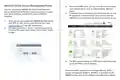
A. Make sure your WB550 is powered on and
you have access to the WebGUI.
•
•
Network status should be showing Connected. If it is
showing disconnected or connecting, check the network
parameters RSRP, SINR values.
B. Go to Settings > Basic: Management > Factory
Reset, Click on the Restore button.
C. The WB550 will then restore to the factory
default settings.
SINR value (dB) should be Positive. RSRP value must be
greater than -115dBm. Preferred value should be
Note: When performing the Factory Reset or Restart process,
make sure the power adaptor is connected to the WB550
FWA Router to ensure uninterrupted power supply.
around -90 dBm.
Try to Reboot or factory reset the WB550.

| General | Details |
|---|---|
| Name | ATEL WB550 5G Fixed Wireless Access Router User Guide |
| Make | ATEL |
| Language | English |
| Filetype | PDF (Download) |
| File size | 0.32 MB |
 (1 votes, average: 5.00 out of 5)
 Loading...
If you have any questions regarding ATEL WB550 5G Fixed Wireless Access Router User Guide, please ask here and describe the problem in detail.

ATEL RE600 5G CPE Router User Guide

ATEL WB550 Apex 5G CPE Router Owner’s Manual


Actiontec WF-815 Tri-Band Wi-Fi6E Router Owner’s Manual

Cudy AX3000 Wi-Fi 6 Mesh Router Installation Guide

wis network WIS-N300-LTE 4G LTE Router User Guide

RGBlink 202304030620516871 Bond 6 Bonding Network Router User Guide

STAR COMMUNICATIONS GigaSpire Blast u6.2 WiFi Router Instructions

RV WI-FI 2024 V3 DishyDock Router User Manual

Touch Controls ER-B-10-100-120 Ethernet Router Instruction Manual

LITE-ON WPXE8326 Wi-Fi 6E Access Point Mesh Router User Manual

ASUS ZenWiFi Pro XT12 AX11000 Tri Band Router User Manual

ASUS BE6500 Dual Band Wi-Fi 7 Router User Guide