
AZORES AX3000 PRO WiFi-6 Wireless Router Instruction Manual
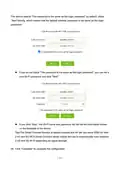


The device selects “The password is the same as the login password” by default, clicks
“Next”directly, which means that the default wireless password is the same as the login
password;
If you do not check "The password is the same as the login password", you can set a
new Wi-Fi password and click "Next".
If you click "Skip", the Wi-Fi name and password will still be the information shown
on the backside of the device.
Tips:The Smart Connect function is default enabled,this AP will use same SSID for both
2.4G and 5G Wi-Fi.Smart Connect allows mobile devices to automatically roam between
2.4G and 5G Wi-Fi depending on signal strength.
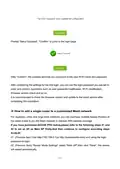
05 Click "Complete" to complete the configuration.
— 10 —

| General | Details |
|---|---|
| Name | AZORES AX3000 PRO WiFi-6 Wireless Router Instruction Manual |
| Make | AZORES |
| Language | English |
| Filetype | PDF (Download) |
| File size | 1.07 MB |
 (1 votes, average: 5.00 out of 5)
 Loading...
If you have any questions regarding AZORES AX3000 PRO WiFi-6 Wireless Router Instruction Manual, please ask here and describe the problem in detail.

AZORES AX6600 WiFi-6 Wireless Router Instruction Manual


HIKVISION DS-3WG105GP-SI Router User Guide

TP-Link Archer AX72 AX5400 Multi-Gigabit Wi-Fi 6 Router Installation Guide

TP-Link ARCHER C7 AC1750 Wireless Dual Band Gigabit Router User Guide

Rockwell CCR-3000 Router User Guide

Spectrum RAC2V1S WiFi 5 Wave 2 Router User Guide

TANGERINE eero 6+ Router User Guide

Cudy LT 700E Cat 6 AC1200 WiFi Router Installation Guide

Cudy WR3000E Gigabit Mesh WiFi 6 Router Installation Guide

Tenda 4G180 4G LTE Advanced Pocket Mobile Wi-Fi Router User Manual

Cudy WR1200 AC1200 Wi-Fi Router Installation Guide