
AZORES AX3000 PRO WiFi-6 Wireless Router Instruction Manual


03 SINGLE ROUTER SETUP STEPS
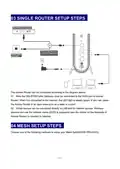
The Azores Router can be connected according to the diagram above.
01 Note the DSL/PON/Cable Gateway must be connected to the WAN port of Azores
Router. When it is connected to the Internet ,the LED light is steady green. If you can, place
the Azores Router in an open area such as a table or a shelf.
02 Wired devices can be connected directly to LAN port for Internet access. Wireless
devices can use the network name (SSID) & password (see the sticker on the backside of
Azores Router) to connect to Internet.
04 MESH SETUP STEPS
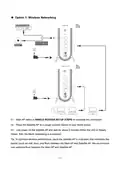
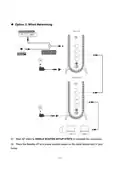
Choose one of the following methods to setup your Mesh Set(AX3000 PRO-DUO).
— 4 —

| General | Details |
|---|---|
| Name | AZORES AX3000 PRO WiFi-6 Wireless Router Instruction Manual |
| Make | AZORES |
| Language | English |
| Filetype | PDF (Download) |
| File size | 1.07 MB |
 (1 votes, average: 5.00 out of 5)
 Loading...
If you have any questions regarding AZORES AX3000 PRO WiFi-6 Wireless Router Instruction Manual, please ask here and describe the problem in detail.

AZORES AX6600 WiFi-6 Wireless Router Instruction Manual


GL TECHNOLOGIES GL-A1300 AC1300 Gigabit Wireless Router User Manual

Inseego FX2000 5G Router User Guide

NETGEAR RS150 Nighthawk WiFi 7 Dual-Band Router Owner’s Manual

ZYXEL LTE3301-PLUS 4G LTE-A Router User Guide

GUDE OF 1200 E Router Instructions

NETGEAR XR300 Nighthawk Gaming Router User Guide

Cudy WR1500 WiFi 6 Trådløs Router Installation Guide

TP-Link Archer AX12 Dual Band WiFi 6 Router Installation Guide

CNCU E550 EasyRoute CNC Router Instructions

TP-Link Archer BE800 BE19000 Tri Band WiFi 7 Router User Manual