
AZORES AX3000 PRO WiFi-6 Wireless Router Instruction Manual
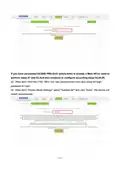


05 Start networking.
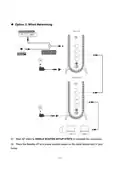
If you choose wired networking, connect the network port of new item to the Main AP
LAN port. The wired network is successful when the new single product indicator is
steady green;
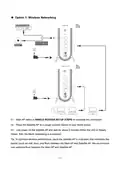
If you choose wireless networking, place the new item near the Main AP, press both
device WPS buttons for 1s, then release. The Main AP indicator will turn on in blue
for 1 minute, then restore to the original state. The wireless pairing is successful
when new added product indicator is steady green. Wait 2 minutes for information
synchronization and the wireless network is successful. You can move the new
product to the network expansion location.
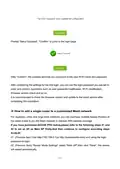
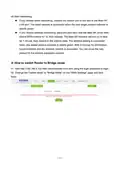
※ How to switch Router to Bridge mode
02 Change the "Uplink mode" to "Bridge Mode" on the "WAN Settings" page and click
Save.
— 13 —

| General | Details |
|---|---|
| Name | AZORES AX3000 PRO WiFi-6 Wireless Router Instruction Manual |
| Make | AZORES |
| Language | English |
| Filetype | PDF (Download) |
| File size | 1.07 MB |
 (1 votes, average: 5.00 out of 5)
 Loading...
If you have any questions regarding AZORES AX3000 PRO WiFi-6 Wireless Router Instruction Manual, please ask here and describe the problem in detail.

AZORES AX6600 WiFi-6 Wireless Router Instruction Manual


Cudy WR1200 AC1200 Dual Band Smart Wi-Fi Router Installation Guide

Tenda RX12L WiFi 6 Router Installation Guide

TELTONIKA OTD140 4G Outdoor Router User Guide

ADVANTECH ICR-3200 Cellular Router Instruction Manual

NIGHTHAWK Router User Manual

robustel R5020 Lite 5G Router Instruction Manual

ASUS E20188 ZenWiFi XD4S Dual Band WiFi Router User Guide

ZYXEL NR5309 5G NR Router User Guide

AMTEL AMT5500 Router User Manual

ASUS RT-BE88U Dual Band WiFi 7 Gaming Router User Guide