
BEC AirConnect 8112 5G Enterprise Router User Guide






BEC AirConnect® 8112 5G Enterprise Router
Hardware Connection
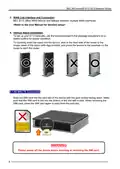
Back Panel Ports & Connectors
Hardware Installation
1. Power Connection
Plug in the supplied power adapter to the wall jack and the other side to the device.
Power ON the 8112 by pressing the Power On/Off button.
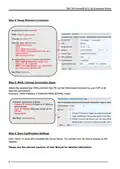
2. LAN Connection
Connect the supplied RJ-45 Ethernet cable to one of the Ethernet ports and the other side
to an Ethernet device.
4

| General | Details |
|---|---|
| Name | BEC AirConnect 8112 5G Enterprise Router User Guide |
| Make | BEC |
| Language | English |
| Filetype | PDF (Download) |
| File size | 0.89 MB |
 (1 votes, average: 5.00 out of 5)
 Loading...
If you have any questions regarding BEC AirConnect 8112 5G Enterprise Router User Guide, please ask here and describe the problem in detail.

BEC MX-241NP 4G LTE CBRS Wi-Fi Router User Guide

BEC 7000 R26-W Gigabit LTE Outdoor Router with Hotspot User Guide

BEC RidgeWave 7000 R26 MaxRange Gigabit LTE Outdoor Router Owner’s Manual


LANCOM VPN 1793VAW Router Installation Guide

CP PLUS DN211-S Dual-Band 4G Router Installation Guide

GRANDSTREAM GWN7062E Wi-Fi 6 Router Instruction Manual

JENSEN Air:Link 3000DG Dual Band Router User Manual

D-Link DSR-250V2 5-Gigabit Port VPN Router Installation Guide

ASUS RT-BE7200 Dual Band Wi-Fi Router User Guide

EnGenius XG60-FIT FitXpress 4 port Gigabit PoE plus VPV Router Owner’s Manual

SEALEY CP20VTR 20V SV20 Series Cordless Trimming Router Instructions

TP-Link BE5000 Outdoor/ Mesh Wi-Fi 7 Router User Guide

inhand ER815NRQ3 Wlan Edge Router Installation Guide