
BEC AirConnect 8112 5G Enterprise Router User Guide






BEC AirConnect® 8112 5G Enterprise Router
3. WAN Link Interface and Connection
BEC 8112 offers WAN failover and failback between multiple WAN interfaces.
<Refer to the User Manual for detailed setup>
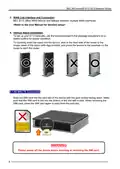
4. Vertical Stand Installation
To set up your 8112 vertically, use the stand provided in the package and place it on a
stable surface for proper operation.
To correctly insert the stand into the device, slide in the front side of the router to the
longer panel of the stand (with logo printed), and press the tenons to the borehole on the
router to latch the router.
4.1 5G NR/LTE Connection
Slide the SIM card into the card slot of the device with the gold contact facing down. Make
sure that the SIM card is slid into the bottom of the slot with a click. When removing the
SIM card, press the SIM card again to eject from the card slot.
WARNING
Please power off the device before inserting or removing the SIM card.
5

| General | Details |
|---|---|
| Name | BEC AirConnect 8112 5G Enterprise Router User Guide |
| Make | BEC |
| Language | English |
| Filetype | PDF (Download) |
| File size | 0.89 MB |
 (1 votes, average: 5.00 out of 5)
 Loading...
If you have any questions regarding BEC AirConnect 8112 5G Enterprise Router User Guide, please ask here and describe the problem in detail.

BEC MX-241NP 4G LTE CBRS Wi-Fi Router User Guide

BEC 7000 R26-W Gigabit LTE Outdoor Router with Hotspot User Guide

BEC RidgeWave 7000 R26 MaxRange Gigabit LTE Outdoor Router Owner’s Manual


Tenda AC9 AC1200 Dual Band Gigabit WiFi Router Installation Guide

LINKSYS FGW5500 5G WiFi 6 Router User Guide

MSA Safety FS-ROUTER-BAC2 FieldServer BACnet Router Instructions

Queclink WR100 Cellular Router User Manual

ASUS TUF-AX6000 Dual Band WiFi Router User Guide

DrayTek Vigor2762 Series ADSL2-2+ and VDSL2 Router User Guide

ASUS TUF-AX4200 Dual Band WiFi Router User Guide

WYZE Pro WiFi 6E Mesh Router Instruction Manual

cisco RV340 Router User Guide

ZYXEL NR2301 5G NR Portable Router User Guide