×
- 1. Quick Installation Guide (Ac1200 Wave 2 Mu-mimo Wi-fi Easymesh Router)
- 2. Beforeyoubegin (Deliverypackage → Routerdir-822 → Poweradapterdc12v/1a → Ethernetcable → Quickinstallationguide → Usermanual)
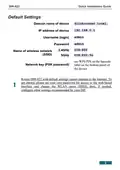
- 3. Quick Installation Guide (Default Settings → Username (login) → Password → Name Of Wireless Network (ssid) → Network Key (psk Password) → Router Dir-822 With Default Settings Cannot Connect To The Internet. To Get Started, Please Set Your Own Password For Access To The Web-based Interface And Change The Wlan Name (ssid); Then, If Needed, Configure Other Settings Recommended By Your Isp.)
- 4. Quick Installation Guide (System Requirements And Equipment)
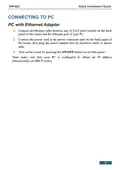
- 5. Connecting To Pc (Pc With Ethernet Adapter)
- 6. Obtainingipaddressautomatically(oswindows7) (Networkandsharingcenter → Changeadaptersettings → Localareaconnectionproperties → Internetprotocolversion4(tcp/ipv4))
- 7. Quick Installation Guide
- 8. Quick Installation Guide (Obtaining Ip Address Automatically → Network & Internet Section → Change Your Network Settings → Change Adapter Options → Local Area Connection Properties → Internet Protocol Version 4 (tcp/ipv4))
- 9. Quick Installation Guide
- 10. Connect The Power Cord To The Power Connector Port On The Back Panel Of The Router, Then Plug The Power Adapter Into An Electrical Outlet Or…
- 11. Quick Installation Guide (Obtaining Ip Address Automatically → Connecting To Wireless Network (os Windows 7) → Network And Sharing Center → Change Adapter Settings → Wireless Network Connection Properties → Internet Protocol Version 4 (tcp/ipv4))
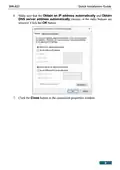
- 12. Quick Installation Guide (Obtain An Ip Address Automatically → Obtain Dns Server Address Automatically → Click The Ok Button → Open The List Of Available Wireless Networks → Connect To Button → Network Icon In The Notification Area)
- 13. Quick Installation Guide (Wireless Network Selection → Entering Network Key → Connection Establishment → Initial Configuration Via Wi-fi → Reconfiguring Wireless Connection)
- 14. Quick Installation Guide (Obtaining Ip Address Automatically → Connecting To Wireless Network (os Windows 10) → Change Your Network Settings → Change Adapter Options → Wireless Network Connection Properties → Internet Protocol Version 4 (tcp/ipv4))
- 15. Quick Installation Guide (Connect To Wireless Network → Select Wireless Network → Enter Network Key → Discoverability Settings → Connection Confirmation)
- 16. Quick Installation Guide (Initial Configuration → Reconfigure Wireless Connection)
- 17. Dir-822 (Quick Installation Guide → Configuring Router → Connecting To Web-based Interface → Setup Wizard)
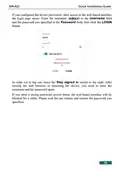
- 18. Quick Installation Guide (Warning: If You Configured The Device Previously, After Access To The Web-based Interface The Login Page Opens. Enter The Username (admin) In The Username Field And The Password You Specified In The Password Field, Then Click The Login Button.)
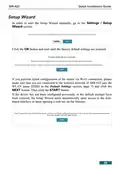
- 19. Quick Installation Guide (Management / Administration → Settings / Setup Wizard)
- 20. Quick Installation Guide (Setup Wizard → Default Settings)
- 21. Quick Installation Guide
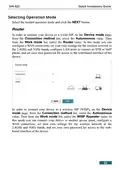
- 22. Quick Installation Guide (Selecting Operation Mode → Router)
- 23. Quick Installation Guide (Access Point Or Repeater → Device Mode → Connection Method → Work Mode → Lan Ip Address → Web-based Interface)
- 24. Quick Installation Guide (Mesh Network Main Device (controller) → Connection Method → Device Role → Work Mode)
- 25. Quick Installation Guide (Mesh Network Subordinate Device (agent) → Connection Method → Device Role)
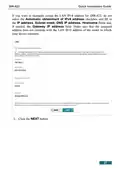
- 26. Quick Installation Guide (Changing Lan Ipv4 Address → Automatic Obtainment Of Ipv4 Address → Hostname Field)
- 27. Quick Installation Guide (Automatic Obtainment Of Ipv4 Address → Ip Address → Subnet Mask → Dns Ip Address → Hostname → Gateway Ip Address)
- 28. Quick Installation Guide (Wi-fi Client → Wisp Repeater → Repeater → Client Modes → Wireless Networks → Update List)
- 29. Quick Installation Guide (Frequency Band → Network Name (ssid) → Network Authentication)
- 30. Dir-822 (Quick Installation Guide → Configuring Wan Connection → Router And Wisp Repeater Modes → Internet Connection Type → Static Ipv4 Configuration → Static Ipv6 Configuration)
- 31. Quick Installation Guide (Pppoe, Ipv6 Pppoe, Pppoe Dual Stack, Pppoe + Dynamic Ip → Pppoe + Static Ip (pppoe Dual Access))
- 32. Quick Installation Guide (Pptp + Dynamic Ip Or L2tp + Dynamic Ip → Pptp + Static Ip Or L2tp + Static Ip)
- 33. Quick Installation Guide (Clone Mac Address → Use Vlan → Next Button)
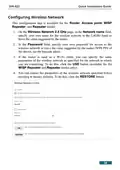
- 34. Quick Installation Guide (Configuring Wireless Network → Wireless Network 2.4 Ghz → Password)
- 35. Quick Installation Guide (Enable Guest Network → Network Name → Password → Enable Shaping → Wireless Network 5 Ghz)
- 36. Quick Installation Guide (Configuring Lan Ports For Iptv/voip → Is An Stb Connected To The Device → Select A Free Lan Port For Connecting Your Set-top Box → Use Vlan Id → Click The Next Button)
- 37. Quick Installation Guide (Voip Configuration → Connecting Ip Phone → Vlan Configuration)
- 38. Quick Installation Guide (Changing Web-based Interface Password → Save Configuration File → Apply Settings)
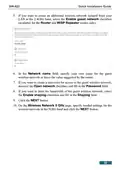
- 39. Quick Installation Guide (Configuring Local Area Network → Settings / Network → Ipv4 → Ipv6)
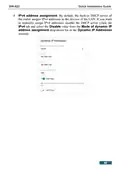
- 40. Quick Installation Guide (Ipv4 Address Assignment)
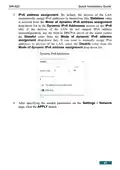
- 41. Quick Installation Guide (Ipv6 Address Assignment → Settings / Network)
- 42. Quick Installation Guide (Specifications → Hardware → Interfaces → Buttons → Software → Wan Connection Types)
- 43. Quick Installation Guide (Software → Advanced Configuration Of Built-in Dhcp Server → Dynamic Dns → Network Address Translation (nat) → Firewall Functions → Vpn)
- 44. Quick Installation Guide (Local And Remote Access To Settings Through Ssh/telnet/web (http/https) → Multilingual Web-based Interface For Configuration And Management → Firmware Update Via Web-based Interface → Wireless Module Parameters → Wireless Connection Security)
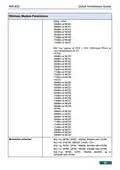
- 45. Quick Installation Guide (Wireless Module Parameters → Advanced Settings → Guest Wi-fi / Support Of Mbssid → Advanced Functions → Wireless Connection Rate → Transmitter Output Power)
- 46. Quick Installation Guide (Wireless Module Parameters)
- 47. Quick Installation Guide (Wireless Module Parameters → Modulation Schemes)
- 48. Quick Installation Guide (Physical Parameters → Operating Environment → Power → Temperature → Humidity)
- 49. Safetyrulesandconditions
- 50. Quick Installation Guide (Technical Support)
×
D-Link DIR-822 AC1200 Wave 2 WiFi Router Instruction Manual
DIR-822
Quick Installation Guide
Obtaining
IP
Address
Automatically
(OS Windows 10)
1. Click the Start button and proceed to the Settings window.
2. Select the Network & Internet section.
3. In the Change your network settings section, select the Change
adapter options line.
4. In the opened window, right-click the relevant Local Area Connection
icon and select the Properties line in the menu displayed.
5. In the Local Area Connection Properties window, on the
Networking tab, select the Internet Protocol Version 4 (TCP/IPv4)
line. Click the Properties button.
8
| General | Details |
|---|---|
| Name | D-Link DIR-822 AC1200 Wave 2 WiFi Router Instruction Manual |
| Make | D-Link |
| Language | English |
| Filetype | PDF (Download) |
| File size | 0.59 MB |
If you have any questions regarding D-Link DIR-822 AC1200 Wave 2 WiFi Router Instruction Manual, please ask here and describe the problem in detail.

D-Link BE3600 Mesh Gigabit Wireless Router Installation Guide

D-Link DBR-700 Router Installation Guide

D Link DIR-822 AC1200 WiFi Router User Guide

D-Link DIR-2660 AC2600 Mesh Wifi Router Installation Guide

D-Link EXO AX AX1800 Wi-Fi Router User Guide

D-Link N300 4G Router User Guide

D-Link M60 AX6000 Wi-Fi 6 Mesh Router Installation Guide

D-Link AX3200 Router Owner’s Manual

D-Link M30 2-pack Mesh Router User Guide

D-Link M30 AQUILA PRO AI AX3000 Wi-Fi 6 Mesh Router User Manual


TP-Link G36 Gigabit VPN Router Installation Guide

dahua DH-MAX18-3 MAX18 Mesh Wireless Router User Guide

SMAWAVE SRE410 LTE CPE Router User Guide

WAVLINK AC1200 WiFi Router Instructions

TP-Link AX58 Dual Band Gigabit Wi-Fi 6 Router Installation Guide

bond6 RGB Link Network Bonding Router User Manual

PRISMXR P1411 Streaming Link Air Bridge WiFi6 Router User Guide

ASUS RT-AX89X Dual-band Wi-Fi Router Instruction Manual

NEXXT NCM-C1200 Bolt AC 1200 Router User Guide

D-Link DWR-M930DS 4G Dual SIM LTE Router Installation Guide
Table of Contents
- 1. Quick Installation Guide - Ac1200 Wave 2 Mu-mimo Wi-fi Easym... →
- 2. Beforeyoubegin - Deliverypackage →
- 3. Quick Installation Guide - Default Settings →
- 4. Quick Installation Guide - System Requirements And Equipment →
- 5. Connecting To Pc - Pc With Ethernet Adapter →
- 6. Obtainingipaddressautomatically(oswindows7) - Networkandshar... →
- 7. Quick Installation Guide →
- 8. Quick Installation Guide - Obtaining Ip Address Automaticall... →
- 9. Quick Installation Guide →
- 10. Connect The Power Cord To The Power Connector Port On The Ba... →
- 11. Quick Installation Guide - Obtaining Ip Address Automaticall... →
- 12. Quick Installation Guide - Obtain An Ip Address Automaticall... →
- 13. Quick Installation Guide - Wireless Network Selection →
- 14. Quick Installation Guide - Obtaining Ip Address Automaticall... →
- 15. Quick Installation Guide - Connect To Wireless Network →
- 16. Quick Installation Guide - Initial Configuration →
- 17. Dir-822 - Quick Installation Guide →
- 18. Quick Installation Guide - Warning: If You Configured The De... →
- 19. Quick Installation Guide - Management / Administration →
- 20. Quick Installation Guide - Setup Wizard →
- 21. Quick Installation Guide →
- 22. Quick Installation Guide - Selecting Operation Mode →
- 23. Quick Installation Guide - Access Point Or Repeater →
- 24. Quick Installation Guide - Mesh Network Main Device (control... →
- 25. Quick Installation Guide - Mesh Network Subordinate Device (... →
- 26. Quick Installation Guide - Changing Lan Ipv4 Address →
- 27. Quick Installation Guide - Automatic Obtainment Of Ipv4 Addr... →
- 28. Quick Installation Guide - Wi-fi Client →
- 29. Quick Installation Guide - Frequency Band →
- 30. Dir-822 - Quick Installation Guide →
- 31. Quick Installation Guide - Pppoe, Ipv6 Pppoe, Pppoe Dual Sta... →
- 32. Quick Installation Guide - Pptp + Dynamic Ip Or L2tp + Dynam... →
- 33. Quick Installation Guide - Clone Mac Address →
- 34. Quick Installation Guide - Configuring Wireless Network →
- 35. Quick Installation Guide - Enable Guest Network →
- 36. Quick Installation Guide - Configuring Lan Ports For Iptv/voi... →
- 37. Quick Installation Guide - Voip Configuration →
- 38. Quick Installation Guide - Changing Web-based Interface Pass... →
- 39. Quick Installation Guide - Configuring Local Area Network →
- 40. Quick Installation Guide - Ipv4 Address Assignment →
- 41. Quick Installation Guide - Ipv6 Address Assignment →
- 42. Quick Installation Guide - Specifications →
- 43. Quick Installation Guide - Software →
- 44. Quick Installation Guide - Local And Remote Access To Settin... →
- 45. Quick Installation Guide - Wireless Module Parameters →
- 46. Quick Installation Guide - Wireless Module Parameters →
- 47. Quick Installation Guide - Wireless Module Parameters →
- 48. Quick Installation Guide - Physical Parameters →
- 49. Safetyrulesandcondit... →
- 50. Quick Installation Guide - Technical Support →