×
- 1. Wifi Industrial Router (User Manual → Industrial Router Fw70-wifi Product Specification)
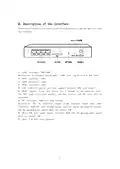
- 2. Description Of The Indicator Light (Warning → System Light (sys) → Wifi → Pwr → Wan Lights → Lan1-lan3 Lamp)
- 3. Description Of The Interface (Rj45 Interface: Wan/lan0 → Rj45 Interface: Lan1 → Rj45 Interface: Lan2 → Rj45 Interface: Lan3 → Sim Card Slot → Reset Button → Dc Interface: Dc5v-12v Wide Voltage)
- 4. Connection (Connect The Device → Wired Connection → Set The Ip Address Of The Computer → Connect Via Wifi)
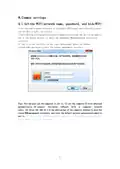
- 5. Common Settings (Set The Wifi Network Name, Password, And Hide Wifi)
- 6. Wireless Settings (Wireless Ssid → Wireless Security → Wpa-psk Key)
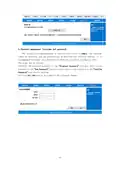
- 7. Wireless Settings (Router Working Mode Settings → Standard Wireless Routing Mode → Static Internet Access)
- 8. Dynamic Internet Access (Pppoe Internet Access)
- 9. Wirelessap+wirelessclientbridgemode(wirelessrelay) (Wirelessap+clientmode(wirelesssignalreception) → Non-essentialfunctionsnotdescribedindetail)
- 10. Lan Settings (Warning: The Assignable Address Must Be In The Same Network Segment As The Lan Port Ip. → Ip Address And Subnet Mask Configuration → Wired Camera Configuration)
- 11. Restart At A Regular Interval (Timed Restart Settings → Improving Stability And Effectiveness)
- 12. Software Upgrade (Restore The Factory Value)
- 13. Password Management (username And Password)
- 14. Frequently Asked Questions (What Should I Do If I Forget My Username And Password? → Can't Find The Wifi Signal Of The Router? → The Router Signal Light Is On, There Is Data Transmission, But The Internet Speed Is Slow? → Why Can't The Device Read The Sim Card When The Card Is Changed During The Operation Of The Router? → Why Is The Speed Slow When Using Wireless Internet Access?)
- 15. Product Replacement, Warranty Content (Paid Maintenance Services Will Be Implemented In The Following Cases)
- 16. Repair Records (Fccwarning → Note: The Repair Shall Be Carried Out By The Authorized Maintenance Unit, And The Maintenance Record Shall Be Filled In And Stamped, Otherwise The Maintenance Record Will Be Invalid And The Warranty Qualification Will Be Lost.)
×
Doonink FW70 WIFI Router User Manual
| General | Details |
|---|---|
| Name | Doonink FW70 WIFI Router User Manual |
| Make | Doonink |
| Language | English |
| Filetype | PDF (Download) |
| File size | 0.53 MB |

Doonink FW40-WIFI Wi-Fi Router User Manual


ZETTABEAM AX3000 Wi-Fi 6 Router Installation Guide

Helmholz LTE11 Router Owner’s Manual
trend Router Cutter Safety Instructions

TP-Link TD-W9970 300 Mbps Wireless DSL and ADSL Modem Wi-Fi Router Owner’s Manual

REYEE RG-R4 1800M Gigabit Dual-Band Wi-Fi 6 Wireless Router User Manual

trend T18S-DS 18V Cordless 1-4 Inch Router Instructions

Wi-Tek WI-LTE300 Wireless 4G LTE Router Installation Guide

ATEL WB550 Apex 5G CPE Router Owner’s Manual

ASUS RT-AX53U Dual Band Wi-Fi Router User Guide

BIGXI AX1800 Wireless Router Installation Guide
Table of Contents
- 1. Wifi Industrial Router - User Manual →
- 2. Description Of The Indicator Light - Warning →
- 3. Description Of The Interface - Rj45 Interface: Wan/lan0 →
- 4. Connection - Connect The Device →
- 5. Common Settings - Set The Wifi Network Name, Password, And H... →
- 6. Wireless Settings - Wireless Ssid →
- 7. Wireless Settings - Router Working Mode Settings →
- 8. Dynamic Internet Access - Pppoe Internet Access →
- 9. Wirelessap+wirelessclientbridgemode(wirelessrelay) - Wireles... →
- 10. Lan Settings - Warning: The Assignable Address Must Be In Th... →
- 11. Restart At A Regular Interval - Timed Restart Settings →
- 12. Software Upgrade - Restore The Factory Value →
- 13. Password Management (username And Password) →
- 14. Frequently Asked Questions - What Should I Do If I Forget My... →
- 15. Product Replacement, Warranty Content - Paid Maintenance Ser... →
- 16. Repair Records - Fccwarning →