
Edge-core AS7926-40XKFB 100G Aggregation Router User Guide
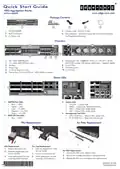
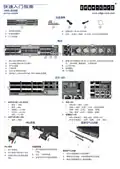
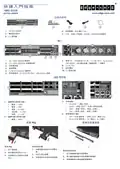


Quick Start Guide
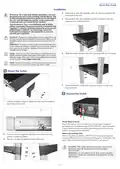
Installation
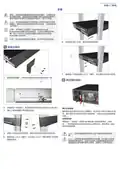
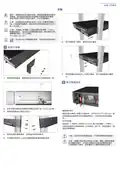
4. Extend each rack-rail assembly until it fits the rear post and the
Warning: For a safe and reliable installation, use only
the accessories and screws provided with the device. Use
of other accessories and screws could result in damage to
the unit. Any damages incurred by using unapproved
accessories are not covered by the warranty.
front post of the rack.
5. Secure each rack-rail assembly using four screws on the rear
post and two on the front post.
Avertissement: Pour une installation sûre et fiable,
utilisez uniquement les accessoires et les vis fournies avec
l’appareil. L’utilisation d’autres accessoires et vis pourrait
endommager l’appareil. Les dommages causés par
l’utilisation d’accessoires non approuvés ne sont pas
couverts par la garantie.
Caution: The server includes plug-in power supply (PSU) and
fan tray modules that are installed into its chassis. Make sure all
installed modules have a matching airflow direction (front-to-
back).
Attention: Le serveur comprend des modules d’alimentation
et de modules de ventilation installés dans son châssis. Assurez-
vous que tous les modules installés ont une direction d’air
adaptée (avant-arrière).
6. Slide the switch into the rack until it connects with the front post.
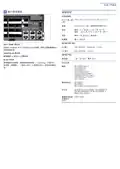
Note: The server has the Open Network Install Environment
(ONIE) software installer preloaded on the switch, but no switch
software image. Information about compatible switch software
Note:The switch drawings in this document are for illustration
only and may not match your particular switch model.
1 Mount the Switch
7. Secure the switch in the rack using two screws on each rack
mount bracket.
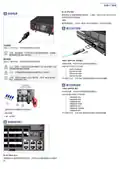
2 Ground the Switch
1. Use the included screws to attach the rack mount bracket to
each side of the switch.
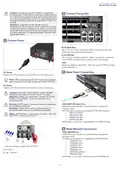
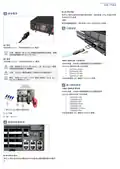
Verify Rack Ground
Ensure the rack on which the switch is to be mounted is properly
grounded and in compliance with ETSI ETS 300 253. Verify that there is
a good electrical connection to the grounding point on the rack (no
paint or isolating surface treatment).
Attach Grounding Wire
2. For each rack-rail assembly, adjust the rear slide plate to the
position marked as 630mm.
3. Secure it in place by fastening the thumbscrew.
Attach a lug (not provided) to a #8 AWG minimum grounding wire
(not provided), and connect it to the grounding point on the switch rear
panel. Then connect the other end of the wire to rack ground.
Caution: The chassis ground connection must not be
removed unless all supply connections have been
disconnected.
Attention: Le raccordement à la terre ne doit pas être
retiré sauf si toutes les connexions d’alimentation ont été
débranchées.
– 2 –

| General | Details |
|---|---|
| Name | Edge-core AS7926-40XKFB 100G Aggregation Router User Guide |
| Make | Edge-core |
| Language | English |
| Filetype | PDF (Download) |
| File size | 0.78 MB |
 (1 votes, average: 5.00 out of 5)
 Loading...
If you have any questions regarding Edge-core AS7926-40XKFB 100G Aggregation Router User Guide, please ask here and describe the problem in detail.

Edge-corE AS9947-36XKB AC Ethernet Switch and Router User Guide


sunhans eSunFi SHFiEL40 eSIM 4G Portable Router User Manual

Cudy AX3000 Wi-Fi 6 Mesh Router Installation Guide

ZYXEL NR7302,NR7303 5G NR Outdoor Router Instruction Manual

EnGenius ESG620 Cloud Managed VPN Router User Guide

Cudy WR3000E Gigabit Mesh WiFi 6 Router Installation Guide

HNK Flow AX1501 Dual Band Wi-Fi 6 AX1500 Router User Guide

Cudy WR1200 AC1200 Wi-Fi Router Installation Guide

SDMC NE1611B WiFi Cable Modem Router User Manual

NIRAD Networks N200-I-SDWAN-EDGE EDGE Router Installation Guide

REPUBLC OF GAMERS GT-BE98 Quad Band Gaming Router User Guide