
Edge-core AS7926-40XKFB 100G Aggregation Router User Guide
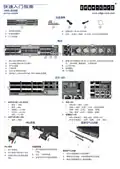
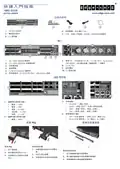
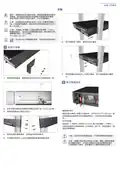


Quick Start Guide
Caution: The device must be installed in a restricted-
access location. It should have a separate protective ground
terminal on the chassis that must be permanently connected
to a well grounded chassis or frame to adequately ground
the device chassis and protect the operator from electrical
hazards.
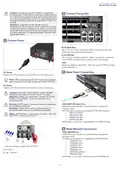
4 Connect Timing Port
Attention: L'appareil doit être installé dans un
emplacement à accès restreint. Il doit comporter une borne
de terre de protection distincte sur le châssis, qui doit être
connectée en permanence à la terre pour assurer une mise
à la terre adéquate du châssis et protéger l'opérateur des
risques électriques.
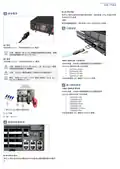
3 Connect Power
RJ-45 Stack-Sync
Use a Cat. 5e or better twisted-pair cable to synchronize devices in
master and slave stacking configurations.
RJ-45 PPS/ToD
Use a Cat. 5e or better twisted-pair cable to connect the 1-pulse-per-
second (1PPS) and Time of Day to other synchronized devices.
1PPS
Use a coax cable to connect the 1-pulse-per-second (1PPS) to another
synchronized device.
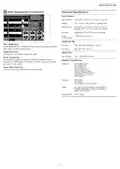
5 Make Fabric Connections
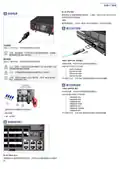
AC Power
Install two AC PSUs and then connect them to an AC power source.
Note: When using only one AC PSU to power a fully loaded
system, be sure to use a high-voltage source (200-240 VAC).
DC Power
Install two DC PSUs and then connect them to a DC power source.
Caution: Use a IEC/UL/EN 60950-1 and/or 62368-1
certified power supply to connect to a DC converter.
Attention: Utilisez une alimentation certifiée IEC/UL/EN
60950-1 et/ou 62368-1 pour vous connecter à un
convertisseur CC.
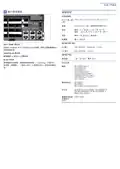
400G QSFP-DD Fabric Ports
Install transceivers and then connect fiber optic cabling to the
transceiver ports.
Caution: All DC power connections should be performed
by a qualified professional.
Attention: Toutes les connexions d’alimentation CC
doivent être effectuées par un professionnel qualifié.
The following transceivers are supported in the QSFP-DD ports:
QSFP-DD 400GE
QSFP56-DD FR4
QSFP56-DD DR4
QSFP56-DD SR8
Note: Use #10 AWG / 4 mm2 copper wire (for a -48 to -60
VDC PSU) to connect to a DC PSU.
Alternatively, connect DAC cables directly to the QSFP-DD slots.
6 Make Network Connections
100G QSFP28 Ports
Install transceivers and then connect fiber optic cabling to the
transceiver ports.
The following transceivers are supported in the QSFP28 ports:
1
2
3
100GBASE-CR4
100GBASE-AOC
100GBASE-SR4
100GBASE-PSM4
100GBASE-LR4
100GBASE-CWDM4
1. Use the ring lugs included with the DC PSU.
2. DC return
3. -48 – -60 VDC
100GBASE-ER4
Alternatively, connect DAC cables directly to the QSFP28 slots.
– 3 –

| General | Details |
|---|---|
| Name | Edge-core AS7926-40XKFB 100G Aggregation Router User Guide |
| Make | Edge-core |
| Language | English |
| Filetype | PDF (Download) |
| File size | 0.78 MB |
 (1 votes, average: 5.00 out of 5)
 Loading...
If you have any questions regarding Edge-core AS7926-40XKFB 100G Aggregation Router User Guide, please ask here and describe the problem in detail.

Edge-corE AS9947-36XKB AC Ethernet Switch and Router User Guide


DrayTek V4.3.2.5 Vigor1000B Multi WAN Security Router User Guide

TP-Link 7106508102 Deco Router Installation Guide
Edge-corE AS9947-36XKB AC Ethernet Switch and Router User Guide

TP-Link AX6000 8-Stream Wi-Fi 6 Router Installation Guide

ASUS ZenWiFi XT9 AX7800 Tri Band WiFi Router User Guide

ASUS RTAX6P00 ZenWiFi Hybrid MoCA Mesh Router User Manual

LINKSYS AX1800 Dual-Band WiFi 6 Router E7350 User Guide

GL TECHNOLOGIES GL-A1300 AC1300 Gigabit Wireless Router User Manual

GL iNet AX1800 Slate AX Wireless Router User Manual

REYEE RG-R4 1800M Gigabit Dual-Band Wi-Fi 6 Wireless Router User Manual