
EDiMAX EW-7489WAX Wireless Router Installation Guide

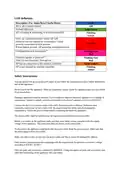


The appliance produces heat. Ensure that there is sufficient air circulation to remove the heat.
Avoid a permanent high level of air humidity and formation of condensation. Protect the appliance
from humidity and chemicals. Safe use of the appliance is no longer possible if: the chassis is
damaged water penetrated the appliance objects entered the appliance via air opening smoke comes
out of the appliance the power cable is damaged it does not work properly
Immediately turn off the appliance in the event of one of the above problems, remove the power cable
from the power socket and contact your customer service as soon as possible.
We expressly exclude any product liability and warranty claims if the appliance is not operated
according to the instructions in these notes and to the notes attached to the appliance itself.
PoE-Injector Safety Information
Caution: The PoE injector is to be connected only to PoE networks without routing to the outside
plant.
ÌAC Power Cord: The power cord must have regulatory agency approval for the specific country in
which it is used (for example, UL, CSA, VDE, GS, etc.).
The power cord must be a three-conductor type (two current carrying conductors; one ground
conductor terminated on one end by an IEC 60320 appliance coupler (for connection to the PoE-
Injector), and on the other end by a plug containing a ground (earthing) contact).
The power cord must be razed for a minimum of 250 VAC RMS operation, with a minimum rated
current capacity of 5 A (or a minimum wire gauge of 18 AWG (0.75 mm2)).
A PoE-Injector installed in Australia requires power cords with a minimum wire gauge of 16 AWG
(1.0 mm2).
The PoE-Injector "Data In" and "Data & Power Out" ports are shielded RJ45 data sockets. They
cannot be used as Plain Old Telephone Service (POTS) telephone sockets. Connect RJ45 data
connectors only to those sockets.
The AC wall socket-outlet must be near the PoE-Injector and easily accessible. You can remove AC
power from the PoE-Injector by disconnecting the AC power cord from either the wall socket-outlet
or the PoE-Injector appliance coupler.
The PoE-Injector "Data In" and "Data & Power Out" interfaces are qualified as Safety Extra-Low
Voltage (SELV) circuits according to IEC 62368-1. Connect these interfaces only to SELV interfaces
on other equipment.
Warnings
Connect the PoE-Injector only to the IP device with which it was bought. Using the PoE-Injector with
other IP devices can cause damage to the IP device.
Read the installation instructions before connecting the PoE-Injector to its power source.
Follow basic electricity safety measures whenever connecting the PoE-Injector to its power source.
A voltage mismatch can cause equipment damage and may pose a fire hazard. If the voltage indicated on
the label is different from the power outlet voltage, do not connect the PoE-Injector to that power outlet.
Federal Communication Commission Interference Statement
This device complies with Part 15 of the FCC Rules. Operation is subject to the following two
conditions: (1) This device may not cause harmful interference, and
(2) this device must accept any interference received, including interference
that may cause undesired operation.
This equipment has been tested and found to comply with the limits for a Class B digital device,
pursuant to Part 15 of the FCC Rules. These limits are designed to provide reasonable protection
against harmful interference in a residential installation. This equipment generates, uses and can
radiate radio frequency energy and, if not installed and used in accordance with the instructions,
may cause harmful interference to radio communications. However, there is no guarantee that
interference will not occur in a particular installation. If this equipment does cause harmful
interference to radio or television reception, which can be determined by turning the equipment off
and on, the user is encouraged to try to correct the interference by one of the following measures:
-Reorient or relocate the receiving antenna.
-Increase the separation between the equipment and receiver.
-Connect the equipment into an outlet on a circuit different from that to which
the receiver is connected.
-Consult the dealer or an experienced radio/TV technician for help.
FCC Caution: Any changes or modifications not expressly approved by the party responsible for
compliance could void the user's authority to operate this equipment.
This transmitter must not be co-located or operating in conjunction with any other antenna or
transmitter.
This device meets all the other requirements specified in Part 15E, Section 15.407 of the FCC
Rules.
Radiation Exposure Statement:
This equipment complies with FCC radiation exposure limits set forth for an
uncontrolled environment. This equipment should be installed and operated with minimum
distance 20cm between the radiator & your body.
Note: The country code selection is for non-US model only and is not available to all US model.
Per FCC regulation, all WiFi product marketed in US must fixed to US operation channels only.
FCC regulations restrict the operation of this device to indoor use only.
Industry Canada statement
This device contains licence-exempt transmitter(s)/receiver(s) that comply with Innovation, Science
and Economic Development Canada’s licence-exempt RSS(s). Operation is subject to the following
two conditions:
1. This device may not cause interference.
2. This device must accept any interference, including interference that may cause undesired
operation of the device.
L’émetteur/récepteur exempt de licence contenu dans le présent appareil est conforme aux CNR
d’Innovation, Sciences et Développement économique Canada applicables aux appareils radio
exempts de licence. L’exploitation est autorisée aux deux conditions suivantes :
1. L’appareil ne doit pas produire de brouillage;
2. L’appareil doit accepter tout brouillage radioélectrique subi, même si le brouillage est
susceptible d’en compromettre le fonctionnement.
Caution
Operation shall be limited to indoor use only;
Utilisation limitée à l’intérieur seulement;
Radiation Exposure Statement
This equipment complies with ISED radiation exposure limits set forth for an uncontrolled environment. This
equipment should be installed and operated with greater than 23cm between the radiator & your body.
Déclaration d'exposition aux radiations
Cet équipement est conforme aux limites d'exposition aux rayonnements ISED établies pour un environnement
non contrôlé. Cet équipement doit être installé et utilisé à plus de 23cm entre le radiateur et votre corps.
1

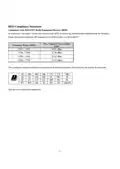
RED Compliance Statement
Compliance with 2014/53/EU Radio Equipment Directive (RED)
In accordance with Article 10.8(a) and 10.8(b) of the RED, the following table provides information on the frequency
bands used and the maximum RF transmit power of the product for sale in the EU:
Max. Transmit Power (dBm)
Frequency Range (MHz)
EIRP
2412 ~ 2472
5180 ~ 5240
19.91 dBm
22.98 dBm
5250 ~ 5320
5500 ~ 5700
22.93 dBm
22.92 dBm
This equipment should be installed and operated with minimum distance 20cm between the radiator & your body.
AT
EE
IT
BE
FI
LV
RO
BG
FR
LT
HR
DE
LU
SI
CY
EL
MT
ES
CZ
HU
NL
DK
IE
PL
PT
SK
SE UK(NI)
This device is restricted to indoor use
2

| General | Details |
|---|---|
| Name | EDiMAX EW-7489WAX Wireless Router Installation Guide |
| Make | EDIMAX |
| Language | English |
| Filetype | PDF (Download) |
| File size | 0.29 MB |
 (1 votes, average: 5.00 out of 5)
 Loading...
If you have any questions regarding EDiMAX EW-7489WAX Wireless Router Installation Guide, please ask here and describe the problem in detail.

EDIMAX BR-6428NS V5 4 in 1 N300 WiFi Router Installation Guide


LAB4MUSIC Sipario Expanded Advanced MIDI Router User Manual

ASUS RT-BE92U BE9700 Tri Band WIFI 7 Router User Guide

TP-Link RM100 Router WiFi 4G LTE 300MBPS User Manual

ASUS GT-BE19000 WiFi 7 Tri Band Gaming Router User Guide

MERCUSYS MR47BE BE9300 Tri Band WiFi 7 Router User Guide

TP-Link GXE75 AXE5400 Tri-Band Wi-Fi 6E Gaming Router User Guide

NETGEAR MR90 Nighthawk Tri-band Mesh Wi-Fi 6E Router Owner’s Manual

TP-Link M7000 Portable Travel WiFi 4G Router Installation Guide

Milesight UR35 Dual SIM Router User Guide

BT Hub 3 Broadband Router User Guide