
×
- 1. Quick Start Guide
- 2.
- 3. Sicherheitshinweise (Betreiben Der Fritz!box → Montage Mit Klebepad → Einsatz Der Fritz!box Im Freien → Montage An Fenstern → Schutzart Ip54 → Betrieb Im Außenbereich Bei Gewitter)
- 4. Sim Einstecken (Montieren → Betreiben)
- 5. Netzteil (Fritz!box Anschließen → Wlan)
- 6. Wlan-gerät Verbinden (Smartphone Oder Tablet Verbinden → Computer Oder Notebook Verbinden)
- 7. Internetzugang Einrichten (Internetverbindung Herstellen → Benutzeroberfläche Der Fritz!box → Wi-fi Network (ssid) → Wi-fi Password (wpa2) → Fritz!box Password → Folgen Sie Den Anweisungen Auf Dem Bildschirm)
- 8. Schnurlostelefone Verbinden (Netzwerkgerät Anschließen → Schalten Sie Ihr Telefon An → Bringen Sie Das Telefon In Anmeldebereitschaft → Geben Sie Die Pin Der Fritz!box Ein → Drücken Sie Die Taste Connect An Der Fritz!box)
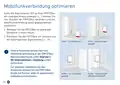
- 9. Mobilfunkverbindung Optimieren (Standorte Der Fritz!box → Signalstärke-led → Benutzeroberfläche Unter Internet > 5g-informationen > Empfang → Verbesserung Des Empfangs → Positionierung Der Fritz!box)
- 10. Montage Am Fenster (Innenbereich → Außenbereich → Wlan → Power/mobile → Im Außenbereich → Adapter Mit Der Befestigungsschraube)
- 11. Installation (Setup → Konformitätserklärung → Diagnose → Rechtliche Hinweise)
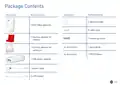
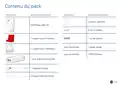
- 12. Package Contents (Wlan → Power/mobile → Fritz!box 6860 5g → Housing Adapter For Indoors → Housing Adapter For Outdoors → Quick Guide → Poe Power Adapter)
- 13. Safety Instructions (Operate The Fritz!box With The Poe Power Adapter → Check The Adhesive Pad → Do Not Operate The Fritz!box Near Heat Sources → Enable The Option Fritz!box Used Outdoors → The Fritz!box Is Dust And Splash-protected → Mount The Fritz!box So That It Does Not Come Into Contact With Blinds Or Shutters → Do Not Operate The Fritz!box Outdoors During An Electrical Storm)
- 14. Insert The Sim Card (Mount The Fritz!box → Do Not Mount The Fritz!box In Places Where People Could Be Injured → Make Sure That The Window Weep Holes Are Clear → Insert Your Nano-sim Card Into The Sim Card Slot → Only Use The Fritz!box With A Lan Cable)
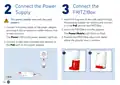
- 15. Connect The Power Supply (Connect The Fritz!box → Position The Fritz!box → Connect A Lan Cable Included With Delivery)
- 16. Connect A Wireless Device (Connecting A Smartphone Or Tablet → Connecting A Computer Or Notebook)
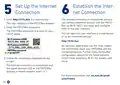
- 17. Set Up The Internet Connection (Establish The Internet Connection → Fritz!box Password → Wi-fi Network (ssid) → Wi-fi Password (wpa2) → Follow The Instructions Displayed On The Screen → An Overview Page Shows You The Most Important Information About Your Fritz!box And The Connected Devices.)
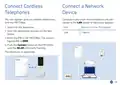
- 18. Connect Cordless Telephones (Connect A Network Device → Switch On The Telephone → Start The Registration Process On The Telephone → Enter The Pin Of The Fritz!box → Push The Connect Button On The Fritz!box Until The Wlan Led Starts Flashing → The Telephone Is Registered)
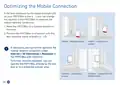
- 19. Optimizing The Mobile Connection (Positioning The Fritz!box For Best Signal Strength → Improving Reception → Operating The Fritz!box Outdoors)
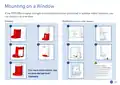
- 20. Mounting On A Window (Indoors → Outdoors → Wlan → Power/mobile)
- 21. Installation (Setup → Configuration → Diagnostics → Declaration Of Conformity → Legal Information → Support)
- 22. Contenu Du Pack
- 23. Consignes De Sécurité (Utilisez La Fritz!box Avec Le Bloc D'alimentation Poe À Proximité D'une Prise Facilement Accessible À L'intérieur, Dans Un Endroit Suffisamment Aéré Et Sans Exposition Directe Aux Rayons Du Soleil.)
- 24. Insérer La Carte Sim (Montez La Fritz!box Dans Un Endroit Protégé → Ne Montez Pas La Fritz!box Dans Des Endroits Où Des Personnes Peuvent Être Blessées → Assurez-vous Que Les Écoulements D'eau Ne Sont Pas Obstrués → Utilisez La Fritz!box Uniquement Avec Un Des Câbles Ethernet Fournis)
- 25. Brancher Le Bloc D'alimentation (Connecter La Fritz!box → Raccordez Le Câble Électrique → Placez La Fritz!box Dans Le Support → Posez La Fritz!box À Environ Un Mètre Du Sol → Branchez Un Câble Lan Fourni)
- 26. Connecter Le Périphérique Wi-fi (Connecter Le Smartphone Ou La Vitrine → Raccorder Le Pc Ou L'ordinateur Portable)
- 27. Configurer L'accès À Internet (Établir L'accès À Internet → L'interface Utilisateur De La Fritz!box → Suivez Les Indications Qui S'affichent À L'écran → Wi-fi Network (ssid) → Wi-fi Password (wpa2) → Fritz!box Password)
- 28. Connecter Des Téléphones Sans Fil (Connecter Un Périphérique → Vitesse De Transmission Maximale → Port Lan → Wlan)
- 29. Optimiser La Connexion Mobile (Déplacez La Fritz!box Dans Des Endroits Appropriés De La Pièce. → Placez La Fritz!box À L'endroit Avec La Meilleure Puissance De Signal Possible → Si Nécessaire, Vous Pouvez Optimiser Davantage Votre Connexion Mobile Dans L'interface Utilisateur De La Fritz!box Sous Internet > Informations 5g > Réception → Pour Améliorer Davantage La Réception, Vous Pouvez Utiliser La Fritz!box Directement À La Fenêtre Ou Dans Un Espace Extérieur Protégé.)
- 30. Montage À La Fenêtre (Espace Extérieur → Espace Intérieur → Wlan → Power/mobile)
- 31. Mode D'emploi (Déclaration De Conformité → Diagnostic)
- 32. Contenido Del Paquete (Wlan → Power/mobile → Guía Rápida → Adaptador De Carcasa Para Uso En Interiores → Adaptador De Carcasa Para Uso En Exteriores → Fuente De Alimentación → Cables Lan)
- 33. Instrucciones De Seguridad (Instalación Con Almohadilla Adhesiva → Uso En Exteriores → Protección Contra Polvo Y Salpicaduras → Instalación Segura → Verificación De La Almohadilla Adhesiva → Precauciones Durante Tormentas Eléctricas)
- 34. Insertar La Tarjeta Sim (Instalación Del Fritz!box → Requisitos De Instalación → Uso Del Cable Lan)
- 35. Conectar La Fuente De Alimentación (Conectar El Fritz!box → Coloque El Fritz!box Aproximadamente A Un Metro Del Suelo Y Cerca De La Ventana. → Conecte Un Cable Lan Del Volumen De Suministro A La Toma Poe De La Fuente De Alimentación.)
- 36. Conectar Un Dispositivo Wi-fi (Conectar Un Smartphone O Tablet → Conectar Ordenadores O Portátiles → Wi-fi Network (ssid) → Wi-fi Password (wpa2) → Fritz!box Password)
- 37. Configurar El Acceso A Internet (Introduzca Http://fritz.box En La Barra De Direcciones Del Navegador → Introduzca La Contraseña Del Fritz!box → Wi-fi Network (ssid) → Wi-fi Password (wpa2) → Fritz!box Password → Siga Las Instrucciones Que Aparecerán En Pantalla)
- 38. Conectar Teléfonos Inalámbricos (Conectar Un Dispositivo De Red → Introduzca El Pin Del Fritz!box → Mantenga Pulsado El Botón Connect En El Fritz!box)
- 39. Optimizar La Conexión Del Móvil (Coloque El Fritz!box En Un Lugar Adecuado → Coloque El Fritz!box En El Lugar Con La Mejor Intensidad De Señal Posible → Si Es Necesario, Puede Optimizar Aún Más Su Conexión Móvil → Para Mejorar Aún Más La Recepción)
- 40. Montaje En La Ventana (Zona Exterior → Zona Interior → Wlan → Power/mobile)
- 41. Manual (Declaración De Conformidad → Diagnóstico)
- 42. Wlan (Power/mobile → Fritz!box 6860 5g → Alimentatore Poe → Guida Rapida → Cavo Di Alimentazione → Cavi Lan)
- 43. Istruzioni Di Sicurezza (Usate Il Fritz!box Con Lalimentatore Poe → Installazione Con Un Pad Adesivo → Controllate Ladesivo → Utilizzo Del Fritz!box Allesterno → Grado Di Protezione Ip54 → Installazione In Modo Sicuro)
- 44. Inserimento Della Sim (Installazione Del Fritz!box → Utilizzo Del Fritz!box → Controllo Dei Cavi Lan)
- 45. Collegamento Dellalimentatore (Collegamento Del Fritz!box → Wlan)
- 46. Connessione Di Dispositivi Wireless (Connessione Di Smartphone O Tablet → Connessione Di Computer O Notebook → Wi-fi Network (ssid) → Wi-fi Password (wpa2) → Fritz!box Password)
- 47. Configurazione Dellaccesso A Internet (Stabilire La Connessione A Internet → Inserite La Password Del Fritz!box → Seguite Le Istruzioni Sullo Schermo → Wi-fi Network (ssid) → Wi-fi Password (wpa2) → Fritz!box Password)
- 48. Connessione Di Telefoni Cordless (Collegamento Di Dispositivi Della Rete → Utilizzate Il Cavo Lan Per Collegare Computer E Altri Dispositivi Alla Porta Lan Dellalimentatore → Portate Il Telefono In Modalità Di Registrazione → Digitate Il Pin Del Fritz!box → Premete Il Tasto Connect Del Fritz!box Fino A Quando Il Led Wlan Lampeggia → Il Telefono Viene Registrato)
- 49. Ottimizzazione Della Connessione Di Rete Mobile (Spostate Il Fritz!box In Una Posizione Adeguata Nella Stanza → Collocate Il Fritz!box Nella Posizione Con La Migliore Intensità Di Segnale Possibile → Ottimizzazione Della Connessione Di Rete Mobile Nellinterfaccia Utente → Utilizzare Il Fritz!box Direttamente Alla Finestra O In Unarea Esterna Protetta)
- 50. Installazione Sulla Finestra (Ambiente Interno → Ambiente Esterno (necessaria Laltra Staffa) → Wlan → Power/mobile)
- 51. Nellinterfaccia Utente Del Fritz!box: Guida > Informazioni Legali (Dichiarazione Di Conformità → Diagnosi)
- 52. Omvang Van De Levering (Wlan → Power/mobile → Fritz!box 6860 5g → Behuizingsadapter Voor Binnen → Behuizingsadapter Voor Buiten → Poe-voeding)
- 53. Veiligheidsinstructies (Gebruik De Fritz!box Met De Poe-voeding → Controleer Om De 2 Maanden Of De Zelf-klevende Strip Nog Goed Vastzit → Gebruik De Fritz!box Niet In De Buurt Van Warmtebronnen → Monteer De Fritz!box Niet Aan Kiepramen → De Fritz!box Is Beschermd Tegen Stof En Spatwater → Gebruik De Fritz!box Buiten Niet Bij Onweer)
- 54. Sim Insteken (Monteer De Fritz!box Op Een Plaats Die Bescherming Biedt Tegen Blikseminslag En Sterke Windstoten En Die Niet Toegankelijk Is Voor Onbevoegden. → Gebruik De Fritz!box Alleen Met De Meegeleverde Lan-kabel En Controleer Deze Kabel Regelmatig Op Beschadigingen.)
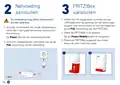
- 55. Netvoeding Aansluiten (Fritz!box Aansluiten → Wlan)
- 56. Wi-fi-apparaat Verbinden (Smartphone Of Tablet Verbinden → Computer Of Laptop Verbinden → Scan De Qr-code Voor Het Wi-fi-netwerk → Selecteer Het Wi-fi-netwerk Van Uw Fritz!box → Volg De Instructies Van Uw Camera → Verbind Uw Wi-fi-apparaat In Slechts Enkele Stappen)
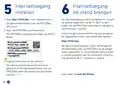
- 57. Internettoegang Instellen (Internettoegang Tot Stand Brengen → Gebruikersinterface Instellen → Wi-fi Network (ssid) → Wi-fi Password (wpa2) → Fritz!box Password → Volg De Instructies Op Het Scherm)
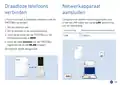
- 58. Draadloze Telefoons Verbinden (Netwerkapparaat Aansluiten → Aansluiting Lan → Zet Uw Telefoon Aan → Zet De Telefoon In De Aanmeldmodus → Toets De Pincode Van De Fritz!box In → Houd De Toets Connect Van De Fritz!box Ingedrukt)
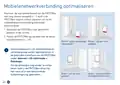
- 59. Mobielenetwerkverbinding Optimaliseren (Plaats De Fritz!box Op De Plek Met De Beste Signaalsterkte → Optimaliseren In De Gebruikersinterface Van De Fritz!box → Ontvangst Verbeteren)
- 60. Montageophetraam (Binnen → Buitenomgeving → Wlan → Power/mobile)
- 61. Installatie (Configuratie → Diagnose → Juridische Informatie → Ondersteuning → Ce-verklaring → Service)
- 62. Zakres Dostawy (Rysunek → Ilość / Opis → Wlan → Power/mobile → Adapter Do Obudowy Do Zastosowania W Pomieszczeniach → Adapter Do Obudowy Do Zastosowania Na Zewnątrz)
- 63. Wskazówki Bezpieczeństwa (Używaj Routera Fritz!box Z Zasilaczem Sieciowym Poe W Pobliżu Łatwo Dostępnego Gniazda Elektrycznego W Pomieszczeniu W Miejscu, Które Nie Jest Wystawione Na Bezpośrednie Działalnie Promieni Słonecznych. → Router Fritz!box Ma Stopień Ochrony Ip54, Tzn. Jest Chroniony Przed Pyłem I Rozbryzgami Wody, A Także Nadaje Się Do Użytkowania W Chronionych Obszarach Zewnętrznych. → Nie Używaj Routera Fritz!box W Pobliżu Źródeł Ciepła I Nie Ustawiaj Go Na Powierzchniach Wrażliwych Na Działanie Temperatury. → Nie Mocuj Żadnych Przedmiotów Do Routera Fritz!box I Nie Zakrywaj Go Podczas Użytkowania. → Nie Montuj Routera Fritz!box Na Oknach Uchylnych Lub Oknach, Które Są Niestabilne Lub Zmieniają Swój Kształt. → Nie Używaj Routera Fritz!box Na Zewnątrz Podczas Burzy. → Router Fritz!box Należy Montować W Taki Sposób, Aby Nie Miał Kontaktu Z Żaluzjami Lub Roletami Przeciwsłonecznymi.)
- 64. Wkładanie Karty Sim (Zamontuj Router Fritz!box → Upewnij Się, Że Odpływy Wody Okien Są Drożne → Używaj Routera Fritz!box Wyłącznie Z Kablem Lan)
- 65. Podłączanie Zasilacza Sieciowego (Podłącz Kabel Zasilający → Umieść Fritz!box W Adapterze → Ustaw Router Fritz!box → Podłącz Kabel Lan)
- 66. Podłączanie Urządzenia Obsługującego Wi-fi (Łączenie Smartfona Lub Tableta Z Routerem → Podłączanie Komputera Lub Notebooka → Zeskanuj Kod Qr Sieci Wi-fi Routera → Wybierz Wi-fi Routera Fritz!box → Nazwę Sieci Wi-fi (ssid) Oraz Klucz Sieciowy Wi-fi Znajdziesz Na Urządzeniu Fritz! Notes → Postępuj Zgodnie Z Instrukcjami Wyświetlanymi W Oknie Dialogowym)
- 67. Konfigurowanie Dostępu Do Internetu (Nawiązywanie Połączenia Z Internetem → Podaj Hasło Do Routera Fritz!box → Postępuj Zgodnie Z Instrukcjami Na Ekranie)
- 68. Łączenie Z Telefonami (Łączenie Z Urządzeniem → Z Routerem Fritz!box Możesz Połączyć Maksymalnie 6 Telefonów Bezprzewodowych. → Podłącz Komputer I Inne Urządzenia Sieciowe Za Pomocą Kabla Lan Do Gniazda Lan Zasilacza Sieciowego. → Ustaw Tryb Logowania W Telefonie. → Wpisz W Telefonie Kod Pin Routera Fritz!box. → Naciśnij I Przytrzymaj Przycisk Connect Na Routerze Fritz!box, Aż Zacznie Migać Dioda Led Wi-fi.)
- 69. Optymalizacja Połączenia Przez Sieć Komórkową (Umieść Router Fritz!box W Odpowiednim Miejscu W Pomieszczeniu → Umieść Fritz!box W Miejscu, W Którym Jest Najlepsza Siła Sygnału → W Razie Potrzeby Można Dalej Przeprowadzać Optymalizację Połączenia Z Siecią Komórkową W Interfejsie Użytkownika → W Celu Dalszej Poprawy Jakości Odbioru Można Korzystać Z Routera Fritz!box Bezpośrednio Przy Oknie)
- 70. Montaż Na Oknie (Użytkowanie W Pomieszczeniach → Użytkowanie Na Zewnątrz (wymagana Wymiana Adaptera) → Wlan → Power/mobile)
- 71. Instrukcja Obsługi (Deklaracja Zgodności → Diagnostyka)
- 72. There Are No Subheadings Or Relevant Sentences In The Provided Html Code.
- 73. Frequencies (Maximum Transmitter Power 5g And 4g (lte): 200 Mw; 3g (umts): 250 Mw → Band → Downlink → Uplink)
- 74. Device Setup (Wi-fi Configuration → Dect Configuration → Frequency Bands → Power Output Limits → Indoor Use Restrictions → Home Networking)
- 75.
×
FRITZ!Box 6860 5G Outdoor Router User Guide
















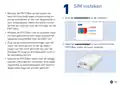



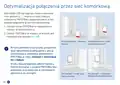


Insert the SIM Card
1
• Mount the FRITZ!Box at a location that is
protected from lightning, strong wind, and
from unauthorized access. When in doubt,
consult a specialist for mounting the FRITZ!-
Box.
1. Break the nano-SIM card out of the SIM card.
SIM
Mini SIM
• Do not mount the FRITZ!Box in places where
people could be injured by the device falling
down, for example.
Nano SIM
Micro SIM
• Make sure that the window weep holes are
clear and that the window seals are suitable
for mounting No moisture may enter the
power adapter via the cable.
2. Insert your nano-SIM card into the SIM card
slot of the FRITZ!Box until it clicks into place.
• Only use the FRITZ!Box with a LAN cable
included with delivery and check it regularly
for damage. Do not use damaged cables.
15

| General | Details |
|---|---|
| Name | FRITZ!Box 6860 5G Outdoor Router User Guide |
| Make | FRITZ |
| Language | English |
| Filetype | PDF (Download) |
| File size | 5.26 MB |
 (1 votes, average: 5.00 out of 5)
 Loading...
If you have any questions regarding FRITZ!Box 6860 5G Outdoor Router User Guide, please ask here and describe the problem in detail.
FRITZ 4690 Box Wi-Fi Router User Guide


Ruijie RG-EG105GW All-in-One Wireless Router User Manual

LANCOM 1793VAW VPN Router User Guide

ASUS RT-BE88U Dual Band WiFi Router User Guide

vantiva MGA5331 Unveils FWA Modem and Wi-Fi Router User Manual

AmpliFi AFi-INS-R Instant Router User Guide

TANGERINE BYO Router Instruction Manual

JUNIPER NETWORKS PTX10004 Packet Transport Router User Guide

UBIQUITI NETWORKS ER-12 10 Port Gigabit Router User Guide

TELTONIKA 4G LTE Wi-Fi Dual-SIM Router RUT950 User Guide

NETGEAR RBE971SB Quad Band WiFi 7 Mesh Router Instructions
Table of Contents
- 1. Quick Start Guide →
- 2. Page 2 →
- 3. Sicherheitshinweise - Betreiben Der Fritz!box →
- 4. Sim Einstecken - Montieren →
- 5. Netzteil - Fritz!box Anschließen →
- 6. Wlan-gerät Verbinden - Smartphone Oder Tablet Verbinden →
- 7. Internetzugang Einrichten - Internetverbindung Herstellen →
- 8. Schnurlostelefone Verbinden - Netzwerkgerät Anschließen →
- 9. Mobilfunkverbindung Optimieren - Standorte Der Fritz!box →
- 10. Montage Am Fenster - Innenbereich →
- 11. Installation - Setup →
- 12. Package Contents - Wlan →
- 13. Safety Instructions - Operate The Fritz!box With The Poe Pow... →
- 14. Insert The Sim Card - Mount The Fritz!box →
- 15. Connect The Power Supply - Connect The Fritz!box →
- 16. Connect A Wireless Device - Connecting A Smartphone Or Table... →
- 17. Set Up The Internet Connection - Establish The Internet Conn... →
- 18. Connect Cordless Telephones - Connect A Network Device →
- 19. Optimizing The Mobile Connection - Positioning The Fritz!box... →
- 20. Mounting On A Window - Indoors →
- 21. Installation - Setup →
- 22. Contenu Du Pack →
- 23. Consignes De Sécurité - Utilisez La Fritz!box Avec Le Bloc D... →
- 24. Insérer La Carte Sim - Montez La Fritz!box Dans Un Endroit P... →
- 25. Brancher Le Bloc D'alimentation - Connecter La Fritz!box →
- 26. Connecter Le Périphérique Wi-fi - Connecter Le Smartphone Ou... →
- 27. Configurer L'accès À Internet - Établir L'accès À Internet →
- 28. Connecter Des Téléphones Sans Fil - Connecter Un Périphériqu... →
- 29. Optimiser La Connexion Mobile - Déplacez La Fritz!box Dans D... →
- 30. Montage À La Fenêtre - Espace Extérieur →
- 31. Mode D'emploi - Déclaration De Conformité →
- 32. Contenido Del Paquete - Wlan →
- 33. Instrucciones De Seguridad - Instalación Con Almohadilla Adh... →
- 34. Insertar La Tarjeta Sim - Instalación Del Fritz!box →
- 35. Conectar La Fuente De Alimentación - Conectar El Fritz!box →
- 36. Conectar Un Dispositivo Wi-fi - Conectar Un Smartphone O Tab... →
- 37. Configurar El Acceso A Internet - Introduzca Http://fritz.bo... →
- 38. Conectar Teléfonos Inalámbricos - Conectar Un Dispositivo De... →
- 39. Optimizar La Conexión Del Móvil - Coloque El Fritz!box En Un... →
- 40. Montaje En La Ventana - Zona Exterior →
- 41. Manual - Declaración De Conformidad →
- 42. Wlan - Power/mobile →
- 43. Istruzioni Di Sicurezza - Usate Il Fritz!box Con Lalimentato... →
- 44. Inserimento Della Sim - Installazione Del Fritz!box →
- 45. Collegamento Dellalimentatore - Collegamento Del Fritz!box →
- 46. Connessione Di Dispositivi Wireless - Connessione Di Smartph... →
- 47. Configurazione Dellaccesso A Internet - Stabilire La Conness... →
- 48. Connessione Di Telefoni Cordless - Collegamento Di Dispositi... →
- 49. Ottimizzazione Della Connessione Di Rete Mobile - Spostate I... →
- 50. Installazione Sulla Finestra - Ambiente Interno →
- 51. Nellinterfaccia Utente Del Fritz!box: Guida > Informazioni L... →
- 52. Omvang Van De Levering - Wlan →
- 53. Veiligheidsinstructies - Gebruik De Fritz!box Met De Poe-voe... →
- 54. Sim Insteken - Monteer De Fritz!box Op Een Plaats Die Besche... →
- 55. Netvoeding Aansluiten - Fritz!box Aansluiten →
- 56. Wi-fi-apparaat Verbinden - Smartphone Of Tablet Verbinden →
- 57. Internettoegang Instellen - Internettoegang Tot Stand Brenge... →
- 58. Draadloze Telefoons Verbinden - Netwerkapparaat Aansluiten →
- 59. Mobielenetwerkverbinding Optimaliseren - Plaats De Fritz!box... →
- 60. Montageophetraam - Binnen →
- 61. Installatie - Configuratie →
- 62. Zakres Dostawy - Rysunek →
- 63. Wskazówki Bezpieczeństwa - Używaj Routera Fritz!box Z Zasila... →
- 64. Wkładanie Karty Sim - Zamontuj Router Fritz!box →
- 65. Podłączanie Zasilacza Sieciowego - Podłącz Kabel Zasilający →
- 66. Podłączanie Urządzenia Obsługującego Wi-fi - Łączenie Smartf... →
- 67. Konfigurowanie Dostępu Do Internetu - Nawiązywanie Połączeni... →
- 68. Łączenie Z Telefonami - Łączenie Z Urządzeniem →
- 69. Optymalizacja Połączenia Przez Sieć Komórkową - Umieść Route... →
- 70. Montaż Na Oknie - Użytkowanie W Pomieszczeniach →
- 71. Instrukcja Obsługi - Deklaracja Zgodności →
- 72. There Are No Subheadings Or Relevant Sentences In The Provid... →
- 73. Frequencies - Maximum Transmitter Power 5g And 4g (lte): 200... →
- 74. Device Setup - Wi-fi Configuration →
- 75. Page 75 →