
×
- 1. Quick Start Guide
- 2.
- 3. Sicherheitshinweise (Betreiben Der Fritz!box → Montage Mit Klebepad → Einsatz Der Fritz!box Im Freien → Montage An Fenstern → Schutzart Ip54 → Betrieb Im Außenbereich Bei Gewitter)
- 4. Sim Einstecken (Montieren → Betreiben)
- 5. Netzteil (Fritz!box Anschließen → Wlan)
- 6. Wlan-gerät Verbinden (Smartphone Oder Tablet Verbinden → Computer Oder Notebook Verbinden)
- 7. Internetzugang Einrichten (Internetverbindung Herstellen → Benutzeroberfläche Der Fritz!box → Wi-fi Network (ssid) → Wi-fi Password (wpa2) → Fritz!box Password → Folgen Sie Den Anweisungen Auf Dem Bildschirm)
- 8. Schnurlostelefone Verbinden (Netzwerkgerät Anschließen → Schalten Sie Ihr Telefon An → Bringen Sie Das Telefon In Anmeldebereitschaft → Geben Sie Die Pin Der Fritz!box Ein → Drücken Sie Die Taste Connect An Der Fritz!box)
- 9. Mobilfunkverbindung Optimieren (Standorte Der Fritz!box → Signalstärke-led → Benutzeroberfläche Unter Internet > 5g-informationen > Empfang → Verbesserung Des Empfangs → Positionierung Der Fritz!box)
- 10. Montage Am Fenster (Innenbereich → Außenbereich → Wlan → Power/mobile → Im Außenbereich → Adapter Mit Der Befestigungsschraube)
- 11. Installation (Setup → Konformitätserklärung → Diagnose → Rechtliche Hinweise)
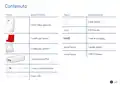
- 12. Package Contents (Wlan → Power/mobile → Fritz!box 6860 5g → Housing Adapter For Indoors → Housing Adapter For Outdoors → Quick Guide → Poe Power Adapter)
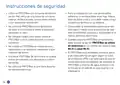
- 13. Safety Instructions (Operate The Fritz!box With The Poe Power Adapter → Check The Adhesive Pad → Do Not Operate The Fritz!box Near Heat Sources → Enable The Option Fritz!box Used Outdoors → The Fritz!box Is Dust And Splash-protected → Mount The Fritz!box So That It Does Not Come Into Contact With Blinds Or Shutters → Do Not Operate The Fritz!box Outdoors During An Electrical Storm)
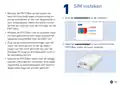
- 14. Insert The Sim Card (Mount The Fritz!box → Do Not Mount The Fritz!box In Places Where People Could Be Injured → Make Sure That The Window Weep Holes Are Clear → Insert Your Nano-sim Card Into The Sim Card Slot → Only Use The Fritz!box With A Lan Cable)
- 15. Connect The Power Supply (Connect The Fritz!box → Position The Fritz!box → Connect A Lan Cable Included With Delivery)
- 16. Connect A Wireless Device (Connecting A Smartphone Or Tablet → Connecting A Computer Or Notebook)
- 17. Set Up The Internet Connection (Establish The Internet Connection → Fritz!box Password → Wi-fi Network (ssid) → Wi-fi Password (wpa2) → Follow The Instructions Displayed On The Screen → An Overview Page Shows You The Most Important Information About Your Fritz!box And The Connected Devices.)
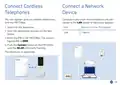
- 18. Connect Cordless Telephones (Connect A Network Device → Switch On The Telephone → Start The Registration Process On The Telephone → Enter The Pin Of The Fritz!box → Push The Connect Button On The Fritz!box Until The Wlan Led Starts Flashing → The Telephone Is Registered)
- 19. Optimizing The Mobile Connection (Positioning The Fritz!box For Best Signal Strength → Improving Reception → Operating The Fritz!box Outdoors)
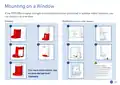
- 20. Mounting On A Window (Indoors → Outdoors → Wlan → Power/mobile)
- 21. Installation (Setup → Configuration → Diagnostics → Declaration Of Conformity → Legal Information → Support)
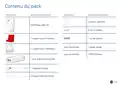
- 22. Contenu Du Pack
- 23. Consignes De Sécurité (Utilisez La Fritz!box Avec Le Bloc D'alimentation Poe À Proximité D'une Prise Facilement Accessible À L'intérieur, Dans Un Endroit Suffisamment Aéré Et Sans Exposition Directe Aux Rayons Du Soleil.)
- 24. Insérer La Carte Sim (Montez La Fritz!box Dans Un Endroit Protégé → Ne Montez Pas La Fritz!box Dans Des Endroits Où Des Personnes Peuvent Être Blessées → Assurez-vous Que Les Écoulements D'eau Ne Sont Pas Obstrués → Utilisez La Fritz!box Uniquement Avec Un Des Câbles Ethernet Fournis)
- 25. Brancher Le Bloc D'alimentation (Connecter La Fritz!box → Raccordez Le Câble Électrique → Placez La Fritz!box Dans Le Support → Posez La Fritz!box À Environ Un Mètre Du Sol → Branchez Un Câble Lan Fourni)
- 26. Connecter Le Périphérique Wi-fi (Connecter Le Smartphone Ou La Vitrine → Raccorder Le Pc Ou L'ordinateur Portable)
- 27. Configurer L'accès À Internet (Établir L'accès À Internet → L'interface Utilisateur De La Fritz!box → Suivez Les Indications Qui S'affichent À L'écran → Wi-fi Network (ssid) → Wi-fi Password (wpa2) → Fritz!box Password)
- 28. Connecter Des Téléphones Sans Fil (Connecter Un Périphérique → Vitesse De Transmission Maximale → Port Lan → Wlan)
- 29. Optimiser La Connexion Mobile (Déplacez La Fritz!box Dans Des Endroits Appropriés De La Pièce. → Placez La Fritz!box À L'endroit Avec La Meilleure Puissance De Signal Possible → Si Nécessaire, Vous Pouvez Optimiser Davantage Votre Connexion Mobile Dans L'interface Utilisateur De La Fritz!box Sous Internet > Informations 5g > Réception → Pour Améliorer Davantage La Réception, Vous Pouvez Utiliser La Fritz!box Directement À La Fenêtre Ou Dans Un Espace Extérieur Protégé.)
- 30. Montage À La Fenêtre (Espace Extérieur → Espace Intérieur → Wlan → Power/mobile)
- 31. Mode D'emploi (Déclaration De Conformité → Diagnostic)
- 32. Contenido Del Paquete (Wlan → Power/mobile → Guía Rápida → Adaptador De Carcasa Para Uso En Interiores → Adaptador De Carcasa Para Uso En Exteriores → Fuente De Alimentación → Cables Lan)
- 33. Instrucciones De Seguridad (Instalación Con Almohadilla Adhesiva → Uso En Exteriores → Protección Contra Polvo Y Salpicaduras → Instalación Segura → Verificación De La Almohadilla Adhesiva → Precauciones Durante Tormentas Eléctricas)
- 34. Insertar La Tarjeta Sim (Instalación Del Fritz!box → Requisitos De Instalación → Uso Del Cable Lan)
- 35. Conectar La Fuente De Alimentación (Conectar El Fritz!box → Coloque El Fritz!box Aproximadamente A Un Metro Del Suelo Y Cerca De La Ventana. → Conecte Un Cable Lan Del Volumen De Suministro A La Toma Poe De La Fuente De Alimentación.)
- 36. Conectar Un Dispositivo Wi-fi (Conectar Un Smartphone O Tablet → Conectar Ordenadores O Portátiles → Wi-fi Network (ssid) → Wi-fi Password (wpa2) → Fritz!box Password)
- 37. Configurar El Acceso A Internet (Introduzca Http://fritz.box En La Barra De Direcciones Del Navegador → Introduzca La Contraseña Del Fritz!box → Wi-fi Network (ssid) → Wi-fi Password (wpa2) → Fritz!box Password → Siga Las Instrucciones Que Aparecerán En Pantalla)
- 38. Conectar Teléfonos Inalámbricos (Conectar Un Dispositivo De Red → Introduzca El Pin Del Fritz!box → Mantenga Pulsado El Botón Connect En El Fritz!box)
- 39. Optimizar La Conexión Del Móvil (Coloque El Fritz!box En Un Lugar Adecuado → Coloque El Fritz!box En El Lugar Con La Mejor Intensidad De Señal Posible → Si Es Necesario, Puede Optimizar Aún Más Su Conexión Móvil → Para Mejorar Aún Más La Recepción)
- 40. Montaje En La Ventana (Zona Exterior → Zona Interior → Wlan → Power/mobile)
- 41. Manual (Declaración De Conformidad → Diagnóstico)
- 42. Wlan (Power/mobile → Fritz!box 6860 5g → Alimentatore Poe → Guida Rapida → Cavo Di Alimentazione → Cavi Lan)
- 43. Istruzioni Di Sicurezza (Usate Il Fritz!box Con Lalimentatore Poe → Installazione Con Un Pad Adesivo → Controllate Ladesivo → Utilizzo Del Fritz!box Allesterno → Grado Di Protezione Ip54 → Installazione In Modo Sicuro)
- 44. Inserimento Della Sim (Installazione Del Fritz!box → Utilizzo Del Fritz!box → Controllo Dei Cavi Lan)
- 45. Collegamento Dellalimentatore (Collegamento Del Fritz!box → Wlan)
- 46. Connessione Di Dispositivi Wireless (Connessione Di Smartphone O Tablet → Connessione Di Computer O Notebook → Wi-fi Network (ssid) → Wi-fi Password (wpa2) → Fritz!box Password)
- 47. Configurazione Dellaccesso A Internet (Stabilire La Connessione A Internet → Inserite La Password Del Fritz!box → Seguite Le Istruzioni Sullo Schermo → Wi-fi Network (ssid) → Wi-fi Password (wpa2) → Fritz!box Password)
- 48. Connessione Di Telefoni Cordless (Collegamento Di Dispositivi Della Rete → Utilizzate Il Cavo Lan Per Collegare Computer E Altri Dispositivi Alla Porta Lan Dellalimentatore → Portate Il Telefono In Modalità Di Registrazione → Digitate Il Pin Del Fritz!box → Premete Il Tasto Connect Del Fritz!box Fino A Quando Il Led Wlan Lampeggia → Il Telefono Viene Registrato)
- 49. Ottimizzazione Della Connessione Di Rete Mobile (Spostate Il Fritz!box In Una Posizione Adeguata Nella Stanza → Collocate Il Fritz!box Nella Posizione Con La Migliore Intensità Di Segnale Possibile → Ottimizzazione Della Connessione Di Rete Mobile Nellinterfaccia Utente → Utilizzare Il Fritz!box Direttamente Alla Finestra O In Unarea Esterna Protetta)
- 50. Installazione Sulla Finestra (Ambiente Interno → Ambiente Esterno (necessaria Laltra Staffa) → Wlan → Power/mobile)
- 51. Nellinterfaccia Utente Del Fritz!box: Guida > Informazioni Legali (Dichiarazione Di Conformità → Diagnosi)
- 52. Omvang Van De Levering (Wlan → Power/mobile → Fritz!box 6860 5g → Behuizingsadapter Voor Binnen → Behuizingsadapter Voor Buiten → Poe-voeding)
- 53. Veiligheidsinstructies (Gebruik De Fritz!box Met De Poe-voeding → Controleer Om De 2 Maanden Of De Zelf-klevende Strip Nog Goed Vastzit → Gebruik De Fritz!box Niet In De Buurt Van Warmtebronnen → Monteer De Fritz!box Niet Aan Kiepramen → De Fritz!box Is Beschermd Tegen Stof En Spatwater → Gebruik De Fritz!box Buiten Niet Bij Onweer)
- 54. Sim Insteken (Monteer De Fritz!box Op Een Plaats Die Bescherming Biedt Tegen Blikseminslag En Sterke Windstoten En Die Niet Toegankelijk Is Voor Onbevoegden. → Gebruik De Fritz!box Alleen Met De Meegeleverde Lan-kabel En Controleer Deze Kabel Regelmatig Op Beschadigingen.)
- 55. Netvoeding Aansluiten (Fritz!box Aansluiten → Wlan)
- 56. Wi-fi-apparaat Verbinden (Smartphone Of Tablet Verbinden → Computer Of Laptop Verbinden → Scan De Qr-code Voor Het Wi-fi-netwerk → Selecteer Het Wi-fi-netwerk Van Uw Fritz!box → Volg De Instructies Van Uw Camera → Verbind Uw Wi-fi-apparaat In Slechts Enkele Stappen)
- 57. Internettoegang Instellen (Internettoegang Tot Stand Brengen → Gebruikersinterface Instellen → Wi-fi Network (ssid) → Wi-fi Password (wpa2) → Fritz!box Password → Volg De Instructies Op Het Scherm)
- 58. Draadloze Telefoons Verbinden (Netwerkapparaat Aansluiten → Aansluiting Lan → Zet Uw Telefoon Aan → Zet De Telefoon In De Aanmeldmodus → Toets De Pincode Van De Fritz!box In → Houd De Toets Connect Van De Fritz!box Ingedrukt)
- 59. Mobielenetwerkverbinding Optimaliseren (Plaats De Fritz!box Op De Plek Met De Beste Signaalsterkte → Optimaliseren In De Gebruikersinterface Van De Fritz!box → Ontvangst Verbeteren)
- 60. Montageophetraam (Binnen → Buitenomgeving → Wlan → Power/mobile)
- 61. Installatie (Configuratie → Diagnose → Juridische Informatie → Ondersteuning → Ce-verklaring → Service)
- 62. Zakres Dostawy (Rysunek → Ilość / Opis → Wlan → Power/mobile → Adapter Do Obudowy Do Zastosowania W Pomieszczeniach → Adapter Do Obudowy Do Zastosowania Na Zewnątrz)
- 63. Wskazówki Bezpieczeństwa (Używaj Routera Fritz!box Z Zasilaczem Sieciowym Poe W Pobliżu Łatwo Dostępnego Gniazda Elektrycznego W Pomieszczeniu W Miejscu, Które Nie Jest Wystawione Na Bezpośrednie Działalnie Promieni Słonecznych. → Router Fritz!box Ma Stopień Ochrony Ip54, Tzn. Jest Chroniony Przed Pyłem I Rozbryzgami Wody, A Także Nadaje Się Do Użytkowania W Chronionych Obszarach Zewnętrznych. → Nie Używaj Routera Fritz!box W Pobliżu Źródeł Ciepła I Nie Ustawiaj Go Na Powierzchniach Wrażliwych Na Działanie Temperatury. → Nie Mocuj Żadnych Przedmiotów Do Routera Fritz!box I Nie Zakrywaj Go Podczas Użytkowania. → Nie Montuj Routera Fritz!box Na Oknach Uchylnych Lub Oknach, Które Są Niestabilne Lub Zmieniają Swój Kształt. → Nie Używaj Routera Fritz!box Na Zewnątrz Podczas Burzy. → Router Fritz!box Należy Montować W Taki Sposób, Aby Nie Miał Kontaktu Z Żaluzjami Lub Roletami Przeciwsłonecznymi.)
- 64. Wkładanie Karty Sim (Zamontuj Router Fritz!box → Upewnij Się, Że Odpływy Wody Okien Są Drożne → Używaj Routera Fritz!box Wyłącznie Z Kablem Lan)
- 65. Podłączanie Zasilacza Sieciowego (Podłącz Kabel Zasilający → Umieść Fritz!box W Adapterze → Ustaw Router Fritz!box → Podłącz Kabel Lan)
- 66. Podłączanie Urządzenia Obsługującego Wi-fi (Łączenie Smartfona Lub Tableta Z Routerem → Podłączanie Komputera Lub Notebooka → Zeskanuj Kod Qr Sieci Wi-fi Routera → Wybierz Wi-fi Routera Fritz!box → Nazwę Sieci Wi-fi (ssid) Oraz Klucz Sieciowy Wi-fi Znajdziesz Na Urządzeniu Fritz! Notes → Postępuj Zgodnie Z Instrukcjami Wyświetlanymi W Oknie Dialogowym)
- 67. Konfigurowanie Dostępu Do Internetu (Nawiązywanie Połączenia Z Internetem → Podaj Hasło Do Routera Fritz!box → Postępuj Zgodnie Z Instrukcjami Na Ekranie)
- 68. Łączenie Z Telefonami (Łączenie Z Urządzeniem → Z Routerem Fritz!box Możesz Połączyć Maksymalnie 6 Telefonów Bezprzewodowych. → Podłącz Komputer I Inne Urządzenia Sieciowe Za Pomocą Kabla Lan Do Gniazda Lan Zasilacza Sieciowego. → Ustaw Tryb Logowania W Telefonie. → Wpisz W Telefonie Kod Pin Routera Fritz!box. → Naciśnij I Przytrzymaj Przycisk Connect Na Routerze Fritz!box, Aż Zacznie Migać Dioda Led Wi-fi.)
- 69. Optymalizacja Połączenia Przez Sieć Komórkową (Umieść Router Fritz!box W Odpowiednim Miejscu W Pomieszczeniu → Umieść Fritz!box W Miejscu, W Którym Jest Najlepsza Siła Sygnału → W Razie Potrzeby Można Dalej Przeprowadzać Optymalizację Połączenia Z Siecią Komórkową W Interfejsie Użytkownika → W Celu Dalszej Poprawy Jakości Odbioru Można Korzystać Z Routera Fritz!box Bezpośrednio Przy Oknie)
- 70. Montaż Na Oknie (Użytkowanie W Pomieszczeniach → Użytkowanie Na Zewnątrz (wymagana Wymiana Adaptera) → Wlan → Power/mobile)
- 71. Instrukcja Obsługi (Deklaracja Zgodności → Diagnostyka)
- 72. There Are No Subheadings Or Relevant Sentences In The Provided Html Code.
- 73. Frequencies (Maximum Transmitter Power 5g And 4g (lte): 200 Mw; 3g (umts): 250 Mw → Band → Downlink → Uplink)
- 74. Device Setup (Wi-fi Configuration → Dect Configuration → Frequency Bands → Power Output Limits → Indoor Use Restrictions → Home Networking)
- 75.
×
FRITZ!Box 6860 5G Outdoor Router User Guide


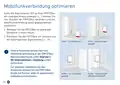





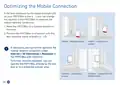



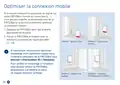







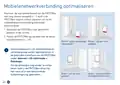


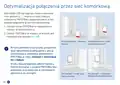


Optimizing the Mobile Connection
If the level displayed by the signal strength LED
on your FRITZ!Box is low ( ), you can change
the location of the FRITZ!Box to optimize the
mobile network connection.
1. Move the FRITZ!Box to a suitable location in
the room.
Conect
WLAN
Power/Mobile
Conect
WLAN
Power/Mobile
2. Position the FRITZ!Box in a location with the
best possible signal strength (
,
).
Indoors – freely positioned
Indoors – attached to a
window
If necessary, you can further optimize the
mobile network connection under
Internet > 5G Information > Reception in
the FRITZ!Box user interface.
Conect
Cnoect
To further improve reception, you can
operate the FRITZ!Box directly by the win-
dow or in a protected outdoor area.
Outdoors - screwed into the
window reveal
Outdoors – attached to a
window
20

| General | Details |
|---|---|
| Name | FRITZ!Box 6860 5G Outdoor Router User Guide |
| Make | FRITZ |
| Language | English |
| Filetype | PDF (Download) |
| File size | 5.26 MB |
 (1 votes, average: 5.00 out of 5)
 Loading...
If you have any questions regarding FRITZ!Box 6860 5G Outdoor Router User Guide, please ask here and describe the problem in detail.
FRITZ 4690 Box Wi-Fi Router User Guide


OptConnect neo2 dura 4 Multi Carrier Cellular Router User Guide

THREE CJB74V0HWAAC 4G Plus MiFi Mobile WiFi Router User Guide

TP-Link AX3000 Wi-Fi 6 Air Router Installation Guide

MICRONET N300 Wireless Router, N300 WiFi Router T1 Pro User Guide

Cudy X6 AX1800 1800mbps Dual Band Smart Wi-Fi 6 Router Installation Guide

NOKIA FRRX504C 5G Field Router User Guide

TP-Link NX200 5G CPE Router Installation Guide

NETGEAR R7450 WiFi Router User Guide

Tenda AC1200 WiFi 6 Router Installation Guide

JENSEN Air:Link 3000DG Dual Band Router User Manual
Table of Contents
- 1. Quick Start Guide →
- 2. Page 2 →
- 3. Sicherheitshinweise - Betreiben Der Fritz!box →
- 4. Sim Einstecken - Montieren →
- 5. Netzteil - Fritz!box Anschließen →
- 6. Wlan-gerät Verbinden - Smartphone Oder Tablet Verbinden →
- 7. Internetzugang Einrichten - Internetverbindung Herstellen →
- 8. Schnurlostelefone Verbinden - Netzwerkgerät Anschließen →
- 9. Mobilfunkverbindung Optimieren - Standorte Der Fritz!box →
- 10. Montage Am Fenster - Innenbereich →
- 11. Installation - Setup →
- 12. Package Contents - Wlan →
- 13. Safety Instructions - Operate The Fritz!box With The Poe Pow... →
- 14. Insert The Sim Card - Mount The Fritz!box →
- 15. Connect The Power Supply - Connect The Fritz!box →
- 16. Connect A Wireless Device - Connecting A Smartphone Or Table... →
- 17. Set Up The Internet Connection - Establish The Internet Conn... →
- 18. Connect Cordless Telephones - Connect A Network Device →
- 19. Optimizing The Mobile Connection - Positioning The Fritz!box... →
- 20. Mounting On A Window - Indoors →
- 21. Installation - Setup →
- 22. Contenu Du Pack →
- 23. Consignes De Sécurité - Utilisez La Fritz!box Avec Le Bloc D... →
- 24. Insérer La Carte Sim - Montez La Fritz!box Dans Un Endroit P... →
- 25. Brancher Le Bloc D'alimentation - Connecter La Fritz!box →
- 26. Connecter Le Périphérique Wi-fi - Connecter Le Smartphone Ou... →
- 27. Configurer L'accès À Internet - Établir L'accès À Internet →
- 28. Connecter Des Téléphones Sans Fil - Connecter Un Périphériqu... →
- 29. Optimiser La Connexion Mobile - Déplacez La Fritz!box Dans D... →
- 30. Montage À La Fenêtre - Espace Extérieur →
- 31. Mode D'emploi - Déclaration De Conformité →
- 32. Contenido Del Paquete - Wlan →
- 33. Instrucciones De Seguridad - Instalación Con Almohadilla Adh... →
- 34. Insertar La Tarjeta Sim - Instalación Del Fritz!box →
- 35. Conectar La Fuente De Alimentación - Conectar El Fritz!box →
- 36. Conectar Un Dispositivo Wi-fi - Conectar Un Smartphone O Tab... →
- 37. Configurar El Acceso A Internet - Introduzca Http://fritz.bo... →
- 38. Conectar Teléfonos Inalámbricos - Conectar Un Dispositivo De... →
- 39. Optimizar La Conexión Del Móvil - Coloque El Fritz!box En Un... →
- 40. Montaje En La Ventana - Zona Exterior →
- 41. Manual - Declaración De Conformidad →
- 42. Wlan - Power/mobile →
- 43. Istruzioni Di Sicurezza - Usate Il Fritz!box Con Lalimentato... →
- 44. Inserimento Della Sim - Installazione Del Fritz!box →
- 45. Collegamento Dellalimentatore - Collegamento Del Fritz!box →
- 46. Connessione Di Dispositivi Wireless - Connessione Di Smartph... →
- 47. Configurazione Dellaccesso A Internet - Stabilire La Conness... →
- 48. Connessione Di Telefoni Cordless - Collegamento Di Dispositi... →
- 49. Ottimizzazione Della Connessione Di Rete Mobile - Spostate I... →
- 50. Installazione Sulla Finestra - Ambiente Interno →
- 51. Nellinterfaccia Utente Del Fritz!box: Guida > Informazioni L... →
- 52. Omvang Van De Levering - Wlan →
- 53. Veiligheidsinstructies - Gebruik De Fritz!box Met De Poe-voe... →
- 54. Sim Insteken - Monteer De Fritz!box Op Een Plaats Die Besche... →
- 55. Netvoeding Aansluiten - Fritz!box Aansluiten →
- 56. Wi-fi-apparaat Verbinden - Smartphone Of Tablet Verbinden →
- 57. Internettoegang Instellen - Internettoegang Tot Stand Brenge... →
- 58. Draadloze Telefoons Verbinden - Netwerkapparaat Aansluiten →
- 59. Mobielenetwerkverbinding Optimaliseren - Plaats De Fritz!box... →
- 60. Montageophetraam - Binnen →
- 61. Installatie - Configuratie →
- 62. Zakres Dostawy - Rysunek →
- 63. Wskazówki Bezpieczeństwa - Używaj Routera Fritz!box Z Zasila... →
- 64. Wkładanie Karty Sim - Zamontuj Router Fritz!box →
- 65. Podłączanie Zasilacza Sieciowego - Podłącz Kabel Zasilający →
- 66. Podłączanie Urządzenia Obsługującego Wi-fi - Łączenie Smartf... →
- 67. Konfigurowanie Dostępu Do Internetu - Nawiązywanie Połączeni... →
- 68. Łączenie Z Telefonami - Łączenie Z Urządzeniem →
- 69. Optymalizacja Połączenia Przez Sieć Komórkową - Umieść Route... →
- 70. Montaż Na Oknie - Użytkowanie W Pomieszczeniach →
- 71. Instrukcja Obsługi - Deklaracja Zgodności →
- 72. There Are No Subheadings Or Relevant Sentences In The Provid... →
- 73. Frequencies - Maximum Transmitter Power 5g And 4g (lte): 200... →
- 74. Device Setup - Wi-fi Configuration →
- 75. Page 75 →