
MERCKU M6S Ms Router User Guide




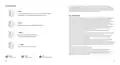


LED indicator color
This guide provides a brief introduction to Mercku hardware and software. The images, steps, and descriptions are
purely for illustrative purposes and may not accurately represent your personal experience. Please note that this guide
is for informational purposes only, and we cannot guarantee the accuracy or completeness of the information
provided. Additionally, please be aware that updates to the content may happen without prior notice.
Red
FCC ID: �APR�-M�S
Blinking: Interactions (upgrades firmware, reboots router)
Blinking frequently: Restore to factory settings
This device complies with Part �� of the FCC rules. Operation is subjected to the following two conditions:
(�) this device may not cause harmful interference, and (�) this device must accept any interference received, including
interference that may cause undesired operation.
Changes or modifications not expressly approved by the party responsible for compliance could void your authority to
operate the equipment.
The device for operation in the band ����-���� MHz is only for indoor use to reduce the potential for harmful
interference to co-channel mobile satellite systems;
Blue
This device contains licence-exempt transmitter(s)/receiver(s) that comply with Innovation, Science and Economic
Development Canada’s licence-exempt RSS(s). Operation is subject to the following two conditions:
(�) This device may not cause interference; and
Blinking: Pairing mode (Adding a node)
(�) This device must accept any interference, including interference that may cause undesired operation of the device.
This device complies with FCC radiation exposure limits set forth for an uncontrolled environment. The distance
between user and products should be no less than ��cm.
L'appareil dans la bande ����-���� MHz ne fonctionne uniquement qu'à l'intérieur afin de réduire le risque
d'interférence nuisible aux systèmes mobiles par satellite dans le même canal;
White
L'émetteur/récepteur exempt de licence contenu dans le présent appareil est conforme aux CNR d'Innovation, Sciences
et Développement économique Canada applicables aux appareils radio exempts de licence. L'exploitation est
autorisée aux deux conditions suivantes :
Steadily illuminated: Stable network connection
Blinking: Poor mesh connection
(�) Cet appareil ne doit pas provoquer d'interférences; et
(�) Cet appareil doit accepter toute interférence, y compris les interférences susceptibles de provoquer un
fonctionnement indésirable de l'appareil.
La distance entre l'utilisateur et les produits ne doit pas être inférieure à �� cm.
This equipment has been tested and found to comply with the limits for a Class B digital device, pursuant to part �� of
the FCC Rules. These limits are designed to provide reasonable protection against harmful interference in a residential
installation. This equipment generates uses and can radiate radio frequency energy and, if not installed and used in
accordance with the instructions, may cause harmful interference to radio communications. However, there is no
guarantee that interference will not occur in a particular installation. If this equipment does cause harmful interference
to radio or television reception, which can be determined by turning the equipment off and on, the user is encouraged
to try to correct the interference by one or more of the following measures:
Orange
Steadily illuminated: No Internet connection
-Reorient or relocate the receiving antenna.
-Increase the separation between the equipment and receiver.
-Connect the equipment into an outlet on a circuit different from that to which the receiver is connected.
-Consult the dealer or an experienced radio/TV technician for help.
The device meets the exemption from the routine evaluation limits in section �.� of RSS ��� and compliance with
RSS-��� RF exposure, users can obtain Canadian information on RF exposure and compliance.
Le dispositif rencontre l'exemption des limites courantes d'évaluation dans la section �.� de RSS ��� et la conformité à
l'exposition de RSS-��� rf, utilisateurs peut obtenir l'information canadienne sur l'exposition et la conformité de rf.
Website:
Email:
Need help:
��
��

| General | Details |
|---|---|
| Name | MERCKU M6S Ms Router User Guide |
| Make | MERCKU |
| Language | English |
| Filetype | PDF (Download) |
| File size | 0.51 MB |
 (1 votes, average: 5.00 out of 5)
 Loading...
If you have any questions regarding MERCKU M6S Ms Router User Guide, please ask here and describe the problem in detail.

MERCKU M6a Plus WiFi 6 Mesh Router User Guide

MERCKU X6 Wi-Fi 6 Mesh Router User Manual

MERCKU X6 Wi-Fi 6 Mesh Dual WAN Router Installation Guide


SENWA 4G LTE CPE Router User Guide

TELTONIKA Networks RUT951 4G LTE Router User Guide

NRadio Technologies N300 4G Pocket Size LTE Modem Router User Manual

EDIMAX BR-6428NS V5 4 in 1 N300 WiFi Router Installation Guide

ASUS ET12 ZenWiFi Pro AXE11000 Tri Band WiFi Router User Guide

HNK Flow AX1501 Dual Band Wi-Fi 6 AX1500 Router User Guide

TP-Link ER706W Omada AC1350 Gigabit VPN Router Installation Guide

Dragonglass DGR7 1200M Wireless Router Installation Guide

verizon xc46be224t Internet Gateway Router Instruction Manual

LINKSYS AX1800 Dual-Band WiFi 6 Router E7350 User Guide