
NETGEAR PR460X Multi-Gigabit Dual WAN Pro Router Installation Guide


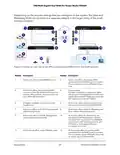




10G/Multi-Gigabit Dual WAN Pro Router Model PR460X
The WAN1 port supports Auto Uplink technology, which allows you to attach devices
using either straight-through or crossover cables. Use a Category 5e (Cat 5e), or Cat 6
cable that is terminated with an RJ-45 connector.
Note: Instead of a modem, you can also use an existing LAN that provides Internet
connectivity through another router in your network. In that case, connect the cable
from the existing LAN to the WAN1 port on the router. The router then functions as a
secondary router. For more information, see the user manual, which you can download
by visiting netgear.com/support/download/.
To connect a modem to the router’s RJ-45 WAN1 port:
1. Unplug the modem’s power, leaving the modem connected to the wall jack for your
Internet service.
If the modem uses a battery backup, remove the battery.
2. Connect the modem to the RJ-45 WAN1 port on the router.
Ethernet specifications limit the cable length between the router and the Internet
modem to 328 feet (100 meters).
3. Verify that the cable is installed correctly.
4. If the modem uses a battery backup, put the battery back in the modem.
5. Plug in and turn on the modem.
Optional Step 6: Connect the router to a
second modem for WAN failover
The following procedure describes how to connect the router to a second modem such
as a DSL or cable modem that provides failover Internet connectivity.
By default, the LAN5 WAN2 port functions as a high-speed LAN5 port. You can use the
device UI to change the function of the LAN5 WAN2 port to a WAN2 port and manually
configure your second ISP connection. For more information, see the user manual,
which you can download by visiting netgear.com/support/download/.
In a dual WAN setup, one WAN port functions as the primary or active interface, and
the other WAN port as the secondary or backup interface. (You can configure which
WAN port functions as the primary interface.) If the primary interface goes down (for
example, your ISP has an outage), the router can automatically switch (that is, failover)
to the secondary WAN interface. When the primary WAN interface comes back up again,
the router can automatically switch back from the secondary WAN interface to the
primary WAN interface. Only one WAN connection is up at any time.
Installation
28
Hardware Installation Guide

| General | Details |
|---|---|
| Name | NETGEAR PR460X Multi-Gigabit Dual WAN Pro Router Installation Guide |
| Make | NETGEAR |
| Language | English |
| Filetype | PDF (Download) |
| File size | 1.45 MB |
 (1 votes, average: 5.00 out of 5)
 Loading...
If you have any questions regarding NETGEAR PR460X Multi-Gigabit Dual WAN Pro Router Installation Guide, please ask here and describe the problem in detail.

NETGEAR RAX40v2 Nighthawk AX4 4-Stream AX3000 WiFi Router User Manual

NETGEAR RAX10 AX1800 WiFi 6 Router User Guide

NETGEAR XR1000v2 Nighthawk WiFi 6 Pro Gaming Router User Guide

NETGEAR PR60X Pro 10G Multi Gigabit Dual WAN Pro Router Installation Guide

NETGEAR AC2600 Wi-Fi Router User Guide

NETGEAR AX6 Stream Wi-Fi Router User Manual

NETGEAR MR6110 M6 5G WiFi 6 Mobile Router User Manual

NETGEAR RBR20 Orbi Mesh WiFi Router User Guide

NETGEAR RS280S Nighthawk WiFi 7 Tri-Band Router Owner’s Manual

NETGEAR BE9200 WiFi 7 Router Instruction Manual


cradlepoint E100 Enterprise Router Endpoints User Guide

ASUS RT-AX88U Pro AX6000 Dual Band Wi-Fi Router User Guide

HUAWEI Router User Guide

LANCOM SYSTEMS LANCOM OAP-830 Wireless Router User Guide

MOXA TN-4908-WV-CT-T Tough Net Router Installation Guide

eero 609R010111 6+ Dual-Band Mesh Wi-Fi 6 Router User Guide

GL iNet XE2000 Dual SIM Wi-Fi 6 Router User Guide

technicolor CGA437T Router Instruction Manual

HUAWEI WS880 802.11ac Wireless Router User Guide

RANGEXTD RJ45 WIFI Router User Guide