
Newland NL-81 Router User Manual

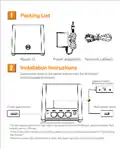


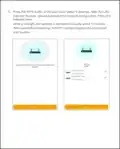



5、Set the router's new Wi-Fi
and administrator password.
It is recommended to set the Wi-Fi
password as the administrator
password.
6、The configuration is successful.
* The router LED indicator white long bright
indicates that the network connection is
successful, and can access the Internet

| General | Details |
|---|---|
| Name | Newland NL-81 Router User Manual |
| Make | Newland |
| Language | English |
| Filetype | PDF (Download) |
| File size | 0.17 MB |
 (1 votes, average: 5.00 out of 5)
 Loading...
If you have any questions regarding Newland NL-81 Router User Manual, please ask here and describe the problem in detail.


Scribd HDA802B 6.5A Variable Speed Compact Router User Manual

LINKSYS 750MR7500 Hydra Pro 6E Mesh Router User Guide

Chosen Selective EL988 CS Dual Band Global Mifi Router User Manual

COMFAST CF-WR631AX Wireless Router Installation Guide

inseego 5G Router FG2000 User Guide

ASUS GT-AX6000 Dual Band WiFi 6 Extendable Gaming Router User Guide

WAVLINK AC1200 Dual Band Wi-Fi Extender/AP User Guide

Cudy LT500D Dual Band Unlocked 4G LTE Modem Router Installation Guide

NRadio Technologies CC 4G LTE Router Installation Guide

Roam-ON R10 MiFi 4G LTE WiFi Mobile Hotspot Router User Manual