
robustel R5020 Lite 5G Router Instruction Manual






Robustel R5020 Lite Hardware Manual
Hardware Installation
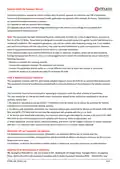
1. SIM Card Installation. Remove the SIM card cover to insert the SIM cards into the device, then screw up the
cover.
2. Antenna Installation. Rotate the antenna into the antenna connector accordingly.
3. Terminal Block Installation. Insert the 3-PIN terminal blocks into the interfaces connector, then can connect
the devices or sensors to the gateway via corresponding interfaces.
4. Mounting Kit Installation.
-
DIN Rail Mounting
-
Wall Mounting
RT098_HM_R5020_Lite
11/13

| General | Details |
|---|---|
| Name | robustel R5020 Lite 5G Router Instruction Manual |
| Make | robustel |
| Language | English |
| Filetype | PDF (Download) |
| File size | 0.44 MB |
 (1 votes, average: 5.00 out of 5)
 Loading...
If you have any questions regarding robustel R5020 Lite 5G Router Instruction Manual, please ask here and describe the problem in detail.

robustel R5020 5G WiFi Wireless Router Owner’s Manual

robustel R2010 Dual SIM VPN IoT Router Instruction Manual

robustel R1520LG Dual SIM LTE Router User Manual

robustel R2000 Dual SIM Cellular VPN Router Instruction Manual

robustel R3000 Lite Dual-SIM VPN Router User Manual

robustel R2011 Cellular Router Instruction Manual

robustel R1510 4G LTE Router User Manual

robustel R1510-4L VPN Router Owner’s Manual


NETGEAR NIGHTHAWK BE6500 Tri Band Wi-Fi 7 Router User Guide

xiaomi RB02 AC1200 Gigabit Router User Manual

TCL LINKHUB HH40L2 Wi-Fi Router User Manual

ASUS BE3600 Dual Band WiFi Router User Guide

TP-Link ER605 Omada VPN Router Installation Guide

D-Link G415 4G Router Instructions

GL-INET GL-AR300M Shadow Mini Router User Guide

NETGEAR BR200 Insight Managed Router Installation Guide

neptronic RPB11 BACnet Router Installation Guide

LANCOM SYSTEMS 1930EF Gigabit Ethernet Black Wired Router User Guide