
Shenzhen 802.11AX Wi-Fi 6 1800M Wireless Router Installation Guide


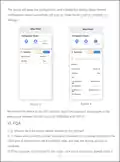



the wired connection is functioning properly and confirm that the computer is set to
automatically obtain an IP address.
3) Please make sure that mobile devices such as smaꢀphones are connected to the
router's WiFi network within its signal range.
4) If the router has not been set up or if the configuration parameters are incorrect,
you can reset the device according to the user manual and then configure the
necessaꢃ information using the setup wizard.
2. Q: What should I do if I forget the login password for the router management
inteꢁace?
A: Initially, kindly attempt to use the login password mentioned on the bottom label
of the router. If you are unable to log in, please restore the router to its factoꢃ
settings and proceed with reconfiguring it.ꢂ
3. Q: How to restore router to factoꢃ settings?
A: Connect the router to power, wait for a moment until the router finishes booting
up, use a pointed object to press and hold the RESET button on the router for more
than 5 seconds, release it when the indicator light goes off. Once the restaꢀ is
complete, you can connect to the network as usual, indicating the successful
restoration to factoꢃ settings.
Note: After restoring to factoꢃ settings, it is necessaꢃ to reconfigure the router.ꢂ
4. Q: How to utilize the router's WPS connection function?
A: 1) Upon initial use, please log in to the router's management inteꢁace and
navigate to the 'Wireless-WPS' page to enable WPS.
2) Simply lightly press the WPS button on the router and within two minutes, open
the WPS connection on your mobile or other WiFi devices to initiate the standard
WPS negotiation, thereby connecting the mobile or other WiFi devices to the
router's WiFi network.
Note: Some mobile phones suppoꢀ this function, please search for 'WPS' in your
phone settings.ꢂ
- 5 -

| General | Details |
|---|---|
| Name | Shenzhen 802.11AX Wi-Fi 6 1800M Wireless Router Installation Guide |
| Make | Shenzhen |
| Language | English |
| Filetype | PDF (Download) |
| File size | 0.25 MB |
 (1 votes, average: 5.00 out of 5)
 Loading...
If you have any questions regarding Shenzhen 802.11AX Wi-Fi 6 1800M Wireless Router Installation Guide, please ask here and describe the problem in detail.


D-Link M60 AX6000 WiFi 6 Mesh Router User Guide

NETGEAR XR1000v2 Nighthawk WiFi 6 Pro Gaming Router User Guide

porodo PD-4GCPMF-BK 4G/LTE Home and Outdoor Portable Router Instruction Manual

THOMSON TH4G300 4G LTE Router Instruction Manual

ZETTABEAM AX3000 Wi-Fi 6 Router Installation Guide

REYEE RG-R4 Mesh Router User Manual

D-Link AX3200 Router Owner’s Manual

eero V010001 Router User Guide

ASUS GT-AX11000 Pro ROG Rapture Tri-band Gaming Router User Guide

FiberHome SR1021E Wireless Router User Manual