
snap one Araknis 220 Router User Guide





Configuration
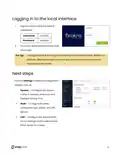
Araknis routers can be configured through OvrC or the local interface. The local
interface is accessible using OvrC’s WebConnect feature, or typing the router’s default
IP address, 192.168.1.1, into your browser's address bar.
Configuring the router in OvrC
OvrC provides remote device management, real-time notifications, and intuitive
customer management, right from your computer or mobile device. Setup is plug-and-
play, with no port forwarding or DDNS address required.
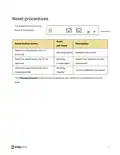
To add this device to your OvrC account:
1.
2.
3.
Connect the router to the internet
Create a customer in OvrC or select
an existing one.
4.
5.
Click the Add Device button, then
enter the router's MAC address and
Service Tag.
Click the WebConnect icon to
connect to the router's local
interface.
8

| General | Details |
|---|---|
| Name | snap one Araknis 220 Router User Guide |
| Make | Snap One |
| Language | English |
| Filetype | PDF (Download) |
| File size | 0.29 MB |
 (1 votes, average: 5.00 out of 5)
 Loading...
If you have any questions regarding snap one Araknis 220 Router User Guide, please ask here and describe the problem in detail.


Cudy LT18 4G LTE Dual Band WiFi 6 Gigabit Cellular Hotspot Router Installation Guide

technicolor CGA437T Router Instruction Manual

HBC BX54 Gigabit Dual Band Wireless Router User Manual

Cudy WR3600E Gigabit Wi-Fi 7 Router Installation Guide

NETGEAR RS150 Nighthawk Wi-Fi 7 Dual Band Router User Manual

NETGEAR RS100 Nighthawk Dual Band WiFi 7 Router User Guide
UniFi A3000 WiFi 6 Router User Manual

peplink BR1 Mini 100 Mbps 4G LTE Router User Manual

Juniper ACX7509 Cloud Metro Router User Guide

Ruijie RG-EW1800GX(PRO) Wi-Fi 6 Dual Band Router Installation Guide