
snap one Araknis 220 Router User Guide





Connections
Power off all other network devices before connecting the router.
Caution: -.
A.
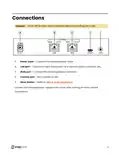
Power input — Connect the supplied power cable.
LAN port — Connect a client device such as a network switch, computer, etc.
WAN port — Connect the internet gateway (modem).
Console port — Not currently in use.
B.
C.
D.
E.
Reset button — Refer to LEDs & reset procedures.
Connect the included power supply to the router after making all other network
connections.
5

| General | Details |
|---|---|
| Name | snap one Araknis 220 Router User Guide |
| Make | Snap One |
| Language | English |
| Filetype | PDF (Download) |
| File size | 0.29 MB |
 (1 votes, average: 5.00 out of 5)
 Loading...
If you have any questions regarding snap one Araknis 220 Router User Guide, please ask here and describe the problem in detail.


NEXXT SOLUTIONS NBL301P NebulaN301 Wireless-N Router Installation Guide

ioGiant AX1800 Wi-Fi Router Smart Wireless Router Installation Guide

DIGI EX50 5G Cellular Router Instruction Manual

TradeWinds G720 Wireless Router User Guide

TP-Link ER605 Omada VPN Router Installation Guide

MERCUSYS AC12G Wireless Router Installation Guide

Newland NL-81 Router User Manual

Spectrum 20240729 WiFi 6E Router User Guide

MOXA TN-5916 ToughNet NAT Router Installation Guide

DrayTek Vigor2865 Series VDSL2 Gigabit Ethernet WAN Router Owner’s Manual