
snap one Araknis 220 Router User Guide





Logging in to the local interface
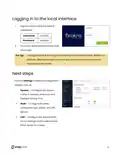
1.
Log into the AP using the default
credentials:
Username
Password
araknis
araknis
2.
You must update the password after
initial login.
Strong passwords are long and unrelated to the client’s public details. For
Pro Tip: -_
example, thepepperonipizzas is stronger and easier to remember than
P@ssword or thesmiths.
Next steps
Click on Settings to expand configuration
options, such as:
l
System — Configure the System
name, IP address, time zone, and
Daylight Saving Time.
l
WAN — Configure the WAN
connection type, speed, and DNS
servers.
l
LAN — Configure the default DHCP
server settings and/or add another
DHCP server for a VLAN.
9

| General | Details |
|---|---|
| Name | snap one Araknis 220 Router User Guide |
| Make | Snap One |
| Language | English |
| Filetype | PDF (Download) |
| File size | 0.29 MB |
 (1 votes, average: 5.00 out of 5)
 Loading...
If you have any questions regarding snap one Araknis 220 Router User Guide, please ask here and describe the problem in detail.


FALCON 150 Mbps 4G LTE Portable Router User Manual

Milesight UR32S CCTV Router Owner’s Manual

caravansplus RV WI-FI Dishydock Router User Guide

GL iNet X3000NR 5G NR Wi-Fi 6 Router User Guide

CP PLUS CP-GR-DE412 Dual-Band 4G Router Installation Guide

TP-Link Archer C20 Wireless Dual Band Router Installation Guide

GL iNet GL-X3000NR 5G NR WiFi 6 Router User Guide

unifi DPN-FX3060V Optical Network Router User Manual

ASUS GT-AX11000 Pro ROG Rapture Pro Tri-band Gaming Router User Guide

TP-Link BE7200 Dual Band Wi-Fi 7 XGS PON Router Installation Guide