
STARLINK Mini Kit Dish With Built In Router User Guide


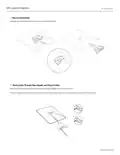


ETHERNET PORT
Using the RJ45 Port
1.
Remove the Starlink Plug
2. Plug in the Mini Starlink Cable available on shop.starlink.com or your own ethernet cable into the port. Connect the
other end of your cable to your wired mesh or 3rd party hardware.
Note: This product is no longer rated IP67 with a standard RJ45 cable.
support.starlink.com

| General | Details |
|---|---|
| Name | STARLINK Mini Kit Dish With Built In Router User Guide |
| Make | Starlink |
| Language | English |
| Filetype | PDF (Download) |
| File size | 0.36 MB |
 (1 votes, average: 5.00 out of 5)
 Loading...
If you have any questions regarding STARLINK Mini Kit Dish With Built In Router User Guide, please ask here and describe the problem in detail.

STARLINK GEN 3 WIFI ROUTER Enhancing Homes Router Installation Guide

UTR-231 Starlink Router User Manual

UTR-232 WiFi 6 Starlink Router Instruction Manual

STARLINK 02633101 Gen 3 Wi-Fi Router User Guide

STARLINK LJ439RBIV3M5 Mini Router Installation Guide

STARLINK Router Installation Guide

STARLINK Mini Kit Dish With Router User Guide

STARLINK Standard Gen 3 Router User Guide


peplink P1234 Wireless Router User Manual

PHILIPS PH-001 LTE Mi-Fi Router User Manual

TCL HH130VM Home Station Router User Guide

UfiSpace S9600-32X 100G Aggregation Router Installation Guide

more eero 6+ TrueMesh Wi-Fi 6 Dual-Band Router User Guide

TP-Link Archer MR500 AC1200 Wireless Dual Band Gigabit Router User Guide

WolfPack HDTVHDMX0808 4K 8×8 HDMI Matrix Router User Manual

D-Link DIR-825 Xtreme N Dual Band Gigabit Router Instruction Manual

Cudy R700 Gigabit Multi-WAN VPN Router Installation Guide

NETGEAR NIGHTHAWK RS Series Dual Band Wi-Fi 7 Router Instruction Manual