
STARLINK Mini Kit Dish With Built In Router User Guide


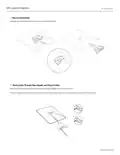


PIPE ADAPTER INSTALL
1 | Remove Kickstand
Squeeze the release tab and pull it away from its fixed location.
2 | Route Cable Through Pipe Adapter and Plug In Cable
Route the Starlink cable through the opening in the pipe adapter and out the front end.
Plug the cable into your Starlink and ensure the plug is fully inserted such that the plug face is flush with the surface.
support.starlink.com

| General | Details |
|---|---|
| Name | STARLINK Mini Kit Dish With Built In Router User Guide |
| Make | Starlink |
| Language | English |
| Filetype | PDF (Download) |
| File size | 0.36 MB |
 (1 votes, average: 5.00 out of 5)
 Loading...
If you have any questions regarding STARLINK Mini Kit Dish With Built In Router User Guide, please ask here and describe the problem in detail.

STARLINK GEN 3 WIFI ROUTER Enhancing Homes Router Installation Guide

UTR-231 Starlink Router User Manual

UTR-232 WiFi 6 Starlink Router Instruction Manual

STARLINK 02633101 Gen 3 Wi-Fi Router User Guide

STARLINK LJ439RBIV3M5 Mini Router Installation Guide

STARLINK Router Installation Guide

STARLINK Mini Kit Dish With Router User Guide

STARLINK Standard Gen 3 Router User Guide


acer WA-36W12FU-AKAA 6E Predator Connect W6 Wi-Fi Router User Manual

Cudy AC1200 Dual Band Unlocked 4G LTE Modem Router Installation Guide

HUAWEI H122-373 5G CPE PRO 2 Router User Manual

Ruijie RG-EW300T N300 Wireless 4G LTE Router User Guide

Hongdian H8922 3G/4G Router User Guide

TP-Link BE220_V1 Dual Band Wi-Fi 7 Router Installation Guide

Edge-corE AS9947-36XKB AC Ethernet Switch and Router User Guide

ASUS RT-AX82U V2 AX5400 Dual Band WiFi Router User Guide

ASUS RT-AX57 Go AX3000 Dual Band Wi-Fi 6 Router User Guide

TP-Link Omada Gigabit VPN Router ER605 Installation Guide